Our Short List of 3

All 3 Picks at a Glance
| Product | Specs | Action |
|---|---|---|
 1. ASUS ROG Strix G16 (G614JV-AS74) — Best Overall | Check price on Amazon | |
 2. Acer Predator Helios 16 (PH16-71-74UU) — Best Display | Check price on Amazon | |
| 3. Lenovo Legion 5i (RTX 4060, 32GB Configuration) — Best Memory and Value | Check price on Amazon |
Key takeaways
- Searching for the best and worse gaming laptops? Compare three strong RTX 4060 picks and learn which weak configurations are worth avoiding before you buy.
Introduction
Shopping for the best and worse gaming laptops can feel like walking through a minefield. Every listing promises desktop-class power and smooth frame rates, yet two laptops with similar names can hide very different graphics cards, memory, and displays. A good gaming laptop should run modern titles at high settings without stuttering, stay cool enough to hold its performance during long sessions, and still be useful for school or work when the game closes. A bad one can leave you with choppy frame rates, a dim screen, and storage that fills up after two or three large games.
This guide does both jobs at once. First, it highlights three gaming laptops that earn their place on a shortlist, each built around a dedicated NVIDIA GeForce RTX 4060 graphics card, at least 16GB of memory, and a fast high-refresh display. Then it explains the configurations and older designs that belong on the “worse” side of the list, so you can spot them before spending your money. Every pick below is a complete gaming laptop of the same product type, listed on Amazon US, and each one is linked so you can check the current listing and confirm availability before ordering.
How to Choose a Gaming Laptop
Before comparing individual models, it helps to know which specifications actually decide how a laptop plays games.
Graphics Card First
The graphics card, or GPU, is the single most important part of a gaming laptop. It renders every frame you see, and it sets the ceiling for resolution and detail settings. For current games, an RTX 4060 laptop GPU is a sensible baseline: it handles 1080p and 1440p gaming well, supports modern features such as ray tracing and AI upscaling, and leaves enough headroom for demanding titles released in the last few years. Older entry-level cards, such as the GTX 1650, were fine in their day, but they now struggle with newer releases and lack the features that keep frame rates smooth at higher settings.
Pay attention to the power limit of the GPU as well. Two laptops can carry the same RTX 4060 chip while delivering different performance, because manufacturers set different maximum wattages. A higher-wattage version of the same chip generally sustains faster frame rates. Listings that mention the maximum graphics power, such as 140W, are a useful clue that the laptop is allowed to run its GPU near full strength.
Processor and Memory
The processor, or CPU, works alongside the GPU. A modern 13th or 14th generation Intel Core i7, or a comparable AMD Ryzen 7, is more than enough for gaming and also handles streaming, video editing, and heavy multitasking without complaint. You do not need the most expensive processor on the market; a balanced CPU paired with a strong GPU almost always beats a top-tier CPU paired with a weak GPU.
Memory matters just as much. 16GB of DDR5 RAM is the minimum worth considering for a new gaming laptop, and 32GB gives extra comfort for running a game alongside a browser, voice chat, and streaming software. Check whether the memory can be upgraded later: laptops with two memory slots let you add RAM down the road, while models with soldered memory lock you into whatever you bought on day one.
Display Quality
A gaming laptop lives or dies by its screen. A 165Hz refresh rate makes motion look noticeably smoother than a standard 60Hz panel, especially in fast shooters and racing games. Resolution matters too: a 1920 by 1200 or 2560 by 1600 panel both look sharp at 16 inches, with the higher resolution offering crisper detail if your GPU can keep up. Features such as G-SYNC help prevent screen tearing by syncing the display to the graphics card, and a bright IPS panel keeps colors accurate when you view the screen from an angle.
Storage and Cooling
Modern games are large, so a 1TB SSD is a practical starting point; a 512GB drive fills up fast and forces constant uninstalls. Cooling is the hidden factor that separates good gaming laptops from disappointing ones. A laptop that cannot move heat away from its processor and graphics card will slow itself down to stay safe, a behavior called thermal throttling. Designs with multiple fans, extra heat pipes, and liquid metal on the CPU tend to hold their performance longer. You can also help any laptop by using it on a hard, flat surface and keeping its vents clear of dust.
Battery Life and Portability
Gaming laptops are not known for long battery life while gaming, and that is normal: a powerful GPU draws far more energy than a battery can supply for hours. What matters is everyday battery life for browsing, classes, or office work, where six hours is a reasonable expectation for a 16-inch machine. Most capable 16-inch gaming laptops weigh around five and a half pounds, so they travel well in a backpack but are not featherlight ultrabooks.
Top Picks
The three laptops below all share the same core recipe: a dedicated RTX 4060 graphics card, a modern Intel Core i7 processor, at least 16GB of DDR5 memory, a 1TB SSD, and a 165Hz display. What differs is the screen resolution, the amount of memory, and the cooling and feature set around those parts.
1. ASUS ROG Strix G16 (G614JV-AS74) — Best Overall
The ASUS ROG Strix G16 is the best all-rounder of this group, and it is easy to see why it shows up on so many shortlists. It pairs a 13th Gen Intel Core i7-13650HX processor with an NVIDIA GeForce RTX 4060 laptop GPU running at up to 140W maximum graphics power, which gives it the headroom to push high frame rates in demanding games. The 16-inch display runs at 165Hz with a 1920 by 1200 resolution, and the panel covers the full sRGB color range with Pantone validation, so games look vivid and creative work looks accurate too.
Memory and storage are well judged: 16GB of DDR5 memory running at 4800MHz, and a 1TB PCIe Gen 4 SSD that loads games quickly and holds a decent library before you need to manage space. Cooling is a genuine strength here. ASUS fits liquid metal on the CPU, a third intake fan, and full-surround vents, which helps the laptop sustain its performance during long sessions instead of slowing down as it heats up.
A MUX switch with Advanced Optimus is another welcome feature. It routes frames directly from the dedicated graphics card to the display when you are gaming, which can lift performance by a few percent, and switches back to the integrated graphics for light work to save battery. Wi-Fi 6E keeps wireless connections fast and stable, and Windows 11 Home comes preinstalled.
This is the pick for buyers who want one laptop that does everything well: strong gaming performance, a good screen, and solid cooling. Its main trade-offs are the standard ones for the class: it is a full-size 16-inch machine, and battery life while gaming is limited, as it is on every laptop in this category.
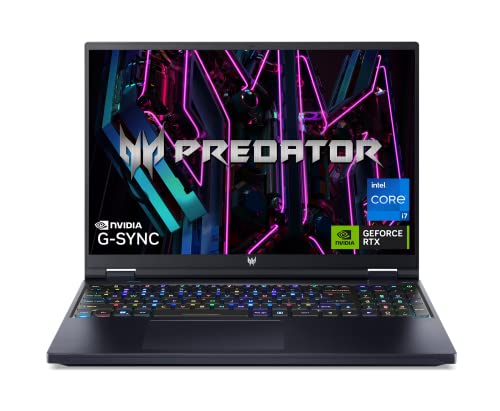
2. Acer Predator Helios 16 (PH16-71-74UU) — Best Display
The Acer Predator Helios 16 takes the same winning formula and upgrades the screen. Its 16-inch display runs at 2560 by 1600 resolution with a 165Hz refresh rate and G-SYNC support, so games look sharper and stay free of tearing during fast action. If you play visually rich games or do photo and video work on the side, the higher-resolution panel is a real advantage.
Inside, the Helios 16 runs a 13th Gen Intel Core i7-13700HX processor, which boosts up to 5GHz, alongside an RTX 4060 laptop GPU tuned for up to 140W of maximum graphics power. The laptop carries 16GB of DDR5 memory across two slots, upgradeable to 32GB, and a 1TB PCIe Gen 4 SSD with a second M.2 slot for adding more storage later.
Acer’s PredatorSense software lets you tune fan speeds, overclocking, and the RGB lighting to your taste, which is handy if you like to squeeze extra performance out of the hardware or keep the fans quiet during lighter use. Killer Wi-Fi 6E is included for low-latency wireless gaming.
The Helios 16 is the pick for buyers who rank display quality first. The sharper panel is its headline feature, and the upgradeable memory and second storage slot make it a laptop that can grow with your needs.
3. Lenovo Legion 5i (RTX 4060, 32GB Configuration) — Best Memory and Value
The Lenovo Legion 5i in this 32GB configuration is the pick for buyers who want maximum memory without paying for a higher-tier graphics card they do not need. It pairs the same Intel Core i7-13650HX processor and RTX 4060 laptop GPU found in the Strix G16 with 32GB of DDR5 memory, fitted as two 16GB modules. That extra memory makes a difference when you run a game alongside streaming software, a browser, and chat apps, and it leaves plenty of room for future games that ask for more memory.
The display is a 16-inch QHD panel running at 165Hz with G-SYNC, so it matches the Helios 16 on sharpness while keeping the smooth, tear-free motion that competitive players want. Storage is a 1TB PCIe NVMe SSD, which is the right size for a modern game library, and the laptop includes a four-zone RGB backlit keyboard.
Choose the Legion 5i if your priority is a generous memory setup and a high-resolution screen at a sensible overall balance. With 32GB of RAM already installed, it is the most future-proof of the three when it comes to multitasking and upcoming games.
Comparison Table
| Laptop | Processor | Graphics | Memory / Storage | Display |
|---|---|---|---|---|
| ASUS ROG Strix G16 (G614JV-AS74) | Intel Core i7-13650HX | NVIDIA GeForce RTX 4060, up to 140W | 16GB DDR5 / 1TB PCIe Gen 4 SSD | 16-inch, 1920 x 1200, 165Hz |
| Acer Predator Helios 16 (PH16-71-74UU) | Intel Core i7-13700HX | NVIDIA GeForce RTX 4060, up to 140W | 16GB DDR5 / 1TB PCIe Gen 4 SSD | 16-inch, 2560 x 1600, 165Hz, G-SYNC |
| Lenovo Legion 5i (32GB configuration) | Intel Core i7-13650HX | NVIDIA GeForce RTX 4060, up to 140W | 32GB DDR5 / 1TB PCIe NVMe SSD | 16-inch QHD, 165Hz, G-SYNC |
All three laptops share the same graphics tier and display refresh rate, so the choice comes down to screen resolution, memory, and brand-specific features such as cooling design and tuning software.
The Worse Side: Gaming Laptops and Configurations to Avoid
Knowing the best gaming laptops is only half the job. The other half is recognizing the weak choices that still appear in listings and can trap an unwary buyer. The patterns below are consistent, and any laptop that matches several of them deserves a second look before you buy.
Old Entry-Level Graphics Cards
The clearest warning sign is a laptop still sold as a gaming machine while carrying an older entry-level graphics card such as the GTX 1650. That chip was a reasonable budget option several years ago, but modern games now expect more video memory and more raw power. A GTX 1650 laptop will force you to lower settings aggressively, and it lacks support for the AI upscaling features that help newer cards stay smooth. If a listing leads with a GTX 1650 in a laptop sold as new, treat it as a worse choice and move on to an RTX 4060 machine instead.
Only 8GB of Memory, Especially When Soldered
Eight gigabytes of memory was once enough for gaming, but it no longer is. Windows, a game, and a handful of background apps can consume 8GB quickly, and the result is stuttering and slow loading. The problem gets worse when the memory is soldered to the motherboard, because you cannot fix it later. Any new gaming laptop with 8GB of non-upgradeable RAM belongs on the worse side of the list, no matter how attractive the rest of the specification sheet looks.
A 60Hz Display on a Gaming Laptop
A gaming laptop with a 60Hz display wastes the performance of its graphics card. Even if the GPU can render 100 frames per second, a 60Hz panel can only show 60 of them, and fast motion looks less smooth than on a 144Hz or 165Hz screen. Some budget laptops pair a capable GPU with a cheap 60Hz panel to hit a lower price, and that trade-off hurts every game you play. A high refresh rate is one of the cheapest ways to make games feel better, so it is worth insisting on.
Tiny Storage and Slow Drives
A laptop with only 256GB of storage is a poor fit for modern gaming. Two large games can fill it, leaving no room for updates, let alone a library. A small hard drive instead of an SSD is an even bigger red flag: loading times stretch out, and the whole system feels sluggish. Aim for at least 512GB of SSD storage as an absolute minimum, and 1TB if you plan to keep more than a few games installed at once.
Thin Designs with Weak Cooling
Some laptops chase a slim profile by fitting a powerful graphics card into a chassis that cannot cool it. The result is a machine that runs hot, throttles its performance, and sounds like a hair dryer under load. If reviews consistently mention heat problems or frame rates that drop after ten minutes of play, that model is a worse pick than a slightly thicker laptop with proper cooling.
Frequently Asked Questions
What is the best gaming laptop for most buyers?
For most buyers, a 16-inch laptop with an RTX 4060 graphics card, a modern Intel Core i7 or AMD Ryzen 7 processor, 16GB of DDR5 memory, a 1TB SSD, and a 165Hz display hits the sweet spot. That combination plays current games at high settings, handles everyday work, and should stay useful for several years.
Is an RTX 4060 laptop good enough for modern games?
Yes. An RTX 4060 laptop GPU handles modern games well at 1080p and 1440p, supports ray tracing, and benefits from AI upscaling features that keep frame rates smooth. It is a sensible choice unless you specifically want to play at 4K resolution or chase the highest possible frame rates in competitive titles.
How much RAM do I need in a gaming laptop?
16GB of DDR5 RAM is the minimum worth buying in a new gaming laptop, and 32GB is a comfortable upgrade for multitasking and future games. Avoid 8GB configurations, especially when the memory is soldered and cannot be upgraded later.
Should I choose a 1080p or 1440p gaming laptop display?
Both are good choices at 16 inches. A 1080p-class panel such as 1920 by 1200 is easier for the GPU to drive at high frame rates, while a 1440p-class panel such as 2560 by 1600 looks sharper and shows more detail. If you value maximum frame rates, lean toward the lower resolution; if you value image quality, the higher resolution is worth it.
What makes a gaming laptop one of the worse choices?
A gaming laptop lands on the worse side when it pairs an outdated graphics card, too little memory, a low refresh rate display, or cramped storage with a gaming label. Thin designs that cannot cool their hardware also qualify, as do listings that hide the exact specifications. Checking the graphics card, memory, display refresh rate, and storage before buying will filter out nearly all of the weak options.
Conclusion
The difference between the best and worse gaming laptops comes down to a short checklist: a current dedicated graphics card, enough memory, a fast display, roomy solid-state storage, and cooling that can sustain performance. The ASUS ROG Strix G16, Acer Predator Helios 16, and Lenovo Legion 5i in this guide all clear that bar, each with a different strength: all-round balance, the sharpest display, and the most generous memory setup. On the other side, laptops with old entry-level graphics cards, 8GB of soldered memory, 60Hz screens, or tiny storage may carry a gaming label, but they will disappoint sooner and cost more in the long run.
Before you order, open the listing for your chosen model and confirm the exact configuration matches the one described here. A careful check now is far cheaper than a return later, and it is the simplest way to make sure the laptop you buy lands firmly on the best side of the list.
Disclosure: As an Amazon Associate, we earn from qualifying purchases.
FAQ
What is the best gaming laptop for most buyers?
Is an RTX 4060 laptop good enough for modern games?
How much RAM do I need in a gaming laptop?
Should I choose a 1080p or 1440p gaming laptop display?
What makes a gaming laptop one of the worse choices?
More from Amazon
Programs that pair well with the guide above. Offers and eligibility are set by Amazon and may change.
Free shipping on eligible items, Prime Video and more. Eligible new members can start with a free trial.
Start a Prime free trialA Prime membership for ages 18-24 with a trial period. Eligibility is set by Amazon.
See Prime for Young AdultsAudiobooks and podcasts to listen to on the go. Eligible new members can start with a free trial.
Try Audible freeAd-free music streaming. Eligible new subscribers can start with a free trial.
Try Music Unlimited freeAs an Amazon Associate we earn from qualifying purchases.