
Our Short List of 3
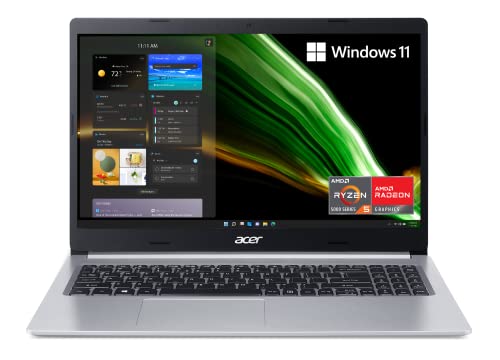
- Best for: Multitasking home-office work with a backlit keyboard for evening use
- Brand: Acer
- Model: A515-45-R74Z
- Display: 15.6 inch Full HD IPS
- Processor: AMD Ryzen 5 5500U hexa-core

- Best for: Touch-driven use with plenty of local storage for files and photos
- Brand: HP
- Model: 15-fc0499nr
- Model number: B8QE2UA#ABA
- Display: 15.6 inch HD touchscreen

- Best for: Heavy browser multitasking with the most memory and storage here
- Brand: ASUS
- Model: Vivobook Go 15, E1504FA
- Display: 15.6 inch FHD IPS
- Processor: AMD Ryzen 5 7520U, 4-core
All 3 Picks at a Glance
| Product | Specs | Action |
|---|---|---|
| Acer Aspire 5 A515-45-R74Z |
| Check price on Amazon |
| HP 15.6 inch Laptop 15-fc0499nr |
| Check price on Amazon |
| ASUS Vivobook Go 15 |
| Check price on Amazon |
Key takeaways
- Four laptops in the under-600 class compared on processor, memory and storage from their Amazon listings, for school, home office and everyday work.
In this price class the real decision is not which laptop looks fastest on a chart, but which compromise you can live with for years. Money is tight enough that every model gives something up: one keeps a stronger processor but a smaller drive, another offers a touchscreen yet settles for a lower-resolution panel, and a third puts memory first. Buyers who choose by a single headline number usually discover the trade they ignored, so the sensible approach is to rank your own daily tasks first and let them arbitrate between these four machines.
This guide is for students, home-office workers and families shopping inside the under-600 class for a Windows laptop that handles documents, browsing, video calls and light creative work. Each machine below was chosen because its Amazon listing places it in this segment, and every specification quoted comes from the name and details on that listing page. Read the panel and memory lines closely, because those two areas separate these laptops more than their processors do.
Quick Picks
As an Amazon Associate we earn from qualifying purchases
| Product | Best for | Key spec from title |
|---|---|---|
| Lenovo IdeaPad Slim 3 | Everyday Windows work on a full HD screen | 15.6 inch FHD, Ryzen 3 7320U, 8GB memory, 256GB storage |
| Acer Aspire 5 A515-45-R74Z | A hexa-core processor with a backlit keyboard | Ryzen 5 5500U, 8GB DDR4, 256GB NVMe SSD, WiFi 6 |
| HP 15.6 inch Laptop 15-fc0499nr | Touch input with the largest drive here | Ryzen 5 7520U, 8GB RAM, 512GB SSD, HD touchscreen |
| ASUS Vivobook Go 15 | The most memory and storage in this group | Ryzen 5 7520U, 16GB LPDDR5, 512GB SSD, 15.6 inch FHD |
How to Choose
Start with memory and storage, not the processor badge
In this class, most processors handle documents, browsing and video calls without drama, while memory and storage decide how the laptop ages. Eight gigabytes of memory copes with everyday multitasking, but sixteen keeps more tabs and apps open at once, which is why the Vivobook Go 15 stands out on paper. Storage fills quietly: a 256GB drive suits cloud-based workers, whereas 512GB gives photographers and students room for local files. Check whether the listing describes memory as onboard, because soldered memory usually cannot be upgraded later.
Read the screen line word by word
Two laptops can both claim a 15.6 inch display and deliver very different pictures. Full HD means a 1920 by 1080 resolution, while an HD panel carries fewer pixels and looks softer with text, a distinction that matters during long reading sessions. The HP in this guide pairs its touchscreen with an HD panel, while the other three list FHD displays, so your choice depends on whether touch or sharpness serves you better. Touch also adds a glossy surface in many designs, which can reflect bright room lighting more than a matte screen.
Match the processor generation to your workload
The Ryzen 5 5500U in the Acer is a hexa-core part aimed at heavier multitasking, while the Ryzen 3 7320U in the Lenovo and the Ryzen 5 7520U in the HP and ASUS are efficient four-core designs built for everyday work and longer unplugged stretches. None of these machines targets demanding gaming or professional video editing, and integrated Radeon graphics set that ceiling. For school and office tasks the differences feel small; for large spreadsheets or many simultaneous apps, core count and memory together matter more than any single clock figure.
Check the everyday details in the listing title
Small features decide daily satisfaction in this segment. A backlit keyboard, named in the Acer listing, helps in dim rooms; a numeric keypad speeds up data entry; WiFi 6 support keeps the laptop current with newer routers. Port selection also varies, so confirm the listing names the connections you rely on, such as HDMI for an external monitor or USB-C for a dock. Finally, note the operating system edition stated on the page, since Windows 11 Home in S Mode on some listings limits where apps can come from until switched.
The 4 Best Options
Lenovo IdeaPad Slim 3
Lenovo positions the IdeaPad Slim 3 as an everyday laptop, and its listing leads with the combination most buyers in this class actually need: a full HD screen, a current Ryzen 3 processor and Windows 11. It fits the student or home user whose work lives in a browser, documents and video calls, and who values a clear display over touch input. The 256GB drive is the honest compromise here, so it suits people comfortable keeping larger archives in cloud storage or on an external drive at home.
Specs
- Brand: Lenovo
- Model line: IdeaPad Slim 3
- Display: 15.6 inch FHD
- Processor: AMD Ryzen 3 7320U
- Memory: 8GB
- Storage: 256GB
- Operating system: Windows 11
- Colour in this listing: Arctic Grey
Best for: Everyday school and home work where a sharp FHD screen matters most
Watch out for: The 256GB storage is the smallest here alongside the Acer, so check your current file usage before ordering
ASIN: B0C3MNPB8P
Acer Aspire 5 A515-45-R74Z
- Best for: Multitasking home-office work with a backlit keyboard for evening use
- Brand: Acer
- Model: A515-45-R74Z
- Display: 15.6 inch Full HD IPS
- Processor: AMD Ryzen 5 5500U hexa-core
Multitasking home-office work with a backlit keyboard for evening use
Memory and storage sit at 8GB and 256GB, so heavy local file collections will outgrow it sooner than the 512GB models
The Aspire 5 is the pick for the buyer who keeps many things running at once. Its Ryzen 5 5500U is a hexa-core processor, giving it the strongest multitasking claim in this group, and the listing adds a backlit keyboard and WiFi 6, two features that earn their keep daily. The trade sits in storage and memory, which match the Lenovo rather than the leaders here. For a home-office worker who docks at one desk and stores files on a network or cloud drive, that balance makes considerable sense.
HP 15.6 inch Laptop 15-fc0499nr
- Best for: Touch-driven use with plenty of local storage for files and photos
- Brand: HP
- Model: 15-fc0499nr
- Model number: B8QE2UA#ABA
- Display: 15.6 inch HD touchscreen
Touch-driven use with plenty of local storage for files and photos
The HD panel is lower resolution than the FHD screens elsewhere in this guide, so read the display line carefully
This HP is the only touchscreen in the group, which changes how the machine gets used: tapping through presentations, signing documents and scrolling long pages by hand all become natural. Its listing pairs a Ryzen 5 7520U with a 512GB drive, doubling the storage of the Lenovo and Acer. The compromise is the panel itself, described as HD rather than full HD, so text carries less fine detail. Buyers who value touch and storage over pixel density will accept that exchange knowingly rather than discovering it later.
ASUS Vivobook Go 15
- Best for: Heavy browser multitasking with the most memory and storage here
- Brand: ASUS
- Model: Vivobook Go 15, E1504FA
- Display: 15.6 inch FHD IPS
- Processor: AMD Ryzen 5 7520U, 4-core
Heavy browser multitasking with the most memory and storage here
The listing names Wi-Fi 5 rather than WiFi 6, so confirm it suits your router if wireless standard matters to you
The Vivobook Go 15 carries the strongest memory and storage combination in this guide: 16GB of LPDDR5 memory and a 512GB solid state drive, paired with a full HD IPS display. That pairing suits the buyer who keeps a browser full of tabs beside documents and a video call, and who wants local room for coursework or family photos. Its Ryzen 5 7520U matches the HP for everyday performance, while the extra memory gives it the clearest headroom of the four as software grows heavier over the years.
Which One Fits Your Situation
You live in a browser with many tabs open
Choose the ASUS Vivobook Go 15 for tab-heavy days. Its 16GB of memory is double the rest of this group, and memory is what keeps a crowded browser, a document and a call running together without slowdowns. The 512GB drive and full HD screen remove the other two common compromises in this class, making it the most balanced specification here.
Your work is documents, calls and a second screen
Pick the Acer Aspire 5 when a hexa-core processor and a backlit keyboard fit your routine. It handles busy multitasking confidently and the WiFi 6 support pairs well with a modern home router. Add an external monitor at your desk and its 256GB drive matters less, because working files can live on the network or in the cloud.
You want touch and room for a photo library
Take the HP 15-fc0499nr when touching the screen is how you naturally work and your files live on the machine itself. The 512GB drive swallows photo and document collections that would crowd the smaller drives here. Accept the HD resolution as the deliberate trade, and it becomes a practical, flexible family laptop.
You need a straightforward laptop for school
Go with the Lenovo IdeaPad Slim 3 for a clear full HD display and a simple, current specification. It covers homework, research and video lessons without paying for touch or extra cores you may never use. If your schoolwork lives in cloud accounts, the 256GB drive stops being a limitation and the screen quality becomes the feature you notice daily.
Common Mistakes
- Judging laptops in this class by processor name alone and ignoring memory, which decides how much can stay open at once.
- Missing the difference between HD and full HD in a listing title, then finding text less sharp than expected.
- Buying the smallest storage option while keeping a large local photo or video library on the machine.
- Assuming memory can be upgraded later when the listing describes onboard or soldered memory.
- Expecting integrated graphics in this segment to handle demanding games or professional editing workloads.
Frequently Asked Questions
Is 8GB of memory enough in this price class?
For documents, browsing, email and video calls, 8GB remains workable, and three of the four laptops here ship with it. The strain appears when many browser tabs, a call and several apps run together for hours. If that describes your routine, the 16GB Vivobook Go 15 gives noticeably more headroom without leaving the segment.
Does full HD matter on a 15.6 inch laptop?
Yes, for most people it does. A full HD panel shows sharper text and fits more of a spreadsheet or web page on screen than an HD panel of the same size. The exception is a buyer who actively wants touch input and accepts lower resolution for it, which is exactly the trade the HP in this guide makes.
Can laptops in this class play games?
They handle light and older games and browser-based titles through their integrated Radeon graphics, but they are not built for demanding modern games at high settings. Buyers whose main hobby is gaming should look at laptops with dedicated graphics instead. For school, office and family use, the processors here are comfortably capable.
How long should a laptop in this segment last?
With everyday care, the hardware here should serve several years of school or office work. Longevity depends less on the processor than on memory and storage headroom, because software and file collections grow over time. Choosing 16GB of memory or a 512GB drive at purchase is the simplest way to extend useful life in this class.
FAQ
Is 8GB of memory enough in this price class?
Does full HD matter on a 15.6 inch laptop?
Can laptops in this class play games?
How long should a laptop in this segment last?
More from Amazon
Programs that pair well with the guide above. Offers and eligibility are set by Amazon and may change.
Free shipping on eligible items, Prime Video and more. Eligible new members can start with a free trial.
Start a Prime free trialA Prime membership for ages 18-24 with a trial period. Eligibility is set by Amazon.
See Prime for Young AdultsAudiobooks and podcasts to listen to on the go. Eligible new members can start with a free trial.
Try Audible freeAd-free music streaming. Eligible new subscribers can start with a free trial.
Try Music Unlimited freeAs an Amazon Associate we earn from qualifying purchases.









