
Our Short List of 3
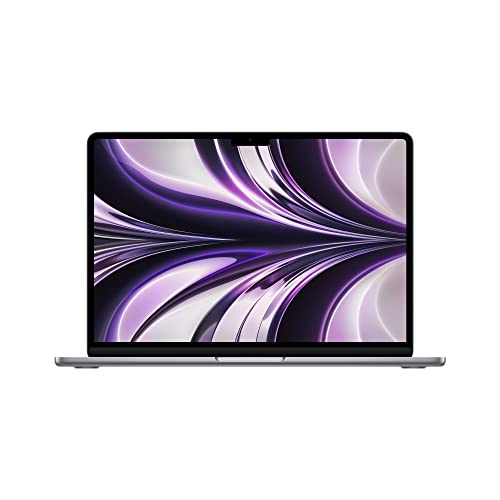
- Apple M2 chip
- 13.6-inch Liquid Retina display
- 8GB RAM
- 256GB SSD storage

- AMD Ryzen 7 8840HS processor
- 16GB memory
- 512GB SSD storage
- 14-inch display

- Intel Core Ultra 5 125H processor
- 14-inch OLED display, 2880 x 1800 resolution
- 8GB LPDDR5 memory
- 512GB SSD storage
All 3 Picks at a Glance
| Product | Specs | Action |
|---|---|---|
| Apple MacBook Air with M2 Chip |
| Check price on Amazon |
| ASUS Zenbook 14 (UM3406HA) |
| Check price on Amazon |
| Acer Swift Go 14 (SFG14-73-58EP) |
| Check price on Amazon |
Key takeaways
- Compare laptops for computer science students by RAM, storage, keyboard and ports, with four Amazon listings matched to coding, compiling and coursework.
The real decision for a computer science student is not raw speed on a spec sheet. It is whether one machine can run an IDE, a browser full of documentation tabs, a terminal, and a local database or container at the same time, in a library, without slowing down or dying before the last lecture. RAM headroom and storage space decide that far more often than the processor badge does.
This guide is for first-year students buying their first serious laptop, upper-year students moving into systems, data or machine learning electives, and anyone replacing a machine that struggles with coursework. Every pick below was chosen from the name and specifications shown on its Amazon product page, so the configuration described here is the configuration that listing actually sells.
Quick Picks
As an Amazon Associate we earn from qualifying purchases.
| Product | Best for | Key spec from title |
|---|---|---|
| Lenovo IdeaPad Slim 3 15ABR8 | Everyday coding on a larger screen | Ryzen 5 7530U, 16GB RAM, 512GB SSD, 15.6-inch touch display |
| Apple MacBook Air with M2 Chip | Quiet library work and long days on campus | M2 chip, 13.6-inch Liquid Retina display, 8GB RAM, 256GB SSD |
| ASUS Zenbook 14 (UM3406HA) | Heavier compile jobs in a portable body | Ryzen 7 8840HS, 16GB RAM, 512GB SSD, 14-inch display |
| Acer Swift Go 14 (SFG14-73-58EP) | A sharp OLED screen for long reading and coding sessions | Core Ultra 5 125H, 14-inch OLED 2880 x 1800 display, 512GB SSD |
How to Choose
Coursework changes across a degree, so choose for the heaviest ordinary week you expect, not for the first week of an introductory class.
Start With Memory, Not the Processor Badge
An introductory Python class runs on almost anything, but a second-year week is different: an IDE indexing a project, a browser holding documentation and lecture recordings, a chat app, and a database running locally all compete for memory at once. Sixteen gigabytes keeps that mix comfortable, while eight gigabytes forces constant tab closing and slower switching. Check the exact listing, because the same model name is sold in both sizes, and the cheaper configuration is usually the one with less memory.
Storage Fills Faster Than Students Expect
Development tools are bulky. Each IDE, SDK, language runtime and container image takes real space, and a semester of virtual machines or datasets can quietly consume what looked like plenty in September. A 512GB SSD is the sensible floor for a four-year degree, and it also leaves room for the operating system to breathe. If a listing shows 256GB, plan how you will handle large course files, because deleting tools mid-semester to free space is a recurring distraction.
Keyboard and Screen Decide Daily Comfort
You will type on this machine for hours at a stretch and read dense code on it late at night, so the keyboard and display matter more than a small difference in processor tier. Look for a full-size keyboard layout you can type symbols on without hunting, and a display resolution that keeps two windows readable side by side. Touch input is optional for coding, but screen space is not: a cramped panel makes debugging side-by-side files genuinely harder.
Ports and Operating System Fit Your Courses
Check what your program actually uses before ordering. Some courses assume Windows, some provide Linux instructions, and macOS suits many web and mobile electives but can complicate a class built around a specific Windows tool. Count the ports on the listing as well: presenting from a classroom projector, connecting a second monitor at a dorm desk, and charging at the same time is much easier when the machine has both USB-C and HDMI or enough USB ports.
The 4 Best Options
Lenovo IdeaPad Slim 3 15ABR8
This is the straightforward Windows choice for a student who wants the memory and storage figures that coursework actually needs, without paying for a premium chassis. The 15.6-inch screen gives room for an editor and documentation side by side, which suits long lab sessions at a desk or library table. It fits students whose programs are Windows or Linux based and who would rather put their budget into RAM and SSD capacity than into a thinner shell.
Specs
- AMD Ryzen 5 7530U processor
- 16GB RAM
- 512GB SSD storage
- 15.6-inch Full HD touchscreen display
- Windows operating system
- Best for: Students who want 16GB of RAM and a large screen for desk-based coursework.
- Watch out for: Confirm the listing configuration shows 16GB, because this model name is also sold with less memory.
Apple MacBook Air with M2 Chip
- Apple M2 chip
- 13.6-inch Liquid Retina display
- 8GB RAM
- 256GB SSD storage
The MacBook Air suits students whose courses live in a browser, a Unix-style terminal and lightweight editors, and who carry the laptop between lectures all day. It is fanless and light, which makes it easy to live with in quiet rooms and crowded lecture halls. It is the natural pick for students leaning toward web development, scripting and iOS electives, provided their required course software runs on macOS and they are comfortable working within a smaller storage allowance.
ASUS Zenbook 14 (UM3406HA)
- AMD Ryzen 7 8840HS processor
- 16GB memory
- 512GB SSD storage
- 14-inch display
The Zenbook 14 is the pick for students whose electives get heavier: larger projects, data work and longer compile times benefit from the stronger processor tier while the 14-inch body stays easy to carry. It balances performance and portability better than a bulky 16-inch machine, which matters when the laptop moves between dorm, lab and lecture hall every day. Choose it if your degree plan includes demanding upper-year courses and you want one machine to finish the degree on.
Acer Swift Go 14 (SFG14-73-58EP)
- Intel Core Ultra 5 125H processor
- 14-inch OLED display, 2880 x 1800 resolution
- 8GB LPDDR5 memory
- 512GB SSD storage
The Swift Go 14 earns its place for students who read and write code for long stretches and care about the screen in front of them. Its high-resolution OLED panel makes dense text and long documentation sessions easier on the eyes, and the Intel Evo platform suits students who move around campus and reconnect constantly. It fits a student who prioritises display quality and portability and whose coursework is more about writing, reading and moderate projects than huge local workloads.
Which One Fits Your Situation
Match the machine to the degree you are actually taking, not the one in the brochure.
You Are Starting a General CS Degree
Choose the Lenovo IdeaPad Slim 3 if your program is Windows based and your budget matters. Its 16GB of memory and 512GB SSD cover the ordinary mix of IDEs, browsers and local tools without the compromises that show up in cheaper configurations, and the larger screen helps during long lab work.
Your Electives Lean Toward Data or Systems
Pick the ASUS Zenbook 14 when later courses involve bigger projects, longer builds or data tools. The stronger processor tier and 16GB of memory give headroom for that work, while the 14-inch size keeps it realistic to carry to labs and group sessions every day.
You Live in the Library and Travel Light
The MacBook Air fits students who move constantly and work mainly in a browser, terminal and editor. It is quiet and easy to carry, but go in knowing the storage on this listing is limited, so keep large datasets and media in cloud or external storage from the start.
You Read Code All Day and Hate Eye Strain
Choose the Acer Swift Go 14 if your workload is reading-heavy: documentation, papers and long editing sessions on a sharp OLED panel. It suits coursework that is more text than computation, and it keeps a full 512GB SSD for tools and files.
Common Mistakes
- Buying 8GB of RAM for a degree that will involve containers, virtual machines or Android development, then discovering the memory cannot be upgraded.
- Choosing a laptop by processor name alone while ignoring the storage size shown on the listing.
- Assuming every course tool runs on macOS or Windows without checking the syllabus first.
- Picking the smallest screen for portability, then struggling to read code and documentation side by side.
- Forgetting to count ports, then needing adapters for classroom projectors and desk monitors.
Frequently Asked Questions
How much RAM does a computer science student need?
Sixteen gigabytes is the comfortable target for a full degree, because an IDE, browser, terminal and local services run together during ordinary coursework. Eight gigabytes can handle introductory classes and browser-based work, but it leaves little headroom for containers, virtual machines or larger projects in later years.
Is a MacBook suitable for a CS degree?
It depends on the program. macOS works well for web development, scripting and many electives, and its Unix-style terminal suits common course instructions. Some programs, however, build courses around Windows-only tools. Check your course requirements first, and if the syllabus names specific software, confirm it runs on macOS before ordering.
Do CS students need a dedicated graphics card?
Most do not. Introductory and intermediate coursework is processor, memory and storage bound, not graphics bound. A dedicated GPU matters mainly for specific electives such as local machine learning experiments or game development. For a general degree, spending on RAM and SSD capacity usually serves you better than paying for graphics hardware.
Should I choose a 14-inch or 15.6-inch laptop?
Choose by where you work. A 15.6-inch screen makes side-by-side code and documentation easier at a desk, while a 14-inch machine is simpler to carry between lectures and fits smaller library tables. Either works for coursework; the deciding factor is whether screen space or daily carrying comfort matters more to you.
FAQ
How much RAM does a computer science student need?
Is a MacBook suitable for a CS degree?
Do CS students need a dedicated graphics card?
Should I choose a 14-inch or 15.6-inch laptop?
More from Amazon
Programs that pair well with the guide above. Offers and eligibility are set by Amazon and may change.
Free shipping on eligible items, Prime Video and more. Eligible new members can start with a free trial.
Start a Prime free trialA Prime membership for ages 18-24 with a trial period. Eligibility is set by Amazon.
See Prime for Young AdultsAudiobooks and podcasts to listen to on the go. Eligible new members can start with a free trial.
Try Audible freeAd-free music streaming. Eligible new subscribers can start with a free trial.
Try Music Unlimited freeAs an Amazon Associate we earn from qualifying purchases.









