Key takeaways
- Compare the best departmental document scanners for shared offices with key specs, pros, cons, and buying guidance. See verified Amazon US picks with ASINs.
As an Amazon Associate we earn from qualifying purchases.
Disclosure: This article contains affiliate links. If you buy through links on this page, we may earn a commission at no extra cost to you. Product availability on Amazon US can change; check the product page for current details before ordering.

Quick Picks
| Product | Best For | Key Spec | ASIN |
|---|---|---|---|
| Fujitsu fi-8170 | Departmental throughput | 70 ppm/140 ipm, 100-sheet ADF, Ethernet + USB | B0BZZ9W6V1 |
| Kodak Alaris S2080W | Fastest shared unit | 80 ppm/160 ipm, 80-sheet ADF, USB + Wi-Fi + Ethernet | B076CVP7Y6 |
| RICOH fi-7300NX | PC-free shared scanning | 60 ppm/120 ipm, Wi-Fi 5GHz + Ethernet + USB, touchscreen | B07H85KW2L |
| Kodak Alaris S2060W | Touchscreen sharing | 60 ppm/120 ipm, 80-sheet ADF, touchscreen job buttons | B076CX5G1H |
| Fujitsu fi-7160 | Shared workstation USB | 60 ppm/120 ipm, USB 3.0 only, 80-sheet ADF | B00GKC5HO6 |
| ## How We Selected These Picks | |||
| Departmental scanners are a distinct class above business sheet-fed models. Departmental means 60 to 80 ppm simplex and 120 to 160 ipm duplex, an 80-sheet to 100-sheet ADF, and 9,000 to 12,000 sheets per day for network-shared units. Connectivity centers on Ethernet, often with Wi-Fi, so one scanner can serve a floor or department from a shared alcove. |
Business sheet-fed scanners run at 26 to 40 ppm, hold 50 to 60 sheets, and handle 3,000 to 6,000 sheets per day. Most are USB desk units for a small workgroup. They suit lighter scanning but bottleneck when a department clears batches all day.
We selected verified Amazon US listings with duplex scanning, feeder capacity at or above 80 sheets, and published speed and volume figures. Network capability was weighted for shared placement. One USB-only model is included as a staffed workstation alternative.
1. Fujitsu fi-8170 – Best For Departmental Throughput
ASIN: B0BZZ9W6V1
Amazon US: https://www.amazon.com/dp/B0BZZ9W6V1
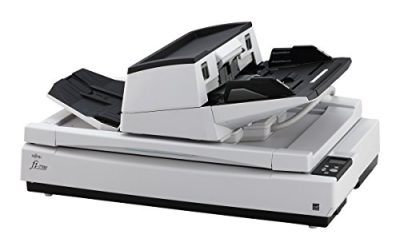
The Fujitsu fi-8170 is the throughput pick for large daily batches. It scans at 70 ppm simplex and 140 ipm duplex with a 100-sheet ADF and 10,000 sheets per day expected volume. Duplex capture in a single pass suits two-sided forms and invoices. The 100-sheet feeder reduces reloads on long runs.
Connectivity is Ethernet plus USB with no Wi-Fi. Ethernet places the scanner on the wired network for multi-user access. USB covers a direct host connection. Confirm a wired drop at the intended location, since wireless placement is not an option.
Pros
– 70 ppm simplex and 140 ipm duplex
– 100-sheet ADF for long batches with fewer reloads
– 10,000 sheets per day expected volume
– Ethernet plus USB for wired sharing
Cons
– No Wi-Fi for wireless placement
– Larger feeder class than small workgroups need
2. Kodak Alaris S2080W – Best For Fastest Shared
ASIN: B076CVP7Y6
Amazon US: https://www.amazon.com/dp/B076CVP7Y6
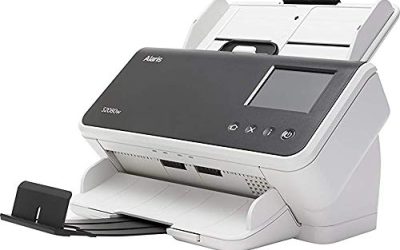
The Kodak Alaris S2080W is the fastest shared unit at 80 ppm simplex and 160 ipm duplex, with an 80-sheet ADF and up to 12,000 sheets per day, the highest volume in this set. Duplex scanning is standard.
Connectivity covers USB, Wi-Fi, and Ethernet. Ethernet supports a fixed location, Wi-Fi supports rooms without a cable run, and USB supports a direct workstation. The 80-sheet feeder needs one more reload than the fi-8170 on very long batches, but higher speed compensates in total batch time.
Pros
– Fastest speed at 80 ppm and 160 ipm
– Up to 12,000 sheets per day
– USB, Wi-Fi, and Ethernet connectivity
– 80-sheet ADF with duplex scanning
Cons
– Smaller feeder than the 100-sheet fi-8170
– Wi-Fi placement needs network planning in busy offices
3. RICOH fi-7300NX – Best For PC-Free Shared

ASIN: B07H85KW2L
Amazon US: https://www.amazon.com/dp/B07H85KW2L
The RICOH fi-7300NX is the PC-free pick for walk-up scanning. It runs at 60 ppm simplex and 120 ipm duplex with an 80-sheet ADF and 9,000 sheets per day expected volume. PC-free touchscreen scanning lets staff scan from the panel without a computer application first.
Connectivity includes Wi-Fi 5GHz, Ethernet, and USB. The 5GHz band helps where 2.4GHz networks are crowded. Speed sits at the departmental threshold, so offices with sustained peak loads may prefer the fi-8170 or S2080W. Choose this model when ease of use for walk-up users matters most.
Pros
– PC-free touchscreen scanning for walk-up use
– Wi-Fi 5GHz plus Ethernet plus USB
– 60 ppm and 120 ipm with 80-sheet ADF
– 9,000 sheets per day expected volume
Cons
– Slower than 70 ppm and 80 ppm models
– Destinations need setup before walk-up use
4. Kodak Alaris S2060W – Best For Touchscreen Sharing
ASIN: B076CX5G1H
Amazon US: https://www.amazon.com/dp/B076CX5G1H
The Kodak Alaris S2060W uses touchscreen job buttons for repeatable shared workflows. It scans at 60 ppm simplex and 120 ipm duplex with an 80-sheet ADF and up to 9,000 sheets per day. Job buttons let a lead define destinations once so every user follows the same steps.
Connectivity is USB, Wi-Fi on 802.11b/g/n, and Ethernet. Ethernet is the future-proof shared path for this unit, since Wi-Fi is an older radio limited to 802.11b/g/n with no 5GHz Wi-Fi noted. At 60 ppm, speed matches the fi-7300NX and trails the faster departmental models, but daily volume keeps it firmly in departmental class.
Pros
– Touchscreen job buttons for consistent shared jobs
– 60 ppm and 120 ipm with 80-sheet ADF
– Up to 9,000 sheets per day
– USB, Wi-Fi, and Ethernet connectivity
Cons
– Older Wi-Fi radio on 802.11b/g/n only
– Slower than 70 ppm and 80 ppm models
5. Fujitsu fi-7160 – Best For Shared Workstation USB
ASIN: B00GKC5HO6
Amazon US: https://www.amazon.com/dp/B00GKC5HO6
The Fujitsu fi-7160 is the USB workstation pick for a staffed desk. It runs at 60 ppm simplex and 120 ipm duplex with an 80-sheet ADF and up to 4,000 scans per day. Connection is USB 3.0 only with no network capability.
At up to 4,000 scans per day, this model sits below the 9,000 to 12,000 per day network departmental class and near the upper end of business sheet-fed duty. It fits a single team with moderate batches and one trained operator, not a walk-up scanner for a busy shared floor. USB-only operation simplifies setup at one computer but requires that host to be available for every job.
Pros
– 60 ppm and 120 ipm with 80-sheet ADF
– USB 3.0 direct connection for a dedicated desk
– Duplex scanning in a single pass
Cons
– USB only with no Ethernet or Wi-Fi
– Up to 4,000 scans per day, below departmental network class
Buying Guide: What to Look For
Throughput in Pages and Images per Minute
Departmental speed runs from 60 ppm and 120 ipm to 80 ppm and 160 ipm in this guide. Business sheet-fed models run at 26 to 40 ppm. Estimate peak batch size, such as a morning mail stack, and choose speed that clears it within the available window. Higher speed matters most when several users queue at the same scanner in the same hour.
Feeder Capacity and Daily Volume
Departmental models hold 80 to 100 sheets and handle 9,000 to 12,000 sheets per day. Business sheet-fed models hold 50 to 60 sheets and handle 3,000 to 6,000 per day. A larger feeder reduces reloads and operator time. Match daily volume to real load including peak days, not average days. The fi-7160 at up to 4,000 scans per day illustrates the boundary between workstation and departmental network class.
Network Connectivity for Shared Placement
Ethernet is the most stable departmental path at a fixed location. Wi-Fi adds placement flexibility, with band support varying by model: the fi-7300NX notes Wi-Fi 5GHz, while the S2060W notes 802.11b/g/n as an older radio. USB-only models such as the fi-7160 suit a staffed workstation rather than walk-up sharing. Confirm drops, wireless coverage, and IT policy at the scanner location before ordering.
Compatibility and Setup Notes
Confirm operating system support, drivers, and software requirements on the product page. For network models, plan IP addressing and destinations with IT. For PC-free models, define destinations once and document steps at the scanner. Verify current details on the Amazon US product page before purchase.
Comparison Table
| Product | Speed | ADF | Daily Volume | Connectivity | ASIN |
|---|---|---|---|---|---|
| Fujitsu fi-8170 | 70 ppm/140 ipm | 100 sheets | 10,000 sheets/day expected | Ethernet + USB | B0BZZ9W6V1 |
| Kodak Alaris S2080W | 80 ppm/160 ipm | 80 sheets | Up to 12,000/day | USB + Wi-Fi + Ethernet | B076CVP7Y6 |
| RICOH fi-7300NX | 60 ppm/120 ipm | 80 sheets | 9,000/day expected | Wi-Fi 5GHz + Ethernet + USB | B07H85KW2L |
| Kodak Alaris S2060W | 60 ppm/120 ipm | 80 sheets | Up to 9,000/day | USB + Wi-Fi (802.11b/g/n) + Ethernet | B076CX5G1H |
| Fujitsu fi-7160 | 60 ppm/120 ipm | 80 sheets | Up to 4,000 scans/day | USB 3.0 only | B00GKC5HO6 |
FAQ
What makes a scanner departmental rather than business sheet-fed?
Departmental models run at 60 to 80 ppm and 120 to 160 ipm, hold 80 to 100 sheets, and handle 9,000 to 12,000 sheets per day as network-shared units. Business sheet-fed models run at 26 to 40 ppm, hold 50 to 60 sheets, handle 3,000 to 6,000 per day, and are mostly USB desk units.
Is Ethernet or Wi-Fi better for a shared office scanner?
Ethernet is most stable for a fixed location and is available on the fi-8170, S2080W, fi-7300NX, and S2060W. Wi-Fi adds placement flexibility. Note the band difference: the fi-7300NX includes Wi-Fi 5GHz, while the S2060W Wi-Fi is 802.11b/g/n. The fi-7160 has no network option.
Which model fits walk-up scanning without a computer?
The RICOH fi-7300NX is the PC-free touchscreen pick. The Kodak Alaris S2060W also supports touchscreen job buttons for repeatable jobs. Both need destinations configured in advance. The fi-7160 requires a USB host computer.
Final Verdict
Start with a network departmental model for most shared offices. The Fujitsu fi-8170, ASIN B0BZZ9W6V1, leads on feeder size and departmental throughput over Ethernet. The Kodak Alaris S2080W, ASIN B076CVP7Y6, leads on speed and daily volume with USB, Wi-Fi, and Ethernet. Choose the RICOH fi-7300NX, ASIN B07H85KW2L, for PC-free walk-up scanning, and the Kodak Alaris S2060W, ASIN B076CX5G1H, for touchscreen job standardization. Keep the Fujitsu fi-7160, ASIN B00GKC5HO6, for a staffed USB workstation with moderate volume. Verify current details on the Amazon US product page before ordering.
FAQ
What makes a scanner departmental rather than business sheet-fed?
Is Ethernet or Wi-Fi better for a shared office scanner?
Which model fits walk-up scanning without a computer?
More from Amazon
Programs that pair well with the guide above. Offers and eligibility are set by Amazon and may change.
Free shipping on eligible items, Prime Video and more. Eligible new members can start with a free trial.
Start a Prime free trialA Prime membership for ages 18-24 with a trial period. Eligibility is set by Amazon.
See Prime for Young AdultsAudiobooks and podcasts to listen to on the go. Eligible new members can start with a free trial.
Try Audible freeAd-free music streaming. Eligible new subscribers can start with a free trial.
Try Music Unlimited freeAs an Amazon Associate we earn from qualifying purchases.