Our Short List of 3
All 3 Picks at a Glance
| Product | Specs | Action |
|---|---|---|
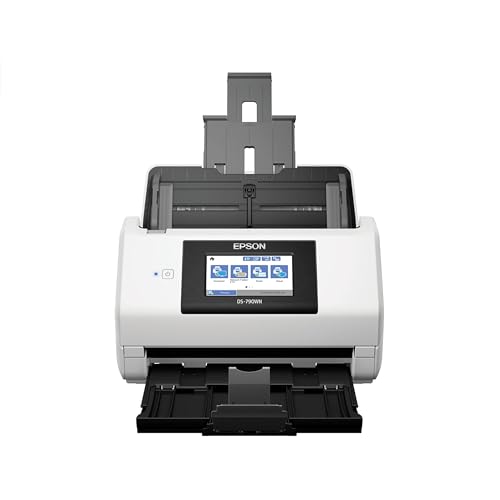 Epson WorkForce DS-790WN (ASIN: B09TVBYMYV) | Check price on Amazon | |
 Brother ADS-4900W (ASIN: B09TRX9JQ3) | Check price on Amazon | |
 Canon imageFORMULA DR-M260 (ASIN: B0765BMRG4) | Check price on Amazon |
Key takeaways
- Compare the best departmental document scanners for paperless operations by scan speed, feeder capacity, daily volume and connectivity, with verified models and
As an Amazon Associate, we earn from qualifying purchases made through links on this page.
Most departments going paperless do not need a production line — they need one dependable scanner that absorbs the department’s daily paper: the morning mail, the signed forms, the legacy folder that finally gets converted. Departmental scanners fill that role with 45-70 ppm engines, feeders that take a meaningful stack and daily ratings sized for a team’s real volume rather than a service bureau’s. This guide focuses on models that combine that capacity with the connections and software hooks a paperless department depends on, including network access so the scanner serves the whole team instead of one desk.
What to Look For
- Speed matched to departmental reality: 45-70 ppm duplex clears a day’s departmental paper in minutes, leaving time for the indexing work that makes paperless worthwhile.
- Network or shared access — LAN, Wi-Fi or a touchscreen with scan-to-folder — so the scanner belongs to the department, not to one PC.
- Daily volume rating comfortably above the department’s peak days, such as month-end or intake surges.
- Searchable output: OCR and PDF/A support in the bundled software, because a paperless archive nobody can search is just a digital pile.
- Compact footprint for a shared surface, credenza or mail corner rather than a dedicated machine room.
The Picks
Fujitsu fi-8170 (Ricoh fi Series) (ASIN: B0BZZ9W6V1)
The fi-8170 is the departmental anchor of the Ricoh (formerly Fujitsu) fi Series: a 70 ppm sheet-fed scanner with both USB and wired LAN connections, so one unit can serve a whole workgroup through PaperStream networking or sit on a single high-volume desk. Its ultrasonic iMFF sensor watches every page for overlaps, and the straight, reliable paper path handles mixed batches of office paper, cards and long documents.
Key specifications:
– 70 ppm / 140 ipm single-pass duplex scanning
– 100-sheet automatic document feeder
– Manufacturer daily volume up to 10,000 sheets
– USB 3.2 and Gigabit Ethernet LAN connectivity
– Ultrasonic intelligent multi-feed function (iMFF) double-feed detection
– PaperStream IP TWAIN/ISIS drivers and PaperStream Capture software
– Clear Image Capture optics and automatic skew, crop and color detection
Limitations to know: Network deployment works best through the PaperStream software stack, so mixed-platform offices should confirm driver coverage for every operating system in use before standardizing on it.
Epson WorkForce DS-790WN (ASIN: B09TVBYMYV)
The DS-790WN is built for shared network scanning without a host computer: staff walk up, choose a destination on the large touchscreen and scan straight to a network folder, email or cloud service over Wi-Fi or Ethernet. The 100-sheet feeder and 45 ppm engine are sized for departmental daily work rather than occasional desktop batches, and PC-free operation keeps the workflow running even when the nearest computer is busy or off.
Key specifications:
– 45 ppm / 90 ipm single-pass duplex scanning
– 100-sheet automatic document feeder
– Built-in Wi-Fi, Ethernet and USB 3.0 connectivity
– PC-free scanning from a 4.3-inch color touchscreen
– Scan to network folders, email, cloud services and USB drives
– Ultrasonic double-feed detection and slow mode for delicate pages
– Epson Scan 2, TWAIN and Document Capture Pro support
Limitations to know: At 45 ppm it is half the speed of the fastest models here, so a single centralized high-volume station is better served by the DS-970 class.
Brother ADS-4900W (ASIN: B09TRX9JQ3)
The ADS-4900W is Brother’s professional desktop flagship: a 60 ppm engine, every connection type in the class and a large touchscreen that stores per-user workflows for shared departments. It is positioned for busy workgroups that scan all day, with image processing compatibility (Kofax VRS) that larger organizations often standardize on, and an ultrasonic sensor guarding batch integrity.
Key specifications:
– 60 ppm / 120 ipm single-pass duplex scanning
– 100-sheet automatic document feeder
– Wi-Fi, Gigabit Ethernet and USB 3.0 connectivity
– 4.3-inch color touchscreen with customizable workflow shortcuts
– Ultrasonic multifeed detection sensor
– Kofax VRS Elite image processing compatibility and TWAIN/ISIS support
– Scan to network, SharePoint, FTP/SFTP, email server and cloud services
Limitations to know: Its feature set is aimed at administered workgroups; a single user with light volume pays for networking and workflow capacity they will not use.
Canon imageFORMULA DR-M260 (ASIN: B0765BMRG4)
The DR-M260 is Canon’s departmental speed option: 60 ppm driven by an onboard processor chip, so scan speed does not depend on the attached PC’s power. The five-line LCD makes status and job selection clear at the device, the double-feed release button lets operators re-feed a flagged page without restarting the batch, and the paper path accepts everything from receipts to folded A3 sheets.
Key specifications:
– 60 ppm / 120 ipm duplex scanning
– 80-sheet automatic document feeder
– Manufacturer daily volume up to 7,500 scans
– Ultrasonic double-feed detection with double-feed release function
– USB 3.1 connection and a five-line LCD operator panel
– Onboard DR chip image processing independent of PC speed
– Handles folded A3, long documents and passports up to 6 mm thick
Limitations to know: Like Canon’s other departmental models here it is USB-connected, so network sharing requires a host PC or Canon’s separate network adapters.
Quick Comparison
| Model | ASIN | Speed | Feeder | Connection |
|---|---|---|---|---|
| Fujitsu fi-8170 | B0BZZ9W6V1 | 70 ppm / 140 ipm | 100 sheets | USB, Ethernet |
| Epson DS-790WN | B09TVBYMYV | 45 ppm / 90 ipm | 100 sheets | Wi-Fi, Ethernet, USB |
| Brother ADS-4900W | B09TRX9JQ3 | 60 ppm / 120 ipm | 100 sheets | Wi-Fi, Ethernet, USB |
| Canon imageFORMULA DR-M260 | B0765BMRG4 | 60 ppm / 120 ipm | 80 sheets | USB |
Frequently Asked Questions
How does a departmental scanner differ from a personal desktop scanner?
Capacity and sharing. Departmental models hold 80-100 sheets, run at 45-70 ppm, carry multi-thousand-page daily ratings and usually offer network connections or walk-up controls for a team.
Can one scanner really serve a whole department?
For most departments, yes — daily paper volume is usually a few hundred pages. The shared models here let each person scan to their own folder or email from the device panel.
What should we scan first when going paperless?
Start with day-forward paper — everything new gets scanned on arrival — then convert legacy files by retrieval likelihood. Active files first; deep archive only when there is a compliance reason.
Do these scanners create searchable PDFs?
Yes. Each brand’s capture software includes OCR that produces searchable PDF or PDF/A output, which is the format most paperless archives standardize on.
Verdict
The fi-8170 is the balanced departmental choice, especially on a wired network. Pick the DS-790WN when PC-free walk-up scanning matters most, the ADS-4900W for the richest shared workflow features, and the DR-M260 when a single powerful workstation drives the department’s scanning.
FAQ
How does a departmental scanner differ from a personal desktop scanner?
Can one scanner really serve a whole department?
What should we scan first when going paperless?
Do these scanners create searchable PDFs?
More from Amazon
Programs that pair well with the guide above. Offers and eligibility are set by Amazon and may change.
Free shipping on eligible items, Prime Video and more. Eligible new members can start with a free trial.
Start a Prime free trialA Prime membership for ages 18-24 with a trial period. Eligibility is set by Amazon.
See Prime for Young AdultsAudiobooks and podcasts to listen to on the go. Eligible new members can start with a free trial.
Try Audible freeAd-free music streaming. Eligible new subscribers can start with a free trial.
Try Music Unlimited freeAs an Amazon Associate we earn from qualifying purchases.