Key takeaways
- Best overall for minimizing wiring: AUTO-VOX Solar Wireless Backup Camera — A wireless design with a 5-inch 1080P monitor, split-screen capability, and a 5000mAh battery.
- Best for a straightforward plug-and-play setup: 15-Minute Easy to Install Backup Camera — Advertised with plug-and-play installation, a 15-foot connection, 1080P imaging, and clear night vision.
- Best for trucks, RVs, and larger vehicles: eRapta Backup Camera for Truck — Includes a 7-inch 2K monitor and is described for cars, RVs, trucks, tractors, buses, semitrailers, and pickups.
- Best for license-plate mounting: YIMU Backup Camera System — A plug-and-play license-plate camera with a 150-degree wide angle, night vision, and an optional dual bracket.
- Best for a larger wireless display: HD 1080P 7 Inch Wireless Backup Camera — Combines a 7-inch monitor, wireless operation, 1080P video, starlight night vision, and a 150-degree view angle.
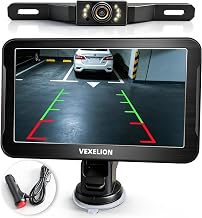
- Best for a wired zero-lag connection: 2K Backup Camera Kit — A wired kit with a 7-inch monitor, 2K video, and a stated zero-lag design.
- Best for dual-camera monitoring and recording: AUTO-VOX Solar Wireless Backup Camera with 7.2-inch Monitor — Offers a solar wireless format, split-screen viewing, dual antennas, 1080P color night vision, and DVR recording.
- Best for a compact 12V setup: Plug & Play Backup Camera with Monitor — A 4.6-inch monitor system described for 12V cars and SUVs, with a 150-degree wide angle and 12 LED night vision.
Older vehicles often lack the camera wiring, compatible infotainment screen, and factory mounting points found in newer cars. The most practical retrofit is therefore usually a self-contained camera-and-monitor kit rather than a camera intended to work with a modern factory display. The products in this guide cover several installation approaches, including plug-and-play wired systems, wireless cameras, solar-assisted designs, license-plate mounting, and larger monitor kits for trucks, trailers, and other vehicles with substantial rear blind spots.
The best choice depends less on the vehicle’s age than on the installation path you are willing to take. A wireless or solar-assisted system can reduce the need to route video cable through an older cabin, while a wired kit may be preferable when you want a direct connection and do not mind running cable. Screen size, camera placement, night-visibility claims, weather resistance, power requirements, and the vehicle’s available mounting space all deserve attention before ordering. This guide uses the specifications and product descriptions provided for each listing, while identifying compatibility details that should be confirmed before installation.
Our top picks




As an Amazon Associate we earn from qualifying purchases at no extra cost to you.
Updated October 2026 — The best backup cameras for older vehicle retrofitting are self-contained camera-and-monitor kits, because many cars built before the 2018 U.S. rear-visibility rule have no screen that accepts a camera. For the least wiring, pick the AUTO-VOX Solar Wireless Backup Camera with a 5-inch monitor. For the steadiest wired image at a low price, pick the LeeKooLuu 15-Minute Easy to Install Backup Camera. For trucks and long vehicles, pick the eRapta 7-inch HD 2K kit. If you already have an aftermarket stereo with a video input, a camera-only unit such as the eRapta ERT01 or NATIKA OEM-style camera is all you need.
Want the screen in the mirror instead of on the dash? The AUTO-VOX T2 OEM Rear View Mirror Camera and the WOLFBOX G840S both replace the view you already check when reversing.
Quick Answer: Top Picks for Older Vehicle Retrofitting
- Best overall for minimizing wiring: AUTO-VOX Solar Wireless Backup Camera — A wireless design with a 5-inch 1080P monitor, split-screen capability, and a 5000mAh battery.
- Best for a straightforward plug-and-play setup: 15-Minute Easy to Install Backup Camera — Advertised with plug-and-play installation, a 15-foot connection, 1080P imaging, and clear night vision.
- Best for trucks, RVs, and larger vehicles: eRapta Backup Camera for Truck — Includes a 7-inch 2K monitor and is described for cars, RVs, trucks, tractors, buses, semitrailers, and pickups.
- Best for license-plate mounting: YIMU Backup Camera System — A plug-and-play license-plate camera with a 150-degree wide angle, night vision, and an optional dual bracket.
- Best for a larger wireless display: HD 1080P 7 Inch Wireless Backup Camera — Combines a 7-inch monitor, wireless operation, 1080P video, starlight night vision, and a 150-degree view angle.
- Best for a wired zero-lag connection: 2K Backup Camera Kit — A wired kit with a 7-inch monitor, 2K video, and a stated zero-lag design.
- Best for dual-camera monitoring and recording: AUTO-VOX Solar Wireless Backup Camera with 7.2-inch Monitor — Offers a solar wireless format, split-screen viewing, dual antennas, 1080P color night vision, and DVR recording.
- Best for a compact 12V setup: Plug & Play Backup Camera with Monitor — A 4.6-inch monitor system described for 12V cars and SUVs, with a 150-degree wide angle and 12 LED night vision.
How We Researched This Guide
This guide is based on the product titles and specifications shown for the listed backup-camera systems, with emphasis on the needs of older-vehicle owners. We compared the advertised installation method, monitor format, image-resolution claim, viewing angle, night-visibility description, weather-resistance claim, power approach, and intended vehicle types.
Because detailed feature sheets were not provided for these listings, the guide does not assume that an advertised feature includes every accessory or adjustment a particular vehicle may require. For example, a listing that says “wireless” may still require power at the camera and monitor, and a product described as plug-and-play may still require routing a power lead or connecting to the vehicle’s reverse-light circuit. Buyers should review the current listing, included hardware, wiring diagram, connector type, and installation instructions before purchasing.
We also avoid treating resolution or viewing-angle numbers as a complete measure of performance. A higher stated resolution does not by itself confirm screen quality in sunlight, and a wider viewing angle can change how far-away objects appear. Owner-review patterns can be useful for identifying recurring concerns such as signal interruptions, difficult instructions, or challenging cable routing, but those reports should be weighed against the vehicle’s layout and the installer’s expectations.
How to Choose a Backup Camera for an Older Vehicle
1. Choose the Installation Method Before Choosing the Camera
Installation method is often the most important decision in an older-vehicle retrofit. A wired camera generally requires a video cable between the rear-mounted camera and the monitor, along with power connections. That can be a sensible choice when the vehicle has accessible trim panels and a clear route through the cabin. It may be less appealing on a collector car, a vehicle with fragile interior trim, or a truck where the distance between the camera and display makes cable routing more involved.
Wireless systems can simplify the video connection, but “wireless” does not mean completely free of wiring. The camera and monitor may still need their own power sources, and the camera may need a connection near the rear lighting or another suitable circuit. Solar-assisted models can reduce dependence on a fixed power lead, but the solar panel’s position, exposure, and charging behavior should be checked for the intended mounting location.
For the simplest installation path, look for clear information about whether the kit is plug-and-play, what type of connection it uses, and whether the monitor is included. Avoid assuming that a short installation time in the product title applies to every older vehicle. Rusted fasteners, inaccessible trim, unusual body construction, or an absent reverse-light circuit can turn a basic installation into a more involved project.
2. Confirm Power and Reverse-Trigger Compatibility
Older vehicles can have electrical systems that differ from the assumptions made by newer vehicle accessories. Before buying, identify the vehicle’s system voltage and determine where the camera and monitor will receive power. The compact plug-and-play system in this group is specifically described as fitting 12V cars and SUVs, but the other listings do not provide complete electrical compatibility details.
A backup camera may be activated by the reverse-light circuit, a manual switch, or another trigger depending on its design. Confirm which method the kit requires. If the camera must connect to the reverse-light wiring, inspect the condition of that circuit and verify that the vehicle’s reverse lamps operate reliably. If the vehicle has been modified, converted, or fitted with non-factory lighting, the expected trigger may not be present in the usual location.
Wireless and solar-powered products still need a power plan. Check how the camera battery is charged, whether the monitor has its own power lead, and what happens when the vehicle has been parked for an extended period. For any product with a built-in battery, look for instructions covering charging, storage, and low-battery behavior rather than assuming the battery will remain ready indefinitely.
3. Match Monitor Size and Placement to the Vehicle
A standalone monitor is useful when the original vehicle has no compatible display. The products in this group range from a compact 4.6-inch monitor to 5-inch, 7-inch, and 7.2-inch formats. A smaller screen can be easier to position without blocking the driver’s view, while a larger screen may be more useful in a truck, RV, trailer, or work vehicle where the rear area is farther away or broader.
Before ordering, measure the intended mounting area and consider the display’s relationship to the driver’s normal sightline. A monitor that sits too low, too far to one side, or in a location affected by glare may be less useful even if its stated resolution is high. Check whether the kit includes a mounting solution suited to the dashboard or windshield area, and whether the proposed position interferes with controls, air vents, airbags, or the original rearview mirror.
Split-screen products deserve particular attention when more than one camera or view is involved. The two AUTO-VOX listings in this group advertise split-screen capability, but the listing does not specify every supported camera arrangement. Confirm whether additional cameras are included, optional, or required for split-screen operation before treating that feature as a complete multi-camera solution.
4. Evaluate Resolution, Viewing Angle, and Image Behavior Together
Resolution provides a useful starting point, but it is not the only factor affecting practical visibility. The products here advertise several image formats, including 1080P, 2K, and HD descriptions. A higher stated resolution may provide more image detail on a compatible monitor, yet the result still depends on the camera sensor, the display, lighting, signal transmission, lens cleanliness, and the way the image is processed.
Viewing angle is equally important. The YIMU, Starlight, and compact plug-and-play systems are described with a 150-degree wide angle. A broad view can help cover areas beside the rear bumper and reduce blind spots, but wide-angle images can make objects appear smaller or distort distances near the edges. Drivers should use the camera as a visibility aid rather than treating screen distance as a precise measurement.
Check whether the image can be flipped or adjusted for the mounting position, especially if the camera may be installed above or below a license plate. Also verify whether parking guidelines are fixed, adjustable, or removable. The product descriptions for the YIMU and eRapta products mention grid or guide lines, but it does not establish how those lines are adjusted for a particular vehicle. Misaligned guidelines can be misleading when the camera is mounted at an unusual height or angle.
5. Treat Night Vision Claims as a Feature to Verify
Night visibility matters particularly on older vehicles because reverse-light output, lens condition, and wiring quality may vary substantially. The products in this group use several descriptions, including clear night vision, starlight night vision, color night vision, 12 LED night vision, and general night vision. These labels are not interchangeable, so read the listing details to determine whether the camera uses infrared illumination, a low-light sensor, visible LEDs, or another approach.
Also inspect the condition and position of the vehicle’s reverse lights. A camera cannot create a well-lit scene if the lens is dirty, the bulbs are weak, or the camera is mounted where the bumper blocks useful illumination. If the vehicle will be used on unlit roads or in a dark driveway, confirm how the camera behaves when there is little ambient light and whether the display automatically changes modes.
Avoid selecting a camera solely because its title includes “night vision.” Look for owner-review patterns concerning glare, washed-out images, reflections from the bumper, and readability in darkness. It is also worth checking whether the camera lens has a protective cover that can be cleaned easily and whether the installation angle keeps exhaust residue, road spray, and mud away from the lens.
6. Check Weather Protection and Mounting Exposure
External backup cameras face water, dirt, road salt, vibration, temperature changes, and accidental impacts. Several products in this group advertise IP69 or IP69K protection, including the AUTO-VOX 5-inch model, the eRapta kit, and the YIMU system. Those claims are useful indicators of the manufacturer’s stated weather-resistance position, but buyers should still confirm the exact rating in the current listing and installation documentation.
Weather protection also depends on the installation. A camera can be rated for outdoor use while its connector, splice, cable entry, or mounting hole remains vulnerable to moisture. Plan how the cable will be secured and sealed, and avoid placing a connector where it can collect water. On older vehicles, inspect the license-plate area, hatch, tailgate, and bumper for corrosion or loose panels before attaching the camera.
Mounting style affects durability as well as appearance. A license-plate camera may preserve a cleaner look, while a bracket-mounted unit can offer more flexibility in positioning. The YIMU listing mentions an optional dual bracket, which may help with mounting choices, but the exact bracket configuration should be checked before ordering. For trucks and trailers, make sure the selected camera’s cable length, bracket position, and connector protection suit the greater distance and vibration.
7. Match the Kit to the Vehicle’s Size and Use
A compact sedan, vintage coupe, pickup, RV, tractor, and semitrailer can all benefit from a backup camera, but they do not present the same retrofit problem. A small display and short connection may be appropriate for a car, while a truck or trailer may benefit from the 7-inch monitor offered by several products in this group. The eRapta listing specifically names RVs, trucks, tractors, buses, semitrailers, and pickups, making its stated vehicle coverage broader than that of products described primarily for cars and SUVs.
Consider how often the vehicle reverses with a trailer, camper, or other attachment. A camera mounted on the vehicle may not show the area immediately behind a trailer, and a camera mounted on a trailer may require a different power and signal plan. A split-screen or dual-camera product could be relevant for this use, but verify which cameras and cables are included and whether the monitor supports the desired arrangement.
Use also affects the best control style. A daily driver may benefit from automatic reverse activation, while a work truck or recreational vehicle may need a view that can be selected manually. A system with DVR recording, such as the 7.2-inch AUTO-VOX listing, may appeal to buyers who specifically want recording capability, but confirm storage requirements, recording controls, and whether recording is active during the intended type of driving.
8. Avoid Common Retrofit Mistakes
- Assuming wireless means installation-free: Check every power requirement for the camera, monitor, transmitter, receiver, and any solar or battery component.
- Skipping a cable-route plan: Identify how the video or power cable will pass from the rear mounting point to the display before drilling or removing trim.
- Ignoring the monitor location: Confirm that the screen will not obstruct visibility, controls, airbags, or the original rearview mirror.
- Relying on stated guide lines without adjustment: Verify whether lines can be calibrated or disabled, especially when the camera is mounted off-center.
- Overlooking connector protection: Seal exposed connections and keep splices away from water collection points, road spray, and moving panels.
- Choosing by resolution alone: Compare the screen size, viewing angle, night-visibility system, connection method, and intended vehicle use as a complete package.
- Failing to verify included hardware: Check whether the listing includes the monitor, mounting bracket, power leads, video cable, camera, and any required antenna or storage accessory.
- Skipping a temporary trial run: Before final mounting, verify the camera view, trigger behavior, signal stability, image orientation, and cable reach using a safe, temporary setup.
9. Pick a Display Route: Standalone Monitor, Mirror Screen, or Aftermarket Head Unit
Every backup camera needs a screen. In an older vehicle without a factory display, there are three realistic routes, and choosing one first narrows the product list quickly.
| Display route | How it works | Strengths | Watch-outs |
|---|---|---|---|
| Standalone monitor kit | Camera and a dash or windshield monitor sold together | Everything matches out of the box; no stereo changes | Adds a screen to the dash; mount position and glare need planning |
| Mirror-style display | Rear view appears on a screen that fits over or replaces the rearview mirror | Screen sits where drivers already look; dash stays clear | Rear cable still runs the length of the cabin; screen size matters in small cars |
| Aftermarket head unit | Camera-only product plugs into a stereo with a camera input | Clean factory-style result; stereo upgrades often add other features | Needs a compatible dash opening, wiring adapters, and a matching video signal |
The standalone kits make up most of this guide because they are the least invasive. A mirror display suits owners who dislike extra hardware on the dash. A head-unit route makes the most sense when the original radio is already gone or worn out, or when you also want features such as smartphone mirroring. Camera-only products are much cheaper than complete kits, but only because the display is a separate purchase.
10. Match the Video Signal Before Mixing Brands
When the camera and screen come in one box, compatibility is the manufacturer’s job. When you combine a camera-only product with a stereo or monitor from another brand, it becomes yours. Most aftermarket stereos and many basic monitors accept standard-definition composite video, often called CVBS, through an RCA-style camera input. Higher-definition analog cameras, usually labeled AHD, need a display that specifically lists AHD support. Plug an AHD camera into a composite-only input and you may get a scrambled picture or none at all unless the camera can switch to a standard mode.
Check three things before mixing brands: the camera’s output format (CVBS, AHD, or a switchable design), the display’s accepted camera formats, and the connector type at both ends. Also note whether the camera needs its own power lead and whether the stereo provides a reverse-trigger input that switches to the camera automatically.
11. Decide Between DIY and Professional Installation
A plug-and-play or wireless kit is a realistic DIY job for many owners who are comfortable removing trim and identifying the reverse-light wire with a test light or multimeter. Professional installation makes more sense when the camera has to be integrated with an aftermarket stereo, when the cable has to run through a tailgate, hatch hinge, or firewall grommet, or when the vehicle has fragile or hard-to-replace interior trim.
Installer pricing varies by region and vehicle, but labor for a basic backup camera install is generally one of the more affordable services of this kind. Truck, RV, and trailer installs, plus jobs that include a new head unit, can cost more. Ask for a quote that lists how the cable will be routed and sealed, where the camera will be mounted, and how the reverse trigger will be connected. On a collector or classic vehicle, also ask the installer to avoid drilling any body panel without your approval.
A Practical Way to Narrow the Choices
Start by deciding whether you prefer a wired connection or want to reduce video-cable routing. Then choose the monitor size that fits the vehicle without compromising the driver’s view. After that, confirm power compatibility, mounting location, weather exposure, and the desired night-visibility features. A compact 12V system may suit a car or SUV, while a larger monitor or broader vehicle coverage may make more sense for a truck, RV, trailer, or work vehicle.
Finally, treat installation claims as a starting point rather than a guarantee. Older vehicles vary widely in trim construction, wiring condition, lighting circuits, and available mounting space. The right retrofit is the one whose connection method, display, camera position, and power requirements match the vehicle you actually have.
Detailed product breakdowns
1. 15-Minute Easy to Install Backup Camera
This camera is positioned as a straightforward retrofit for drivers who want to add rear visibility without taking on a complicated installation. Its product description emphasizes plug-and-play setup, a 15-foot connection, clear night vision, HD 1080P imaging, and real-time image transmission. Because the listing does not identify the included monitor, connector type, power requirements, or exact mounting hardware, buyers should confirm those details before ordering.
Key specifications:
- Advertised as a 15-minute easy-install backup camera.
- Plug-and-play design.
- 15-foot connection or cable length is referenced in the product name.
- HD 1080P image resolution.
- Clear night vision.
- Real-time image transmission.
- Described as dustproof and weatherproof.
Strengths: The main appeal is its emphasis on simplified installation. A 15-foot reach may be useful for many sedans, hatchbacks, and smaller SUVs, although the vehicle’s body layout determines whether that length is sufficient. The 1080P designation suggests that the camera is intended to provide a detailed image rather than a basic low-resolution view. Night vision and weather resistance are particularly relevant for an externally mounted camera that may be used in poor lighting and changing weather.
Trade-offs: The listing does not state whether this is a camera-only product or a complete kit with a display. It also does not specify whether the connection is RCA, USB, or another interface, nor does it identify a waterproof rating, viewing angle, monitor compatibility, or parking-line controls. Buyers should verify the display requirement, cable routing method, reverse-light power connection, camera dimensions, and whether the included wiring is long enough for the vehicle.
Best for: DIY owners of older cars or compact vehicles who prioritize a conventional wired retrofit and want a product described as quick to install.
Skip it if: You need a wireless or solar-powered system, a standalone monitor included in the package, a documented IP rating, or a camera designed specifically for a long truck, camper, or trailer.
View the 15-Minute Easy to Install Backup Camera
2. AUTO-VOX Solar Wireless Backup Camera with 5-Inch Monitor
This AUTO-VOX system is aimed at older vehicles where routing a video cable through the cabin, hatch, or firewall would be undesirable. The product name identifies a solar wireless design, a 5-inch 1080P monitor, a 5000mAh battery, and a two-minute installation claim. It also advertises split-screen capability and an IP69K waterproof rating. The available information does not explain the solar panel’s location, charging conditions, wireless range, monitor mounting method, or whether the system supports one or two cameras.
Key specifications:
- Solar wireless backup camera system.
- 5-inch monitor.
- 1080P monitor resolution is advertised.
- 5000mAh battery.
- Two-minute easy-install claim.
- A two-view split-screen mode is referenced in the product name (“2 Split Screen”).
- IP69K waterproof rating.
- Listed for cars, vans, SUVs, trucks, and trailers.
Strengths: Wireless transmission and a solar-related power design can reduce the amount of permanent wiring needed during an older-vehicle retrofit. That may be valuable when the vehicle has fragile trim, difficult-to-access body panels, or no factory camera harness. The included 5-inch monitor means buyers do not necessarily have to replace an original radio or add an aftermarket head unit. A 5000mAh battery may also reduce dependence on an immediate hardwired power connection, though the actual operating time and charging behavior should be confirmed.
Trade-offs: Wireless does not necessarily mean completely cable-free: buyers should verify how the camera charges, whether the monitor requires a 12-volt connection, and whether reverse-trigger wiring is still needed. The product name does not provide the wireless range, refresh behavior, solar-panel dimensions, or performance in extended shade. The two-view split-screen mode may be useful for multi-camera setups, but the package contents and camera expansion options should be checked rather than assumed.
Best for: Owners of older cars, vans, SUVs, and light trucks who want to avoid running a long video cable and prefer a dedicated monitor.
Skip it if: You need a fully hardwired, permanently powered system, a display integrated into the factory dashboard, or documented details about wireless range and battery runtime before purchase.
View the AUTO-VOX Solar Wireless Backup Camera with 5-Inch Monitor
3. eRapta 7-Inch HD 2K Backup Camera Kit
The eRapta kit is presented as a larger-screen wired-style solution for vehicles that need more extensive rear coverage. Its name identifies a 7-inch HD 2K front/rear-view monitor, IP69 waterproofing, night vision, and DIY grid lines. It is listed for cars, RVs, trucks, tractors, buses, semi-trailers, and pickups, making it one of the more broadly oriented options in this group. The listing does not specify cable length, camera count, monitor inputs, viewing angle, or whether all mounting hardware is included.
Key specifications:
- 7-inch HD 2K monitor.
- Front/rear-view monitor kit.
- IP69 waterproof rating.
- Night vision.
- DIY grid lines.
- Listed for cars, RVs, trucks, tractors, buses, semi-trailers, and pickup vehicles.
Strengths: A 7-inch display can be easier to read than a compact screen, especially in larger vehicles with long rear sections. The front/rear designation suggests a broader camera-system configuration than a basic single rear camera, while DIY grid lines may let owners tailor the on-screen parking guides to the vehicle’s position. The broad vehicle list makes this a candidate for unusual or commercial-style retrofits where a passenger-car camera may not provide enough flexibility.
Trade-offs: Larger screens occupy more dashboard space and may be visually intrusive in an older interior. “DIY grid lines” means alignment may require careful adjustment; buyers should not assume the guides will automatically match the vehicle’s width or trajectory. The product name does not identify the included cable lengths, connector standards, number of cameras, or power requirements. Owners of long vehicles should verify that the wiring reaches the intended mounting points without extensions.
Best for: Pickup, RV, tractor, bus, semi-trailer, and other larger-vehicle owners who want a substantial display and front/rear viewing capability.
Skip it if: Your older vehicle has limited dashboard space, you want a discreet factory-style installation, or you are seeking a wireless system with minimal cable routing.
View the eRapta 7-Inch HD 2K Backup Camera Kit
4. YIMU License Plate Backup Camera System
The YIMU system uses a license-plate backup camera format, which can simplify placement on vehicles where drilling a separate bumper hole is undesirable. Its product description highlights plug-and-play installation, a DIY guide-line function, a 150-degree wide angle, night vision, IP69K waterproofing, and an optional dual-bracket configuration. The model is identified as K4302. Buyers should verify whether a monitor is included, what video connection is used, and whether the license-plate mounting dimensions match the vehicle.
Key specifications:
- License-plate backup/reverse camera design.
- Plug-and-play installation.
- DIY guide lines.
- 150-degree wide-angle view.
- Night vision.
- IP69K waterproof rating.
- Optional dual-bracket configuration.
- Model K4302.
Strengths: License-plate placement can be a practical choice for older vehicles because it may avoid creating a new visible opening in the bumper or tailgate. The 150-degree viewing angle is intended to show a broad area behind the vehicle, which can help when reversing in tight spaces. IP69K is a clearly stated protection rating, and the night-vision feature addresses low-light use. The optional dual-bracket reference may provide additional mounting flexibility, but the exact bracket arrangement should be confirmed.
Trade-offs: A wide-angle view can make objects appear smaller or farther away than expected, so drivers still need to use mirrors and check the surroundings directly. DIY guide lines require adjustment and should not be treated as a precise measurement system. The listing does not identify resolution, cable length, monitor compatibility, or whether the camera is intended for a specific license-plate format. Buyers should also check that the mounting position does not obscure registration information or conflict with local plate-display rules.
Best for: Owners seeking a relatively discreet, license-plate-based retrofit with broad coverage and documented weather protection.
Skip it if: Your vehicle has an unusual plate mount, you require a large integrated monitor, or you prefer a narrow view that prioritizes distance judgment over maximum coverage.
View the YIMU License Plate Backup Camera System
5. HD 1080P 7-Inch Wireless Backup Camera for Truck
This wireless camera system is designed around a 7-inch monitor and is marketed primarily toward truck owners. The product name highlights HD 1080P imaging, a 15-minute installation claim, starlight night vision, and a 150-degree wide view designed to reduce rear blind spots. The available data does not state whether the system is solar powered, battery powered, or connected to the vehicle’s electrical system, so the installation should not be assumed to be completely wire-free.
Key specifications:
- Wireless backup camera system.
- 7-inch monitor.
- HD 1080P image resolution.
- 15-minute easy-install claim.
- Starlight night vision.
- 150-degree wide viewing angle.
- Intended to help eliminate rear blind spots.
- Listed for trucks, pickups, and cars.
Strengths: The larger monitor may suit pickup owners who need a clear view across a wide or tall rear area. Wireless transmission can reduce the need to route a video cable through the cab, while the 150-degree view is intended to cover more of the area behind the vehicle. Starlight night vision is a notable low-light feature in the product description, although buyers should look for specific information about illumination requirements and image behavior in complete darkness.
Trade-offs: A 7-inch display takes more space than a compact monitor and may need careful placement so it does not block forward visibility. “Wireless” describes the video connection, not necessarily every power connection. The listing does not provide a weatherproof rating, wireless range, battery details, mounting options, or cable requirements. Buyers should verify those points, particularly when installing the camera on a full-size pickup or a vehicle with a trailer connection.
Best for: Pickup and truck owners who want a large screen, broad rear coverage, and a wireless video connection.
Skip it if: You need a documented waterproof rating, a solar-charged camera, or a small display that blends into a compact older-car dashboard.
View the HD 1080P 7-Inch Wireless Backup Camera for Truck
6. 2K Backup Camera Kit with 7-Inch Monitor
This kit is described as a 2K wired backup-camera system with a 7-inch monitor, zero-lag video, and night vision. Its wired design may appeal to owners who prefer a direct connection over wireless transmission, especially when consistent signal delivery is more important than minimizing cable routing. However, the listing does not identify the camera’s mounting style, cable length, weatherproof rating, viewing angle, or whether the kit supports front and rear cameras.
Key specifications:
- 2K backup camera kit.
- 7-inch monitor.
- Wired connection.
- Zero-lag video is advertised.
- Night vision.
Strengths: The wired format may be attractive for older vehicles where owners want to avoid potential wireless interference or signal dropouts. A 7-inch display provides a generous viewing area, while the advertised zero-lag design is relevant when precise timing matters during reversing. The 2K designation indicates a higher stated resolution than standard HD, although the effective image also depends on the display and camera specifications.
Trade-offs: Wiring is the central installation cost of this design. On an older vehicle, routing the cable through trim, a hatch, or a firewall can take substantially longer than the advertised setup time of some wireless products. The data does not say whether the camera is waterproof, what connector it uses, or how long the included cable is. Buyers should also verify whether “zero-lag” refers to the complete camera-to-monitor system and whether the monitor accepts additional camera inputs.
Best for: DIY retrofitters who prefer a wired connection and want a large monitor with a stated 2K camera format.
Skip it if: You want to avoid running cables, need a solar or battery-powered camera, or require a documented weather-resistance rating before installation.
View the 2K Backup Camera Kit with 7-Inch Monitor
7. AUTO-VOX Solar Wireless Backup Camera with 7.2-Inch Split-Screen Monitor
This second AUTO-VOX option is aimed at drivers who want a larger display and more camera-system capability than a basic single-view retrofit. Its product name identifies a solar wireless design, a 7.2-inch HD split-screen monitor, dual antennas, 1080P color night vision, and DVR recording. It is listed for cars, trucks, campers, and trailers. The available data does not specify battery capacity, recording storage, camera count, solar charging details, or the system’s precise installation requirements.
Key specifications:
- Solar wireless backup camera system.
- 7.2-inch HD split-screen monitor.
- Dual-antenna signal design.
- 1080P color night vision.
- DVR recording.
- Listed for cars, trucks, campers, and trailers.
Strengths: The 7.2-inch split-screen format can suit owners who need to view more than one camera angle or want a large image in a camper, trailer, or truck. Dual antennas are presented as a signal-support feature, while color night vision may make nighttime scenes easier to interpret than a monochrome display. DVR recording adds a documentation function beyond basic reversing assistance, although the storage method and recording controls need confirmation.
Trade-offs: A larger monitor and split-screen interface require more installation space and setup decisions than a simple single-camera display. The product description does not state how many cameras are included, whether the solar camera has a rechargeable battery, how recordings are stored, or whether the monitor must be connected to switched power. Wireless and solar features may still require careful placement to maintain signal and charging performance, particularly on enclosed trailers or vehicles with obstructed rear sections.
Best for: Owners of campers, trailers, trucks, and other vehicles who want a large split-screen display, wireless video, and DVR functionality.
Skip it if: You only need a compact single-camera retrofit, have little dashboard space, or do not need recording and multi-view features.
View the AUTO-VOX Solar Wireless Backup Camera with 7.2-Inch Monitor
8. Plug-and-Play Backup Camera with 4.6-Inch Monitor
This compact system combines a plug-and-play backup camera with a 4.6-inch monitor. Its product description identifies a 12-LED HD rearview camera, night vision, a 150-degree wide angle, and compatibility with 12V cars and SUVs. The smaller monitor may be easier to position in an older vehicle with limited dashboard room. Because the available data does not specify the resolution, cable length, waterproof rating, or connection type, those details should be confirmed before purchase.
Key specifications:
- Plug-and-play backup camera and monitor system.
- 4.6-inch monitor.
- 12 LED lights.
- HD rearview camera.
- Night vision.
- 150-degree wide viewing angle.
- Designed for 12V cars and SUVs.
Strengths: The included 4.6-inch monitor offers a more compact alternative to the 7-inch displays in several other options. Plug-and-play construction may appeal to owners who want a self-contained retrofit rather than a camera intended to work with a replacement head unit. The 12 LED lights and night-vision designation address low-light reversing, while the 150-degree angle is intended to provide broad rear coverage. Stated 12V compatibility matches the electrical architecture commonly found in cars and SUVs, but the vehicle’s wiring condition still matters.
Trade-offs: The product is identified for 12V cars and SUVs rather than larger trucks, trailers, or commercial vehicles, so owners of those vehicles should verify suitability before ordering. A 4.6-inch screen is space-efficient but provides less viewing area than a 7-inch monitor. The available data does not state the exact image resolution, weatherproof rating, camera dimensions, or installation cable length. Buyers should verify those items and confirm how the monitor is powered and mounted.
Best for: Owners of older 12V cars and SUVs who want a compact, self-contained monitor and a plug-and-play installation approach.
Skip it if: You need a large screen for a truck or trailer, solar wireless operation, DVR recording, or a clearly documented waterproof rating.
View the Plug-and-Play Backup Camera with 4.6-Inch Monitor
9. WOLFBOX G840S 12-Inch 4K Mirror Dash Cam with Backup Camera — Best for Putting the Screen Where You Already Look
As an Amazon Associate we earn from qualifying purchases at no extra cost to you.

Every kit above adds a separate monitor to the dashboard or windshield. A mirror-style system puts the display at the rearview mirror instead, so the reversing view appears where your eyes already go when backing up. For many older cars and trucks, that also keeps the original dashboard untouched and avoids searching for a mounting spot that does not block vents, gauges, or the driver’s view.
The listing describes a 12-inch mirror display, 4K recording, an included 32GB memory card, and GPS. In practice, this is a dash cam and backup camera in one: it can record the road ahead as well as show the rear view. The rear camera is still wired to the mirror unit, so plan the cable route along the headliner and pillar trim to the back of the vehicle, and decide whether the reverse view will use the reverse-light circuit as its trigger. Check how the unit attaches to your existing mirror and whether the screen size suits a smaller older cabin.
Pros
- Uses the mirror position, so no extra screen sits on the dash
- Combines front recording and a rear camera in one purchase
- GPS and a memory card are listed as included
Cons
- The rear camera still needs a cable run to the back of the vehicle
- A 12-inch mirror can feel large in compact or vintage cabins
- More features means more settings to learn than with a basic kit
10. NATIKA Metal OEM-Style Backup Camera — Best for a Factory Look With an Aftermarket Stereo

Many older vehicles have already been given an aftermarket double-DIN stereo with a camera input. In that case, a camera-only product is often the cleanest retrofit, because the stereo becomes the monitor. This NATIKA camera is listed with IP69K waterproofing, night vision, a super-wide angle, and a metal OEM-style housing. It can be used as either a backup or a front-view camera, and it is listed for cars, pickups, SUVs, RVs, and vans.
The small metal body suits owners who want the camera to blend into a bumper, handle area, or tailgate rather than hang from a bracket. This is a camera only. You will need a stereo or separate monitor with a matching video input, plus a plan for power and the reverse trigger. Before ordering, confirm the camera’s video signal format and connector against the stereo’s camera input.
Pros
- Metal, OEM-style housing for a discreet installation
- IP69K rating listed for exterior exposure
- Can serve as a rear or front-view camera
Cons
- No monitor included; it needs a compatible display
- Flush or surface mounting may mean drilling into the body or bumper
- Signal compatibility has to be checked against your stereo
11. PixelMan PMD2A-S AHD 1080P Backup Camera — Best for Displays With AHD Input

The PixelMan PMD2A-S is aimed at owners who want a sharper image from a camera-only setup. The listing specifies AHD 1080P output, a metal body, a 170-degree wide angle, night vision, and IP69 waterproofing. AHD is a higher-definition analog video format, so it can show more detail than a standard-definition backup camera. The catch is that the stereo or monitor must accept AHD 1080P to display it properly.
This camera makes most sense when paired with a newer aftermarket head unit or monitor whose camera input is listed as AHD-compatible. The 170-degree angle covers a lot of the area behind the bumper, but like any very wide lens it makes distant objects look smaller and curves the edges of the image. If your display only accepts standard composite video, check whether the camera offers a compatible output mode before buying.
Pros
- AHD 1080P output for more detail on compatible displays
- Metal housing and IP69 rating for exterior durability
- 170-degree view covers the corners behind the bumper
Cons
- Requires an AHD-capable stereo or monitor for full resolution
- Camera only, so the display, power, and trigger are separate tasks
- The wide lens distorts distance near the edges of the frame
12. eRapta ERT01 License Plate Backup Camera — Best Low-Cost Camera for an Existing Screen

The eRapta ERT01 is a budget-tier backup camera, and it fits a very common older-vehicle situation: you already have an aftermarket stereo or monitor with a camera input and just need an inexpensive rear camera. The listing describes an HD rear-view camera designed for license-plate mounting, so it can usually sit above the plate using existing plate fasteners instead of new holes in the bodywork.
Because it is camera-only, the ERT01 does not solve the display question. Pair it with a head unit or monitor that accepts its signal, and budget time for routing the video cable from the plate area to the dash. For drivers who want the simplest and cheapest way to add a rear view to a stereo that is already installed, it is a sensible starting point. Buyers who want the sharpest image on a high-resolution display may prefer an AHD camera instead.
Pros
- Low-cost route to a rear view when a screen is already installed
- License-plate mounting avoids drilling new holes in most cases
- Compact camera that suits cars, SUVs, and pickups
Cons
- No monitor in the box
- Image detail is basic next to AHD 1080P cameras
- A wired video cable still has to run through the cabin
Options 9-12 at a glance
| Product | Type | Display needed? | Key listed features | Best match |
|---|---|---|---|---|
| WOLFBOX G840S | Mirror dash cam with rear camera | No, the 12-inch mirror is the display | 4K recording, GPS, 32GB card | Drivers who want a clean dash and recording |
| NATIKA OEM-Style | Camera only, metal housing | Yes | IP69K, night vision, wide angle | Older vehicles with an aftermarket stereo |
| PixelMan PMD2A-S | Camera only, AHD | Yes, AHD-compatible | AHD 1080P, 170-degree view, IP69 | Newer head units with AHD input |
| eRapta ERT01 | Camera only, license plate | Yes | HD rear-view camera, plate mounting | Lowest-cost add-on to an existing screen |
Three More Retrofit Backup Cameras Worth a Look
These three options cover other retrofit setups: a mirror-replacement kit, a Garmin wireless camera and a budget license-plate camera for aftermarket stereos. Here is where each fits.
AUTO-VOX T2 OEM Rear View Mirror Camera (4.3-Inch) — Best for a Factory-Look Mirror Display

- Display: 4.3-inch screen built into a replacement rear view mirror; shows the image automatically in reverse
- Camera: 170-degree view, 480p, 6 LEDs for low light, IP68
- Connection: wired, 12V; mounts on the original mirror bracket
- Guide lines: on-screen parking lines are advertised; how they are switched on or off varies by unit, so check the manual
The AUTO-VOX T2 OEM Rear View Mirror Camera swaps your stock mirror for one with a small screen inside, so nothing sits on the dash or windshield. It suits classic and older cars where a suction-cup monitor would look out of place. The wired link avoids the interference some cheap wireless kits show, but you still route a cable from the rear of the car to the mirror.
Pros
- Clean, factory-style look
- Wired video with no wireless dropouts
- Uses the mirror you already check when reversing
Cons
- 480p and a 4.3-inch screen are basic next to 1080p kits
- Not a fit for some compact cars; check mirror-mount compatibility
Skip it if: you want a large screen for a truck or trailer; a 7-inch kit is easier to read.
Garmin BC 50 Wireless Backup Camera — Best for Drivers Who Already Use a Garmin Navigator

- Video: 720p at up to 30 fps, 160-degree field of view
- Wireless: 2.4 GHz Wi-Fi link, range up to about 50 feet
- Power: switched 12V or 24V, such as the reverse-light circuit
- Housing: weather-resistant (listed as IPX7 or IP67 depending on the retailer)
- Display: a compatible Garmin navigator such as DriveSmart 66/76/86, RV 795/895/1095 or dēzl OTR models; up to four cameras per navigator
The Garmin BC 50 Wireless Backup Camera turns a compatible Garmin GPS into the backup screen, which is neat in an older truck, RV or tow vehicle that already has a Garmin on the dash. It is a camera only, so it is not a fit unless you own or plan to buy a compatible navigator. A night-vision version (BC 50 with Night Vision) lights up to about 20 feet behind the vehicle.
Pros
- One screen for navigation and reversing
- Small camera body; license-plate mount version available
- Supports multiple cameras for trailers and RVs
Cons
- Works only with specific Garmin navigators
- Camera only, so it adds nothing without a compatible navigator
- Garmin recommends professional installation
Skip it if: you do not use a Garmin navigator; a complete wireless kit includes its own monitor.
BOSS Audio Systems LPCB36 License Plate Backup Camera — Best Budget Camera for a BOSS or Other Aftermarket Stereo

- Mount: bar camera that bolts through the license-plate screw holes
- View: 170 degrees with distance guide lines
- Video: 640 x 480 analog (RCA), 0.5 lux minimum illumination
- Weather: IP68; operating range -22°F to 158°F
- Power: 9 to 15V DC, triggered by the reverse light
The BOSS Audio Systems LPCB36 is a simple analog camera for a head unit or monitor with an RCA camera input, a common setup when an older car already has an aftermarket double-DIN stereo. Image quality is basic, but analog RCA is the most widely supported camera input on budget stereos.
Pros
- Very low cost and easy plate mounting
- RCA output works with most aftermarket stereos and monitors
- Wide temperature range for cold-climate cars
Cons
- Standard-definition image
- No screen included
Skip it if: your stereo has an AHD input; the PixelMan PMD2A-S gives a sharper 1080p picture.
Two Budget Wired Kits for Older Vehicle Retrofitting
Small, low-cost kits that bundle a camera with a compact monitor suit many older cars. Two of them fill a gap in the budget tier here: one with a 4.3-inch screen and one with a 150-degree plug-and-play camera.
eRapta 4.3-Inch HD 1080P Backup Camera Kit – Best Compact Wired Kit for a Small Dash

The eRapta 4.3-inch kit is a complete wired package: a camera and a small monitor sold together, so an older car with no screen needs nothing else. It suits owners of sedans, hatchbacks, and older SUVs who want the cheapest dependable route to a rear view and are willing to run one video cable to the dash.
- Display: 4.3-inch monitor included
- Image: HD 1080P, per the listing
- Use: front-view or rear-view installation
- Package: camera and monitor sold as one kit
Pros
- Small screen fits crowded or vintage dashboards
- Complete kit, so no stereo replacement is needed
- Wired video avoids the dropouts some wireless links show
Cons
- A 4.3-inch screen shows far less detail than a 7-inch monitor
- Cable routing through the cabin is still your job
Skip it if: you drive a truck, camper, or trailer, where the 7-inch eRapta 2K kit is easier to read.
FEISIKE 1080P Backup Camera with Monitor – Best Low-Cost Plug-and-Play Kit

The FEISIKE kit is another camera-plus-monitor bundle aimed at buyers who want the lowest entry price and a short install. It suits a daily-driver car or small SUV where you only need a reliable rear view, not recording or multi-camera features.
- Image: 1080P camera with infrared night vision
- View: 150-degree wide angle
- Package: monitor included
- Setup: plug-and-play, per the listing
- Water resistance: IP68, per the listing title
Pros
- Camera and monitor in one low-cost package
- Wide 150-degree view covers the corners behind the bumper
- Simple setup for owners new to wiring
Cons
- The IP68 rating comes from the listing title only, so confirm it before mounting the camera outside
- Infrared night vision at this price is basic; judge it against your reverse lights
Skip it if: you need a screen larger than a compact dash monitor, recording, or solar wireless operation.
Backup Cameras for Older Vehicle Retrofitting: Side-by-Side Comparison
Older vehicles rarely have a factory camera harness, compatible infotainment screen, or a convenient route for video wiring. That makes the installation method just as important as image quality. The comparison below separates the listed systems by the specifications stated in their product names. Where a given listing does not identify a detail—such as power requirements, connector type, viewing-distance performance, or monitor mounting hardware—check the listing before ordering.
| Product | Best fit | Connection or installation approach | Display | Image and viewing features | Weather or durability information | Details to verify |
|---|---|---|---|---|---|---|
| 15-Minute Easy to Install Backup Camera | Older cars, trucks, and SUVs needing a straightforward retrofit | Plug-and-play; 15-foot transmission is stated | Monitor details: See maker page | HD 1080P; clear night vision | Dustproof and weatherproof | Connector type, monitor inclusion, camera power requirements, and mounting options |
| AUTO-VOX Solar Wireless Backup Camera, 5-inch | Retrofitting where running video cable is difficult | Wireless; two-minute installation claim; solar system with 5,000mAh battery | 5-inch 1080P monitor; two-view split screen | 1080P; reverse-camera application | IP69K waterproof | Solar-panel placement, charging behavior in shade, reverse-light connection, and wireless range |
| eRapta 7-inch HD 2K Backup Camera Kit | Trucks, RVs, tractors, buses, semitrailers, and pickups | Kit; wiring and installation method: See maker page | 7-inch monitor | 2K; front/rear-view monitor; night vision; DIY grid lines | IP69 waterproof | Camera count, cable length, power connections, screen mounting, and whether the system supports the intended vehicle voltage |
| YIMU License Plate Backup Camera System | Cars and SUVs where a license-plate mounting position is preferred | Plug-and-play; easy installation; optional dual bracket | Monitor details: See maker page | 150-degree wide angle; night vision; DIY guidelines | IP69K waterproof | Display inclusion, cable length, plate-bracket fit, image orientation, and power requirements |
| HD 1080P 7-inch Wireless Backup Camera | Pickup owners wanting a large standalone screen | Wireless; 15-minute installation claim | 7-inch monitor | 1080P; starlight night vision; 150-degree wide viewing angle | Weatherproof rating: See maker page | Wireless range, monitor power source, camera charging or wiring, and compatibility with trailers |
| 2K Backup Camera Kit with 7-inch Monitor | Buyers prioritizing a wired, zero-lag video connection | Wired; zero-lag transmission is stated | 7-inch monitor | 2K; night vision | Weatherproof rating: See maker page | Cable length, camera angle, grid-line settings, power draw, connector type, and included mounting hardware |
| AUTO-VOX Solar Wireless Backup Camera, 7.2-inch | Trucks, campers, trailers, and buyers needing split-screen viewing | Wireless; three-minute installation claim; solar system | 7.2-inch HD split-screen monitor | 1080P color night vision; dual-antenna signal; DVR recording | Weatherproof rating: See maker page | Battery capacity, solar charging details, camera inputs, recording storage, and trailer wiring requirements |
| Plug & Play Backup Camera with 4.6-inch Monitor | 12V cars and SUVs with limited dashboard space | Plug-and-play; universal 12V fitment is stated | 4.6-inch monitor | HD rearview camera; 12 LED night vision; 150-degree wide angle | Weatherproof rating: See maker page | Cable length, screen mounting, camera dimensions, reverse-light connection, and whether the monitor stays visible in the intended location |
| WOLFBOX G840S 12-inch Mirror Dash Cam | Drivers who want the screen at the rearview mirror, plus front recording | Rear camera wired to the mirror unit; reverse trigger to plan | 12-inch mirror display | 4K recording; GPS; 32GB card included | Weatherproof rating: See maker page | Rear-camera cable length, how the unit attaches to the existing mirror, reverse trigger, fit in a small cabin |
| NATIKA Metal OEM-Style Camera | Older vehicles that already have an aftermarket stereo | Camera only; needs a stereo or monitor with a matching video input | None included | Night vision; super-wide angle; usable as a rear or front camera | IP69K waterproof; metal housing | Video signal format, connector, power source, and reverse trigger |
| PixelMan PMD2A-S AHD 1080P Camera | Head units or monitors with an AHD input | Camera only | None included; AHD-capable display needed | AHD 1080P; 170-degree wide angle; night vision | IP69 waterproof; metal housing | AHD support on the display, power source, and reverse trigger |
| eRapta ERT01 License Plate Camera | Lowest-cost add-on to an existing screen | Camera only; license-plate mount | None included | HD rear-view camera | Weatherproof rating: See maker page | Display input type, video cable run from the plate area, and power source |
| AUTO-VOX T2 OEM Rear View Mirror Camera | Factory-look mirror display in an older car | Wired, 12V; mounts on the original mirror bracket | 4.3-inch screen built into the replacement mirror | 170-degree view; 480p; 6 LEDs for low light | IP68 waterproof | Mirror-bracket adapter fit, cable route to the rear, and guide-line behavior |
| Garmin BC 50 Wireless Backup Camera | Drivers who already own a compatible Garmin navigator | Wireless link to the navigator; switched 12V or 24V power | Compatible Garmin navigator (not included) | 720p at up to 30 fps; 160-degree field of view | Weather-resistant (IPX7 or IP67 depending on retailer) | Navigator compatibility, wireless range, and professional-install advice from Garmin |
| BOSS Audio Systems LPCB36 License Plate Camera | Budget camera for an aftermarket stereo with an RCA input | Bolts through the plate screw holes; 9 to 15V DC; triggered by the reverse light | None included | 170-degree view; 640 x 480 analog (RCA); 0.5 lux minimum illumination | IP68; -22 to 158 degrees F operating range | RCA camera input on the stereo and the reverse-light trigger |
| eRapta 4.3-inch HD 1080P Kit | Small or vintage dashboards | Wired kit; one video cable to route | 4.3-inch monitor | HD 1080P per the listing; front or rear installation | Weatherproof rating: See maker page | Cable length, monitor mounting, and power connection |
| FEISIKE 1080P Backup Camera with Monitor | Low-cost daily drivers and small SUVs | Plug-and-play wired kit | 4.3-inch monitor | 1080P; infrared night vision; 150-degree wide angle | IP68 waterproof (per listing title) | Cable length, monitor mounting, and power connection |
Best Pick by Need
Best for avoiding a long video cable: AUTO-VOX Solar Wireless 5-inch
The 5-inch AUTO-VOX solar system is the most focused option for a retrofit where routing cable through an older hatch, trunk, cab, or firewall would be inconvenient. Its stated wireless design, solar charging, and 5,000mAh battery address the main installation obstacle directly. The 1080P monitor also lists a two-view split-screen mode, which may help if the installation eventually expands to more than one camera. Before buying, confirm where the solar component should be mounted and how the system activates when reverse is selected.
Best for a large screen in a pickup or work vehicle: eRapta 7-inch HD 2K kit
The eRapta kit is aimed at substantially larger vehicles, including trucks, RVs, tractors, buses, semitrailers, and pickups. Its 7-inch monitor should be easier to read than a compact display from a normal driving position, while the stated 2K image, night vision, and DIY grid lines provide a feature set suited to larger rear blind spots. Because the listing does not specify cable length or camera quantity, verify that the kit reaches the intended mounting point before beginning the installation.
Best for wired, low-delay video: 2K Backup Camera Kit
A wired system is worth considering when the vehicle has a practical cable route and immediate video response is more important than installation simplicity. This 2K kit specifically identifies zero-lag wired video, along with a 7-inch monitor and night vision. That combination may suit drivers who prefer a direct connection rather than a wireless signal. Check the included cable, connector style, and power requirements carefully, especially if the vehicle has a long body or an unusual electrical system.
Best for a license-plate mounting position: YIMU
The YIMU system is designed around a license-plate backup camera and offers a 150-degree wide angle, night vision, DIY guidelines, IP69K waterproofing, and an optional dual bracket. This format can be useful when the bumper or body panel is difficult to drill, although the plate area must leave enough room for the bracket and wiring. Confirm that the camera does not interfere with plate visibility, registration stickers, hatch movement, or local inspection requirements.
Best for a wireless 7-inch display: HD 1080P Wireless Camera
The HD 1080P wireless system pairs a 7-inch monitor with a claimed 15-minute installation approach. It may be a practical middle ground for pickup owners who want a larger view without committing to a wired video run. Starlight night vision and a 150-degree wide viewing angle are also listed. Since the listing does not identify the weatherproof rating or battery arrangement, verify how the camera is powered and whether the wireless link is appropriate for the vehicle’s length.
Best for recording and multi-view use: AUTO-VOX Solar Wireless 7.2-inch
The larger AUTO-VOX solar system stands out for its 7.2-inch split-screen display, dual-antenna signal, 1080P color night vision, and DVR recording. It is particularly relevant to campers, trailers, and trucks where more than one camera view may be useful. Recording can require storage media or specific setup steps, so check what is included and how footage is saved. Also verify the solar and battery specifications before mounting the camera in a shaded or enclosed location.
Best for a compact 12V installation: Plug-and-Play 4.6-inch system
The 4.6-inch system is listed for 12V cars and SUVs and includes a 150-degree wide angle plus 12 LED night vision. Its smaller monitor may be easier to place in an older dashboard without covering existing controls or sightlines. It is a sensible candidate when cabin space is limited, but buyers should confirm the exact monitor mounting method and whether the included wiring reaches the rear of the vehicle.
Best Backup Cameras for Older Vehicles by Budget
One spec line per pick, grouped by budget tier. Check the current listing for pricing.
Budget tier: camera-only units and basic kits
- eRapta ERT01 — camera only · license-plate mount · RCA · for an existing screen
- BOSS Audio Systems LPCB36 — camera only · 170° · 640 x 480 · IP68
- NATIKA Metal OEM-Style Backup Camera — camera only · metal housing · IP69K · factory look
- PixelMan PMD2A-S — camera only · AHD 1080p · 170° · needs an AHD input
- YIMU Backup Camera System — plate camera + monitor · 150° · IP69K
- LeeKooLuu 15-Minute Easy to Install Backup Camera — wired kit · 1080p · 15 ft cable · plug-and-play
- Vexelion 2K Backup Camera Kit — wired kit · 7-in. monitor · 2K
- eRapta 7-Inch HD 2K kit — wired kit · 7-in. monitor · front/rear use · IP69
- Plug & Play Backup Camera with 4.6-inch Monitor — wired kit · 4.6-in. monitor · 150° · 12 LED night vision
- eRapta 4.3-Inch HD 1080P kit — wired kit · 4.3-in. monitor · 1080p · front or rear use
- FEISIKE 1080P Backup Camera with Monitor — plug-and-play kit · 4.3-in. monitor · 150° · IP68
What to expect at this tier:
- Wired video, which is steadier than cheap wireless links
- Simple suction-cup or dash monitors; plan the cable route through the trunk and headliner
- Camera-only units assume your stereo or monitor has a matching video input
Mid-range tier: wireless, solar and mirror kits
- LeeKooLuu HD 1080P 7-Inch Wireless Backup Camera — wireless · 7-in. monitor · 150° · starlight night vision
- AUTO-VOX Solar Wireless (5-inch) — solar + 5000mAh battery · 1080p monitor · IP69K
- AUTO-VOX T2 OEM Rear View Mirror Camera — mirror replacement · 4.3-in. · 170° · wired
- WOLFBOX G840S — 12-in. mirror dash cam · 4K front recording · rear camera
What to expect at this tier:
- No video cable through the cabin on wireless and solar kits
- Larger screens, split views and recording
- Wireless signal can drop on long trucks or with metal in the way; check range
Premium tier: large solar kits and platform cameras
- AUTO-VOX Solar Wireless (7.2-inch) — solar · split screen · DVR recording · dual antennas
- Garmin BC 50 Wireless Backup Camera — 720p · 160° · Wi-Fi to a compatible Garmin navigator
What to expect at this tier:
- Bigger split-screen displays with recording on the solar kits, or integration with a screen you already own
- Multi-camera support for RVs and trailers
- Higher total cost if you also need the navigator
How to Power and Trigger a Backup Camera on an Older Vehicle
Most retrofit problems come from power, not the camera. These are the connections that decide whether a kit works the first time.
- Reverse-light trigger: connect the camera’s power lead to the positive wire of a reverse lamp so the picture appears only in reverse. Find that wire with a test light or multimeter: it shows 12V only with the ignition on and the shifter in reverse.
- Ground: connect the black lead to bare, clean chassis metal. A poor ground is a common cause of flicker and a rolling picture.
- Monitor power: most kits plug into a cigarette-lighter or accessory socket. For a cleaner look, use a fuse tap on an ignition-switched circuit instead of splicing into the harness.
- Damaged or converted reverse lights: if the reverse wiring is faulty, or LED bulbs cause flicker, power the camera from a switched source and add an inline switch to turn it on by hand.
- Wireless and solar kits: the transmitter still needs power or a charged battery, so decide on a reverse-light tap or solar charging before you mount it.
- Before you close up trim: shift into reverse and confirm the picture is upright and steady, then fuse every new power lead.
Care and Setup Tips for an Older Vehicle Retrofit
- Map the installation first. Identify the camera position, monitor location, power source, and cable route before removing trim. Older vehicles may contain brittle clips, exposed metal edges, or previous wiring repairs that complicate routing.
- Confirm the electrical arrangement. Check whether the camera and monitor use a 12V supply, whether the camera activates from the reverse-light circuit, and whether a fuse or separate switch is required. Do not assume that “plug-and-play” means every vehicle uses the same connector.
- Protect every pass-through. Use an appropriate grommet wherever a cable passes through sheet metal. Keep wiring away from exhaust components, hinges, sharp edges, seat tracks, and areas that can pinch the cable when a hatch or tailgate moves.
- Verify before final trim reassembly. Temporarily connect the camera and monitor, select reverse, and check the image from the intended driver position. Confirm that the picture is upright, the camera angle covers the desired area, and the display does not obstruct forward visibility.
- Do not treat guide lines as exact measurements. Parking lines are visual aids, not a substitute for checking the actual distance behind the vehicle. Their accuracy depends on camera angle, mounting height, and calibration.
- Seal the mounting point. Any new hole or exposed fastener can allow water into a trunk lid, tailgate, or body panel. Use a suitable automotive seal and make sure the camera bracket remains secure after the sealant cures.
- Keep wireless and solar components accessible. Wireless systems still require power, and solar-assisted cameras need a useful charging position. Avoid placing a solar panel behind opaque tint, under a roof overhang, or where cargo routinely blocks it.
- Clean the lens gently. Road film, wax, dust, and water spots can reduce night visibility. Use a soft cloth and a suitable cleaner rather than an abrasive material that could scratch the lens cover.
- Recheck after bad weather and trim work. Inspect the bracket, cable seals, and image after heavy rain, a car wash, or work near the tailgate. A camera that has shifted only slightly may show a substantially different view.
Frequently Asked Questions
Do I need to replace the original radio to add one of these cameras?
Not necessarily. Several products are described as including a standalone monitor, including the 5-inch, 7-inch, 7.2-inch, and 4.6-inch options listed here. A standalone display can avoid modifying an older factory radio. Check each listing to confirm exactly what is included, how the monitor mounts, and whether the screen must be connected to the vehicle’s reverse circuit.
Is a wireless camera completely wire-free?
Wireless generally refers to the video signal, not necessarily every connection. The camera may still need power, a reverse-light trigger, or solar charging, while the monitor may require its own power connection. Ask whether the camera has a rechargeable battery, solar panel, or wired power lead, and confirm the installation requirements before assuming no cable work is needed.
Which camera is better for a long truck, camper, or trailer?
The products specifically presented for larger vehicles include the eRapta kit, which lists RVs, tractors, buses, semitrailers, and pickups, and the 7.2-inch AUTO-VOX system, which lists trucks, campers, and trailers. The right choice still depends on cable or wireless range, camera power, and mounting distance. Check those specifications against the actual length of the vehicle.
Does a wider viewing angle always provide a better image?
A wider angle can show more of the area behind the vehicle, but it may also make objects appear smaller or more distant on the screen. The YIMU, HD 1080P wireless, and 4.6-inch systems each state a 150-degree wide angle. Use the angle alongside camera height, monitor size, and the vehicle’s rear shape rather than treating it as the only measure of usefulness.
Are night-vision labels interchangeable between products?
No. The listings use different descriptions, including clear night vision, starlight night vision, color night vision, LED night vision, and night vision. These terms do not by themselves establish identical performance. Check whether the system uses infrared or visible LEDs, how the reverse lights illuminate the area, and whether the camera view remains clear in the intended mounting position.
What should I check before mounting a license-plate camera?
Confirm that the bracket fits the vehicle’s plate area and does not cover registration information, plate characters, lighting, or required inspection markings. Also inspect hatch and trunk clearance, cable routing, and the camera’s vertical angle. The YIMU system lists an optional dual bracket, so verify which bracket is included and whether it suits the intended mounting position.
Can I install a backup camera if my older vehicle has a weak battery?
You should first determine the camera and monitor’s power requirements and how long each component remains active. A system that activates only during reverse may have a different electrical impact from one that remains powered continuously. Solar models include battery-related features, but the listing does not establish their operating duration in every condition. Have the vehicle’s charging system checked if battery health is uncertain.
Are the on-screen parking guidelines accurate enough to rely on?
Guidelines can help show the projected path, but they require correct camera placement and may not match the vehicle’s exact width or turning path. The eRapta and YIMU products specifically mention DIY grid lines or guidelines. Use them as a supplement to mirrors and direct observation, and calibrate or adjust them according to the listing instructions if that option is provided.
Is a mirror-style backup camera a good choice for an older car?
It can be, especially if you want the rear view to appear where you already look and do not want a separate monitor on the dashboard. Mirror units often double as dash cams, which adds front recording. Check the mounting method against your existing mirror, the screen size relative to the cabin, and the length of the rear camera cable, because the rear camera is still normally wired back to the mirror.
Can I use a camera-only product with my aftermarket stereo?
Yes, if the stereo has a camera input and the camera’s video format matches it. Most aftermarket stereos accept standard composite video, while AHD cameras need a display that lists AHD support. Also confirm the connector type, whether the stereo has a reverse-trigger input, and how the camera will get power.
Does a license-plate camera have to avoid covering the plate?
In general, yes. Plate display rules vary by state and country, but most require the plate number and registration details to stay clearly visible and the plate lighting to remain unobstructed. Mount the camera above or beside the characters rather than over them, and check local rules if you plan to use a frame-style camera that wraps around the plate.
Are older vehicles required to have a backup camera?
No. In the United States, the federal rear-visibility requirement applies to new light vehicles built from May 2018 onward and does not require owners of older vehicles to retrofit a camera. Adding one is still a worthwhile safety upgrade, particularly for trucks, vans, SUVs, and anything that tows.
Should I choose a camera that also works as a front-view camera?
Some camera-only units, such as OEM-style metal cameras, are designed to work as either a rear or front-view camera. That flexibility helps if you later want a second camera for a long-nose truck, a lifted vehicle, or tight parking spaces. A front camera usually needs its own trigger or manual switch, and the display needs enough inputs or a split-screen mode to show both views.
What is the best backup camera for an older car with no screen?
A self-contained camera-and-monitor kit is the best fit, because it brings its own display. The AUTO-VOX Solar Wireless Backup Camera with the 5-inch monitor suits owners who want the least cable routing, and the LeeKooLuu 15-Minute Easy to Install Backup Camera suits those who accept one wired run. Camera-only units such as the eRapta ERT01 make sense only when a stereo or monitor with a camera input is already installed.
How far can a wireless backup camera transmit?
Entry-level digital wireless kits publish ranges of roughly 30 to 50 feet, enough for most cars, while larger DVR models aimed at trailers advertise several hundred feet. Treat those figures as open-air best cases, because metal bodies and interference shorten them. Confirm the range in the listing, and choose a wired kit if the vehicle is longer than the stated range.
Do I have to connect a backup camera to the reverse lights?
Not always, but it is the cleanest setup. Tying the camera’s power lead to a reverse lamp makes the picture appear automatically when you shift into reverse. Kits powered from a cigarette-lighter plug or another switched source show the picture whenever the monitor is on, and a switched fuse tap with an inline switch is the usual workaround when the reverse wiring is damaged.
Final Verdict
For most older-vehicle retrofits, the best starting point is the AUTO-VOX Solar Wireless Backup Camera with the 5-inch monitor because its stated wireless installation, solar design, 5,000mAh battery, 1080P display, and IP69K waterproofing address the wiring and exposure problems common to older vehicles. Its smaller screen may be preferable in a compact cabin, while the split-screen feature leaves room for a broader setup.
Choose the 15-Minute Easy to Install Backup Camera if a plug-and-play approach and 15-foot transmission are more important than a solar wireless design. For large vehicles, compare the eRapta 7-inch 2K kit and the 7.2-inch AUTO-VOX solar system, paying close attention to cable length, camera count, wireless range, and power details. Buyers who prioritize a wired connection should examine the 2K zero-lag kit, while compact 12V vehicles may be better matched to the 4.6-inch system. In every case, confirm the connector, power source, mounting hardware, and weather protection in the current listing before beginning the retrofit.
FAQ
Do I need to replace the original radio to add one of these cameras?
Is a wireless camera completely wire-free?
Which camera is better for a long truck, camper, or trailer?
Does a wider viewing angle always provide a better image?
Are night-vision labels interchangeable between products?
What should I check before mounting a license-plate camera?
Can I install a backup camera if my older vehicle has a weak battery?
Are the on-screen parking guidelines accurate enough to rely on?
More from Amazon
Programs that pair well with the guide above. Offers and eligibility are set by Amazon and may change.
Free shipping on eligible items, Prime Video and more. Eligible new members can start with a free trial.
Start a Prime free trialA Prime membership for ages 18-24 with a trial period. Eligibility is set by Amazon.
See Prime for Young AdultsAudiobooks and podcasts to listen to on the go. Eligible new members can start with a free trial.
Try Audible freeAd-free music streaming. Eligible new subscribers can start with a free trial.
Try Music Unlimited freeAs an Amazon Associate we earn from qualifying purchases.