
Key takeaways
- Compare 5 wired gaming mice under 20, from the Logitech G203 to the Redragon M612. Sensors, buttons, grips and cables compared so you pick with confidence.
A wired gaming mouse under 20 can still track cleanly, click crisply and survive long sessions. The trick is knowing where budget mice cut corners and where they do not. A weak sensor spins out on fast swipes, a stiff cable drags across the pad, and a cramped shell tires your hand before the match ends. A good budget mouse avoids all three, even if it skips the premium extras found on mice that cost several times more.
This guide compares five wired gaming mice in the under-20 class, each one still listed on Amazon US. We look at the sensor, the buttons, the shape, the cable and the software, then match each mouse to the player it suits best.
Quick Picks
- Best all-rounder: Logitech G203 Lightsync — clean 8,000 DPI sensor, six programmable buttons and LIGHTSYNC RGB in a compact shell.
- Best for palm grip: Razer DeathAdder Essential — the classic ergonomic DeathAdder shape with a 6,400 DPI sensor and five programmable buttons.
- Best for extra buttons and lighting: Redragon M711 Cobra — seven programmable buttons, five DPI levels and 16.8 million color RGB.
- Best symmetrical shape: HyperX Pulsefire Core — Pixart 3327 sensor, 87 g body and seven programmable buttons.
- Best for MMO buttons on a budget: Redragon M612 Predator — eleven programmable buttons, a rapid-fire button and an 8,000 DPI sensor.
| Mouse | Sensor | Buttons | Best for |
|---|---|---|---|
| Logitech G203 Lightsync | Up to 8,000 DPI | 6 programmable | Most players |
| Razer DeathAdder Essential | Up to 6,400 DPI | 5 programmable | Palm grip |
| Redragon M711 Cobra | Up to 10,000 DPI | 7 programmable | Buttons and lighting |
| HyperX Pulsefire Core | Pixart 3327, up to 6,200 DPI | 7 programmable | Symmetrical comfort |
| Redragon M612 Predator | Pixart P3104, up to 8,000 DPI | 11 programmable | MMO and MOBA |
How to Choose
Sensor and DPI
The sensor decides whether the mouse keeps up with your hand. At this level, look for a named optical sensor and a DPI range that covers 400 to 3,200 for everyday play, with headroom above that for high-sensitivity players. A higher maximum DPI number alone does not make a mouse better. What matters is steady tracking at the DPI you actually use, with no jitter, no angle snapping you cannot turn off, and no spin-outs on fast flicks. All five mice here use optical sensors that track cleanly at normal play speeds.
Shape and grip
Shape matters more than the sensor once you pass a basic quality floor. Palm-grip players need a taller, longer shell that fills the hand, while claw and fingertip players do better with a shorter, lower shell they can lift and flick. If your hand is large, a compact mouse like the G203 can feel cramped after an hour. If your hand is small, a wide ergonomic shell like the DeathAdder Essential can feel bulky. Match the shell to your grip first, then worry about the sensor.
Buttons and software
Count the buttons you will actually use. Two side buttons cover most shooters. MMO and MOBA players benefit from a thumb grid, which is where the M612 Predator earns its place. Check whether the buttons are programmable and whether the software runs on your system. Logitech G HUB, Razer Synapse, HyperX NGenuity and Redragon software all run on Windows, and most of these mice keep their settings in on-board memory, so your button mapping and DPI steps travel with the mouse.
Cable and build
A wired mouse lives or dies by its cable. A stiff, heavy cable drags and fights your aim, while a flexible braided cable moves out of the way. The M711 Cobra and M612 Predator ship with braided cables, and the Pulsefire Core uses a flexible braided cable too. Build quality at this level is mostly solid plastic, so check the side grips and the scroll wheel feel. Rubber side grips help in long sessions, and a notched wheel with a firm click makes weapon switching reliable.
What to skip
Skip any mouse that hides its sensor model, lists no DPI steps, or ships with a cable so short it pulls when you swipe. Skip wireless mice in this class too: at this budget, wireless models usually cut the sensor or the battery to hit the number.
5 Best Options
1. Logitech G203 Lightsync — Best All-Rounder

The G203 Lightsync is the safest pick in this group, and the reason is simple: it does nothing badly. The 8,000 DPI sensor tracks cleanly at every sensitivity a normal player uses, the six buttons are all programmable through Logitech G HUB, and the LIGHTSYNC RGB strip along the base plus the glowing G logo let you match the mouse to your setup. The shell is compact and light, which suits claw and fingertip grips well, and it works for palm grip too if your hand is on the smaller side.
On-board memory stores your DPI steps and lighting, so the mouse keeps your setup when you plug it into another machine. The cable is a standard rubber USB lead, not braided, which is the one place the G203 shows its budget roots. A cable bungee or a simple loop of slack fixes the drag, and once that is sorted the G203 feels like a mouse that costs far more than its class suggests.
For a first gaming mouse, or for a player who wants one mouse that handles shooters, MOBAs and everyday work without fuss, the G203 is the default answer. It is also the easiest mouse here to live with: the software is mature, the shape is proven, and replacement units are easy to find.
Specs
- Sensor: Up to 8,000 DPI
- Buttons: 6 programmable
- Lighting: LIGHTSYNC RGB
- Memory: On-board memory
- Model: 910-005790
- Connection: Wired USB
- Compatibility: PC and Mac
Best for: Most players, first gaming mice, claw and fingertip grips
Watch out for: The rubber cable can drag without a bungee, and the compact shell may feel small for large hands.
2. Razer DeathAdder Essential — Best for Palm Grip

The DeathAdder Essential carries the most famous ergonomic shape in gaming mice, and that shape is the whole point. The right-handed shell is tall and long, with a gentle hump that fills the palm and textured rubber grips on both sides. If you rest your whole hand on the mouse, this is the most comfortable pick in the group, and the difference shows up in the second and third hour of a session rather than the first five minutes.
The 6,400 DPI optical sensor is older than the sensors in the rest of this group, but it tracks cleanly at the sensitivities most players use, and the five programmable buttons cover the essentials: two main clicks, a clickable wheel and two thumb buttons. The mechanical switches give a firm, tactile click, and the mouse works with Razer Synapse for button mapping and DPI steps. There is no RGB lighting beyond the green scroll wheel glow, which keeps the look simple.
This mouse suits players who want comfort above all else and who play shooters or story games where a steady palm grip matters more than a pile of extra buttons. MMO players who need a thumb grid should look at the M612 Predator instead, but for everyone else the DeathAdder Essential is a calm, comfortable workhorse.
Specs
- Sensor: Up to 6,400 DPI optical
- Buttons: 5 programmable
- Switches: Mechanical switches
- Grips: Textured rubber side grips
- Model: RZ01-03850100-R3U1
- Connection: Wired USB
- Color: Classic Black
Best for: Palm grip, long sessions, shooters and story games
Watch out for: The 6,400 DPI ceiling is lower than the rest of this group, and there are only two thumb buttons for ability-heavy games.
3. Redragon M711 Cobra — Best for Extra Buttons and Lighting

The M711 Cobra packs the most features into this group. Seven programmable buttons, five DPI levels up to 10,000 DPI, five on-board profiles and 16.8 million color RGB lighting give you a lot of room to tune the mouse to your games. The ergonomic right-handed shell has textured side grips and a thumb rest, and the braided cable is flexible enough to stay out of your way during fast swipes.
The DPI button sits behind the scroll wheel, so you can shift sensitivity mid-match without opening software, and the Redragon software lets you remap keys, record macros and set lighting effects. The sensor is a solid optical unit that holds tracking at normal play speeds, and the 1,000 Hz polling keeps input steady. The shell is on the larger side, which suits palm and claw grips with medium to large hands.
For players who want a feature-rich mouse and like a bit of lighting on the desk, the Cobra is the most generous pick here. It asks for a little patience with the software, but once the buttons and DPI steps are set, it covers shooters, MOBAs and everyday use without asking you to give anything up.
Specs
- Sensor: Up to 10,000 DPI
- Buttons: 7 programmable
- Lighting: 16.8 million color RGB
- DPI levels: 5 adjustable levels
- Profiles: 5 on-board memory profiles
- Cable: Braided, 1.8 m
- Connection: Wired USB
Best for: Feature hunters, palm and claw grips, players who want RGB lighting
Watch out for: The shell runs large for small hands, and the software takes a few minutes to learn.
4. HyperX Pulsefire Core — Best Symmetrical Shape
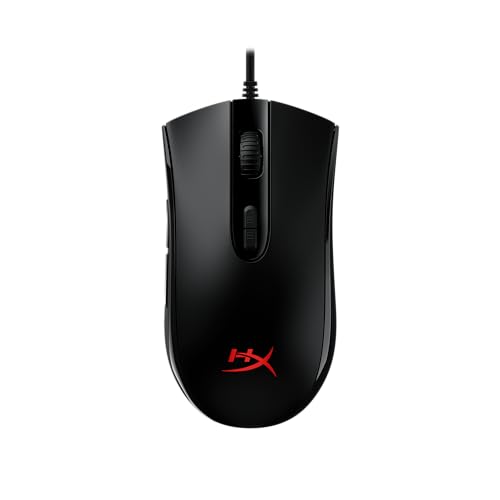
The Pulsefire Core is the quiet achiever of this group. Its symmetrical shape suits both left and right hands, and at 87 g it is the lightest mouse here, which makes it easy to flick and lift during fast play. The Pixart 3327 optical sensor reaches 6,200 DPI and tracks without hardware acceleration, so the cursor goes where your hand goes, with no smoothing to fight.
Seven programmable buttons give you room for push-to-talk, melee, grenades and DPI switching, and the switches are built for a 20-million-click life. The RGB lighting runs through the HyperX NGenuity software, which also handles macros and DPI steps, and the large skates plus the flexible braided cable keep the glide smooth. The symmetrical shape means no thumb rest, so palm-grip players with large hands may want the DeathAdder Essential instead, but for claw and fingertip players the Pulsefire Core is a natural fit.
This is the pick for players who value a light, neutral mouse that does not force a grip style on them. It is also a strong choice for shared setups, since the symmetrical shell works for either hand.
Specs
- Sensor: Pixart 3327 optical, up to 6,200 DPI
- Buttons: 7 programmable
- Weight: 87 g
- Switches: 20-million-click life
- Polling rate: 1,000 Hz
- Model: HX-MC004B
- Software: HyperX NGenuity
- Connection: Wired USB
Best for: Claw and fingertip grips, light-mouse players, shared setups
Watch out for: No thumb rest for palm-grip players, and the 6,200 DPI ceiling is modest next to the Cobra and the M612.
5. Redragon M612 Predator — Best for MMO Buttons on a Budget

The M612 Predator is the button king of this group. Eleven programmable buttons include a 12-key style thumb cluster layout on the side, plus a dedicated rapid-fire button, so MMO and MOBA players can bind abilities, potions and macros without reaching for the keyboard. The Pixart P3104 optical sensor reaches 8,000 DPI across a 500 to 8,000 range, with 15G acceleration for fast flicks.
The ergonomic right-handed shell has textured side grips and a matte finish that stays grippy in long sessions, and the 1.8 m braided cable is flexible enough for wide swipes. Five backlit modes and on-board memory let you keep your lighting and button mapping on the mouse, and the Redragon software handles keybinds and the rapid-fire setting. HUANO switches under the main buttons are built for a 20-million-click life.
For MMO, MOBA and strategy players, the M612 is the only mouse in this group with enough buttons to map a full ability bar. Shooter players who only need two side buttons may prefer the simpler G203, but if your games live on the thumb buttons, this is the pick.
Specs
- Sensor: Pixart P3104 optical, up to 8,000 DPI
- Buttons: 11 programmable, including rapid-fire button
- Switches: HUANO, 20-million-click life
- DPI range: 500–8,000
- Acceleration: 15G
- Backlit modes: 5
- Memory: On-board memory
- Cable: Braided, 1.8 m
- Connection: Wired USB
Best for: MMO and MOBA players, ability-heavy games, thumb-button users
Watch out for: The thumb cluster takes time to learn, and the shell is wide for small hands.
Which One Fits
- Most players: Logitech G203 Lightsync. The compact shape, clean sensor and mature software make it the easiest recommendation in the group.
- Palm grip and long sessions: Razer DeathAdder Essential. The tall ergonomic shell and rubber grips win over hours of play.
- Features and lighting: Redragon M711 Cobra. Seven buttons, five DPI levels and full RGB give you the most to tune.
- Light and neutral: HyperX Pulsefire Core. At 87 g with a symmetrical shell, it suits claw and fingertip players and either hand.
- MMO and MOBA: Redragon M612 Predator. Eleven programmable buttons and a rapid-fire button map a full ability bar to your thumb.
- Small hands: G203 Lightsync or Pulsefire Core. Both shells are compact enough for claw and fingertip grips.
- Large hands: DeathAdder Essential or M711 Cobra. Both shells fill a big palm and give the thumb room to rest.
Common Mistakes
Chasing the biggest DPI number. A 10,000 DPI ceiling sounds better than 6,200 DPI, but almost no one plays above 3,200 DPI. What matters is clean tracking at the sensitivity you use, not the top of the range. Pick the shape and the buttons first, then check that the sensor covers your DPI.
Buying a thumb grid for a shooter. Eleven buttons are a gift in an MMO and a distraction in a shooter, where a stray thumb press can throw a grenade at the wrong moment. Match the button count to your games, not to the spec sheet.
Ignoring the cable. A stiff cable is the most common complaint with budget wired mice, and it is also the easiest to fix. Give the cable slack, route it over a bungee or a monitor arm, and the drag disappears. If you skip this step, even a great sensor feels sluggish.
Skipping the software setup. Every mouse here ships with a usable default, but the real value comes from setting your DPI steps, button mapping and polling rate once, then saving them to on-board memory. Ten minutes of setup pays off in every session after that.
Judging a mouse in five minutes. A shell that feels odd at first can feel natural after a week, and a shell that feels fine at first can cramp your hand after two hours. Give a new mouse a few full sessions before deciding, and pay attention to your ring finger and wrist, not just your aim.
FAQ
Are wired mice under 20 good enough for competitive play?
Yes, for most players. The sensors in this group track cleanly at normal play speeds, the polling rate is 1,000 Hz, and the wired connection removes battery and wireless worries. What you give up against costlier mice is mostly weight tuning, premium switches and lighter shells, not raw tracking. If your aim is held back, the cause is more likely your sensitivity settings or your pad than the mouse.
How much DPI do I actually need?
Most players use 400 to 3,200 DPI, based on their sensitivity and screen size. Low-sensitivity players use the bottom of that range with big arm movements, while high-sensitivity players sit near the top. A mouse that covers 400 to 3,200 DPI with steps you can tune is enough. The extra headroom above that is useful only if you play at very high sensitivity.
Do I need software to use these mice?
No. Every mouse here works as soon as you plug it in, with default DPI steps and button mapping. The software adds button remapping, macros, lighting control and DPI tuning, and most of these mice save your settings to on-board memory. Install the software once, set the mouse up the way you like, and you can leave it after that.
Will a wired mouse work on a laptop and a desktop?
Yes. All five mice use a standard USB-A connection and work on Windows and Mac without extra drivers. Plug the mouse into any free USB port and it is ready. If your laptop only has USB-C ports, a small USB-C to USB-A adapter handles the connection.
As an Amazon Associate, we earn from qualifying purchases.
FAQ
Are wired mice under 20 good enough for competitive play?
How much DPI do I actually need?
Do I need software to use these mice?
Will a wired mouse work on a laptop and a desktop?
More from Amazon
Programs that pair well with the guide above. Offers and eligibility are set by Amazon and may change.
Free shipping on eligible items, Prime Video and more. Eligible new members can start with a free trial.
Start a Prime free trialA Prime membership for ages 18-24 with a trial period. Eligibility is set by Amazon.
See Prime for Young AdultsAudiobooks and podcasts to listen to on the go. Eligible new members can start with a free trial.
Try Audible freeAd-free music streaming. Eligible new subscribers can start with a free trial.
Try Music Unlimited freeAs an Amazon Associate we earn from qualifying purchases.









