Key takeaways
- Small hands need a short, light, truly ambidextrous mouse. Compare three compact gaming mice with verified Amazon listings and find your fit.
A mouse that is too long for your hand forces your fingers to stretch for the main buttons and drags your palm across the pad on every flick. For players with small hands, that stretch turns into missed clicks, sore wrists, and aim that drifts when a match runs long. The fix is not a higher DPI number or a flashier shell. It is a short, light, genuinely ambidextrous body that lets your fingers sit where they naturally fall, with side buttons you can actually reach.
This guide covers three compact gaming mice that suit small hands, claw grips, and fingertip grips, including players who switch hands or share a mouse with a left-handed sibling. Each one appears below with its Amazon listing details, from the budget-friendly Logitech G203 Lightsync to the featherweight Glorious Model O- and the wireless BenQ Zowie S2-DW 4K. Pick by hand length and grip first, and the sensor numbers will take care of themselves.
Quick Picks
As an Amazon Associate we earn from qualifying purchases
| Product | Best for | Key spec from title |
|---|---|---|
| Logitech G203 Lightsync | First gaming mouse for small hands | 8,000 DPI sensor |
| Glorious Model O- Matte Black | Fingertip grip at the lightest weight | 58 g honeycomb shell |
| BenQ Zowie S2-DW 4K Wireless | Wireless play with a small symmetrical body | 4,000 Hz polling rate |
How to Choose
Measure Your Hand Before You Shop
Hand size decides comfort more than any sensor number, so measure before you order. Stretch your hand flat and measure from the tip of your middle finger to the crease at your wrist, then compare it with the length on the Amazon listing. Most players with hands under 17 cm long feel at home with a mouse shorter than 120 mm and narrower than 65 mm, because the main buttons fall under the fingertips instead of past them. A mouse that is 125 mm or longer pushes small fingers forward and bends the wrist, which shows up as fatigue late in a long session. A wide body also spreads small fingers apart and puts side buttons further away.
Weight Changes How a Small Hand Aims
A heavy mouse asks a small hand to do more work on every flick, and that work adds up across hundreds of small corrections in a match. Mice under 70 grams feel almost weightless in fast turns, while models near 85 grams still move easily for players who like a little resistance under the palm. The shell matters as much as the number on the scale: honeycomb shells cut weight without shrinking the body, while solid shells feel sturdier and keep dust out of the inside. Keep the total under 85 grams for a fingertip grip, since your fingers alone lift and stop the mouse. Claw grip players can go heavier, because the palm shares the load.
Side Buttons Are Not Always Ambidextrous
Many mice carry the word ambidextrous in the listing while keeping both side buttons on the left edge, which only helps right-handed players. That layout is fine when you play right-handed, but a left-handed player pays for buttons that sit under the wrong thumb. Look at the listing photos from both sides before you buy, and count the buttons on each edge. Some symmetrical mice skip side buttons entirely, which sounds like a loss but actually suits left-handed players perfectly, because nothing is missing on either side. If forward and back buttons matter to you, pick a model with buttons on both edges or accept that the left-side pair is the price of a symmetrical shape.
Sensor, Cable, and Connection
Sensor numbers look dramatic on a listing, but most players never move past 1,600 DPI in actual play, so an 8,000 DPI sensor already leaves plenty of headroom. What matters more is clean tracking at the speed you flick, a polling rate that keeps up with fast turns, and a cable that does not drag across the pad. Lightweight paracord-style cables behave almost like a wireless connection, while stiff rubber cables tug the mouse off line during wide swipes. Wireless models remove the cable entirely, but they add a battery and a receiver, so check the listed weight with the battery included. Driverless mice that work straight out of the box also save setup time on shared or borrowed computers.
The 3 Best Options
Logitech G203 Lightsync

The G203 Lightsync is the safest first pick for small hands, because its short body and classic shape suit claw and fingertip grips without asking a new player to learn a strange layout. At 116.6 mm long and 62.15 mm wide, it sits comfortably under smaller palms, and the 8,000 DPI sensor covers every sensitivity a casual or competitive player is likely to use. Six programmable buttons give room for a couple of handy binds, while the LIGHTSYNC RGB lighting adds a personal touch that younger players enjoy. On-board memory keeps your settings on the mouse when you move between computers.
Specs
- 8,000 DPI gaming-grade sensor
- 6 programmable buttons
- LIGHTSYNC RGB lighting with color wave effects
- On-board memory for saved settings
- Classic 6-button design
- 116.6 x 62.15 x 38.2 mm
- 85 g
Best for: A first gaming mouse for a small-handed player who wants a proven shape and simple setup.
Watch out for: The side buttons sit on the left edge only, so left-handed players lose quick access to them.
Glorious Model O- Matte Black
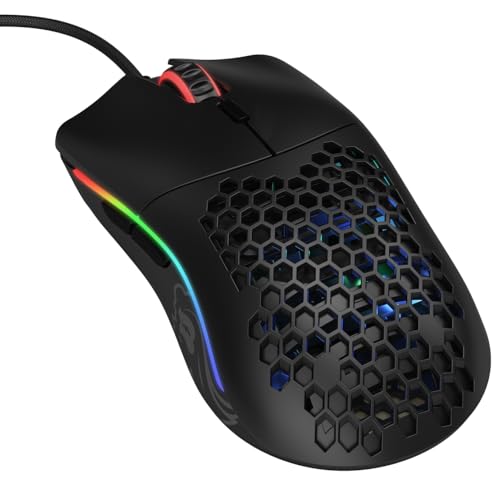
The Model O- is the lightest mouse in this guide, and that 58-gram body is the whole point for fingertip players with small hands. The honeycomb shell keeps the weight down while the ambidextrous shape stays narrow enough for a short palm, and the Pixart 3360 sensor tracks cleanly through fast flicks. Six buttons cover the essentials, the Omron switches are built to last 20 million clicks, and the Ascended Paracord cable feels so light that it almost disappears during play. RGB lighting runs along the sides and the scroll wheel, so the mouse looks sharp on a dark desk.
Specs
- 58 g honeycomb shell
- Pixart 3360 sensor
- 6 buttons
- Omron switches built for 20 million clicks
- Ambidextrous shape for small and medium hands
- RGB lighting
- Ascended Paracord cable
Best for: Fingertip grip players who want the lightest possible mouse for fast, repeated flicks.
Watch out for: The honeycomb shell has open holes, so dust and crumbs can get inside and need a quick clean now and then.
BenQ Zowie S2-DW 4K Wireless

The S2-DW 4K is the wireless pick for small hands, pairing a short symmetrical body with a high polling rate that keeps wireless play feeling instant. At 120 mm long and 60.9 mm wide, it fits small palms without forcing the fingers forward, and the 65-gram weight sits low enough for long sessions without wrist strain. The 3950 sensor and 4,000 Hz polling rate with the enhanced receiver handle fast turns cleanly, while the 24-step optical scroll wheel gives precise control over weapon swaps. Setup stays simple because the mouse works without drivers, which suits players who plug into different computers.
Specs
- 65 g symmetrical design
- 120 x 60.9 x 38.1 mm
- 3950 sensor
- 4,000 Hz polling rate with enhanced receiver
- 24-step optical scroll wheel
- Driverless setup
- Wireless connection
Best for: Competitive players with small hands who want wireless freedom without giving up a low, light body.
Watch out for: Finish availability varies by seller, so confirm the exact finish on the listing before you order.
Which One Fits Your Situation
Fingertip Grip With the Smallest Hands
Pick the Glorious Model O- when your fingers do all the work and your palm barely touches the mouse. Its 58-gram body and narrow shell let small fingers lift, stop, and flick with almost no effort, which matters most when the mouse changes direction constantly. The honeycomb shell keeps the weight down without shrinking the grip area, so your fingers still find a natural resting place. Skip it if the open holes bother you, and look at the G203 instead.
Claw Grip and Everyday Gaming
Pick the Logitech G203 Lightsync when you play a mix of games and want one mouse that handles all of them. The claw-friendly shape supports the palm just enough for long sessions, the 8,000 DPI sensor covers every sensitivity you will use, and the six buttons are easy to learn. It also costs less than the other two picks while keeping the build quality of a bigger brand, which makes it the easy choice for a first serious gaming mouse.
Wireless Play Without the Cable Drag
Pick the BenQ Zowie S2-DW 4K when a cable keeps catching on your desk edge or pulling your aim off line. Wireless play removes that drag entirely, and the 4,000 Hz polling rate keeps the connection feeling instant during fast turns. The short symmetrical body suits small hands better than most wireless mice, which tend to run long and heavy. Just check the finish and the seller on the listing, since stock moves between finishes.
Left-Handed Players
Pick the BenQ Zowie S2-DW 4K when you play left-handed and want a shape that treats both hands equally. Its symmetrical body has no side buttons at all, so nothing sits under the wrong thumb and nothing is missing on either side. The G203 and the Model O- also work in the left hand, but their side buttons live on the left edge, which only helps right-handed players. A button-free symmetrical shape is the honest fix for a shared mouse.
Common Mistakes
- Buying by the DPI number alone instead of checking the length and width against your hand.
- Assuming every mouse labeled ambidextrous has side buttons on both sides.
- Picking a heavy mouse for a fingertip grip, then wondering why the wrist gets tired.
- Ignoring the cable, even though a stiff cord drags a light mouse off line.
- Ordering a finish or color without checking that the listing actually has it in stock.
Frequently Asked Questions
What size mouse fits small hands?
Measure from your middle fingertip to the crease at your wrist, then look for a mouse shorter than 120 mm and narrower than 65 mm for a hand under 17 cm. Length matters more than width, because a long body pushes your fingers past the buttons. Compare the listed dimensions with your measurement instead of trusting words like compact or mini. A short, narrow body suits claw and fingertip grips.
Are ambidextrous mice good for claw grip?
Yes, when the body is short with a middle hump. A middle hump supports the palm in a claw grip without stretching the fingers, and a symmetrical shape lets thumb and pinky rest evenly on both sides. The G203 and the Model O- both work here, while the S2-DW suits players who like a lower profile. Avoid long mice with a high rear hump, since they push small hands forward.
Does a lighter mouse improve aim?
A lighter mouse helps most players aim fast, because less weight means less effort to start and stop each flick. Under 70 grams the difference is clear, since the mouse moves before your hand catches up. Weight is personal, though: some players aim better with a little resistance under the palm, especially in slow, precise games. Start light for fast shooters, and add weight only when your aim feels floaty.
Wired or wireless for small hands?
Both work, and the choice comes down to desk setup, not hand size. A wired mouse with a light, flexible cable keeps weight down and never needs charging, which suits players who hate battery chores. A wireless mouse removes cable drag entirely and keeps the desk tidy, but it adds a battery and costs more. For small hands, check the listed weight either way, since wireless models often run heavier.
FAQ
What size mouse fits small hands?
Are ambidextrous mice good for claw grip?
Does a lighter mouse improve aim?
Wired or wireless for small hands?
More from Amazon
Programs that pair well with the guide above. Offers and eligibility are set by Amazon and may change.
Free shipping on eligible items, Prime Video and more. Eligible new members can start with a free trial.
Start a Prime free trialA Prime membership for ages 18-24 with a trial period. Eligibility is set by Amazon.
See Prime for Young AdultsAudiobooks and podcasts to listen to on the go. Eligible new members can start with a free trial.
Try Audible freeAd-free music streaming. Eligible new subscribers can start with a free trial.
Try Music Unlimited freeAs an Amazon Associate we earn from qualifying purchases.