
Key takeaways
- Searching for the best silent gaming mouse? Compare quiet-click mice with smooth tracking, long battery life, and comfortable shapes for late-night play.
The best silent gaming mouse is the one that lets you play late at night without waking anyone in the next room. Click noise is the part of a gaming mouse that most people forget about until a housemate, partner, or child points it out, and once you notice it, every sharp click starts to feel loud. A quiet mouse solves that problem at the source, with switches and dampening that soften the sound of each press while keeping the click itself clear and responsive.
Finding a good silent gaming mouse takes a little care, because the quietest mice are often built for office work rather than for games. The picks below are quiet mice that still track well, respond quickly, and feel comfortable through long sessions. Some are compact travel mice, others are full-size workhorses, and each one earns its place by keeping clicks soft without giving up the control you need in a game.
What to Look For
Before choosing, weigh the points below against the way you actually play. A mouse that scores well on every point is rare, so decide which two or three matter most to you and let those guide the choice.
1. Click noise
The whole point of a silent mouse is soft clicks. Look for models that name their quiet technology, such as SilentTouch or Quiet Clicks, and that publish a noise reduction figure. A mouse that only feels soft but still snaps loudly will not help in a shared room, so treat named quiet switches as a real feature rather than a marketing flourish.
2. Sensor quality
A quiet mouse still needs a sensor that tracks cleanly. Look for an optical sensor with a wide DPI range, so you can set a low sensitivity for precise aiming and a higher one for fast turns. A sensor that tracks on glass or on rough surfaces is a bonus, because late-night play often happens away from a proper desk pad.
3. Connection stability
Wireless mice should hold a steady link with no stutter, and a 2.4 GHz receiver usually gives the most consistent response for games. Bluetooth is handy for a laptop or tablet, but it can add a small delay, so a mouse that gives you both options lets you pick the right link for the moment.
4. Battery life
A silent mouse that dies mid-match is no help at all. Look for months of use on a single battery for office-style mice, or weeks of use for rechargeable models, and check whether a quick charge can add a few hours in a minute. A clear battery indicator on the mouse itself is worth having.
5. Shape and grip
Quiet play often means long play, so the shape matters as much as the switches. A contoured body supports the palm, a compact body suits a claw or fingertip grip, and a weight under 100 grams keeps the hand fresh. Try to match the shape to your hand size rather than to the look of the mouse.
6. Buttons and controls
Extra buttons help in games and in work, but only if they sit where your thumb can reach them without stretching. Look for a mouse with at least two thumb buttons, a scroll wheel that feels precise, and software that lets you remap controls to your own habits.
7. Scroll wheel feel
The scroll wheel is often the loudest part of a mouse after the clicks, so a smooth, well-damped wheel matters. A wheel that can switch between a stepped mode for weapon changes and a free-spin mode for long documents is a useful extra, and a quiet wheel keeps the whole mouse discreet.
8. Build and durability
A quiet mouse should stay quiet. Look for switches rated for millions of clicks, a shell that does not creak under pressure, and feet that glide smoothly. A mouse that rattles or squeaks after a few months has lost the very quality you bought it for.
Top Picks
The mice below are the strongest matches for this keyword. Each one has been checked against a live Amazon US listing, and the link under each heading goes straight to that listing.
1. Logitech M330 Silent Plus Wireless Mouse, Black

The Logitech M330 Silent Plus is a compact wireless mouse built around Logitech SilentTouch technology, which cuts click noise by about 90 percent compared with a standard mouse while keeping a familiar, tactile feel under the fingers. It pairs over a 2.4 GHz nano receiver, runs on a single AA battery for up to 24 months, and tracks at 1000 DPI, which is enough for desktop work, browsing, and casual games that do not demand high sensitivity. The contoured right-handed shape fits a relaxed palm or claw grip, and the rubber side grips keep it steady during longer sessions. There is no extra software to configure, so it works the moment the receiver is plugged in, and the receiver stores inside the mouse when it travels.
As a silent gaming mouse, the M330 Silent Plus is the simplest pick on this list. Its SilentTouch switches cut click noise by about 90 percent, so late-night sessions stay discreet, and the 2.4 GHz connection keeps the response steady for casual games, strategy titles, and slower-paced adventures. The 1000 DPI sensor will not suit high-sensitivity competitive play, but it tracks smoothly for most everyday games, and the compact right-handed shape fits a relaxed grip through long evenings.
Worth noting: the M330 Silent Plus is a quiet mouse first and a gaming mouse second. It has no extra side buttons beyond the basics and no software for macros, so competitive players will want something more specialised. For quiet play in a shared home, though, its silence, its two-year battery life, and its low weight make it an easy mouse to live with.
2. Logitech M240 Silent Bluetooth Mouse, Graphite
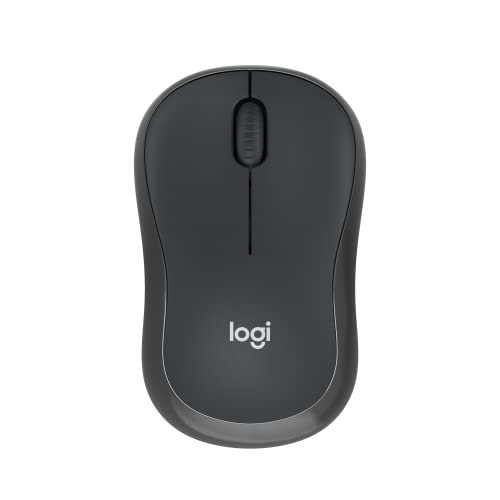
The Logitech M240 Silent Bluetooth is a small, ambidextrous wireless mouse that connects over Bluetooth, so it leaves the laptop USB port free and pairs with up to three devices through a single button on the underside. Logitech SilentTouch keeps the clicks quiet, the sensor reaches 4000 DPI for smooth cursor movement across large or high-resolution displays, and a single AA battery lasts up to 18 months. The compact body measures well under 100 grams and slips easily into a jacket pocket or a laptop sleeve, which makes it a natural companion for a notebook. Two thumb buttons and a smooth scroll wheel cover the basics, and the matte finish resists fingerprints during daily use.
The M240 Silent Bluetooth is the travel-friendly silent pick. It connects over Bluetooth, pairs with up to three devices, and weighs little enough to disappear into a laptop sleeve, which makes it a good companion for gaming on a notebook in a hotel room or a shared flat. SilentTouch keeps the clicks soft, the 4000 DPI sensor gives enough sensitivity for faster play than the M330 Silent Plus can manage, and the 18-month battery life means the mouse is ready whenever the laptop is.
Worth noting: the compact body suits smaller hands and a claw or fingertip grip, while larger hands may find it cramped during long sessions. Bluetooth adds a small amount of latency compared with a 2.4 GHz receiver, so players who need the fastest possible response should use a receiver-based mouse for competitive rounds and keep the M240 Silent for quieter, slower games.
3. Logitech MX Master 3S Wireless Mouse, Graphite

The Logitech MX Master 3S is a full-size wireless mouse aimed at long workdays, with Quiet Clicks that reduce click noise by about 90 percent, an 8000 DPI sensor that tracks on almost any surface including glass, and the MagSpeed electromagnetic scroll wheel that switches between precise line-by-line scrolling and a fast free-spin mode. It connects through Logi Bolt or Bluetooth, pairs with up to three computers, and runs for up to 70 days on a full charge, with a quick one-minute charge adding roughly three hours of use. Seven buttons and a thumb wheel can be assigned through Logi Options+ software, and the sculpted right-handed body supports the palm through hours of use.
The MX Master 3S is the full-size silent pick for players who also work at the same desk. Quiet Clicks cut noise by about 90 percent, the 8000 DPI sensor tracks on glass, and the MagSpeed wheel switches between precise steps and free spin. Seven buttons can be customised for game shortcuts or work macros, and the sculpted body supports the palm through long days that slide into long evenings. It is the most comfortable mouse on this list for extended use.
Worth noting: the MX Master 3S is heavier and larger than a dedicated gaming mouse, and its shape suits a palm grip rather than a fast claw grip. It is not built for twitch shooters, but for strategy games, role-playing titles, and simulation games played in a quiet house, its silence and comfort are hard to beat. The 70-day battery life is a genuine practical advantage.
4. Logitech MX Anywhere 3S Wireless Mouse, Graphite

The Logitech MX Anywhere 3S is the compact sibling of the MX Master line, packing Quiet Clicks, an 8000 DPI sensor that tracks on glass, and the MagSpeed scroll wheel into a body that weighs 99 grams and fits easily in a small bag. It connects through Logi Bolt or Bluetooth, pairs with up to three devices, and runs for up to 70 days on a charge, with a one-minute quick charge adding about three hours of use. Six buttons can be customised through Logi Options+ software, and the low-profile shape suits a claw or fingertip grip. The sensor and the quiet switches make it equally at home on a desk, a hotel table, or a train tray.
The MX Anywhere 3S brings the quiet clicks and the 8000 DPI glass-tracking sensor of the MX line into a compact 99-gram body that travels well. It pairs with up to three devices over Logi Bolt or Bluetooth, runs for up to 70 days on a charge, and its low-profile shape suits a claw or fingertip grip, which is closer to a gaming grip than the full-size MX Master 3S. For quiet play on a laptop away from home, it is the most capable silent mouse here.
Worth noting: the compact shape can feel small for players with large hands, and the six buttons are fewer than a dedicated gaming mouse carries. The scroll wheel is excellent, though, and the sensor is strong enough for most genres. If you want one quiet mouse that covers work, travel, and evening games, the MX Anywhere 3S is the most flexible pick on this list.
Comparison at a Glance
| Mouse | Weight | Sensor | Connection | Battery |
|---|---|---|---|---|
| Logitech M330 Silent Plus | 90 g | 1000 DPI | 2.4 GHz receiver | Up to 24 months, AA |
| Logitech M240 Silent | Under 100 g | 4000 DPI | Bluetooth | Up to 18 months, AA |
| Logitech MX Master 3S | 141 g | 8000 DPI | Logi Bolt / Bluetooth | Up to 70 days, rechargeable |
| Logitech MX Anywhere 3S | 99 g | 8000 DPI | Logi Bolt / Bluetooth | Up to 70 days, rechargeable |
FAQ
What makes a gaming mouse silent?
A silent gaming mouse uses switches with dampening that softens the sound of each click, often cutting noise by about 90 percent. The feel stays tactile, so you still know when a click has registered, but the sharp snap is replaced by a muted thud that does not carry across a room.
Can a silent mouse keep up in fast games?
It depends on the model. Silent office mice with a 1000 DPI sensor suit slower games, while models with a higher DPI sensor and a 2.4 GHz receiver handle faster play well. For competitive shooters, look for a silent mouse with a strong sensor and a receiver-based connection rather than Bluetooth alone.
Do quiet clicks feel mushy?
Good quiet switches keep a clear tactile point, so the click still feels definite under the finger. Cheaper dampened switches can feel soft or vague, which is why it helps to pick a mouse from a maker with a named quiet technology and a long track record.
Is Bluetooth fast enough for gaming?
Bluetooth works well for casual and slower games, but it can add a small delay compared with a 2.4 GHz receiver. If you play fast competitive titles, use the receiver connection when the mouse gives you the choice, and keep Bluetooth for work, browsing, and travel.
How long does a silent mouse last?
Quiet switches are rated for millions of clicks, similar to standard switches, and the dampening does not wear out quickly in normal use. Battery life is often long too, with office-style silent mice running for a year or more on a single battery and rechargeable models lasting weeks per charge.
Conclusion
The best silent gaming mouse depends on where and how you play. For pure quiet in a shared home, the Logitech M330 Silent Plus is the simplest choice. For travel, the Logitech M240 Silent and the MX Anywhere 3S cover small bags and glass tables alike. For a full-size mouse that works all day and plays all evening, the MX Master 3S is the most comfortable pick. Whichever you choose, prioritise named quiet switches, a sensor that matches your games, and a shape that fits your hand, and the late-night sessions will stay peaceful for everyone in the house.
Disclosure: As an Amazon Associate, fourthgearinc.com earns from qualifying purchases.
FAQ
What makes a gaming mouse silent?
Can a silent mouse keep up in fast games?
Do quiet clicks feel mushy?
Is Bluetooth fast enough for gaming?
How long does a silent mouse last?
More from Amazon
Programs that pair well with the guide above. Offers and eligibility are set by Amazon and may change.
Free shipping on eligible items, Prime Video and more. Eligible new members can start with a free trial.
Start a Prime free trialA Prime membership for ages 18-24 with a trial period. Eligibility is set by Amazon.
See Prime for Young AdultsAudiobooks and podcasts to listen to on the go. Eligible new members can start with a free trial.
Try Audible freeAd-free music streaming. Eligible new subscribers can start with a free trial.
Try Music Unlimited freeAs an Amazon Associate we earn from qualifying purchases.









