
Key takeaways
- Looking for the best travel gaming mouse? Compare compact wireless mice with long battery life, strong sensors, and shapes that pack easily for trips.
The best travel gaming mouse is small enough to disappear into a laptop bag, tough enough to survive the trip, and strong enough to play properly when you arrive. A travel mouse has a harder job than a desk mouse: it has to work on a hotel desk, a train tray, or a cafe table, often without a mouse pad, and it has to do it on battery power alone. The picks below are all compact, wireless, and built to keep playing away from home.
Each mouse on this list was chosen for a different kind of trip. Some prioritise battery life above all else, so they can last a whole week away from a charger. Others prioritise a strong gaming sensor and a fast wireless link, so competitive play still feels right. All of them store their receiver inside the body or connect over Bluetooth, so there is nothing loose to lose in a bag.
What to Look For
Before choosing, weigh the points below against the way you actually play. A mouse that scores well on every point is rare, so decide which two or three matter most to you and let those guide the choice.
1. Size and weight
A travel mouse should be compact and light, best kept under 100 grams and short enough to fit in a laptop sleeve pocket. A small body also suits a claw or fingertip grip, which is how most people hold a mouse on a cramped tray table. Check the length as well as the weight, because a long mouse can still feel bulky in a small bag.
2. Battery life
Long battery life is the single most useful travel feature. Look for hundreds of hours on a single battery, or weeks of use per charge for rechargeable models. A mouse that uses a standard AA or AAA cell is easy to feed anywhere in the world, while a rechargeable mouse should support a quick charge for a few extra hours.
3. Receiver storage
A lost receiver ends the trip for a wireless mouse. Look for a storage slot inside the battery compartment or under the shell, so the receiver travels inside the mouse. Bluetooth is a useful backup, because it needs no receiver at all and works with phones, tablets, and laptops.
4. Sensor quality
A travel sensor has to track on hotel desks, glass tables, and bare wood, often without a pad. Look for a high DPI optical sensor with accurate tracking and no acceleration, so the cursor behaves the same on every surface. A sensor that works on glass is a real advantage when the only flat surface is a glass table.
5. Connection options
The best travel mice give you more than one way to connect. A 2.4 GHz receiver gives the fastest response for games, while Bluetooth lets you pair with a laptop, tablet, or phone without using a USB port. The ability to pair with several devices and switch between them is useful when you travel with more than one machine.
6. Durability
A travel mouse gets knocked around in bags, dropped on floors, and squeezed into pockets. Look for switches rated for tens of millions of clicks, a shell that does not flex or creak, and feet that stay attached. A mouse that survives the trip is worth more than one with a slightly better sensor.
7. Grip and comfort
Small mice can cramp larger hands, so match the shape to your grip. A low-profile body suits a claw or fingertip grip, while a slightly taller body supports the palm. If you play for hours in a hotel room, comfort matters as much as it does at home, so do not pick the smallest mouse just because it is small.
8. Software and profiles
On-board memory is useful on the road, because it stores your button setup and DPI settings inside the mouse, so they work on any computer without installing software. If the mouse needs an app, check that the app runs on the laptop you travel with, and that the settings survive a switch between machines.
Top Picks
The mice below are the strongest matches for this keyword. Each one has been checked against a live Amazon US listing, and the link under each heading goes straight to that listing.
1. Logitech G305 LIGHTSPEED Wireless Gaming Mouse, Black

The Logitech G305 LIGHTSPEED is a compact wireless gaming mouse built around the HERO 12K sensor, which reaches 12,000 DPI with accurate tracking at speeds above 400 IPS and no acceleration or smoothing. LIGHTSPEED wireless reports at 1 ms, so the connection feels as responsive as a wired mouse, and a single AA battery powers up to 250 hours of continuous play. Six programmable buttons, on-board memory for stored profiles, and a 99-gram body round out a mouse that has become a common first pick for competitive play. A small storage slot inside the battery compartment holds the USB receiver, so nothing is left dangling when the mouse goes into a bag.
The G305 LIGHTSPEED is the most game-focused travel mouse on this list. Its HERO 12K sensor tracks accurately at up to 12,000 DPI, LIGHTSPEED wireless reports at 1 ms, and a single AA battery lasts up to 250 hours, which covers a long trip without a spare. The built-in receiver storage keeps the USB receiver safe inside the mouse, and the 99-gram compact body fits a laptop bag without adding noticeable weight. Six programmable buttons and on-board memory mean your setup travels with you.
Worth noting: the G305 LIGHTSPEED is the best all-round travel gaming mouse here if competitive play matters. The AA battery adds a little weight compared with ultralight mice, and the shape is symmetrical rather than contoured, so palm-grip players may prefer a larger mouse at home. On the road, though, its balance of sensor, battery life, and size is hard to beat.
2. Razer Orochi V2 Wireless Gaming Mouse, Classic Black

The Razer Orochi V2 is an ultralight wireless gaming mouse that weighs 60 grams and measures 108 mm long, making it one of the smallest serious gaming mice on the market. Its Razer 5G Advanced Optical Sensor reaches 18,000 DPI, second-generation mechanical switches are rated for 60 million clicks, and Razer HyperSpeed wireless plus Bluetooth give two ways to connect. Battery life reaches up to 950 hours in Bluetooth mode and about 425 hours over HyperSpeed on a single AA or AAA cell, and the mouse can run on either size. Six programmable buttons and on-board memory cover the essentials, while the low-profile shape suits a fingertip or claw grip.
The Orochi V2 is the lightest travel mouse on this list at 60 grams, and its 108 mm body is genuinely pocket-sized. It runs on a single AA or AAA battery, with up to 950 hours in Bluetooth mode and about 425 hours over HyperSpeed, so it can outlast almost any trip. The 18,000 DPI optical sensor and second-generation mechanical switches give it proper gaming credentials, and the low-profile shape suits a fingertip or claw grip on a cramped surface.
Worth noting: the small size is both the strength and the limit of the Orochi V2. Players with large hands may find it too small for long sessions, and the battery compartment design means the weight balance changes slightly between AA and AAA cells. For a mouse that disappears into a bag and keeps playing for weeks, though, it is the most portable serious gaming mouse here.
3. Logitech MX Anywhere 3S Wireless Mouse, Graphite

The Logitech MX Anywhere 3S is the compact sibling of the MX Master line, packing Quiet Clicks, an 8000 DPI sensor that tracks on glass, and the MagSpeed scroll wheel into a body that weighs 99 grams and fits easily in a small bag. It connects through Logi Bolt or Bluetooth, pairs with up to three devices, and runs for up to 70 days on a charge, with a one-minute quick charge adding about three hours of use. Six buttons can be customised through Logi Options+ software, and the low-profile shape suits a claw or fingertip grip. The sensor and the quiet switches make it equally at home on a desk, a hotel table, or a train tray.
The MX Anywhere 3S is the travel mouse for players who also work on the road. Its 8000 DPI sensor tracks on glass, which matters in hotels and airports where the only table may be glass, and its Quiet Clicks keep late-night sessions discreet in a shared room. It pairs with up to three devices over Logi Bolt or Bluetooth, runs for up to 70 days on a charge, and weighs 99 grams. The MagSpeed wheel is a genuine help for long documents as well as for games.
Worth noting: the MX Anywhere 3S is a productivity mouse with gaming-capable tracking rather than a dedicated gaming mouse, so it has fewer buttons and no high polling rate for competitive shooters. For strategy games, role-playing titles, and mixed work-and-play trips, its glass tracking, silence, and battery life make it the most practical travel mouse on this list.
4. Logitech M240 Silent Bluetooth Mouse, Graphite
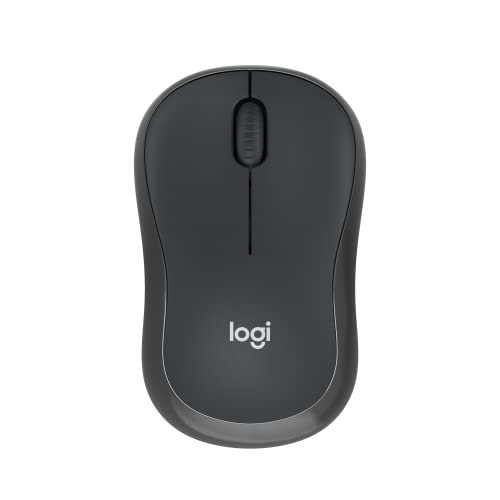
The Logitech M240 Silent Bluetooth is a small, ambidextrous wireless mouse that connects over Bluetooth, so it leaves the laptop USB port free and pairs with up to three devices through a single button on the underside. Logitech SilentTouch keeps the clicks quiet, the sensor reaches 4000 DPI for smooth cursor movement across large or high-resolution displays, and a single AA battery lasts up to 18 months. The compact body measures well under 100 grams and slips easily into a jacket pocket or a laptop sleeve, which makes it a natural companion for a notebook. Two thumb buttons and a smooth scroll wheel cover the basics, and the matte finish resists fingerprints during daily use.
The M240 Silent Bluetooth is the smallest and simplest travel mouse here. It connects over Bluetooth, so it needs no receiver and leaves the laptop USB port free, and it pairs with up to three devices at the touch of a button. SilentTouch keeps clicks quiet in shared spaces, the 4000 DPI sensor tracks smoothly on most surfaces, and a single AA battery lasts up to 18 months. The compact ambidextrous body slips into a jacket pocket as easily as into a bag.
Worth noting: the M240 Silent is best for casual games and slower titles, because Bluetooth adds a little latency and the sensor is not built for competitive play. Its real strength is convenience: no receiver to lose, no cable, and a battery that lasts longer than most trips. As a second mouse that lives in a travel bag, it is hard to fault.
Comparison at a Glance
| Mouse | Weight | Sensor | Connection | Battery |
|---|---|---|---|---|
| Logitech G305 LIGHTSPEED | 99 g | 12,000 DPI | LIGHTSPEED receiver | Up to 250 hours, AA |
| Razer Orochi V2 | 60 g | 18,000 DPI | HyperSpeed / Bluetooth | Up to 950 hours, AA or AAA |
| Logitech MX Anywhere 3S | 99 g | 8000 DPI | Logi Bolt / Bluetooth | Up to 70 days, rechargeable |
| Logitech M240 Silent | Under 100 g | 4000 DPI | Bluetooth | Up to 18 months, AA |
FAQ
What size should a travel gaming mouse be?
Look for a mouse under 100 grams and around 100 to 115 mm long, so it fits in a laptop sleeve or a jacket pocket. A compact body suits a claw or fingertip grip, which is the natural grip on a small tray table, but players with large hands should check the length before choosing the smallest option.
Is Bluetooth good enough for travel gaming?
Bluetooth is fine for casual games, strategy titles, and role-playing games, and it needs no receiver. For fast competitive games, a 2.4 GHz receiver gives a quicker, more stable link, so the best travel mice give you both options and let you switch.
How important is battery life for a travel mouse?
Very important, because you may not have a charger handy. Look for hundreds of hours on a replaceable battery or weeks per charge on a rechargeable model, and check for a quick-charge feature that adds a few hours of use from a short charge.
Can a travel mouse track on glass?
Some can, and it is worth checking. A sensor that tracks on glass, such as the one in the MX Anywhere 3S, works on hotel tables and airport counters where a normal sensor would fail. If you often play without a mouse pad, glass tracking is a genuine advantage.
Should a travel mouse have on-board memory?
Yes, if you use custom button setups or DPI settings. On-board memory stores your profile inside the mouse, so it works on any computer without installing software, which is exactly what you want when you borrow a machine or use a hotel business centre.
Conclusion
The best travel gaming mouse is the one that matches your trips. For serious play on the road, the Logitech G305 LIGHTSPEED gives the strongest balance of sensor, battery life, and size. For the lightest possible bag, the Razer Orochi V2 is the pick. For mixed work and play, the MX Anywhere 3S tracks on glass and stays quiet, while the M240 Silent is the simplest mouse to carry. Pick the one that fits your hand and your games, and make sure the receiver has a home inside the mouse before you zip the bag.
Disclosure: As an Amazon Associate, fourthgearinc.com earns from qualifying purchases.
FAQ
What size should a travel gaming mouse be?
Is Bluetooth good enough for travel gaming?
How important is battery life for a travel mouse?
Can a travel mouse track on glass?
Should a travel mouse have on-board memory?
More from Amazon
Programs that pair well with the guide above. Offers and eligibility are set by Amazon and may change.
Free shipping on eligible items, Prime Video and more. Eligible new members can start with a free trial.
Start a Prime free trialA Prime membership for ages 18-24 with a trial period. Eligibility is set by Amazon.
See Prime for Young AdultsAudiobooks and podcasts to listen to on the go. Eligible new members can start with a free trial.
Try Audible freeAd-free music streaming. Eligible new subscribers can start with a free trial.
Try Music Unlimited freeAs an Amazon Associate we earn from qualifying purchases.









