
Key takeaways
- Compare the best gaming keyboard and mouse set options for wired, wireless and compact desks, with switch type, DPI, polling and battery explained.
Buying separately gives you total freedom, but it also means matching two brands, two software packages, and two cables or receivers. A matched set solves most of that in one box: the devices work together, often share a receiver or control app, and make the desk look intentional.
Sets vary far more than their boxes suggest. Some are full-size wired membrane boards with a modest mouse bundled in. Others are genuine mechanical keyboards paired with a capable wireless mouse. The best gaming keyboard and mouse set for you depends on desk space, whether you want a number pad, and how you feel about charging.
This guide compares five real combo sets, from a wired starter set to a premium tenkeyless mechanical pairing, using the specifications stated on each listing, including the trade-offs.
As an Amazon Associate we earn from qualifying purchases.
Quick Picks
Start with this shortlist, then read the full entries for the limitations.
| Product | ASIN | Best For |
|---|---|---|
| Redragon S101 Wired Gaming Keyboard and Mouse Combo | B00NLZUM36 | First wired setup and full-size value |
| Redragon S101M-KS Wireless Gaming Keyboard and Mouse Combo | B0DXTV9BGJ | Full-size wireless freedom on one receiver |
| Redragon S155-PRO Wireless Gaming Keyboard and Mouse Combo | B0FDG55BPG | Compact desks and quiet typing |
| ASUS TUF Gaming Combo K1 & M3 | B0B1PZTLYW | Durability, spill resistance and a volume knob |
| Logitech G Wireless Gaming Combo G715 + G705 | B0B6WXT3K3 | Premium mechanical feel and smaller hands |
How to Choose
Decide what a set must do better than your current gear, then work through these criteria.
Wired, 2.4GHz Wireless, or Tri-Mode Connectivity
Wired sets are simplest: no battery, no receiver to lose, and no interference to troubleshoot. The downside is two cables. A 2.4GHz receiver gives a low-latency connection while freeing the mouse, and the better sets here use one 2-in-1 receiver for both devices, saving a USB port. Bluetooth suits a tablet or second computer, but treat it as a convenience mode rather than your main competitive connection. Tri-mode sets cover all three situations.
Keyboard Size and the Number Pad Question
Full-size boards keep the number pad and navigation cluster, suiting strategy games, MMO keybinds, and number entry. Tenkeyless boards drop the number pad, bringing the mouse closer and freeing space for wider movement, which low-sensitivity shooter players notice immediately. A 75 percent board compresses function and navigation keys further. It saves the most space and travels best, but you will use function layers for some keys, and some listings call the same board both 75 percent and tenkeyless, so check the layout image rather than the label.
Switch Type: Membrane, Mechanical, and Feel
Most affordable sets use membrane keys. They are quieter, often spill resistant, and usable for casual gaming, but the press feels softer and you cannot swap a single switch later. Mechanical sets cost more in a bundle because each key has its own switch: linear switches press smoothly, tactile switches add a small bump, and clicky switches add sound as well. Check which variant the bundle fixes, because the same model is often sold in all three. For shared rooms and voice chat, a quiet membrane or linear board is usually the considerate choice.
Mouse Sensor, DPI Range, and Polling Rate
DPI is how far the cursor moves for a given hand movement, and the headline maximum is the least useful part of the specification. What matters is sensible preset steps you can switch on the fly, and software that lets you set your own values. A ceiling around 3,200 to 4,800 DPI covers most players, while higher ceilings such as 7,000, 8,200, or 12,800 DPI mainly add finer adjustment room. Polling rate, in hertz, is how often the mouse reports position; 1,000Hz is the common gaming standard here. Shape and weight affect aim more than any DPI figure.
Mouse Size, Weight, and Grip Fit
Combo mice are rarely offered in multiple sizes, which makes fit a genuine risk. A compact mouse around 85 grams can suit smaller hands and fingertip or claw grips, while a larger ergonomic wired mouse suits palm grips. Check stated dimensions and weight where listed, and count the buttons you will actually map. If the mouse does not fit, you will replace it first and be left with half a set.
Battery Life and Charging Habits
Wireless sets replace cable clutter with a charging routine. Listings quote battery life with RGB on and off, and the lights-off figure can be several times higher, so compare like with like. Larger batteries, such as the 4,000mAh cell in the compact Redragon set below, extend the interval between charges, and auto-sleep helps too. Check whether devices charge over USB-C and still work wired while charging.
Software, Macros, and Lighting Control
A shared software package is a real advantage: one app can remap buttons, record macros, set DPI steps, and sync lighting instead of forcing you to learn two utilities. Check what it controls on the specific model, since some sets limit you to lighting and DPI. Dedicated multimedia keys, macro keys, and a volume knob reduce dependence on software in game. Confirm operating system support too: several sets here are built primarily for Windows, with limited Mac keyboard support.
5 Best Options
Each set below is a genuine keyboard and mouse combo. Read the watch-out notes carefully.
Redragon S101 Wired Gaming Keyboard and Mouse Combo

Specs
- Full-size wired keyboard, RGB backlighting with 7 modes and 4 brightness levels
- 25 conflict-free keys, 10 dedicated multimedia keys and 12 FN multimedia keys
- Integrated wrist rest; design built to withstand an average liquid spill
- Mouse up to 3,200 DPI (800, 1600, 2400, 3200), 30G acceleration
- Mouse: 6 buttons, 5 programmable, plus a weight tuning set
- Windows compatibility listed, with limited Mac OS keyboard support
- ASIN: B00NLZUM36
Best for: The straightforward starter set for a first gaming desk. You get a full numeric keypad, an integrated wrist rest, and multimedia control without leaving a game. The DPI steps are modest but sensibly spaced, and the mouse weight tuning set is an unusual extra in a bundled mouse. For students and family PCs, it covers the essentials with no batteries to manage.
Watch out for: Both devices are wired, and lighting effects will not match perfectly across the pair. The 3,200 DPI ceiling gives less adjustment room than the other sets here, and Mac support is limited. This is a membrane-style value set, not a mechanical keyboard, so buyers chasing switch feel should look at the Logitech pairing.
Redragon S101M-KS Wireless Gaming Keyboard and Mouse Combo

Specs
- Tri-mode: wired, Bluetooth, and 2.4GHz via a 2-in-1 receiver shared by both devices
- Full-size RGB keyboard, 10 independent multimedia keys and 12 combination keys
- Rechargeable keyboard rated up to 300 hours with RGB off, with battery indicator
- Mouse: 5 DPI levels (800, 1200, 1600, 3200, 4800), adjustable further in software
- 7 mouse buttons, remappable; polling adjustable from 125 to 1000Hz
- Splash resistance, WIN lock, and a 6-foot detachable USB-C cable
- ASIN: B0DXTV9BGJ
Best for: A full-size layout without the cables. One shared receiver runs both devices for gaming, Bluetooth covers a laptop or tablet, and the detachable cable turns the keyboard wired for charging. The mouse offers more DPI headroom and buttons than the wired S101, and software control over polling and remapping makes the set feel more configurable than its value position suggests. It suits a desk used for work by day and gaming at night.
Watch out for: The 300-hour figure assumes RGB is off, so expect substantially less with effects running. The keyboard is membrane, not mechanical, and the build is primarily plastic. Windows is the core platform for the software, so Mac users should check support for the configuration tools before relying on remapping.
Redragon S155-PRO Wireless Gaming Keyboard and Mouse Combo
Specs
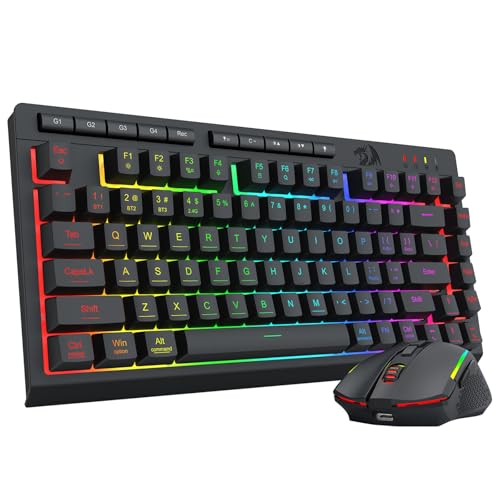
- Compact 75 percent layout in a tenkeyless footprint, quiet membrane keys
- Tri-mode on both devices: Bluetooth 5.0, 2.4GHz 2-in-1 receiver, USB-C wired
- 4,000mAh keyboard and 700mAh mouse batteries; up to 50 hours RGB on, 300 hours off
- Mouse presets 400 to 3200 DPI, customisable in software from 100 to 12,800 DPI
- Polling adjustable 125 to 1000Hz in software; 7 mouse buttons
- 26-key anti-ghosting, 4 onboard macro keys, RGB with 8 effects and 6 custom modes
- ASIN: B0FDG55BPG
Best for: A smaller desk, a laptop setup, or moving between PC, Mac, tablet, and console. The compact board leaves more room for mouse movement, the quiet keys suit shared rooms, and the battery figures are the clearest here because the listing states both lit and unlit ratings. Onboard macro keys work without opening software, and auto-sleep stretches the charge.
Watch out for: There is no number pad, and navigation keys are compressed, so players with many binds may miss a full-size board. The listing mixes 75 percent and tenkeyless wording, so confirm the layout from the images. The 12,800 DPI headline needs driver software; presets stop at 3,200 DPI. The keys are membrane, with no switch to swap later.
ASUS TUF Gaming Combo K1 & M3

Specs
- Full-size wired keyboard, tactile membrane switches, five RGB zones and two side light bars
- Dedicated volume knob, detachable wrist rest, two-height adjustable legs
- Spill resistance up to 300 ml, reinforced frame, 19-key rollover
- M3 mouse: optical sensor from 200 to 7,000 DPI, 1,000Hz polling rate
- Mouse: 7 programmable buttons including two DPI switches; 95 g in specification data
- Keyboard listed at 451 x 155 x 36 mm and 810 g; Aura Sync via Armoury Crate
- ASIN: B0B1PZTLYW
Best for: Durability and physical controls. The volume knob is the feature players value most daily, because adjusting game audio without a function combination becomes second nature. Rated spill resistance, a tested coating, and a detachable wrist rest make it pragmatic for a busy shared desk. The mouse is a step up from typical bundle mice, with a wide DPI range and two DPI buttons.
Watch out for: It is wired only, with no wireless fallback. The keyboard uses tactile membrane switches, not mechanical switches, which some buyers assume from the TUF branding. Five-zone RGB is not per-key lighting, so effects are grouped. The full-size footprint with the wrist rest attached also needs a deep desk.
Logitech G Wireless Gaming Combo G715 + G705
Specs
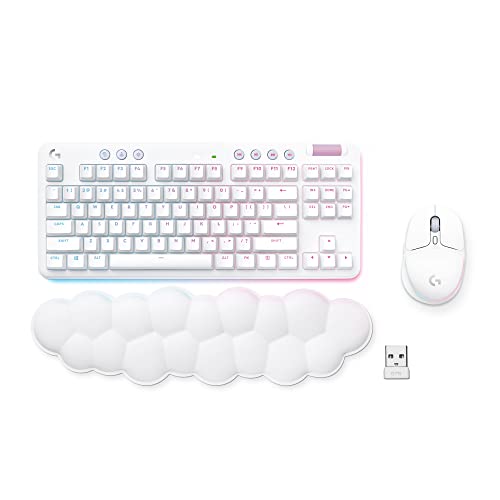
- G715 tenkeyless mechanical keyboard, 87 keys, GX Red Linear switches in this listing
- LIGHTSPEED wireless and Bluetooth, LIGHTSYNC RGB, double-shot PBT keycaps
- Media keys, volume roller, and included palm rest; White Mist finish
- Keyboard battery listed at 25 gaming hours with full lighting
- G705 mouse: 85 g, sensor from 100 to 8,200 DPI, 6 programmable buttons
- Mouse: LIGHTSPEED and Bluetooth, LIGHTSYNC RGB, up to 40 hours with lighting on in specification data; can share one receiver with the G715
- ASIN: B0B6WXT3K3
Best for: The premium step up for key feel and hand fit. A genuine mechanical tenkeyless board with PBT keycaps, a volume roller, and a soft palm rest makes the keyboard a long-term keeper. The G705 is deliberately compact and light, designed with smaller hands in mind, and sharing one LIGHTSPEED receiver keeps the setup tidy. The White Mist styling suits a light-coloured desk theme.
Watch out for: The listing states the bundle contains two items which may ship separately, so confirm both arrive. The compact mouse may feel too small for large-handed palm-grip players, and the board drops the number pad. Battery life is the shortest here, in tens of gaming hours with lighting, so regular charging is part of ownership. This listing fixes the linear switch variant.
Which One Fits You
- Building a first gaming desk: Choose the Redragon S101 for its full-size layout, wrist rest, and zero battery management.
- Want full-size without cables: Choose the Redragon S101M-KS, whose shared receiver runs both devices, with a cable as fallback.
- Small desk or several rooms: Choose the Redragon S155-PRO for its compact layout, quiet keys, and PC, Mac, tablet, and console pairing.
- Drinks and shared use at the desk: Choose the ASUS TUF Gaming Combo K1 & M3 for spill resistance, a detachable wrist rest, and a volume knob.
- Smaller hands and mechanical keys: Choose the Logitech G715 + G705 for its tenkeyless mechanical board and compact 85 g mouse.
- Fast shooters with wide sweeps: Favour a tenkeyless or 75 percent set such as the Logitech or S155-PRO, because saved width becomes mouse space.
Common Mistakes
- Judging a set by the keyboard alone. The mouse is half the product and the half most likely to be replaced early, so check its size, weight, buttons, and DPI steps too.
- Chasing the highest DPI number. A high ceiling reached only in software is less useful than well-spaced presets you can switch mid-game.
- Comparing battery claims without the lighting condition. A figure with RGB off can be several times the figure with RGB on, so compare lit against lit.
- Assuming gaming branding means mechanical switches. Several capable sets here use membrane keys by design for quietness and spill resistance, so read the switch line.
- Ignoring platform limits. A set can pair over Bluetooth with a Mac while its remapping software remains Windows-focused, which matters if macros are central to your play.
FAQ
Is a keyboard and mouse set better than buying them separately?
A set is better when you value one receiver, one software package, matched lighting, and a single purchase that works together immediately. Buying separately is better when you have specific requirements for switch type, mouse shape, or weight, because combos offer fewer variants. Many players start with a set and later upgrade only the half that limits them.
Are membrane gaming keyboard and mouse sets good enough for competitive play?
For casual and mid-level competitive play, a membrane set with anti-ghosting, a 1,000Hz polling mouse, and sensible DPI steps is generally sufficient, and quieter keys help in shared spaces. Serious competitors usually prefer mechanical switches for distinct actuation and a mouse fitted to their grip. The gap is more about feel than a membrane set failing to register inputs.
How do I choose between a full-size, tenkeyless, and 75 percent set?
Choose full-size if you use a number pad for work, data entry, or extra binds and have the desk width. Choose tenkeyless for more mouse room while keeping a clearly separated navigation cluster. Choose 75 percent if space or portability is the priority and you accept function layers for less common keys.
Can one wireless receiver really run both the keyboard and the mouse?
Yes. Several sets here use a 2-in-1 receiver for both devices, and the Logitech pairing can share a single LIGHTSPEED receiver between the G715 and G705. That saves a USB port and simplifies moving the set between computers. Remember that a lost shared receiver affects both devices, which is why a wired fallback is valuable.
The best gaming keyboard and mouse set is the one where neither half feels like a compromise. Match size to your desk, switch type to your preferences, the mouse to your hand, and connectivity to your devices, and any of these five sets will give you a coherent desk from one box.
FAQ
Is a keyboard and mouse set better than buying them separately?
Are membrane gaming keyboard and mouse sets good enough for competitive play?
How do I choose between a full-size, tenkeyless, and 75 percent set?
Can one wireless receiver really run both the keyboard and the mouse?
More from Amazon
Programs that pair well with the guide above. Offers and eligibility are set by Amazon and may change.
Free shipping on eligible items, Prime Video and more. Eligible new members can start with a free trial.
Start a Prime free trialA Prime membership for ages 18-24 with a trial period. Eligibility is set by Amazon.
See Prime for Young AdultsAudiobooks and podcasts to listen to on the go. Eligible new members can start with a free trial.
Try Audible freeAd-free music streaming. Eligible new subscribers can start with a free trial.
Try Music Unlimited freeAs an Amazon Associate we earn from qualifying purchases.









