
Key takeaways
- Compare the best gaming mouse pad under 20 picks from SteelSeries, Logitech G and HyperX, with cloth surfaces, sizes and bases explained clearly.
Choosing a value gaming mouse pad sounds simple until you realise the pad quietly decides how every flick, stop, and tiny correction feels. A surface that is too slick makes crosshair placement twitchy, one that drags makes tracking tiring, and a base that creeps across the desk ruins both. At this end of the market the real decision is not chasing extras, but finding a proven cloth surface, in the right size for your sensitivity, from a range you can replace later.
That balance suits several kinds of players. Low-sensitivity shooter players need enough width for long swipes without running off an edge. Higher-sensitivity players in strategy and multiplayer battle arena games need a compact pad that still stops cleanly. Desk setups shared with work need something thin, plain, and easy to roll away. The three pads below come from established gaming ranges, chosen from the names, sizes, and surface descriptions on their Amazon listings rather than from decorative features you will never use in a match.
Quick Picks
As an Amazon Associate we earn from qualifying purchases
| Product | Best for | Key spec from title |
|---|---|---|
| SteelSeries QcK Medium | Balanced control for most players | Micro-woven cloth surface |
| Logitech G240 Cloth Gaming Mouse Pad | Thin, moderate-friction control | 340 x 280 x 1 mm size |
| HyperX FURY S Speed Edition Pro Gaming Mouse Pad | Faster glide with stitched edges | Seamless anti-fray stitching |
How to Choose
Surface Type and Friction
Surface texture is the choice that shapes aim more than any logo or colourway. A micro-woven cloth, like the SteelSeries QcK listing describes, tends to give a familiar, controlled glide with enough stopping power for tactical shooters. A moderate-friction cloth, the wording Logitech uses for the G240, suits players who make many small corrections and want the mouse to settle rather than skate. Speed-oriented cloth feels looser at first and rewards light touches, but it can expose shaky stopping habits. Match friction to your game first, because no size or thickness compensates for a glide you dislike.
Size for Your Sensitivity and Desk
Measure the space your mouse hand actually uses, not the whole desk. Players who lower sensitivity and sweep from the elbow usually need a medium or large pad so a full turn never reaches the border mid-fight. Wrist players working at higher sensitivity can stay compact, which also leaves room for a keyboard, notebook, or controller beside the pad. Check the listed dimensions against your desk depth, especially on shallow trays where a large pad can push the keyboard too far back. A pad that fits properly, stays flat, and keeps its edges out of your forearm’s path will feel better than an oversized pad forced into a cramped layout.
Base, Thickness, and Edges
The underside matters every time you make a hard flick. A non-slip rubber base should hold the pad still on wood, laminate, and glass-effect desks without needing tape or a keyboard trapping one corner. Thickness changes comfort as much as glide: a very thin pad such as the 1 mm G240 keeps the wrist low and packs easily, while a thicker cloth pad adds cushioning over uneven desk seams. Edges are the third detail. Stitched, anti-fray edges resist peeling where your wrist brushes thousands of times, whereas plain cut edges keep a pad simple and low, but deserve a closer look for early lifting or curling.
Where Budget Pads Cut Corners
Value pads save money in predictable places, and knowing them helps you judge a listing honestly. Expect plain colours instead of printed artwork, no lighting, no charging features, and a single surface finish rather than interchangeable tops. Packaging is basic, size ranges may be narrower, and the cloth may show dust or fade sooner than a premium pad would. None of that automatically hurts aim. What should give you pause is vagueness: no stated dimensions, no base material, no mention of sensor compatibility, or a gaming label attached to what is clearly an office mat. A known entry-level range with clear specifications is usually the safer value buy.
The 3 Best Options
SteelSeries QcK Medium

The QcK Medium is the safest starting point for a player who has never deliberately chosen a surface before. Its micro-woven cloth is positioned for control rather than outright speed, which helps in shooters where stopping on a head or holding an angle matters more than skating across the pad. The medium footprint fits most desks while still giving low-sensitivity players usable sweep room, and the long-running QcK name makes replacement straightforward if you wear one out and simply want the same feel again next time.
Specs
- Brand: SteelSeries
- Model line: QcK
- Surface: Cloth, micro-woven
- Size: Medium, 320 x 270 mm
- Thickness: 2 mm
- Base: Non-slip rubber base
- Sensor optimisation: Optimised for gaming sensors
Best for: Players who want a balanced, control-leaning cloth pad in a standard medium size.
Watch out for: Confirm the exact size variant on the listing before ordering, because QcK pads are sold in several sizes under similar names.
Logitech G240 Cloth Gaming Mouse Pad
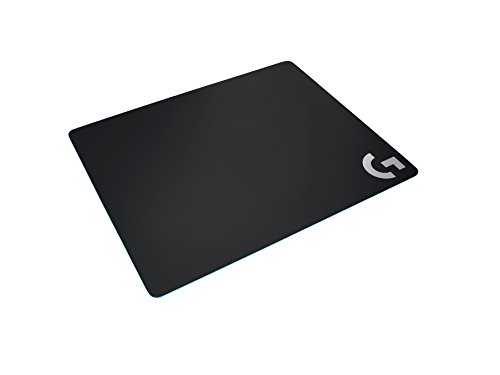
The G240 suits players who prefer a thin pad that almost disappears under the hand. Logitech describes moderate surface friction, which fits high-correction play in fast shooters and strategy games where the mouse starts and stops constantly over short distances. At only 1 mm thick it keeps the wrist angle low, rolls up easily for a laptop bag, and pairs logically with Logitech G mice, although the listing positions it as a gaming-sensor surface generally. Choose it if desk space is tight and you dislike the raised, cushioned feel of thicker pads.
Specs
- Brand: Logitech G
- Model: G240, part 943-000093 class
- Surface: Cloth with moderate surface friction
- Dimensions: 340 x 280 x 1 mm
- Base: Non-slip rubber base
- Treatment: Cloth heat-treated at 200 degrees Celsius
- Compatibility: Optimised for gaming sensors, including Logitech G sensors
Best for: Players who want a very thin, portable pad with predictable stopping friction.
Watch out for: Check that a 1 mm pad suits your desk, because it offers little cushioning over seams, joins, or rough surfaces.
HyperX FURY S Speed Edition Pro Gaming Mouse Pad

The FURY S Speed Edition is the pick for a player who finds control cloth slightly sluggish and wants a freer initial glide for tracking-heavy games. HyperX positions this edition around speed, so wide, continuous mouse movement feels less effortful, while the stitched anti-fray edging addresses the weakness that affects many plain value pads first. It also works well as a first upgrade from a bundled office mat, because the change in glide is noticeable without moving to a hard surface that can feel abrupt, noisy, and less forgiving during slow, precise movements.
Specs
- Brand: HyperX
- Model line: FURY S Pro Gaming Mouse Pad, Speed Edition
- Surface: Cloth, speed edition finish
- Edges: Seamless anti-fray stitched edges
- Material: Fabric surface with rubber underside
- Base: Rubber underside for grip
- Use: Gaming mouse pad for optical mice
Best for: Tracking-focused players who prefer a faster cloth glide and stitched edges.
Watch out for: Confirm the size code in the listing title before ordering, because FURY S pads are offered in multiple sizes with similar packaging.
Which One Fits Your Situation
You Play Tactical Shooters at Low Sensitivity
Pick the SteelSeries QcK Medium if your matches are built around holding angles, clearing corners, and stopping precisely after a sweep. Its control-leaning micro-woven cloth supports that style, and the medium footprint gives enough room for a deliberate turn without demanding a deep desk. Measure your current swipe length first, and if a normal turn already uses most of a small office mat, this is the natural step up in both size and surface consistency.
Your Desk Is Small or Shared With Work
Choose the Logitech G240 when the same surface has to handle matches in the evening and documents during the day. It is thin, plain, and easy to roll aside, yet its moderate friction still feels deliberate rather than slippery during play. The compact footprint leaves space for a keyboard and notebook, and the low profile means your wrist does not sit at an awkward raised angle when you switch back to typing for long periods.
You Track Moving Targets All Match Long
Take the HyperX FURY S Speed Edition if your favourite games keep the mouse in motion, following strafing opponents or tracing vehicles across a screen. A speed-oriented cloth reduces the effort needed to keep moving, and stitched edges help the pad survive the constant wrist contact that comes with that style. If you are coming from a slow, worn office mat, expect an adjustment period while your stopping distance recalibrates to the freer glide.
You Are Replacing a Worn Pad and Want the Same Feel
Stay inside the same product family when your old pad suited you and only age has changed it. Reordering a QcK, a G240, or a FURY S variant with matching dimensions preserves your muscle memory far better than switching surface types on price alone. Photograph the old label, match the size wording exactly, and avoid a similarly named edition with a different finish, because a speed version and a control version can share packaging colours yet feel noticeably different.
Common Mistakes
- Buying by desk size alone and choosing a pad too large for the tray, then playing with a curled edge under the wrist.
- Switching from a control cloth to a speed surface without allowing practice time, then blaming sensitivity settings for overshooting targets.
- Ignoring thickness, even though a very thin pad over a desk seam can feel worse than a slightly thicker pad with a plainer surface.
- Treating a gaming label as a specification, without checking dimensions, base material, or whether the listing states gaming-sensor optimisation.
- Leaving a new cloth pad rolled tightly or dirty for months, which can affect how flat it sits and how consistent the glide feels.
Frequently Asked Questions
Is a cloth pad better than a hard pad at this level?
For most value setups, cloth is the more forgiving starting point. It gives controlled stopping, stays quiet under the mouse, and works comfortably across many games. Hard pads can glide faster and wipe clean easily, but they feel less forgiving during tiny corrections and can be noisier on a desk. Choose cloth first unless you already know you prefer that skating hard-surface feel.
How large should a gaming mouse pad be?
Start with the distance your mouse travels during a full in-game turn, then add margin on both sides. Wrist players at higher sensitivity often manage with a compact or medium pad, while elbow players at low sensitivity usually need medium or large. Always compare that measurement with the listed dimensions and with your real desk depth before ordering any pad.
How long does a budget cloth pad usually last?
Lifespan depends on hours played, wrist pressure, and how clean the surface stays, so treat any fixed promise cautiously. Signs that replacement is near include a shiny worn centre, inconsistent glide between the middle and edges, lifting corners, and a base that no longer grips. Washing gently according to the maker guidance can extend life, but a stretched or peeling pad should be replaced.
Can I use one of these pads with any gaming mouse?
In most cases, yes. These listings describe surfaces optimised for gaming sensors, and modern optical sensors track well on plain cloth. Very light or dark printed designs, glossy finishes, and heavily worn areas can occasionally trouble older sensors, which is another reason these plain, single-colour value pads are practical. If your mouse offers surface calibration, run it once after changing pads.
FAQ
Is a cloth pad better than a hard pad at this level?
How large should a gaming mouse pad be?
How long does a budget cloth pad usually last?
Can I use one of these pads with any gaming mouse?
More from Amazon
Programs that pair well with the guide above. Offers and eligibility are set by Amazon and may change.
Free shipping on eligible items, Prime Video and more. Eligible new members can start with a free trial.
Start a Prime free trialA Prime membership for ages 18-24 with a trial period. Eligibility is set by Amazon.
See Prime for Young AdultsAudiobooks and podcasts to listen to on the go. Eligible new members can start with a free trial.
Try Audible freeAd-free music streaming. Eligible new subscribers can start with a free trial.
Try Music Unlimited freeAs an Amazon Associate we earn from qualifying purchases.









