
Key takeaways
- Five gaming mice for Fortnite building, chosen only on listing-stated programmable button counts and side-button layouts you can assign in the software.
Building in Fortnite lives or dies on how many actions sit under your thumb. Wall, floor, ramp and editing commands compete for keys, and a mouse with a real side-button layout lets a player assign those building functions to the mouse through the maker’s software instead of stretching across the keyboard. The decision is therefore countable: how many programmable buttons the listing states, where they sit, and whether the software named in the listing lets you assign them.
Every mouse below qualified on its Amazon listing alone, using stated programmable button counts and side-button layouts. That is also the limit of what this guide claims: these listings state many programmable thumb-side buttons that a player can assign to building functions via the named software, and no mouse here is claimed to make anyone build or edit faster or better. The picks span wired grids, a wireless grid and one lighter thumb-button alternative.
Quick Picks
As an Amazon Associate we earn from qualifying purchases.
| Product | Best for | Key spec from title |
|---|---|---|
| Razer Naga V2 Pro, Black | A builder who wants the 12-button plate on the mouse for building assignments today, with the option to swap plates instead of buying another mouse later. | Swappable 12, 6 and 2 button side plates, up to 19+1 programmable |
| Corsair Scimitar RGB Elite, Wired | A wired desk setup where a 12-button thumb keypad, adjustable on its slider, carries the building assignments and the cable is no hardship. | 17 programmable buttons, 12-button side keypad, iCUE |
| Redragon M908 Impact, Wired | A player who wants a stated 12-button side grid and macro shortcuts in a wired mouse, with weight tuning to settle the balance. | 12 side buttons, 18 programmable macro shortcuts per title |
| SteelSeries Aerox 9 Wireless | A builder who wants a full side-button layout without a cable, in a shell light enough to lift and reset between fights. | 18 buttons, Quantum 2.0 wireless, 89 g honeycomb shell |
| Logitech G604 Lightspeed | A player who wants the main building functions under the thumb, six buttons rather than twelve, on a mouse that also pairs with a work laptop by Bluetooth. | 15 programmable controls, 6 thumb buttons, dual wireless modes |
How to Choose
Count what the listing states, nothing else
This category invites invented numbers, so the discipline here is strict: a mouse qualifies on the programmable buttons and side buttons its own Amazon listing states. The Naga’s plates, the Scimitar’s 17, the M908’s title-stated 18 macro shortcuts and the Aerox 9’s 18 are listing figures. Where a listing’s own fields disagree, as the M908’s spec table does against its title, the title figure is the one this guide prints. Any mouse whose button count you cannot find in its listing text should be treated as uncounted, however it is described elsewhere.
Grid size is a learning decision, not a power ranking
A 12-button grid holds every building function and more, but each button must be findable by touch at speed, and that familiarity is earned over sessions. The G604’s six thumb buttons are the counter-argument: fewer assignments, each one easier to locate without looking. Neither is objectively better; they are different commitments. A new builder should honestly weigh whether they will train a full grid, because an unused grid is just extra weight and accidental presses, while a practiced one becomes the layout the whole setup is built around.
The software named in the listing does the assigning
Buttons only become building keys through the maker’s software: Razer Synapse for the Naga, Corsair iCUE for the Scimitar, SteelSeries GG for the Aerox 9, Logitech G HUB for the G604 and Redragon’s software for the M908. That has practical consequences. Check that the software supports your operating system, and prefer assignments saved in a way you understand, because a mouse moved to another PC without its profiles is a grid of unlabelled buttons. The listing’s software name is part of the product you are buying.
Connection and weight shape daily use
Three of these mice are wired, which removes charging from a daily building practice routine entirely. The two wireless models answer differently: the Aerox 9 is light at 89 g with a stated 180-hour battery in family text, while the Naga V2 Pro’s battery figures split by mode, 150 hours on HyperSpeed against 300 on Bluetooth. Weight follows the same split, with grid mice generally heavier than plain shooters’ mice. None of that decides building ability; it decides whether the mouse you assigned everything to is charged, present and comfortable every session.
The 5 Best Options
Razer Naga V2 Pro, Black

The Naga V2 Pro is the most flexible button layout in this group because its side plate is interchangeable: the listing states magnetic side plates with 12, 6 and 2 button configurations, so the same mouse can carry a full thumb grid for building-heavy sessions or a slimmer plate when fewer inputs are wanted. The listing description counts up to 19+1 programmable buttons, and assignments are made in Razer Synapse. Underneath, the listing states a Focus Pro 30K optical sensor, Optical Switches Gen-3 and a HyperScroll Pro wheel, with HyperSpeed wireless, Bluetooth and wired USB-C connections.
Specs
- Side plates: interchangeable magnetic plates with 12, 6 and 2 buttons per listing
- Programmable buttons: up to 19+1 per listing description
- Sensor: Focus Pro 30K optical, up to 30,000 DPI
- Switches: Optical Switches Gen-3
- Wheel: HyperScroll Pro wheel
- Connectivity: HyperSpeed Wireless, Bluetooth, wired USB-C
- Battery: up to 150 hours HyperSpeed, up to 300 hours Bluetooth per listing-derived text
- Software: Razer Synapse
Best for: A builder who wants the 12-button plate on the mouse for building assignments today, with the option to swap plates instead of buying another mouse later.
Watch out for: The 300-hour battery figure in the listing refers to Bluetooth mode, not HyperSpeed; plan charging around the 150-hour figure for gaming use.
Corsair Scimitar RGB Elite, Wired

The Scimitar RGB Elite is the wired grid option. Corsair’s title positions it for MOBA and MMO play and states compatibility across PC, Mac, PS5, PS4 and Xbox, and the listing counts 17 programmable buttons including the 12-button side keypad. That keypad sits on a slider, per the listing description, so its position under the thumb can be adjusted rather than accepted. Assignments run through Corsair iCUE, and the sensor is an 18,000 DPI optical unit. For a player assigning wall, floor, ramp and edit to the thumb, the stated layout is the whole case for this mouse.
Specs
- Programmable buttons: 17, including a 12-button side keypad per listing
- Side keypad: adjustable slider position per listing description
- Sensor: 18,000 DPI optical
- Software: Corsair iCUE
- Connectivity: wired USB
- Compatibility as stated in title: PC, Mac, PS5, PS4, Xbox
- Model: CH-9304211-NA
Best for: A wired desk setup where a 12-button thumb keypad, adjustable on its slider, carries the building assignments and the cable is no hardship.
Watch out for: A newer regional listing for this model name carries a different ASIN with an AS suffix; make sure the listing you order is the North American CH-9304211-NA under this ASIN.
Redragon M908 Impact, Wired

The M908 Impact states its case in its own title: 12 side buttons and 18 programmable macro shortcuts, which is the vocabulary this category runs on. The listing description names a PixArt PAW3327 sensor with up to 12,400 DPI, adjustable in steps and by fine increments through the software, plus an eight-piece weight tuning set of 2.4 g weights and 1,000 Hz polling. Those stated counts qualify it here: the side grid is where building functions go, assigned through Redragon’s software. It is the value-shaped route to a full grid, with the assignment capacity stated rather than implied.
Specs
- Side buttons: 12 MMO side buttons per listing
- Programmable: 18 programmable macro shortcuts per listing title
- Sensor: PixArt PAW3327 per listing description, up to 12,400 DPI
- Weights: 8-piece weight tuning set, 2.4 g each per listing
- Polling: 1,000 Hz per listing description
- Connectivity: wired USB
- Software: Redragon software for DPI steps and assignments per listing
Best for: A player who wants a stated 12-button side grid and macro shortcuts in a wired mouse, with weight tuning to settle the balance.
Watch out for: One listing-derived spec table counts 20 programmable inputs against the title’s 18; this guide uses the title’s figure, and the live listing’s ASIN field should be confirmed before ordering, as noted in the package notes.
SteelSeries Aerox 9 Wireless

The Aerox 9 is the wireless grid in this group, and its listing states 18 buttons with a TrueMove Air optical sensor up to 18,000 CPI. Customisation runs through SteelSeries GG and Engine, which is where building functions would be assigned to the side panel. The shell is a water-resistant honeycomb design with AquaBarrier protection per the listing, at 89 g in listing family text, which is light for a mouse carrying this many inputs. Connectivity is Quantum 2.0 wireless over 2.4 GHz plus Bluetooth, and the listing family states battery life up to 180 hours.
Specs
- Buttons: 18 per listing title and description
- Sensor: TrueMove Air optical, up to 18,000 CPI/DPI
- Connectivity: Quantum 2.0 wireless 2.4 GHz and Bluetooth
- Shell: honeycomb with AquaBarrier water resistance per listing
- Weight: 89 g per listing family text
- Battery: up to 180 hours per listing family text
- Software: SteelSeries GG / Engine
Best for: A builder who wants a full side-button layout without a cable, in a shell light enough to lift and reset between fights.
Watch out for: Third-party trackers have shown out-of-stock snippets for this model at times, so confirm a live offer on this ASIN before planning a setup around it.
Logitech G604 Lightspeed
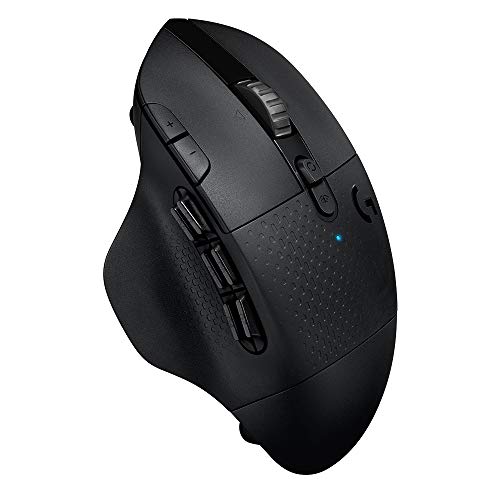
The G604 is the moderate-count alternative for players who do not want a full grid. Logitech’s title states 15 programmable controls and dual wireless connectivity modes, and the listing details six thumb buttons, which is enough to hold the core building pieces while leaving the thumb panel uncrowded. Assignments are made in Logitech G HUB. The mouse switches between LIGHTSPEED and Bluetooth, runs up to 240 hours on one AA battery in LIGHTSPEED mode per the description, and carries a hyper-fast scroll wheel. It is the pick for a hand that wants building inputs on the mouse without learning a twelve-button layout.
Specs
- Programmable controls: 15, including 6 thumb buttons per listing
- Connectivity: LIGHTSPEED wireless and Bluetooth toggle, stated in the title
- Battery: up to 240 hours on one AA, LIGHTSPEED mode per description
- Wheel: hyper-fast scroll wheel
- Sensor: HERO sensor (generation not asserted; listing captures conflict)
- Software: Logitech G HUB
- Model: 910-005622
Best for: A player who wants the main building functions under the thumb, six buttons rather than twelve, on a mouse that also pairs with a work laptop by Bluetooth.
Watch out for: This is an older model and at least one captured offer was used or like-new, so check that the live offer on this ASIN is for a new mouse before ordering.
Which One Fits Your Situation
You want every building piece under your thumb
Take the Naga V2 Pro with its 12-button plate fitted, or the Scimitar if your setup is wired; both state full grids you can assign in their software. Start with the building pieces you use most on the grid’s home row, and leave the far buttons for edits and the less frequent actions you reach for rarely.
You are new to building and want a smaller commitment
Take the G604: six thumb buttons hold the core pieces, and its Bluetooth mode lets the same mouse serve a laptop between sessions. The G HUB assignments travel with your profiles, and the same six thumb buttons can hold work shortcuts on the Bluetooth side during the day.
Your desk is wireless and your mouse must stay light
Take the Aerox 9 Wireless, whose listing states 18 buttons in an 89 g water-resistant honeycomb shell with up to 180 hours of battery in family text. Its stated water resistance also suits a mouse that will be grabbed a thousand times a week, which is the real life of a main mouse.
You want a grid and weight tuning on a wired setup
Take the M908 Impact for its stated 12 side buttons, 18 macro shortcuts and eight-piece weight set, confirming the live ASIN field first as the entry advises. It is the one pick here whose notes carry an extra verification step, and that step is worth doing before the mouse becomes the centre of your setup.
Common Mistakes
- Believing any mouse makes building faster by itself, when listings only state buttons you can assign; the speed comes from practice with a layout, not from a purchase.
- Counting buttons from a roundup or a box photo instead of the listing text, and building a decision on a figure the product page never stated.
- Assigning a full grid on day one and pressing the wrong building piece under pressure for weeks, when staging assignments a few at a time builds the muscle memory that makes a grid useful.
- Ignoring the software requirement: a grid mouse whose software does not run on your system is a mouse with fixed buttons, whatever the listing’s button count says.
- Overlooking the M908-style listing conflict, where a spec table and a title disagree, and quoting the larger number as fact instead of the title figure the seller leads with.
Frequently Asked Questions
How many side buttons do I need for building?
Enough to hold the functions you actually assign. Six thumb buttons, as on the G604, cover the core building pieces for many players; a 12-button grid, as on the Naga’s plate or the Scimitar’s keypad, holds every piece plus extras. The listings state the counts; how many you use is a practice decision.
Can I assign building functions to any programmable mouse?
Where the listing states programmable buttons and names its software, yes: assignments are made in that software, such as Synapse, iCUE, GG or G HUB. This guide only claims what the listings state, which is assignable buttons, not any in-game result.
Wired or wireless for a grid mouse?
Both appear here. Wired models like the Scimitar and M908 never need charging; the Aerox 9 and Naga V2 Pro cut the cable and state long battery figures, with the Naga’s split by connection mode. Choose by desk routine. At this level the connection type decides convenience rather than capability, and both styles appear among serious players’ everyday setups.
Why is the Redragon M908’s button count stated as 18?
Because its listing title says 18 programmable macro shortcuts. A listing-derived spec table elsewhere says 20, and where a listing disagrees with itself this guide prints the title figure and records the conflict rather than choosing the bigger number. The same caution applies to any listing whose fields disagree: print the figure the seller leads with, and note the other one rather than hiding it.
FAQ
How many side buttons do I need for building?
Can I assign building functions to any programmable mouse?
Wired or wireless for a grid mouse?
Why is the Redragon M908’s button count stated as 18?
More from Amazon
Programs that pair well with the guide above. Offers and eligibility are set by Amazon and may change.
Free shipping on eligible items, Prime Video and more. Eligible new members can start with a free trial.
Start a Prime free trialA Prime membership for ages 18-24 with a trial period. Eligibility is set by Amazon.
See Prime for Young AdultsAudiobooks and podcasts to listen to on the go. Eligible new members can start with a free trial.
Try Audible freeAd-free music streaming. Eligible new subscribers can start with a free trial.
Try Music Unlimited freeAs an Amazon Associate we earn from qualifying purchases.









