Key takeaways
- Compare the best network adf scanners for paperless operations with key specs, pros, cons, and buying guidance. See verified Amazon US picks with ASINs.
As an Amazon Associate we earn from qualifying purchases.
Disclosure: This article contains affiliate links. If you buy through links on this page, we may earn a commission at no extra cost to you. Product availability on Amazon US can change; check the product page for current details before ordering.
Our top pick: Kodak Alaris S2060W. Runner-up: Epson WorkForce ES-580W.
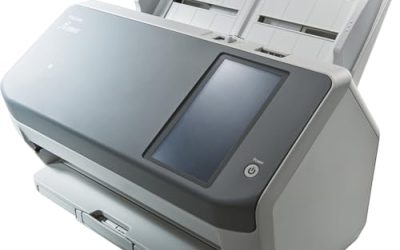
Going paperless usually starts where paper enters the building: invoices at reception, signed forms at a service desk, receipts in a shared office. Network ADF scanners are designed for those points. They connect by Wi-Fi or Ethernet, sit where staff already work, and send documents to shared folders, email, or cloud destinations from a walk-up touchscreen or job button.
This article covers network ADF scanners for paperless operations, meaning shared, connected sheet-fed models for everyday intake. That is different from production document scanners, which are high-volume central units built for dedicated conversion rooms and are often attached to a single workstation by USB. If your goal is distributed, day-to-day paperless intake, the network models below are the right category.
Quick Picks
| Product | Best For | Key Spec | ASIN |
|---|---|---|---|
| Kodak Alaris S2060W | Best Small-Team Paperless Intake | 60 ppm / 120 ipm, 80-sheet ADF | B076CX5G1H |
| Epson WorkForce ES-580W | Best Wi-Fi with Big Feeder | 35 ppm / 70 ipm, 100-sheet ADF | B08P3ZT5WH |
| ScanSnap iX2500 | Best Ease of Use and Wi-Fi 6 | 45 ppm / 90 ipm, 100-sheet ADF | B0F9B1H5VN |
| Brother ADS-3350W | Best Wired and Wireless | 40 ppm / 80 ipm, 60-sheet ADF | B0FWGHF1RS |
| RICOH fi-7300NX | Best PC-Free Paperless Station | 60 ppm / 120 ipm, 80-sheet ADF | B07H85KW2L |
How We Selected These Picks
We selected network ADF scanners that support shared walk-up use, the core of distributed paperless operations. Every pick connects by Wi-Fi, Ethernet, or both, scans duplex, and routes documents to shared destinations without depending on one person’s computer. USB-only production units were excluded because they serve a centralized workflow.
Within the network category, we compared speed, feeder capacity, and daily volume against typical paperless intake, plus how easily a new staff member can complete a scan.
1. Kodak Alaris S2060W – Best For Small-Team Paperless Intake

ASIN: B076CX5G1H
Amazon US: https://www.amazon.com/dp/B076CX5G1H
The Kodak Alaris S2060W anchors a small team’s paperless intake. It scans at 60 ppm and 120 ipm duplex, holds 80 sheets, and is rated for up to 9,000 pages per day. USB 3.2, Wi-Fi 802.11b/g/n, and Ethernet are included, and touchscreen job buttons can be assigned to folders and email destinations.
Those job buttons make paperless habits stick. When an invoice and an expense packet each have a labeled destination, staff spend less time deciding where a scan goes. The limitation is the wireless generation: the S2060W does not include Wi-Fi 6, and its platform dates to 2017. Ethernet is available for a stable wired station.
Pros
– Touchscreen job buttons for repeat destinations
– 60 ppm / 120 ipm duplex with up to 9,000 pages per day
– USB 3.2, Wi-Fi, and Ethernet connectivity
Cons
– Older Wi-Fi radio without Wi-Fi 6 support
– Platform introduced in 2017
2. Epson WorkForce ES-580W – Best For Wi-Fi with a Big Feeder

ASIN: B08P3ZT5WH
Amazon US: https://www.amazon.com/dp/B08P3ZT5WH
The Epson WorkForce ES-580W pairs wireless placement with a 100-sheet feeder for paperless stations on shared shelves. It scans at 35 ppm and 70 ipm with single-pass duplex, with a peak rating of 4,000 pages per day. Wi-Fi and USB are included; Ethernet is not.
Staff can load a full morning batch, start the job, and return to other tasks. Wireless placement means the station does not need a network drop. The trade-offs are daily volume and wired networking: the 4,000-page peak rating is the lowest here, and shared access depends on Wi-Fi. For a small team with moderate paper, those limits are acceptable.
Pros
– 100-sheet feeder for full morning batches
– Wi-Fi placement on shelves and counters
– Single-pass duplex at 35 ppm / 70 ipm
Cons
– Peak rating of 4,000 pages per day
– No Ethernet connection
3. ScanSnap iX2500 – Best For Ease of Use and Wi-Fi 6

ASIN: B0F9B1H5VN
Amazon US: https://www.amazon.com/dp/B0F9B1H5VN
The ScanSnap iX2500 (Black) focuses on simplicity for teams adopting paperless workflows. It scans at 45 ppm and 90 ipm duplex, holds 100 sheets, and connects by Wi-Fi 6 and USB-C. Its daily duty cycle is not published by the manufacturer, so it is best matched to everyday office intake.
A paperless program succeeds when scanning feels easier than filing paper, and a straightforward walk-up experience with a large feeder helps adoption. The limitations are networking and published ratings: there is no Ethernet, and without a published duty cycle, sustained high-volume days should go to a rated model. For moderate distributed intake, the iX2500 keeps the process approachable.
Pros
– Wi-Fi 6 and USB-C for modern wireless offices
– 100-sheet feeder with 45 ppm / 90 ipm duplex
– Straightforward walk-up use
Cons
– No Ethernet; Wi-Fi or USB-C only
– Daily duty cycle is not published
4. Brother ADS-3350W – Best For Wired and Wireless Flexibility

ASIN: B0FWGHF1RS
Amazon US: https://www.amazon.com/dp/B0FWGHF1RS
The Brother ADS-3350W suits paperless operations spanning wired and wireless areas. It scans at 40 ppm and 80 ipm duplex, holds 60 sheets, and is rated for a maximum of 6,000 sheets per day. Ethernet, USB, and Wi-Fi are all included, so one model can serve a wired office and a wireless satellite desk.
That flexibility simplifies standardization: one model, one set of destinations, one training routine. Speed is the compromise. At 40 ppm it is slower than the 60 ppm models here, and the 60-sheet feeder reloads sooner than 100-sheet rivals. For steady distributed intake, the balance fits well.
Pros
– Ethernet, USB, and Wi-Fi for mixed layouts
– 40 ppm / 80 ipm duplex with 6,000-sheet daily maximum
– One model can standardize several desks
Cons
– Slower than 60 ppm models
– 60-sheet feeder is smaller than 100-sheet rivals
5. RICOH fi-7300NX – Best For PC-Free Paperless Stations

ASIN: B07H85KW2L
Amazon US: https://www.amazon.com/dp/B07H85KW2L
The RICOH fi-7300NX is the PC-free choice for paperless counters. It scans at 60 ppm and 120 ipm duplex, holds 80 sheets, and carries an expected daily volume of 9,000 sheets. Wi-Fi on the 5 GHz band, Ethernet, and USB are included, and the shared touchscreen sends documents to folders or email without a host PC.
Staff can scan a signed form at the counter and route it immediately, keeping the workflow at the point of intake. The feeder holds 80 sheets, smaller than the 100-sheet models here, so long packets need splitting. If your plan centers on walk-up intake, this is the most complete fit in the guide.
Pros
– PC-free touchscreen scanning to folders and email
– 60 ppm / 120 ipm duplex with 9,000-sheet expected daily volume
– Wi-Fi 5 GHz, Ethernet, and USB
Cons
– 80-sheet feeder is smaller than 100-sheet rivals
– Destinations need IT setup at installation
Buying Guide: What to Look For
Network ADF Scanners vs Production Scanners
Choose the category before the model. Network ADF scanners, covered here, are shared walk-up units with Wi-Fi or Ethernet, scan-to-folder and scan-to-email routing, and feeders sized for everyday batches. Production document scanners are high-volume central units for dedicated conversion, often with much larger hoppers and a single workstation connection. A paperless plan usually needs network units at intake points first.
Walk-Up Simplicity and Routing
Paperless adoption depends on the first moments at the device. Look for clear touchscreen destinations, preset job buttons, and PC-free options so staff do not open a desktop application for routine scans. Define a short list of destinations and keep naming consistent.
Speed, Feeder Size, and Daily Volume
Match the rating to daily intake at each station. A desk handling a few hundred pages a day fits a 4,000-page peak model with a 100-sheet feeder, while a shared hub benefits from 60 ppm speed and a 9,000-sheet rating. Choose headroom above your busiest day.
Compatibility and Setup Notes
Confirm wireless coverage or Ethernet availability at each station before ordering. Set up shared folders, email destinations, and permissions with IT, then test with your real document mix. Decide where scanned originals go after capture so paper does not drift back into desk trays.
Comparison Table
| Product | Speed (ppm / ipm) | ADF Capacity | Daily Volume | Connectivity | ASIN |
|---|---|---|---|---|---|
| Kodak Alaris S2060W | 60 / 120 | 80 sheets | Up to 9,000 pages/day | USB 3.2, Wi-Fi, Ethernet | B076CX5G1H |
| Epson WorkForce ES-580W | 35 / 70 | 100 sheets | Peak 4,000 pages/day | Wi-Fi, USB | B08P3ZT5WH |
| ScanSnap iX2500 | 45 / 90 | 100 sheets | Not published | Wi-Fi 6, USB-C | B0F9B1H5VN |
| Brother ADS-3350W | 40 / 80 | 60 sheets | Max 6,000 sheets/day | Ethernet, USB, Wi-Fi | B0FWGHF1RS |
| RICOH fi-7300NX | 60 / 120 | 80 sheets | 9,000 sheets expected | Wi-Fi 5 GHz, Ethernet, USB | B07H85KW2L |
FAQ
What is the difference between a network ADF scanner and a production scanner?
A network ADF scanner is a shared walk-up unit with Wi-Fi or Ethernet that sends documents to folders, email, or cloud destinations at the point of intake. A production scanner is a high-volume central unit for dedicated conversion, often with a much larger hopper. Paperless operations usually start with network units.
Can a network scanner send documents to cloud folders?
Network models route scans to shared folders and email from the device, and those folders can be synchronized with cloud storage by your IT setup. Define destinations and permissions during installation so jobs land in the right place.
How many pages per day should a paperless station handle?
Estimate pages at each intake point on your busiest day and choose a rating above that figure. Small desks may fit a 4,000-page peak rating, while shared hubs benefit from 6,000 to 9,000 sheets. Where a duty cycle is not published, match the scanner to moderate intake.
Final Verdict
For distributed paperless operations, the Kodak Alaris S2060W is the balanced small-team choice with 60 ppm duplex speed and touchscreen job buttons. The RICOH fi-7300NX is stronger for PC-free counters where staff scan from the touchscreen without a host computer.
Choose the Epson WorkForce ES-580W for wireless placement with a 100-sheet feeder, the ScanSnap iX2500 for Wi-Fi 6 and straightforward use, and the Brother ADS-3350W when wired and wireless desks need one model. Starting with network units at intake points keeps paperless habits where paper arrives.
FAQ
What is the difference between a network ADF scanner and a production scanner?
Can a network scanner send documents to cloud folders?
How many pages per day should a paperless station handle?
More from Amazon
Programs that pair well with the guide above. Offers and eligibility are set by Amazon and may change.
Free shipping on eligible items, Prime Video and more. Eligible new members can start with a free trial.
Start a Prime free trialA Prime membership for ages 18-24 with a trial period. Eligibility is set by Amazon.
See Prime for Young AdultsAudiobooks and podcasts to listen to on the go. Eligible new members can start with a free trial.
Try Audible freeAd-free music streaming. Eligible new subscribers can start with a free trial.
Try Music Unlimited freeAs an Amazon Associate we earn from qualifying purchases.