Key takeaways
- Five 3D scanners for jewelry design compared on accuracy, scan volume and shiny-metal handling, so you can pick the right one for rings and settings.
Buying a scanner for jewelry work comes down to one demanding question: can it resolve detail small enough to matter on a ring, a pendant, or a bracelet clasp? Prongs, milgrain edges, engraved lines, and stone settings are measured in fractions of a millimeter, so a scanner built for car parts or room interiors will smooth them away. The right tool captures those features cleanly enough that the digital model can guide a redesign, a repair, or a new casting without hours of manual rebuilding.
This guide is written for independent jewelers digitizing existing pieces, designers turning wax carvings into printable files, and small studios archiving a catalog of work. Every scanner below was chosen from the names and specifications shown on its Amazon product page, with attention to accuracy, minimum object size, and how each model handles polished metal and gemstones.
Quick Picks
As an Amazon Associate we earn from qualifying purchases
| Product | Best for | Key spec from title |
|---|---|---|
| Revopoint MetroX Advanced | Capturing fine prongs and engraving on rings | Up to 0.01 mm single-frame precision |
| Creality CR-Scan Raptor | Detailed scans of rings and larger jewelry pieces | 0.02 mm accuracy with blue laser and NIR |
| Revopoint POP 4 Premium | Versatile handheld scanning of pendants and bracelets | Up to 0.03 mm single-frame accuracy |
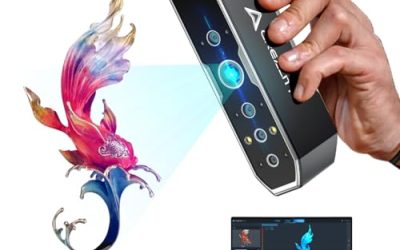
| EINSTAR 2 | Fast wireless scanning of small to large pieces | Up to 90 fps with blue laser and VCSEL infrared |
| Shining 3D EinScan Pro HD | Studio work on dark metal and cast surfaces | Up to 0.045 mm scan accuracy |
How to Choose
Accuracy and point density
Accuracy decides whether a prong reads as a prong or melts into a blob, and point density decides how much surface texture survives. Look for a stated single-frame accuracy of 0.05 mm or finer, plus a point distance near 0.02 mm, when rings and pavilion settings are the main subject. A scanner with a 0.2 mm point distance can still serve for chunky cuffs and pendants, where broad curves matter more than hairline detail. Compare the numbers in the same mode, since fixed turntable scans and handheld scans often carry different ratings, and confirm that the finest figure applies to the way you will actually scan.
Handling shiny metal and stones
Polished gold, silver, and platinum throw structured light back at the sensor, while faceted stones scatter it, so both surfaces create holes and noise in a raw scan. Scanners built for dark or reflective metal, or models that accept markers and matte scanning spray, cope far better than general-purpose handheld units. A light dusting of removable scanning spray turns a mirror finish into a readable matte surface, and it washes off without harming the piece. Before buying, check whether the listing mentions dark or metal surfaces at all, and plan on spray as a standard part of the workflow rather than a last resort.
Scan volume for rings versus larger pieces
A ring occupies a few cubic centimeters, while a statement necklace or a display bust needs a far wider capture area, and few scanners cover both extremes equally well. Check the minimum scan volume first: a model that starts at 10 mm on each side can frame a single ring without losing it in empty space, while one built for objects from 50 mm upward will struggle to lock onto it. At the other end, look at the maximum single capture area and the working distance, because a short-range fine-detail scanner forces many passes on a long necklace. Match the volume to the pieces you scan most often, not the ones you scan once a year.
Software and export formats
The scanner is only half the purchase; the software decides how easily a scan becomes a usable CAD file. Look for exports in STL, OBJ, and PLY at minimum, since those feed slicers, Rhino, and most jewelry CAD tools, with formats such as FBX or GLTF useful when color and texture travel with the model. Mesh editing tools for filling holes, smoothing noise, and aligning multiple scans save real time after every session. Also confirm the supported operating systems and the minimum computer specifications, because fine-detail scanning at high point density needs a capable machine, and some software runs only on desktop systems.
The 5 Best Options
Revopoint MetroX Advanced

The MetroX Advanced is the metrology-grade pick for jewelers who need detail on the smallest pieces. Its blue laser system states single-frame precision up to 0.01 mm and accuracy up to 0.02 mm, with a minimum scan volume of 10 mm on each side, so prongs, milgrain edges, and engraved lines survive as geometry rather than smoothed guesses. Four scanning modes cover cross lines, parallel lines, and full-field capture, while the included marker block kit helps the scanner track featureless polished bands. Jewelers digitizing rings for casting or repair will find its precision hard to match, provided the bench computer meets its specifications.
Specs
- Technology: multi-line blue laser and full-field structured light; 4 scanning modes
- Single-frame precision: up to 0.01 mm; single-frame accuracy: up to 0.02 mm
- Fused point distance: up to 0.05 mm; scanning speed: up to 7,000,000 points per second in full-field mode
- Working distance: 200 to 400 mm; minimum scan volume: 10 x 10 x 10 mm; maximum scan volume: 1 x 1 x 1 m
- Light source: 14 blue cross laser lines, 7 blue parallel laser lines, 62-line blue full-field structured light
- Weight: 508 g; dimensions: 209 x 88 x 44 mm; connector: USB Type-C
- Output file formats: PLY, OBJ, STL, ASC, 3MF, GLTF, FBX
- Included: Marker Block Kit with the Advanced edition
Best for: Jewelers digitizing rings, earrings, and small pendants where fine prongs and engraving must survive the scan.
Watch out for: MetroX uses a Class 2M laser projector, so avoid looking directly at the light source at close range, and check the listed computer requirements before ordering.
Creality CR-Scan Raptor

The CR-Scan Raptor pairs blue laser lines with near-infrared light, a combination that gives it range across both tiny detail work and larger objects. Its stated accuracy of 0.02 mm puts it in the same class as dedicated small-object scanners, while a 60 fps capture speed keeps handheld passes smooth around a bracelet or a necklace draped on a stand. Anti-shake tracking helps when the hand holding the scanner tires during a long session, and 24-bit color capture preserves the look of mixed metals and stones. It suits a studio that scans jewelry one day and larger display pieces the next.
Specs
- Technology: multiple-line blue laser and NIR handheld scanner
- Accuracy: 0.02 mm; scanning speed: up to 60 fps
- Full-color scanning: 24-bit fast full-color capture
- Scan range: objects from 5 mm to 2000 mm
- Tracking: anti-shake tracking for handheld scanning
- Item model number: CR-Scan Raptor; dimensions: 1.9 x 2.9 x 8.4 inches
- Compatible systems: Windows and macOS
Best for: Studios that need fine jewelry detail plus the range to scan larger pieces, busts, and display work with one device.
Watch out for: The scanner is heavier than pocket-sized models, so check the listed weight and plan on a tripod or stand for long sessions.
Revopoint POP 4 Premium
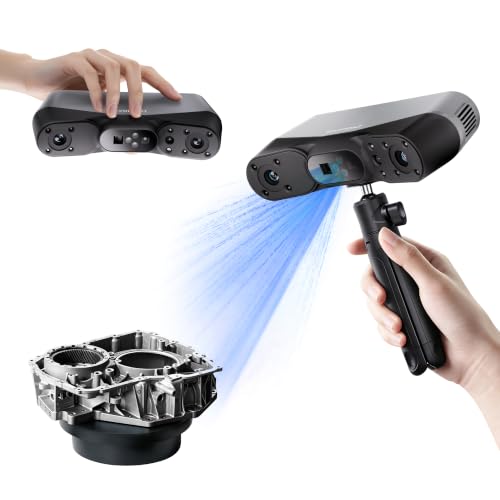
The POP 4 Premium is the versatile handheld pick for jewelers who scan pendants, bracelets, and necklaces without a fixed desktop setup. Five scanning modes combine blue laser lines, near-infrared structured light, and VCSEL projection, so the scanner adapts to polished metal, dark finishes, and deep settings that usually need spray. Its single-frame accuracy reaches 0.03 mm, the minimum scan volume is 10 mm on each side, and capture runs up to 105 fps with NVIDIA GPU acceleration. A battery grip gives up to four hours away from a power outlet, and Wi-Fi 6 keeps the bench cable-free.
Specs
- Technology: multi-line blue laser, near-infrared structured light, and VCSEL projection; 5 scanning modes
- Single-frame accuracy: up to 0.03 mm; volumetric accuracy: 0.03 mm + 0.05 mm x L(m)
- Scanning speed: up to 105 fps with NVIDIA GPU acceleration; up to 5,000,000 points per second
- Scan volume: 10 x 10 x 10 mm to 2 x 2 x 2 m; working distance: 200 to 800 mm across the five modes
- Color capture: 1.3 megapixel RGB camera with two white LEDs
- Battery: 5,500 mAh grip, up to 4 hours; connectivity: Wi-Fi 6, Bluetooth 4.1, USB Type-C
- Weight: 286 g; dimensions: 160 x 30 x 72 mm; outdoor scanning up to 50,000 lux in laser mode
Best for: Jewelers who want a portable handheld scanner for pendants, bracelets, and bangles without a fixed desktop setup.
Watch out for: The headline 105 fps speed needs NVIDIA GPU acceleration, and AI segmentation runs on Windows only, so confirm the computer setup before a full day of scanning.
EINSTAR 2

The EINSTAR 2 is the wireless upgrade path for jewelers who scan at the bench, at a client meeting, or at a trade show, with no cable tying the scanner to a computer. Seventeen parallel blue laser lines handle fine geometry while VCSEL infrared light covers broader surfaces, and capture runs at up to 90 fps, which shortens the time a piece must stay perfectly still. Marker sizes of 3 mm, 6 mm, and 12 mm give options for tracking small, featureless metal surfaces that otherwise confuse a scanner. Two swappable batteries in the box keep a long cataloging session going without a pause for charging.
Specs
- Light sources: 17 parallel blue laser lines and VCSEL infrared light
- Scanning speed: up to 90 fps; supports 3 mm, 6 mm, and 12 mm markers
- Design: wireless handheld scanner with built-in battery compartments
- In the box: scanner, carrying case, calibration board, power adapter, two batteries
- Manufacturer: Shining3D; item model number: EINSTAR 2
- Compatible with small to large objects
Best for: Jewelers who scan away from the bench and need fast wireless capture of pieces in different sizes.
Watch out for: Wireless scanning depends on battery charge and a stable connection, so confirm the included batteries and charging setup before a full day of scanning.
Shining 3D EinScan Pro HD

The EinScan Pro HD is the studio-grade pick here, aimed at jewelers who work with cast metal, dark finishes, and pieces that other scanners struggle to read. It states accuracy up to 0.045 mm in handheld HD mode and up to 0.04 mm in fixed scan mode, with a point distance of 0.2 mm and capture of up to 3,000,000 points per second. A turntable, tripod, and reference spheres come in the box, and fixed scanning on the turntable gives repeatable results for a run of similar pieces. ExScan Pro software handles mesh editing and alignment of multiple scans into one model.
Specs
- Accuracy: up to 0.045 mm in handheld HD mode; up to 0.04 mm in fixed scan mode
- Minimum point distance: 0.2 mm; scan speed: up to 3,000,000 points per second
- Software: ExScan Pro for scanning and mesh editing
- Included: tripod, turntable, and reference spheres
- Handles dark color and casting metal surfaces
- Product dimensions: 9.5 x 6 x 2 inches; item weight: 2.75 pounds; model: ESP960A
Best for: Professional studios scanning cast pieces, dark metals, and mixed-material jewelry that needs repeatable turntable results.
Watch out for: The color texture camera and industrial pack details vary by bundle, so confirm exactly which accessories the listing includes before ordering.
Which One Fits Your Situation
Digitizing a ring collection
A ring collection lives or dies on prong and engraving detail, so the scanner must work close and fine. The Revopoint MetroX Advanced fits this job best, with its 0.01 mm precision, 10 mm minimum scan volume, and blue laser built for small objects. Set each ring on a turntable or a small stand, use markers or spray on polished bands, and scan one piece at a time for the cleanest mesh.
Scanning bracelets and necklaces for a catalog
Longer pieces need a wider capture area and a forgiving working distance, which points toward a handheld model rather than a close-range specialist. The Revopoint POP 4 Premium covers pendants, bracelets, and necklaces with its 200 to 800 mm working distance and fast point capture, so a full catalog moves quickly. Drape each piece on a matte stand and keep the scanner moving steadily to avoid gaps along the chain.
Working away from the studio
Client visits, craft fairs, and supplier meetings call for a scanner that travels light and runs without a desktop computer nearby. The EINSTAR 2 answers that need with wireless operation, two swappable batteries, and capture up to 90 fps, so a piece can be digitized on the spot. Bring the calibration board and a small marker set, since a stable setup matters even more when the bench is a folding table.
Handling cast and dark-metal pieces
Cast surfaces, oxidized silver, and darkened metals confuse many consumer scanners, and that is where a studio-grade tool earns its keep. The Shining 3D EinScan Pro HD is built for dark color and casting metal surfaces, and its fixed turntable mode gives steady, repeatable captures of similar pieces. Use the turntable for batches of castings, then align the scans in ExScan Pro before exporting the mesh.
Common Mistakes
- Scanning a polished ring without spray or markers, then wondering why the band comes out full of holes and warped reflections.
- Choosing a scanner by its maximum object size and ignoring the minimum scan volume, which is what actually decides whether a small ring locks on.
- Comparing accuracy figures from different modes, such as a fixed turntable rating against a handheld rating, as if they meant the same thing.
- Skipping calibration after moving the scanner or changing the working distance, which lets small errors creep into every mesh that follows.
- Exporting a raw scan straight to a slicer or CAD tool without cleaning holes, noise, and stray points, leaving the design software to guess at missing geometry.
Frequently Asked Questions
Can a 3D scanner capture the prongs on a ring?
Yes, provided the scanner resolves detail near 0.01 mm and the ring is prepared well. Blue-laser scanners such as the Revopoint MetroX Advanced are built for this scale, and a light coat of scanning spray on polished metal keeps prongs from disappearing into reflections. Scan slowly, rotate the ring to cover the underside of each prong, and inspect the mesh before moving on.
Do I need scanning spray for polished gold and silver?
In most cases, yes. Polished metal reflects structured light away from the sensor, which creates gaps in the mesh, and spray gives the surface a temporary matte finish the scanner can read. Use a removable spray made for scanning, apply a thin even coat, and clean the piece after the session. Matte or brushed finishes often scan without it.
What file format should I export for jewelry CAD work?
STL and OBJ cover most jewelry CAD and printing workflows, with PLY useful when color data travels with the mesh. Check that the scanner software exports the formats your CAD tool accepts, and keep an unedited copy of each scan before cleaning the mesh. Some designers also keep FBX or GLTF files when a colored model needs to move between programs.
Can one scanner handle both rings and larger display pieces?
Some can, but the trade-off is real. A scanner such as the Creality CR-Scan Raptor covers objects from 5 mm to 2000 mm, which suits mixed work, while a close-range specialist gives finer ring detail at the cost of range. If rings dominate the workload, choose the fine-detail scanner; if display pieces and jewelry share the bench equally, pick the wider-range model.
FAQ
Can a 3D scanner capture the prongs on a ring?
Do I need scanning spray for polished gold and silver?
What file format should I export for jewelry CAD work?
Can one scanner handle both rings and larger display pieces?
More from Amazon
Programs that pair well with the guide above. Offers and eligibility are set by Amazon and may change.
Free shipping on eligible items, Prime Video and more. Eligible new members can start with a free trial.
Start a Prime free trialA Prime membership for ages 18-24 with a trial period. Eligibility is set by Amazon.
See Prime for Young AdultsAudiobooks and podcasts to listen to on the go. Eligible new members can start with a free trial.
Try Audible freeAd-free music streaming. Eligible new subscribers can start with a free trial.
Try Music Unlimited freeAs an Amazon Associate we earn from qualifying purchases.