Key takeaways
- Compare the best bike microphones for streaming and recording, from a four-pattern USB condenser to a dual-output dynamic mic with app control.
As an Amazon Associate, I earn from qualifying purchases.
A clear microphone does more for a stream or a recording than any camera upgrade, because listeners forgive soft video long before they forgive muddy, echoing audio. The five microphones in this roundup are all built for the desk-based creator: four are USB condensers that plug straight into a computer, and one is a dynamic model that adds an XLR output for a later move to an audio interface. Between them they cover solo podcasting, two-person interviews, game streaming with live chat, voiceover work, and sung or played music.
The right pick depends on your room and your habits more than on brand. A condenser capsule hears detail, including the detail of an untreated room, while a dynamic capsule focuses tightly on a close voice and shrugs off background noise. Multiple polar patterns add flexibility for interviews and group calls, while a single cardioid pattern keeps things simple and predictable. Each entry below sticks to the figures and features from its own product page, so you can match the microphone to the way you actually record.
What To Look For In A Recording And Streaming Microphone
Capsule type. Condenser microphones are sensitive and detailed, which flatters voices and acoustic instruments in a reasonably quiet room. Dynamic microphones are less sensitive, so they reject room echo and household noise, but they ask you to stay close to the capsule.
Polar pattern. Cardioid picks up sound from the front and rejects the sides and rear, which suits a single speaker. Bidirectional records front and back for face-to-face interviews, omnidirectional takes in the whole room for group calls, and stereo spreads two channels for music and ambience.
Connection. USB is plug-and-play with a computer and needs no extra hardware. A microphone that also offers XLR can start on USB today and move to an interface or mixer later without being replaced.
Monitoring and controls. A headphone jack on the microphone body lets you hear yourself with no delay. On-body gain, mute, and mix controls keep your hands off the mouse mid-session, which matters most during a live broadcast.
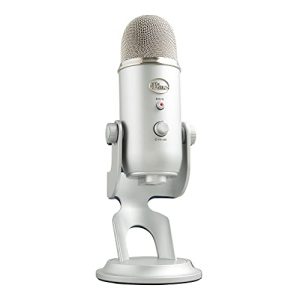
1. Logitech For Creators Blue Yeti USB Microphone (Silver)
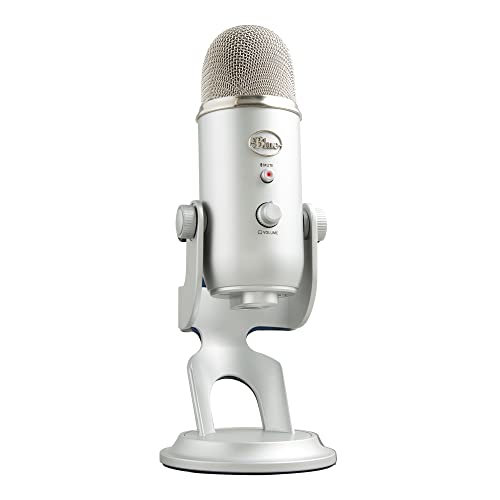
The Blue Yeti is the microphone that defined the USB category, and its tri-capsule array is still the reason to buy it. Three condenser capsules sit behind the grille, and a dial on the back switches between four pickup patterns: stereo for music and ambience, cardioid for a single voice, omnidirectional for a table of speakers, and bidirectional for an interview across a desk. That one control turns a single microphone into four tools, which is why it keeps showing up on podcast and streaming desks.
Controls live on the body where they belong. A mute button and a headphone volume dial sit on the front, a gain dial and the pattern selector sit on the back, and the headphone output delivers zero-latency monitoring so you hear your voice as you speak rather than an echo of it. The listing gives a signal-to-noise ratio of 100 dB, and the microphone arrives with its own desktop stand and USB cable, so the box holds everything a first setup needs. It is a large, heavy unit at 3.2 lb on its stand, and it rewards a quiet room, because the sensitive capsules will find a fan or a refrigerator hum if one is running nearby.
Specs
- Brand: Logitech for Creators
- Model: Yeti (988-000103)
- Type: Condenser, tri-capsule array
- Polar patterns: Stereo, cardioid, omnidirectional, bidirectional
- Connectivity: USB
- Controls: Gain dial, pattern selector, mute button, headphone volume
- Monitoring: Zero-latency headphone output
- Signal-to-noise ratio: 100 dB
- Dimensions: 4.9 x 4.7 x 11.6 in
- Weight: 3.2 lb
- Included: Microphone with desktop stand, USB cable
- Warranty: 2-year limited
2. Shure MV7 Podcast Microphone (MV7-K)

The Shure MV7 takes its design cues from the SM7B, the broadcast dynamic microphone heard on countless radio voices, and rebuilds the idea for a computer desk. It is a dynamic microphone, so its cardioid capsule concentrates on a voice placed close in front of it and pays far less attention to the room behind the speaker. For a streamer in a bedroom with hard walls, a hallway of household noise, or a mechanical keyboard in full song, that focus is the whole point.
What sets the MV7 apart is its pair of outputs. Connect by USB for a plug-and-play setup, or connect the XLR output to an interface or mixer when the studio grows, with both routes carried on the same microphone. Through USB, the ShurePlus MOTIV desktop application adds an Auto Level Mode that adjusts gain and compression as you move and speak, plus switchable EQ filters and savable presets. A built-in headphone output handles monitoring, the body is all metal, and the box includes both USB-A and USB-C cables at a generous 3 m each, along with a thread adapter. The listing notes TeamSpeak and Zoom certification. There are no pattern options here, deliberately: one pattern, done properly, aimed at one voice.
Specs
- Brand: Shure
- Model: MV7-K
- Type: Dynamic
- Polar pattern: Cardioid (unidirectional)
- Connectivity: USB and XLR outputs
- Software: ShurePlus MOTIV app with Auto Level Mode and EQ presets
- Monitoring: Built-in headphone output
- Construction: All-metal body
- Included: Microphone, thread adapter, USB-A cable (3 m), USB-C cable (3 m)
3. RØDE NT-USB Condenser Microphone

The RØDE NT-USB is a side-address condenser built for people who record more than speech. Its single cardioid capsule covers a frequency range of 20 Hz to 20 kHz, so sung vocals and acoustic instruments keep their low body and top-end detail, and the product page lists a signal-to-noise ratio of 82 dB. Podcasters and voiceover artists use it for the same reason musicians do: it behaves like a studio microphone that happens to end in a USB plug.
RØDE includes the accessories that other brands sell separately. A premium pop filter mounts at the base of the microphone and sits at the ideal distance from the capsule to tame plosive bursts, a desktop tripod stand is in the box, and the stand mount carries a standard 3/8-inch thread for arms and stands. On the body, a zero-latency 3.5 mm headphone jack pairs with two dials, one for monitor level and one for the mix between computer audio and the microphone input, so backing tracks and your own voice can be balanced by hand. The page also confirms compatibility with Windows and Mac recording software and with an iPad through a USB connection adapter. A storage pouch rounds out a kit that is ready to travel between a desk and a session.
Specs
- Brand: RØDE
- Model: NT-USB
- Type: Side-address condenser
- Polar pattern: Cardioid
- Frequency range: 20 Hz – 20 kHz
- Signal-to-noise ratio: 82 dB
- Connectivity: USB
- Monitoring: Zero-latency 3.5 mm headphone jack with mix and level dials
- Included: Pop filter, tripod stand, stand mount, storage pouch
- Dimensions: 2.44 x 1.97 x 7.24 in
- Warranty: 2 years
4. HyperX QuadCast S RGB USB Condenser Microphone

The HyperX QuadCast S is built for streamers who are on camera and want the microphone to be part of the picture. Customizable RGB lighting wraps the grille and is adjusted, along with effects and presets, in the HyperX NGENUITY software. Under the lighting, three 14 mm electret condenser capsules deliver the same four polar patterns as the Yeti above: stereo, omnidirectional, cardioid, and bidirectional, selected with a dial.
The practical touches are aimed at live work. An anti-vibration shock mount on elastic suspension isolates the capsule from desk bumps and rumbles, an internal pop filter softens plosives, and a tap-to-mute sensor on top silences the microphone instantly, with the LED indicator showing whether you are live. A gain dial at the base sets sensitivity without opening software, and a headphone jack on the back provides monitoring. The included mount adapter fits both 3/8-inch and 5/8-inch threads, so the microphone moves from its stand to most boom arms, and the USB-C to USB-A cable runs a full 3 m. HyperX lists compatibility with PC, PS5, PS4, and Mac, and the page notes certification by Discord and TeamSpeak. One limit to know: the listing states it is not compatible with Xbox systems.
Specs
- Brand: HyperX
- Model: QuadCast S (HMIQ1S-XX-RG/G)
- Type: Condenser, three 14 mm electret capsules
- Polar patterns: Stereo, omnidirectional, cardioid, bidirectional
- Connectivity: USB-C to USB-A, 3 m cable
- Controls: Tap-to-mute sensor with LED indicator, gain dial, pattern dial
- Features: RGB lighting, anti-vibration shock mount, internal pop filter
- Monitoring: Headphone jack
- Mounting: Adapter fits 3/8 in and 5/8 in threads
- Compatibility: PC, PS5, PS4, Mac
5. Audio-Technica AT2020USB+ Cardioid Condenser Microphone

The AT2020USB+ adapts one of the best-known entry studio condensers, the AT2020, for direct digital recording. It keeps the cardioid condenser capsule and the smooth, extended frequency response of 20 to 20,000 Hz, then adds a high-quality A/D converter running at 16-bit with 44.1 or 48 kHz sampling. The result is a microphone aimed at podcasters, home studio singers, and voiceover work where a single, well-behaved pattern is all that is required.
Two controls on the body cover the daily workflow. A mix control blends the microphone signal with pre-recorded audio from the computer, which is the quickest way to sing or speak over a backing track while hearing both parts in balance, and the built-in headphone jack with its own volume control monitors the microphone signal with no delay. The listing gives a signal-to-noise ratio of 74 dB and USB power at 5V DC, so a laptop is the only supply it needs. At 13.6 oz and 6.4 in long, it is the lightest and most compact microphone in this roundup, and it suits a pivoting stand mount or boom arm better than a crowded desk corner. The box includes a tripod desk stand, a pivoting stand mount, a threaded adapter, a USB cable, and a soft protective pouch.
Specs
- Brand: Audio-Technica
- Model: AT2020USB+
- Type: Condenser, fixed-charge back plate
- Polar pattern: Cardioid
- Frequency response: 20 – 20,000 Hz
- A/D conversion: 16-bit, 44.1/48 kHz sampling rate
- Signal-to-noise ratio: 74 dB
- Controls: Mix control, headphone volume control
- Monitoring: Built-in headphone jack, no-delay monitoring
- Power: USB (5V DC)
- Dimensions: 6.4 x 2 x 2 in
- Weight: 13.6 oz
Frequently Asked Questions
Condenser or dynamic: which type suits a home streaming setup?
It depends on the room. A condenser, like the four USB models above, captures detail and works beautifully in a quiet, soft-furnished space. A dynamic microphone like the Shure MV7 hears less of the room and more of a close voice, so it is the safer choice in an echoing bedroom or a noisy house. Pick the capsule that forgives your space.
Do USB microphones need an audio interface?
No. Each microphone here connects directly to a computer by USB and is recognized as an audio device, so recording and streaming software can select it straight away. An interface only enters the picture with XLR-only microphones, or with a dual-output model like the MV7 when you choose to run it through an interface or mixer instead of its USB connection.
Why does a headphone jack on the microphone matter?
It gives you monitoring with no delay. Software monitoring routes your voice through the computer and back, which adds a distracting echo of latency. A jack on the microphone body plays the capsule signal straight into your headphones as you speak, so level problems, plosives, and background noise are obvious while you can still fix them.
Which polar pattern should a solo streamer use?
Cardioid, almost always. It listens to the front of the microphone, where you sit, and rejects sound from the sides and rear, where keyboards, fans, and room echo live. Save omnidirectional for group calls around one microphone, bidirectional for two people facing each other across it, and stereo for music or room ambience.
FAQ
Condenser or dynamic: which type suits a home streaming setup?
Do USB microphones need an audio interface?
Why does a headphone jack on the microphone matter?
Which polar pattern should a solo streamer use?
More from Amazon
Programs that pair well with the guide above. Offers and eligibility are set by Amazon and may change.
Free shipping on eligible items, Prime Video and more. Eligible new members can start with a free trial.
Start a Prime free trialA Prime membership for ages 18-24 with a trial period. Eligibility is set by Amazon.
See Prime for Young AdultsAudiobooks and podcasts to listen to on the go. Eligible new members can start with a free trial.
Try Audible freeAd-free music streaming. Eligible new subscribers can start with a free trial.
Try Music Unlimited freeAs an Amazon Associate we earn from qualifying purchases.