Key takeaways
- Confirm the server’s depth, rail compatibility, and required rear clearance.
- Choose one socket unless the workload regularly needs more cores or memory.
- Budget for ECC registered memory, drive caddies, rails, and compatible storage controllers.
- Prefer redundant power supplies for business uptime, but consider a single supply for a low-power homelab.
- Check whether remote management features require a paid license or specific motherboard configuration.
- Verify firmware availability and the seller’s return policy when buying used hardware.
- Use SSDs for frequently accessed virtual machines and keep backups separate from the RAID array.
- Leave room for airflow; a rack packed tightly against a wall will run hotter and louder.
The best rackmount servers in 2026 are the Dell PowerEdge R660 for a modern, efficient 1U business server, the HPE ProLiant DL360 Gen11 for a compact enterprise deployment, and a used Dell PowerEdge R630 or R730 when a homelab needs maximum capability per dollar.
Our top picks
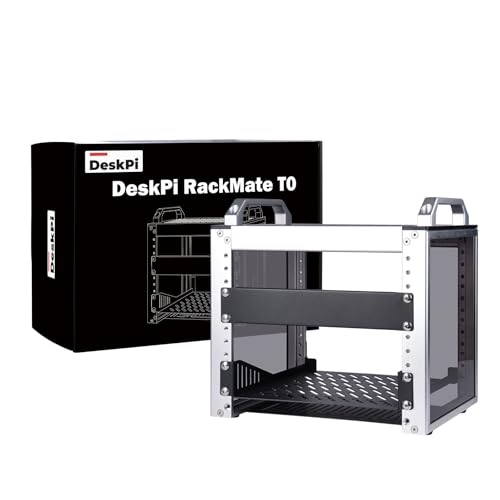 GeeekPi 4U Server Cabinet
- 【DeskPi RackMate T0】It's made of aluminum alloy and…
- 【10-inch width】The cabinet has a width of 10…
- 【Open Design】The cabinet adopts an open design, allowing…
 Tecmojo 1U Rack Shelf
- Heavy Duty 1U Server Rack Shelf: Made from…
- Universal 19-Inch Rack Mount Compatibility: Designed to fit…
- Ventilated Rack Shelf for Improved Airflow: Bottom and…
As an Amazon Associate we earn from qualifying purchases at no extra cost to you.
Quick recommendations by situation
| Situation | Best fit | Why | Typical idle draw |
|---|---|---|---|
| Quiet, low-cost homelab | Used 1U or 2U server with a single Xeon Silver CPU | Large supply of inexpensive enterprise hardware and memory | 45–100W |
| Virtualization with room to grow | Dell PowerEdge R660 | 1U chassis, DDR5 memory, modern Xeon options, strong remote management | 80–160W |
| Business application or database server | HPE ProLiant DL360 Gen11 | Dense 1U platform with enterprise support and redundant components | 90–170W |
| Many disks, GPUs, or expansion cards | Dell PowerEdge R760 or comparable 2U server | More drive bays, PCIe space, cooling capacity, and memory headroom | 130–300W |
| Lowest electricity cost | Single-socket 1U server with a modest CPU | Lower platform overhead than a dual-socket system | 35–80W |
These power figures are useful planning ranges rather than guarantees. Installed memory, drives, network cards, processor choice, fan profile, and workload can move consumption substantially. A server with two high-wattage processors and several hard drives can use several times more power than the same chassis configured as a lightly loaded virtualization host.
What matters most when choosing a rackmount server
Rack units and physical depth
A 1U server occupies 1.75 inches of rack height, while a 2U server occupies 3.5 inches. A 1U model saves valuable rack space, but its small fans usually spin faster and louder. A 2U model has room for larger heatsinks, more storage devices, additional PCIe cards, and sometimes a GPU.
Depth is easy to overlook. Modern enterprise servers can be roughly 28–33 inches deep, excluding front and rear clearance. Measure the rack, the door, and the cable-management area before buying. A short-depth chassis is often a better choice for a home network cabinet than a powerful but very deep data-center server.
CPU: cores are not the whole decision
For a homelab running a few virtual machines, a modest Intel Xeon Silver processor or equivalent server CPU is usually sufficient. Prioritize lower power draw, supported memory, and single-thread performance over the maximum possible core count. File servers, home-assistant workloads, lightweight containers, and test environments rarely need two top-tier processors.
Small businesses running databases, multiple Windows Server virtual machines, or remote-desktop services may benefit from a higher-clocked Xeon Gold configuration. Two sockets make sense when the workload consistently needs many cores or very large memory capacity. They do not automatically make a server faster: a dual-socket system adds motherboard, memory, and idle-power overhead, and some software licenses are charged per core or socket.
Current-generation platforms such as the R660 and DL360 Gen11 support fourth- and fifth-generation Intel Xeon Scalable processors, depending on the exact configuration. Used R630 systems generally use Intel Xeon E5-2600 v4 processors, while R730 systems provide two sockets and substantially more room for drives and expansion. Used hardware remains capable, but its older CPUs consume more power for each unit of performance.
Memory and storage
Virtualization is often limited by memory before it is limited by CPU. A practical starting point is 64GB for a small homelab, 128GB for several virtual machines, and 256GB or more for a busy small-business host. Check whether the server requires registered ECC DIMMs and whether all memory channels must be populated in matched groups.
For storage, enterprise servers commonly support 2.5-inch hot-swap SAS or SATA drives. SSDs improve responsiveness and reduce vibration, while hard drives provide cheaper bulk capacity. A sensible layout is mirrored SSDs for the operating system and virtual machines, plus a separate redundant pool for bulk data. RAID is not a backup: maintain an additional copy on another device or location.
Head-to-head: 1U versus 2U
| Characteristic | 1U server | 2U server |
|---|---|---|
| Rack height | 1.75 inches | 3.5 inches |
| Typical drive capacity | Up to 8–10 2.5-inch bays, configuration dependent | Up to 12–24 2.5-inch bays or several 3.5-inch bays, configuration dependent |
| Expansion | Limited PCIe space | More PCIe slots and better clearance |
| Noise | Usually higher-pitched and louder | Usually easier to cool quietly |
| Best use | Compute, virtualization, network services | Storage, GPUs, databases, expansion-heavy workloads |
| Typical idle power | 45–170W | 80–300W |
For a home rack in a spare room, a 2U chassis can be the more comfortable choice even when a 1U model technically fits. Fan noise and heat accumulate quickly in a small room. In a basement, garage, or dedicated server closet, the density advantage of 1U equipment matters more.
Recommended server classes
Dell PowerEdge R660: best modern all-rounder
The R660 is a 1U, dual-socket platform for organizations that need current-generation performance without moving to a 2U chassis. It supports DDR5 memory, modern Xeon Scalable processors, redundant power supplies, remote management through iDRAC, and multiple storage configurations. It is a strong choice for virtualization clusters, business applications, and a homelab that is also used for professional testing.
The drawback is cost. New enterprise configurations can become expensive once additional memory, SSDs, networking, and support are included. A single modest CPU, 128GB of memory, mirrored SSDs, and one power supply can be a more sensible configuration than selecting the highest-core processors.
HPE ProLiant DL360 Gen11: best compact business platform
The DL360 Gen11 is another modern 1U, dual-socket server based on Intel Xeon Scalable processors. HPE’s iLO management system, extensive configuration options, and enterprise support make it suitable for a small business that needs predictable administration and a vendor-backed platform.
As with the Dell, it is important to compare the complete configuration rather than the chassis name. Drive controllers, licenses, memory kits, and support terms can change the total cost significantly. For a homelab, a decommissioned or refurbished system may offer better value, provided firmware access and replacement parts are available.
Used Dell PowerEdge R630 or R730: best value for experimentation
The R630 is a dense 1U option, while the R730 is a roomier 2U platform. Both can support substantial memory and multiple virtual machines at low purchase prices on the refurbished market. They are attractive for learning Proxmox VE, VMware administration, storage platforms, and network labs.
The ownership trade-off is electricity and noise. Older Xeon E5 systems may draw 80–200W before a heavy workload, and used fans, power supplies, and drive caddies may need replacement. Calculate the running cost before assuming cheap hardware is cheap overall.
Worked power-cost calculation
Suppose a homelab server averages 120W continuously. Annual energy use is:
0.120kW × 24 hours × 365 days = 1,051kWh per year.
At an electricity rate of $0.20 per kWh, that is about $210 per year, before cooling costs. A second server averaging 180W adds about 1,577kWh and $315 per year at the same rate. If a newer system reduces average consumption by 60W, the annual saving is approximately $105 at that electricity price.
Measure actual consumption with a plug-in power meter. Do not estimate from the wattage printed on the power supply; that is its capacity, not its constant consumption.
Buying checklist for homelabs and small businesses
- Confirm the server’s depth, rail compatibility, and required rear clearance.
- Choose one socket unless the workload regularly needs more cores or memory.
- Budget for ECC registered memory, drive caddies, rails, and compatible storage controllers.
- Prefer redundant power supplies for business uptime, but consider a single supply for a low-power homelab.
- Check whether remote management features require a paid license or specific motherboard configuration.
- Verify firmware availability and the seller’s return policy when buying used hardware.
- Use SSDs for frequently accessed virtual machines and keep backups separate from the RAID array.
- Leave room for airflow; a rack packed tightly against a wall will run hotter and louder.
Maintenance and ownership realities
Dust buildup is the most common preventable problem. Clean intake filters and fan areas periodically, but avoid spinning fans aggressively with compressed air unless they are held still. Monitor inlet temperature, fan speed, drive health, and power usage. Replace failed fans or power supplies with compatible parts rather than mixing unverified components.
Hard drives and fans are usually the first mechanical components to wear. SSDs can also fail without warning, so monitor their health and maintain tested backups. Common mistakes include installing unmatched memory, using consumer SATA cables in hot-swap backplanes, disabling fan control to reduce noise, and assuming RAID protects against accidental deletion or ransomware.
Final verdict
Choose a modern 1U server such as the Dell PowerEdge R660 or HPE ProLiant DL360 Gen11 when supportability, compactness, and current performance matter. Choose a 2U platform such as the Dell PowerEdge R760 when storage, GPUs, or expansion are central to the workload. For learning and experimentation, a used R630 or R730 can be excellent value—but compare its measured electricity cost and noise with a newer, lower-power system before buying.
More from Amazon
Programs that pair well with the guide above. Offers and eligibility are set by Amazon and may change.
Free shipping on eligible items, Prime Video and more. Eligible new members can start with a free trial.
Start a Prime free trialA Prime membership for ages 18-24 with a trial period. Eligibility is set by Amazon.
See Prime for Young AdultsAudiobooks and podcasts to listen to on the go. Eligible new members can start with a free trial.
Try Audible freeAd-free music streaming. Eligible new subscribers can start with a free trial.
Try Music Unlimited freeAs an Amazon Associate we earn from qualifying purchases.