Key takeaways
- Compare the best 4G routers for home, RV, and rural internet. Find SIM slot routers with strong LTE coverage, dual-band Wi-Fi, and failover support.
A 4G router turns a mobile data signal into Wi-Fi for a whole home, office, RV, or remote site. Instead of relying on a cable or fiber line that may not reach the building, these routers take a SIM card, connect to a 4G LTE network, and share that connection with laptops, phones, smart TVs, security cameras, and other devices. The best 4G routers balance cellular speed, Wi-Fi coverage, Ethernet ports, antenna options, and carrier compatibility. This guide compares three 4G routers that cover those different needs, explains what to check before buying, and answers the most common questions about using a 4G router as a main or backup connection. Signal strength, data caps, and carrier support matter more than headline speeds, so those checks come first in the buying guide below.
As an Amazon Associate, we earn from qualifying purchases.
Quick Picks
Our Short List of 3
- Full dual-band AC1200 Wi-Fi with four Ethernet ports, so it works like a normal home router
- Nano SIM plug-and-play setup with WAN, WISP, and 4G backup options
- Supports more than 40 devices,
- Four high-gain antennas for stable coverage around a home
- OpenWrt pre-installed, with support for more than 30 VPN providers and Cloudflare DNS over TLS
- Compact and light at 86 grams, with two detachable external antennas
- AT and T IoT certified and compatible with T-Mobile, with bands suited to the United States market
- MicroSD slot up to 128 GB for local file and media sharing
- LTE Cat 7 with download speeds of up to 300 Mbps and two-carrier aggregation
- Wide carrier support for AT and T, T-Mobile, and Verizon, with 16 LTE bands listed
- Automatic failover to 4G LTE and multi-WAN support for business continuity
- Band locking and broad VPN support, including IPSec, OpenVPN, and WireGuard
All 3 Picks at a Glance
| Product | Specs | Action |
|---|---|---|
| 1. Cudy LT500 4G LTE Router |
| Check price on Amazon |
| 2. GL.iNet GL-X750V2 Spitz 4G LTE VPN Router |
| Check price on Amazon |
| 3. MOFI4500-4GXeLTE-SIM8-V3 4G LTE Router |
| Check price on Amazon |
1. Cudy LT500 4G LTE Router
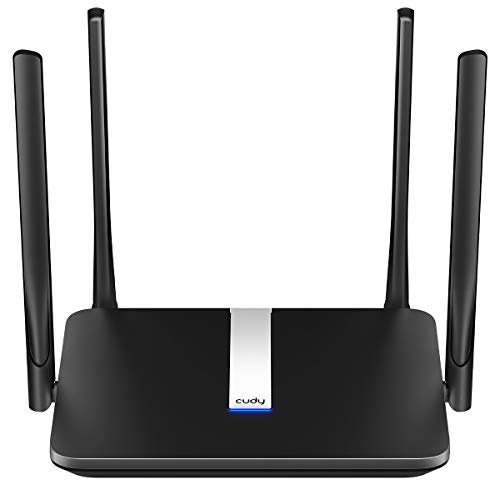
- Full dual-band AC1200 Wi-Fi with four Ethernet ports, so it works like a normal home router
- Nano SIM plug-and-play setup with WAN, WISP, and 4G backup options
- Supports more than 40 devices,
- Four high-gain antennas for stable coverage around a home
The Cudy LT500 is the most straightforward pick in this guide, and that is exactly why it suits so many homes. It is a full dual-band router first and a cellular modem second, so it behaves like the router most households already know how to use. Insert a nano SIM card, and the LT500 connects to a 4G network with download speeds of up to 150 Mbps, then shares that connection over dual-band AC1200 Wi-Fi. The 5 GHz band runs at up to 867 Mbps and the 2.4 GHz band at up to 300 Mbps, which is enough for streaming, video calls, browsing, and everyday work across many devices at once. The listing states support for more than 40 devices.
Why it fits this angle is simple: the LT500 is built for a home that needs 4G as its main connection or as a reliable backup. It has four 10/100 Mbps Ethernet ports for wired devices such as a TV, PC, game console, or printer, and one of those ports can serve as a WAN or LAN connection. That gives the router a useful failover role. When a wired broadband line drops, the LT500 can switch to its 4G connection and keep the network online, which matters for surveillance cameras, retail booths, and home offices that cannot afford a long outage.
Key specs taken from the product page include a nano SIM slot, 4G LTE Cat 4 connectivity with download speeds of up to 150 Mbps, dual-band Wi-Fi 5 at AC1200 speeds, four 10/100 Mbps Ethernet ports, four high-gain antennas, and support for VPN protocols including ZeroTier, WireGuard, OpenVPN, IPSec, L2TP, and PPTP. The router also supports DDNS, Cloudflare DNS, Wi-Fi scheduling, and domain or IP blacklists. Its dimensions are 9.84 x 5.48 x 1.42 inches, and it weighs 10.9 ounces. The included components are the LT500 router, an Ethernet cable, an installation guide, and a power adapter.
Pros:
Cons:
2. GL.iNet GL-X750V2 Spitz 4G LTE VPN Router
- OpenWrt pre-installed, with support for more than 30 VPN providers and Cloudflare DNS over TLS
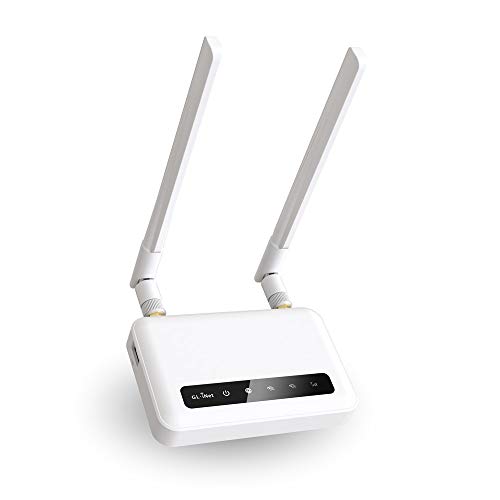
- Compact and light at 86 grams, with two detachable external antennas
- AT and T IoT certified and compatible with T-Mobile, with bands suited to the United States market
- MicroSD slot up to 128 GB for local file and media sharing
The GL.iNet GL-X750V2, known as the Spitz, is a compact 4G LTE router aimed at rural areas, RVs, offshore use, and commercial Internet of Things applications. It is much smaller and lighter than a standard home router, measuring 115 x 74 x 22 mm and weighing 86 grams, so it fits easily in a bag, mounts on a wall, or sits in a vehicle. Despite that size, it is a complete dual-band 4G router with a built-in SIM card slot, two detachable external antennas, and two Ethernet ports. It is certified as an AT and T IoT device and is also compatible with T-Mobile in the United States, working with LTE bands B2, B4, B5, B12, B13, B14, B66, and B71.
Why it fits this angle is its combination of portability and open firmware. The Spitz runs OpenWrt pre-installed, which means the firmware is open source and can be extended with packages and custom settings. It supports more than 30 VPN service providers, with OpenVPN and WireGuard included, through a VPN tunnel. That makes it a strong choice for point-of-sale terminals, ATMs, remote sensors, and other deployments where the network carries sensitive data. It also supports Cloudflare DNS over TLS, which encrypts DNS queries for extra privacy.
Key specs taken from the product page include a Cat 4 LTE module, dual-band Wi-Fi at 300 Mbps on 2.4 GHz and 433 Mbps on 5 GHz, a micro SIM card slot, a microSD slot that supports cards up to 128 GB, two 10/100 Mbps Ethernet ports, a USB 2.0 port, and a QCA9531 processor running at 650 MHz with 128 MB of DDR2 memory and 16 MB of flash storage. The router offers four ways to get online: cable, repeater, 3G or 4G modem, and tethering. It supports IPv6 and comes with a two-year warranty. The model number is GL-X750V2C4.
Pros:
Cons:
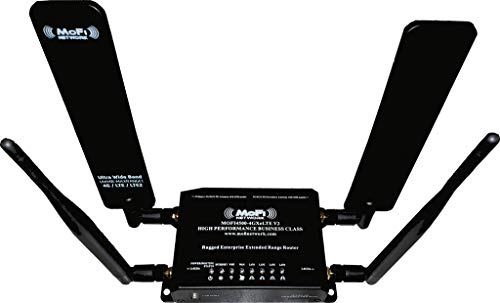
3. MOFI4500-4GXeLTE-SIM8-V3 4G LTE Router
- LTE Cat 7 with download speeds of up to 300 Mbps and two-carrier aggregation
- Wide carrier support for AT and T, T-Mobile, and Verizon, with 16 LTE bands listed
- Automatic failover to 4G LTE and multi-WAN support for business continuity
- Band locking and broad VPN support, including IPSec, OpenVPN, and WireGuard
The MOFI4500-4GXeLTE-SIM8-V3 is a compact, rugged 4G LTE router built for industrial, mobile, and remote use. It is designed for situations where the connection must stay up: RVs, kiosks, ATMs, remote offices, and off-grid sites. The router uses a Sierra Wireless EM7411 cellular module and supports a wide range of LTE bands optimized for North America, including bands B2, B4, B5, B7, B12, B13, B14, B17, B25, B26, B41, B42, B43, B48, B66, and B71. It is compatible with AT and T, T-Mobile, and Verizon, which gives buyers more choice of carrier than many single-network 4G routers.
Why it fits this angle is its focus on stability and carrier range. The MOFI4500 supports LTE Cat 7, with maximum download speeds of 300 Mbps and upload speeds of 150 Mbps, which is twice the cellular download ceiling of the Cat 4 routers in this guide. It also supports two-carrier aggregation, which combines two cellular channels to improve throughput and coverage. The router includes multi-WAN support and automatic failover to 4G LTE, so a business or remote site can keep working when a primary connection fails. Built-in band locking lets advanced users lock the router to a specific LTE band for a steadier signal, and VPN support covers IPSec, OpenVPN, WireGuard, SSL, PPTP, and L2TP.
Key specs taken from the product page include a Sierra Wireless CAT7 LTE modem, maximum data speeds of 300 Mbps download and 150 Mbps upload, a full-size 2FF SIM slot, four LAN ports plus one WAN port at 10/100 Mbps, a front USB 2.0 port, two 5 dBi external SMA antennas for cellular signal, two 5 dBi external reverse SMA antennas for Wi-Fi, Wi-Fi 4 at 802.11g and 802.11n, and dimensions of 110 x 85 x 30 mm with a weight of 340 grams. The box includes the MOFI4500-SIM8 router, two 2.4 GHz Wi-Fi antennas, a 6-foot CAT5 Ethernet cable, a UL-certified 12-volt power supply, a SIM card adapter kit, and instructions. The model number is MOFI4500-4GXeLTE-SIM8-COMBO, and the manufacturer is MOFINETWORK.
Pros:
Cons:
Buying Guide: How to Choose the Best 4G Router
Check carrier compatibility first
Carrier compatibility is the single most important check when buying a 4G router. A router that works well on one network may not work at all on another, because carriers use different LTE bands and different plan rules. Before ordering, confirm that the router supports the bands used by the chosen carrier in the area where it will be used. The Spitz lists LTE bands B2, B4, B5, B12, B13, B14, B66, and B71, and the MOFI4500 lists 16 bands including B2, B4, B5, B12, B13, B14, B17, B66, and B71. Also confirm the plan type. Some carriers require a dedicated data plan or an IoT plan for a router, and a normal phone plan may not work or may be limited. Ask the carrier whether the plan allows router use, whether there is a data cap, and whether speeds are reduced after a set amount of data.
Understand LTE categories
LTE category, often written as Cat 4, Cat 6, Cat 7, or Cat 12, describes the maximum cellular speed the modem can reach. Cat 4 routers, such as the Cudy LT500 and the GL.iNet Spitz, top out at 150 Mbps download. Cat 7 routers, such as the MOFI4500, reach up to 300 Mbps download. Higher categories also tend to support carrier aggregation, which combines two or more cellular channels for better speed and coverage. For browsing, email, video calls, and streaming on one or two screens, Cat 4 is usually enough. For several people streaming at once, a remote office, or faster downloads, a higher category such as Cat 7 is worth the extra cost. The stated maximum is a ceiling under ideal conditions; real-world speed depends on signal strength, distance from the tower, congestion, and the data plan.
Match Wi-Fi and ports to the household
Wi-Fi standard and Ethernet ports decide how well the router serves devices inside the building. Dual-band Wi-Fi, with separate 2.4 GHz and 5 GHz bands, gives more flexibility than a single 2.4 GHz band. The 5 GHz band is faster over short distances, while the 2.4 GHz band reaches further through walls. The Cudy LT500 offers dual-band AC1200 Wi-Fi, the Spitz offers dual-band AC750 Wi-Fi, and the MOFI4500 offers single-band Wi-Fi 4 on 2.4 GHz. Count the wired devices before buying: a TV, a PC, a game console, a printer, and a security camera system can fill four ports quickly.
Antennas, SIM size, and data plans
Antennas make a real difference for a 4G router, especially in rural areas or inside buildings with thick walls. External antennas can be positioned or replaced to improve reception, while internal antennas are fixed and harder to adjust. The Cudy LT500 has four high-gain antennas, the Spitz has two detachable external antennas, and the MOFI4500 has two external cellular antennas plus two external Wi-Fi antennas. If the signal is weak, look for a router with external SMA antenna connectors, which allow an upgrade to a larger or outdoor antenna. Place the router near a window, high up, and away from thick metal objects.
The Cudy LT500 takes a nano SIM, the Spitz takes a micro SIM, and the MOFI4500 takes a full-size SIM, with an adapter kit included in the box. A 4G router also needs a data plan with enough monthly data, since streaming video, cloud backups, and software updates use data quickly.
Failover, VPN, and where a 4G router works best
For a home office or a business, failover and VPN support can be as important as speed. Failover means the router switches to 4G automatically when the main wired connection fails, then switches back when it returns. The Cudy LT500 supports WAN, WISP, and 4G backup, and the MOFI4500 supports multi-WAN and automatic failover to 4G LTE. VPN support matters when the network carries work data or sensitive transactions. The Spitz supports more than 30 VPN providers with OpenVPN and WireGuard, the Cudy LT500 supports ZeroTier, WireGuard, OpenVPN, IPSec, L2TP, and PPTP, and the MOFI4500 supports IPSec, OpenVPN, WireGuard, SSL, PPTP, and L2TP. OpenWrt firmware on the Spitz adds further options for advanced users.
A 4G router works best where fixed broadband is slow, unreliable, or unavailable. Rural homes, cabins, farms, boats, RVs, construction sites, and temporary offices are the classic cases. It also works well as a backup connection for a home or office that already has wired broadband but cannot afford downtime. A 4G router is less suited to a household that already has fast, reliable fiber and uses very large amounts of data every month, because a wired connection usually offers higher speeds and no data cap. Before committing to 4G as the main connection, check the signal strength at the location, confirm the data plan, and consider a router with external antennas and failover support.
Frequently Asked Questions
Do 4G routers need a SIM card?
Yes. A 4G router needs a SIM card with an active data plan from a mobile carrier. The SIM card connects the router to the 4G LTE network, and the router then shares that connection over Wi-Fi and Ethernet. Without a SIM card, the router cannot connect to a cellular network, although some models can still work as a normal wired router or as a Wi-Fi repeater. Check the SIM size the router takes, confirm the plan allows router use, and make sure the plan has enough data for the household.
Can a 4G router replace home broadband?
A 4G router can replace home broadband in many cases, especially in rural areas where cable or fiber is unavailable or slow. It works well for browsing, streaming, video calls, and remote work. Whether it is a good replacement depends on signal strength, data caps, and speed. If the 4G signal is strong and the data plan has a generous allowance, a 4G router can serve as the main connection. A 4G router also makes an excellent backup connection alongside wired broadband.
What speed can I expect from a 4G router?
Speed depends on the LTE category, the signal, the carrier, and the plan. Cat 4 routers top out at 150 Mbps download, while Cat 7 routers reach up to 300 Mbps download. Real-world speeds are usually lower than the maximum, because signal strength, distance from the tower, and network congestion all affect performance. A router in a strong signal area may reach speeds close to the ceiling, while a router in a weak signal area may run much slower. External antennas and good placement near a window can improve the result.
How many devices can a 4G router support?
It depends on the model. The Cudy LT500 lists support for more than 40 devices. The practical limit depends on how much data each device uses, since a router can handle many idle devices but only a few streaming video at once.
Conclusion
The best 4G router depends on how and where it will be used. The Cudy LT500 is the best choice for a simple home setup, with dual-band AC1200 Wi-Fi, four Ethernet ports, and WAN plus 4G failover. The GL.iNet GL-X750V2 Spitz is the best choice for RVs, cabins, and IoT deployments, with a compact body, OpenWrt firmware, and strong VPN support. The MOFI4500-4GXeLTE-SIM8-V3 is the best choice for rugged rural and business use, with Cat 7 LTE speeds of up to 300 Mbps download, wide carrier support, automatic failover, and band locking. Before buying, confirm carrier compatibility, check the LTE bands and the SIM size, and choose a data plan with enough monthly data. Check current price on Amazon for the model that fits the location and the household, and confirm the listing details on the product page before ordering.
FAQ
Do 4G routers need a SIM card?
Can a 4G router replace home broadband?
What speed can I expect from a 4G router?
How many devices can a 4G router support?
More from Amazon
Programs that pair well with the guide above. Offers and eligibility are set by Amazon and may change.
Free shipping on eligible items, Prime Video and more. Eligible new members can start with a free trial.
Start a Prime free trialA Prime membership for ages 18-24 with a trial period. Eligibility is set by Amazon.
See Prime for Young AdultsAudiobooks and podcasts to listen to on the go. Eligible new members can start with a free trial.
Try Audible freeAd-free music streaming. Eligible new subscribers can start with a free trial.
Try Music Unlimited freeAs an Amazon Associate we earn from qualifying purchases.