Key takeaways
- 32GB: Suitable mainly for basic front-only cameras and occasional driving. Expect approximately 3 to 8 hours of footage.
- 64GB: A practical minimum for many front-only cameras and some dual-camera systems. It may hold roughly 6 to 16 hours, depending on resolution.
- 128GB: The best general-purpose choice for many front-and-rear cameras, potentially holding 12 to 30 hours.
- 256GB: Useful for commercial driving or frequent parking surveillance, but only if the camera explicitly supports it. Some cameras accept 256GB cards only after formatting in the device.
Buying a memory card for a dash cam seems simple until recordings disappear, the camera stops recording, or a “full” card forces you to format it at the worst possible time. The most common mistake is choosing a card by capacity alone. A 128GB card is not automatically better than a 64GB card if it is too slow, not designed for constant rewriting, or incompatible with the camera’s file system.
Another frequent error is underestimating how quickly high-resolution footage uses space. A front-and-rear camera can create two video files at once, while parking mode may save short clips throughout the day. Buyers also overlook heat, power requirements, installation space, and whether the camera supports a card larger than 128GB. Use this guide to compare dash cam storage as a complete system rather than as a single number on a package.
Our top picks


As an Amazon Associate we earn from qualifying purchases at no extra cost to you.
Decide These 3 Things First
- How many cameras are recording? A front-only camera needs much less storage than a 4K front and 1080P rear system. Dual-camera footage can consume roughly 1.5 to 2.5 times as much space, depending on bitrate and compression.
- How long should footage remain available? If you only need the last several hours of driving, 64GB may be sufficient. If you drive for work, park outdoors, or want multiple days before files are overwritten, consider 128GB or 256GB—if the camera supports it.
- Will the card face constant rewriting and heat? Dash cams overwrite old clips continuously. Select a high-endurance microSD card rated for video recording, not a basic card intended for occasional phone or tablet use.
Size and Capacity
Storage capacity determines how much ordinary loop footage remains on the card before the camera begins replacing the oldest files. As a broad planning guide, a front 4K camera may use about 500MB to 1GB per hour, while a 1080P camera may use about 200MB to 500MB per hour. Actual consumption varies with bitrate, frame rate, audio, and the camera’s compression settings.
- 32GB: Suitable mainly for basic front-only cameras and occasional driving. Expect approximately 3 to 8 hours of footage.
- 64GB: A practical minimum for many front-only cameras and some dual-camera systems. It may hold roughly 6 to 16 hours, depending on resolution.
- 128GB: The best general-purpose choice for many front-and-rear cameras, potentially holding 12 to 30 hours.
- 256GB: Useful for commercial driving or frequent parking surveillance, but only if the camera explicitly supports it. Some cameras accept 256GB cards only after formatting in the device.
Do not assume the printed capacity is fully available. Formatting and file management use a small portion of the card, and locked emergency clips reduce usable loop space. A 128GB card may provide closer to 115GB of practical space. Check the camera manual before buying; exceeding the stated limit can cause freezes, missing files, or repeated format prompts.
Material and Heat Resistance
For dash cam storage, “material” primarily means the card’s memory components, protective casing, and ability to tolerate a hot vehicle. A parked car can become extremely hot, and a card mounted behind a windshield may experience more stress than one used indoors.
Choose a microSD card labeled High Endurance or specifically rated for continuous video surveillance. These cards are designed for repeated program-and-erase cycles. A standard consumer card may work initially but wear out sooner under loop recording.
Look for operating-temperature information in the product specifications. A useful target is approximately -13°F to 185°F, though the camera itself may have a narrower operating range. Water resistance, shock resistance, and X-ray resistance are helpful safeguards, but they do not replace endurance. Avoid counterfeit or unbranded cards, particularly marketplace listings with unusually low prices and very high capacities.
Construction and Compatibility
Physical fit matters. Most dash cams use a microSD card, not a full-size SD card. The card should slide in smoothly, click securely, and sit flush enough that it does not interfere with a windshield mount, trim panel, or access door. Never force a card into a slot; a reversed or damaged card can bend the internal contacts.
Speed classifications are easy to misread. For most dash cams, a card marked UHS-I, U3, and V30 is a sensible target. V30 guarantees a minimum sustained write speed of 30MB per second under the relevant standard, while U3 also indicates a minimum write-speed class of 30MB per second. A faster-looking V60 or V90 card is usually unnecessary unless the camera specifically requires it.
Capacity and file-system compatibility are equally important. Cards up to 32GB are commonly formatted as FAT32, while larger cards often use exFAT. Some cameras support only FAT32 or require the camera to format the card itself. If the manual recommends a maximum capacity, a specific file system, or a particular brand family, follow that guidance rather than relying on the card’s speed rating alone.
Comfort and Performance
Storage performance affects reliability more than visible picture quality. Resolution is controlled by the camera, but insufficient sustained write speed can produce corrupted clips, dropped recordings, or a camera that repeatedly reboots.
For a front-only 1080P camera, a quality U1 card may sometimes be adequate, but U3/V30 high-endurance storage provides more margin. For 4K footage, dual-channel recording, or high-frame-rate modes, use U3/V30 unless the manufacturer specifies something different. A front 4K and rear 1080P camera may generate two separate streams, so both the capacity and sustained write performance need to be considered together.
Parking mode also changes the workload. Motion-triggered recording may create many short files, while time-lapse or buffered parking modes can write continuously. If parking mode is a major reason for buying the camera, prioritize a high-endurance card and a hardwire kit with low-voltage protection. A typical dash cam draws about 3 to 6 watts while recording, though a dual-camera or parking-mode setup can draw more. The storage card itself uses very little power; the camera and power-management system determine battery impact.
Price Tiers
Price is a useful screening tool, but capacity and endurance matter more than a premium-looking label.
- Budget storage: $8 to $18 for 64GB, or about $12 to $25 for 128GB. Choose only a reputable brand with a stated speed class. This tier works for occasional driving and lower-resolution cameras.
- Midrange storage: $18 to $35 for 128GB, or about $30 to $55 for 256GB. This is the sweet spot for most front-and-rear systems, especially when the card is explicitly rated for high endurance.
- Premium storage: $35 to $70 for 256GB or specialized high-endurance options. Pay more when the camera supports the capacity, the vehicle is used daily, or parking surveillance creates heavy write cycles.
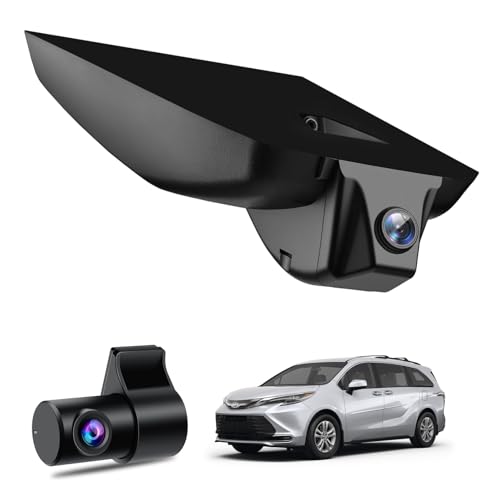
Complete dash cam packages may include a card. For example, an OEM-style 4K front and 1080P rear package may cost around $180 to $270 and include a 64GB or 128GB card. Treat the bundled card as a starting point, not proof that it is the best long-term choice. Confirm its capacity, speed class, and endurance rating before relying on it for important footage.
Warranty and Replacement Support
A storage card should have a clear warranty and a manufacturer willing to replace failed media. Warranty length commonly ranges from 1 year for basic cards to 5 years or a stated endurance limit for specialized products. Some warranties exclude continuous surveillance use, so read the terms rather than assuming any “lifetime” promise applies inside a dash cam.
Keep receipts and record the card’s model number. If the camera reports card errors, do not simply reformat it repeatedly. First back up important files, test the card in a computer if possible, and replace it if errors return. Many dash cam manufacturers recommend formatting every few weeks or once a month. That can help file management, but it cannot restore worn-out memory.
Delivery and Assembly
Storage is easy to install, but timing and setup still matter. A microSD card should arrive in sealed retail packaging, not loose in an envelope. Before installing it, inspect the contacts and compare the printed capacity and model with the order. Insert the card while the camera is powered off, then format it through the camera’s menu if that option is available.
After installation, make a short test recording and verify that the front and rear files save correctly. Check that the date and time are accurate, because incorrect timestamps can reduce the usefulness of evidence. If you are fitting a camera with a hidden power cable, leave enough access to remove the card without dismantling trim. For a dual-camera setup, allow at least 10 to 15 minutes for testing both views, loop recording, emergency locking, and playback.
Spec Checklist
| Spec | Budget | Mid | Premium |
|---|---|---|---|
| Capacity | 64GB | 128GB | 256GB, if supported |
| Speed class | U1 or U3 | U3/V30 | U3/V30 or manufacturer-specified equivalent |
| Endurance | Basic or limited endurance | High Endurance | High Endurance with stated write rating |
| Best use | Front-only, occasional driving | 4K front plus 1080P rear | Daily driving and parking mode |
| Typical price | $8–$25 | $18–$55 | $35–$70 |
Red Flags
- A very high capacity at an implausibly low price.
- No U3, V30, or sustained-write specification for a 4K camera.
- No high-endurance designation for continuous loop recording.
- A seller that does not identify the exact model number or warranty.
- A card that repeatedly causes “memory error,” “slow card,” or “format card” messages.
- A camera bundle that includes a card but does not state its capacity or speed class.
- Buying 256GB storage without confirming that the dash cam supports that capacity and file system.
FAQ
Is 128GB enough for a dual dash cam?
For many 4K front and 1080P rear systems, 128GB is the best starting point. It may provide roughly 12 to 30 hours of combined footage, depending on bitrate and settings. Choose 256GB only when the camera supports it and you need longer retention.
How often should I replace a dash cam memory card?
There is no universal schedule. A daily driver using parking mode may need replacement sooner than an occasional driver. Watch for corrupted clips, missing recordings, slow-card warnings, or repeated formatting requests. A high-endurance card with a stated write rating is preferable to replacing a basic card frequently.
Can I use a normal phone microSD card?
You can sometimes use one, particularly for occasional driving, but it is not the safest choice for continuous loop recording. Phone cards are generally optimized for intermittent use. A high-endurance card is better suited to repeated writing and temperature changes.
Should I leave the card in the camera permanently?
Yes, if the card is compatible and healthy. Removing it unnecessarily increases the chance of dust, bent contacts, or lost files. Format it through the camera at the interval recommended by the manufacturer, and periodically copy important clips to a computer or secure cloud-backed storage.