Key takeaways
- Fixed-mount and presentation barcode scanners compared, from the Zebra DS9208 to desktop omnidirectional imagers, on mounting, sensing and symbologies.
As an Amazon Associate we earn from qualifying purchases.
A fixed-mount barcode scanner earns its place by staying exactly where you put it and reading codes that are presented to it, all day, without a trigger pull. Counters, packing benches, kiosks and production points all use the same idea in different housings: a presentation imager on a counter, an omnidirectional desktop unit, or a scanner held in a stand that switches to automatic sensing. The best fixed-mount barcode scanners share fast omnidirectional reading of 1D and 2D codes, automatic sensing that wakes on movement, and a stable USB link to the host. A note on scope before the picks: true embedded industrial fixed mount engines exist for conveyor lines, but the models below are the fixed position scanners that can be verified on Amazon US today, covering counter, bench and kiosk style mounting. Each one is listed with its identifier so the exact product can be checked.
Disclosure: This article contains affiliate links. If you buy through these links, we may earn a commission at no additional cost to you.
How to Choose
Start with the scan engine. A 1D laser reads printed linear codes quickly and at longer distances, but it cannot read QR codes, Data Matrix or codes shown on a screen. A 2D area imager reads 1D and 2D codes on paper and on screens, handles damaged or poorly printed labels better, and is the safer long term choice for mixed label stock. Next, separate two distances that are often confused: scanning range is how far the scanner sits from the code, while transmission range is how far the operator can walk from the host computer or cradle. A receiving dock may need neither in extreme form, while a stockroom may need one or both. Connectivity follows the workflow: corded USB is simple and never needs charging, 2.4 GHz links to a receiver or cradle, and Bluetooth pairs with phones, tablets and computers. Finally, match the housing to the floor. Sealed housings described with codes such as IP65 or IP67 resist dust and water, and drop resistance to concrete matters anywhere pallets, forklifts and ladders are in daily use. Check the symbology list against your labels too, including Code 128, Interleaved 2 of 5 and any GS1 formats your suppliers use.
For fixed use, the mount and the sensing behaviour matter more than the trigger. Decide how the scanner will be held: a purpose built presentation housing sits on the counter and reads in any orientation, a desktop omnidirectional unit uses a wide window for fast pass through scanning, and a handheld in a stand gives you both fixed sensing and occasional trigger work at the cost of a less stable aim. Check the sensing modes available: auto sensing that reads when a code enters the window, continuous mode for conveyor style feeding, and a sleep behaviour that wakes on movement to save the window from constant illumination. Field of view and resolution decide whether small codes on parts or large codes on cartons read first time, and the cable length and interface decide how clean the installation looks once the bench is built around it.
The Picks in Detail
1. Zebra DS9208 Hands-Free Presentation Scanner Kit

ASIN: B01C65YOE4
Amazon US: https://www.amazon.com/dp/B01C65YOE4
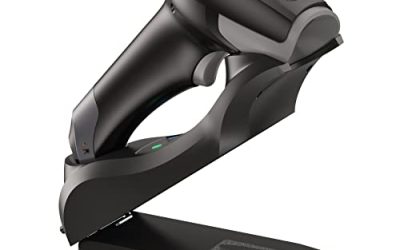
The DS9208 is the reference presentation scanner in this group, a hands free standard range imager supplied as a kit with a shielded USB cable. It reads 1D and 2D codes from printed labels and from mobile phone screens, which covers loyalty codes and digital coupons as well as product labels, and its small footprint sits comfortably at a counter or bench point. The spherical window design reads codes presented at almost any angle, so operators pass items rather than aim them.
Who it suits: Counters, returns desks and bench points that need a compact, proven presentation scanner for mixed paper and screen codes.
Considerations: It is a standard range counter unit, not a conveyor engine, so codes must be presented within its window area. The fixed position also means a second handheld is still needed for oversized items that cannot be brought to the counter.
2. Tera 9000 Desktop Omnidirectional Barcode Scanner

ASIN: B0CZ12RGRW
Amazon US: https://www.amazon.com/dp/B0CZ12RGRW
The Tera 9000 is a desktop omnidirectional unit with a scan head that adjusts up to 30 degrees, a 640 x 480 CMOS sensor and a wired USB connection that needs no driver setup. It reads 1D and 2D codes from digital and printed surfaces, supports hands free operation as items pass the window, and includes volume adjustment for the confirmation beep, a small detail that matters on a shared bench. The maker lists a very high scan throughput for the platform style window, suited to steady streams of smaller items.
Who it suits: Packing benches and retail counters with a steady flow of items that should be scanned by presentation rather than by picking up a scan gun.
Considerations: The wired USB link fixes it to one host, and the adjustable head is a bench feature, not a sealed industrial mount, so it belongs indoors on a stable surface. Very large cartons still need a handheld partner.
3. Symcode 2D Desktop Omnidirectional Hands-Free Scanner

ASIN: B09F2WR8G6
Amazon US: https://www.amazon.com/dp/B09F2WR8G6
This Symcode desktop unit pairs an omnidirectional window with infrared auto sensing, so it wakes and reads as a code enters its field without any button press. The sensor resolves 640 x 480 with accuracy down to 3 mil for small codes, the housing carries IP54 dust and splash protection, and the maker describes drop resistance from 1.5 metres, unusual for a counter unit. It connects by USB cable with a 1.5 metre lead and reads common 1D and 2D codes from labels, paper and screens, including some damaged and fuzzy codes.
Who it suits: Fixed points where small codes, screen codes and hands free sensing meet, such as pharmacy style counters, ticket desks and parts benches.
Considerations: Desktop units read what is presented to them, so workflow design, where staff place items in front of the window, decides real world speed. The USB lead length may need a hub position planned on longer benches.
4. Anyeast 003 Barcode Scanner with Stand

ASIN: B0B4VCSMHS
Amazon US: https://www.amazon.com/dp/B0B4VCSMHS
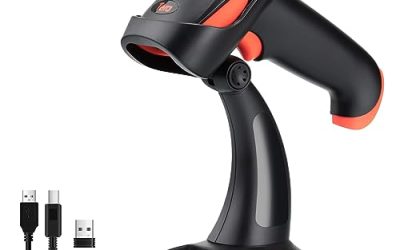
The Anyeast 003 takes the stand mounted route: a handheld CMOS imager that sits in an adjustable stand and switches between key trigger, auto sensing and continuous scanning modes. In the stand it behaves as a fixed scanner for pass under work; lifted out, it handles the awkward item. It reads 1D codes including GS1 DataBar and 2D codes including Data Matrix, PDF417 and Aztec from paper and screens, connects by USB with plug and play setup, and works across Windows, Mac, Linux and Android hosts.
Who it suits: Benches that mostly scan in a fixed position but regularly meet an item too big or too oddly shaped to present to a counter window.
Considerations: A stand mounted handheld is only as stable as its stand setup, so fix the stand position during installation rather than letting it wander. It will not read driver licence PDF417 codes, which the maker states plainly.
Comparison Table
| Product | Type and connection | Standout trait | Best for |
|---|---|---|---|
| Zebra DS9208 Hands-Free Presentation Scanner Kit | Hands free presentation imager | Reads paper and screen codes | Counters and returns desks |
| Tera 9000 Desktop Omnidirectional Barcode Scanner | Desktop omnidirectional, USB | Adjustable scan head | Packing benches |
| Symcode 2D Desktop Omnidirectional Hands-Free Scanner | Desktop omnidirectional, USB | Auto sensing, small code resolution | Parts and ticket counters |
| Anyeast 003 Barcode Scanner with Stand | Handheld in stand, USB | Three scan modes in the stand | Benches with awkward items |
All four are fixed position imagers with automatic or presentation scanning. Differences that decide a purchase are the mount style, the window size and the sensing modes, which are detailed per product above.
FAQ
What is the difference between fixed-mount and presentation scanners?
In practice the terms overlap. Fixed mount usually means the scanner is installed in one position, on a counter, bracket, stand or kiosk panel, and reads codes presented to it. Presentation describes how it scans: omnidirectionally, without aiming, when a code enters the window. Most products in this guide are both.
Can a fixed scanner read codes from phone screens?
The imagers in this guide can, because they photograph the code rather than reflecting a laser line off it. That matters for loyalty codes, digital coupons and ticket wallets. Pure laser fixed units cannot read screens, which is one reason imagers dominate new counter installations.
Auto sensing or continuous mode for a bench?
Auto sensing reads when a code appears and sleeps between items, which suits counters and benches with gaps between scans. Continuous mode keeps the window live and reads everything presented in sequence, which suits fast packing lines. Most units here support both, so the choice is a setting, not a product decision.
How do I mount a scanner under a counter or in a kiosk?
Use the maker’s bracket or stand points, keep the window clear of the counter edge shadow, and test with your real labels at the real presentation distance before final fixing. Desktop units in this guide are designed for surface placement; panel embedding needs a model built for it, so confirm the housing before planning a cut out.
Conclusion
For a classic counter installation, the Zebra DS9208 remains the safe centre of gravity. The Tera 9000 and the Symcode desktop unit add adjustable or auto sensing wide window scanning for busier benches, with the Symcode adding small code resolution and splash protection. Choose the Anyeast 003 when the fixed position must occasionally become a handheld. Whichever you pick, design the presentation point first, item height, window angle and cable route, and the scanner will feel fast regardless of model.
FAQ
What is the difference between fixed-mount and presentation scanners?
Can a fixed scanner read codes from phone screens?
Auto sensing or continuous mode for a bench?
How do I mount a scanner under a counter or in a kiosk?
More from Amazon
Programs that pair well with the guide above. Offers and eligibility are set by Amazon and may change.
Free shipping on eligible items, Prime Video and more. Eligible new members can start with a free trial.
Start a Prime free trialA Prime membership for ages 18-24 with a trial period. Eligibility is set by Amazon.
See Prime for Young AdultsAudiobooks and podcasts to listen to on the go. Eligible new members can start with a free trial.
Try Audible freeAd-free music streaming. Eligible new subscribers can start with a free trial.
Try Music Unlimited freeAs an Amazon Associate we earn from qualifying purchases.