Key takeaways
- Identify the exact vehicle configuration. Record the year, make, model, trim, and factory audio package. Look for changes between trims, not just model years.
- Check the opening and rear clearance. Confirm single-DIN or double-DIN fit, chassis depth, plug space, and any dash-kit requirement.
- List what you need to retain. Include steering-wheel controls, camera, factory amplifier, USB ports, microphone, and vehicle settings or chimes.
- Match the receiver’s inputs and connections. Confirm phone compatibility, camera input, preamp outputs, and wireless features on the exact model.
- Plan the installation and test before reassembly. A qualified installer can verify the harness and vehicle interfaces. Before refitting trim, test audio, calls, steering-wheel controls, the camera, and all connected speakers.
Best Car Stereos for Better In-Car Audio
The best car stereos are the ones that fit your dashboard and wiring, connect reliably to your phone, and provide enough clean power for your speakers; for most drivers, a name-brand 6.8- or 7-inch touchscreen receiver with wired or wireless Apple CarPlay and Android Auto is the most versatile upgrade.
There is no single best choice for every vehicle. A shallow dashboard, factory steering-wheel buttons, an existing backup camera, and plans to add an amplifier can each change which receiver makes sense. Use the comparison below to narrow the format first, then check the fit and integration requirements before buying.
Our top picks


As an Amazon Associate we earn from qualifying purchases at no extra cost to you. Ratings are shown as listed on Amazon.
Quick comparison
| Receiver type or example | Screen | Phone integration | Amplifier output | Installation depth | Best fit |
|---|---|---|---|---|---|
| Single-DIN mechless receiver, such as a Pioneer MVH-S322BT | No large touchscreen; single-DIN face | Bluetooth; features vary by model | Typically about 14–22 W RMS per channel | Usually around 6 inches; verify the exact unit | Older or compact dashboards, lower-cost upgrades |
| Double-DIN touchscreen receiver, such as a Sony XAV-AX4000 | 6.95 inches | Wireless Apple CarPlay and Android Auto | About 20 W RMS per channel | Check the chassis drawing; the screen size does not indicate depth | Drivers who want a large screen and wireless phone access |
| Double-DIN touchscreen receiver, such as a Kenwood DMX809S | 6.8 inches | Wireless Apple CarPlay and Android Auto | About 22 W RMS per channel | Check the model’s installation dimensions and clearance | Touchscreen use with room to expand the audio system |
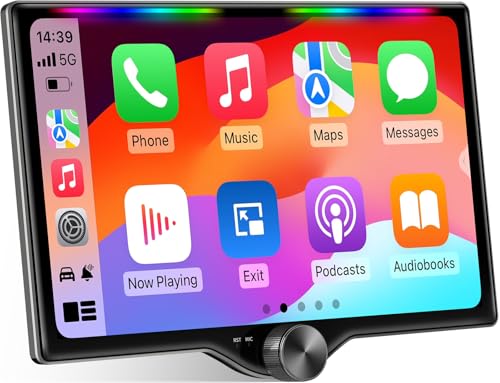
| Floating-screen receiver, such as an Alpine iLX-F511 | 11 inches | Apple CarPlay and Android Auto; connection options vary by setup | About 16 W RMS per channel | Screen projects outward; verify dash, vent, and control clearance | Vehicles where a large display is preferred over a flush fit |
Output figures are representative RMS ratings, not peak-watt marketing numbers. Confirm specifications for the exact model and region before purchase: product revisions and available features can differ. An aftermarket head unit’s built-in amplifier is intended for modest speaker power, not for reproducing the high peak output sometimes advertised on a box.
Choose by your situation
| Your situation | What to prioritize | Likely direction |
|---|---|---|
| You mainly want hands-free calls and music in an older car | Bluetooth, physical controls, simple wiring, and a suitable single-DIN fit | A basic single-DIN receiver |
| You use navigation, messages, and audio apps on most drives | Responsive touchscreen, CarPlay or Android Auto, and a reliable wired or wireless connection | A 6.8- or 7-inch touchscreen receiver |
| Your dashboard is shallow or crowded | Chassis depth, wiring clearance, and screen position—not just the faceplate size | A shallow-chassis model or a carefully planned floating screen |
| You want to keep factory steering-wheel buttons or a backup camera | Vehicle-specific interface support and compatible camera inputs | A receiver with appropriate inputs, plus the required vehicle interface or adapter |
| You plan to add a subwoofer or external amplifier | Preamp outputs, crossover and time-alignment controls, and the right number of channels | A receiver designed for system expansion |
What matters before you buy
Screen size is only part of fit
Single-DIN and double-DIN describe standard front-panel sizes, not how much space is behind the dash. A double-DIN receiver can have a deep chassis that collides with ducting, a crossbar, or bundled factory wiring. Measure the available cavity from the mounting surface to the first obstruction, allowing room for the harness and plugs. Check the manufacturer’s chassis drawing, not just the advertised screen diagonal.
Floating displays can add a large, easy-to-read screen without a matching oversized dash opening. But they may cover vents, block access to controls, or sit too close to a gear selector. Before ordering, compare the screen’s height and reach with the actual dashboard layout.
Phone compatibility: wired or wireless?
Apple CarPlay and Android Auto bring supported phone apps to the receiver’s display; they are not the same as mirroring every phone app. Wired connections charge the phone and avoid wireless pairing or interference issues. Wireless operation is more convenient for short trips but uses the phone’s battery and may connect less consistently in some vehicles. Confirm which connection method the exact receiver supports for your phone.
Power ratings and sound quality
Compare RMS output rather than peak output. Many receivers deliver roughly 14–22 watts RMS per channel into a typical speaker load. That can be adequate for replacing a factory radio with efficient speakers at everyday listening levels. If you want substantially more volume, stronger bass, or clean output at high levels, plan for an external amplifier rather than choosing a head unit by its largest printed wattage.
For an amplifier upgrade, look at the number and voltage of preamp outputs, adjustable crossovers, and channel controls. These features make it easier to connect front and rear speakers and a subwoofer without relying on speaker-level conversion. They matter less if you are keeping the factory speakers and do not expect to expand later.
Steering-wheel controls and backup cameras
Replacing the radio does not automatically preserve factory steering-wheel controls. Many vehicles need a separate integration interface, and some also require a vehicle-specific wiring harness or antenna adapter. Check compatibility by vehicle year, make, model, and trim; factory audio packages can change the requirements.
For a backup camera, check that the receiver has a camera video input and a trigger input, then verify that the factory camera uses a compatible signal and connector. An adapter may be needed to retain the original camera. Some vehicles also require a separate interface to keep factory menus, warning chimes, or other radio-linked functions.
Budget for the complete installation
The receiver price is only one part of the job. A basic single-DIN model may fall around $80–$180, mainstream touchscreen receivers around $250–$600, and large premium-screen or feature-rich models around $600–$1,200 or more. These are broad market ranges, not fixed prices.
Set aside additional money for a dash kit, vehicle-specific wiring harness, steering-wheel-control interface, antenna adapter, camera adapter, and professional installation if needed. Depending on the vehicle and parts, integration components can add roughly $30–$250 or more. Complex factory amplifiers, premium audio packages, and unusual dashboards can raise the total substantially. Get a parts-and-labor quote that names which factory functions will remain usable.
Fit-check steps before ordering
- Identify the exact vehicle configuration. Record the year, make, model, trim, and factory audio package. Look for changes between trims, not just model years.
- Check the opening and rear clearance. Confirm single-DIN or double-DIN fit, chassis depth, plug space, and any dash-kit requirement.
- List what you need to retain. Include steering-wheel controls, camera, factory amplifier, USB ports, microphone, and vehicle settings or chimes.
- Match the receiver’s inputs and connections. Confirm phone compatibility, camera input, preamp outputs, and wireless features on the exact model.
- Plan the installation and test before reassembly. A qualified installer can verify the harness and vehicle interfaces. Before refitting trim, test audio, calls, steering-wheel controls, the camera, and all connected speakers.
Ownership details people often overlook
Touchscreens collect fingerprints, so clean them with a soft microfiber cloth and follow the manufacturer’s instructions; harsh cleaners can damage coatings. Keep the receiver’s software current when updates are offered, and check that your phone’s operating system remains compatible. If wireless phone projection disconnects, first test a known-good cable or reconnect the phone before assuming the receiver is faulty.
Installation mistakes are often more costly than the receiver itself. Forcing a deep unit into a shallow cavity can pinch wiring, while incorrect connections can disable factory features or create electrical problems. Use the correct vehicle harness rather than cutting factory wiring where possible, and leave enough slack to service the unit later.
The bottom line
For a practical all-around upgrade, start with a 6.8- or 7-inch receiver that supports the phone connection you actually use, has sufficient RMS power for your current speakers, and fits the measured dash cavity. Choose a simple single-DIN model when space or budget is the priority; choose a floating screen only after checking visibility and control clearance. Most importantly, confirm camera and steering-wheel integration for your exact vehicle before treating any receiver as a drop-in replacement.