Our Short List of 3
All 4 Picks at a Glance
| Product | Specs | Action |
|---|---|---|
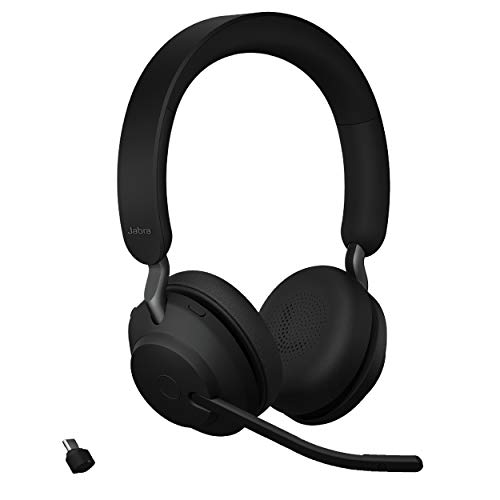 1. Jabra Evolve2 65 UC Stereo — Best Overall Wireless | Check price on Amazon | |
 2. Poly Blackwire 5220 — Best Wired All-Rounder | Check price on Amazon | |
 3. Logitech Zone Wired — Best Wired for Noisy Desks | Check price on Amazon | |
 4. Poly Voyager Focus 2 — Best Active Noise Cancelling Upgrade | Check price on Amazon |
Key takeaways
- Find the best noise cancelling headsets for call centers: wired and wireless UC headsets with boom mics, all-day comfort, and clear call audio for agents.
As an Amazon Associate I earn from qualifying purchases.
The Short Answer
If you spend most of your working day on the phone, the headset matters more than almost any other piece of desk gear. A call center headset has to do three jobs at once: keep your voice clear for the caller, keep the room quiet for you, and stay comfortable through hour after hour of continuous wear. The best noise cancelling headsets for call centers are built around those three jobs, and they look different from ordinary headphones. They use a boom microphone that sits close to your mouth, they work with the calling platforms your team already uses, and they are designed to be worn for a full shift rather than a single meeting.
Our top pick is the Jabra Evolve2 65 UC Stereo: wireless, with a dedicated USB adapter and memory foam ear cushions for passive noise cancelling. The Poly Blackwire 5220 is the wired choice that never needs charging, the Logitech Zone Wired suits closely spaced desks, and the Poly Voyager Focus 2 is the upgrade when the room is loud and you need active noise cancelling. Every headset here is a genuine call center headset with a boom microphone. None is a gaming headset or an earbud, and each link below goes to its Amazon product page so you can confirm the details on the listing before ordering.
Our Top Picks
- Best Overall Wireless: Jabra Evolve2 65 UC Stereo — wireless Bluetooth with a USB adapter, passive noise cancelling, and a long battery life for full shifts.
- Best Wired All-Rounder: Poly Blackwire 5220 — wired USB-C with a USB-A adapter and a 3.5 mm jack, flexible noise-cancelling boom microphone, and a light frame.
- Best Wired for Noisy Desks: Logitech Zone Wired — wired USB-C with a USB-A adapter, Teams certification, and a dual-microphone noise-cancelling system.
- Best Active Noise Cancelling Upgrade: Poly Voyager Focus 2 — wireless Bluetooth with three levels of active noise cancelling, a boom microphone with Acoustic Fence technology, and a charging stand described in the listing.
Quick Comparison
| Headset | Connection | Noise Cancelling | Wearing Style | Best For |
|---|---|---|---|---|
| Jabra Evolve2 65 UC Stereo | Wireless Bluetooth, USB-C adapter | Passive, memory foam ear cushions | Stereo, on-ear | All-day wireless wear |
| Poly Blackwire 5220 | Wired USB-C, USB-A adapter, 3.5 mm | Noise-cancelling boom microphone | Stereo, over-ear | Mixed-device desks |
| Logitech Zone Wired | Wired USB-C, USB-A adapter | Dual-microphone noise cancelling | Stereo, on-ear | Closely spaced desks |
| Poly Voyager Focus 2 (USB-A, with stand) | Wireless Bluetooth, USB-A adapter | Active, three levels | Stereo, over-ear | Loud rooms |
How to Choose
Wired or wireless
Wired headsets remove two failure modes entirely: a flat battery and a lost wireless connection. If your agents sit at fixed desks all day, a wired headset is the lower-maintenance choice. The Blackwire 5220 and the Logitech Zone Wired both draw power from the computer, so there is nothing to charge and nothing to pair.
Wireless headsets suit agents who stand up, walk to a filing cabinet, or move between desks during a shift. The Evolve2 65 and the Voyager Focus 2 both connect through a USB Bluetooth adapter rather than relying on the computer’s built-in Bluetooth, which keeps the connection stable and the call controls working. If you choose wireless, check the talk time on the listing and make sure the charging routine fits your shift pattern.
Noise cancelling: microphone versus earpieces
Two different things get called noise cancelling in headset listings, and they solve different problems. A noise-cancelling microphone filters out the room so the caller hears your voice and not the colleague at the next desk. Active noise cancelling in the earpieces filters out the room so you hear the caller and not the room. For call center work, the microphone matters most, because callers judge you on your voice. Earpiece cancellation matters next, because a quiet listening experience reduces fatigue over a long shift. The best headsets in this guide provide both: a noise-cancelling boom microphone and either passive isolation or active cancellation in the earpieces.
UC certification, comfort, and desk phones
UC stands for Unified Communications. A UC headset works with the calling platforms businesses use, including Microsoft Teams and Zoom, while a Teams-certified headset adds a dedicated Teams button. The Teams and UC versions of the same model are often separate listings with different model numbers, so confirm the variant on the listing before ordering. For comfort, weight and ear cushion material decide how a headset feels by hour six, so order one unit and let an agent wear it for a full shift before buying for the team. If your floor still runs desk phones rather than computer calling, confirm the adapter cable with your phone system supplier, because the headsets in this guide are USB and Bluetooth models built for computer-based calling.
The Picks in Detail
1. Jabra Evolve2 65 UC Stereo — Best Overall Wireless
The Jabra Evolve2 65 UC Stereo is the headset we recommend first for call center work. It is a wireless Bluetooth headset that connects to a computer through the included Jabra Link 380c USB-C adapter (with a USB-C to USB-A cable), so the connection does not depend on the computer’s built-in Bluetooth. The listing states up to 37 hours of music time — talk time is up to 35 hours with the busylight off — which covers several full shifts between charges, and the headset is designed for all-day wear with memory foam ear cushions and a lightweight frame.
Noise control on this model is passive: the ear cushions and the angled ear cups block out a large share of the surrounding sound, and the boom microphone uses noise-cancelling technology to keep your voice clear. A busylight on the ear cup shows colleagues that you are on a call, and the headset mutes when the boom is raised. The UC version listed here suits teams using more than one calling platform; Jabra also sells a Teams version under a different model number, so confirm the UC variant on the listing.
Pros:
– Wireless freedom with a dedicated USB adapter for a stable computer connection
– Long battery life that covers full shifts between charges
– Memory foam ear cushions and a light frame built for all-day wear
– Busylight that signals to colleagues when you are on a call
– UC version works across leading calling platforms
Cons:
– Passive noise cancelling only, so very loud rooms may still leak through
– Battery needs a charging routine, unlike a wired headset
– UC and Teams versions are separate listings, so the variant needs care when ordering
2. Poly Blackwire 5220 — Best Wired All-Rounder
The Poly Blackwire 5220 is the wired headset we recommend for desks that need to work with more than one device. It connects through USB-C, and the listing includes a tethered USB-A adapter and a 3.5 mm jack, so the same headset plugs into a newer laptop, an older laptop, or a phone. There is no battery to charge and nothing to pair.
The microphone is a flexible noise-cancelling boom that you position close to your mouth, and the ear cushions provide passive isolation from the room. The headset is certified for Microsoft Teams and Zoom, so call controls work with the platforms most call centers use. The listing gives a weight of 138 grams, and a carrying case is included in the box. The model number for this listing is 9P7X6AA, and the style is the 2024 version with USB-C and USB-A, so confirm that model number on the listing when ordering.
For a call center buying in volume, the Blackwire 5220 has a practical advantage: one headset covers every desk regardless of which ports the computer has. The cord tethers the agent to the desk, which is the main trade-off, but for fixed-desk agents that is rarely a problem.
Pros:
– Three connections in one box: USB-C, USB-A adapter, and 3.5 mm
– No battery to charge and nothing to pair
– Flexible noise-cancelling boom microphone
– Certified for Microsoft Teams and Zoom
– Light frame with a carrying case included
Cons:
– Wired only, so the agent stays tethered to the desk
– Passive earpiece isolation rather than active cancellation
– The cord needs cable management on a shared desk
3. Logitech Zone Wired — Best Wired for Noisy Desks
The Logitech Zone Wired is a wired USB headset built for open offices and closely spaced desks, which is exactly the layout of most call center floors. It connects through USB-C with a USB-A adapter included, and the cable is 1.9 metres long, which gives enough slack to move around the desk. The listing for this ASIN is the Microsoft Teams version, model number 981-000871, with Teams certification and a dedicated Teams button.
The microphone system uses two microphones: a directional main microphone and an omnidirectional secondary microphone, working together to cancel background sound. That dual-microphone design is aimed at the specific problem of nearby voices and keyboard noise leaking into calls, which is the dominant noise on a call center floor. The headset is an on-ear stereo design with a padded headband, and the inline controls on the cable put mute and volume within easy reach. Logitech also sells a UC version under model number 981-000876, so confirm model number 981-000871 on the listing if your team runs Microsoft Teams.
Pros:
– Dual-microphone noise-cancelling system aimed at nearby voices and keyboard noise
– Teams-certified version with a dedicated Teams button
– Wired connection with no battery and no pairing
– Inline call controls on the cable
– Long cable that suits a full desk setup
Cons:
– On-ear design seals less than an over-ear design
– Wired only, so no freedom to walk away from the desk
– Teams and UC versions are separate listings with different model numbers
4. Poly Voyager Focus 2 — Best Active Noise Cancelling Upgrade
The Poly Voyager Focus 2 is the upgrade pick for loud rooms. It is a wireless Bluetooth stereo headset with three levels of active noise cancelling in the earpieces, a step beyond the passive isolation of the other headsets in this guide. The boom microphone uses Poly Acoustic Fence technology, which is designed to keep the caller’s attention on your voice and block out the sound around you. The headset connects to a computer through the BT700 USB-A Bluetooth adapter, and the listing describes a charging stand in the box, so the headset has a home on the desk between shifts.
The listing states talk time of up to 19 hours with active noise cancelling off and up to 16 hours with it on, which covers a full shift with room to spare. The headset works with leading UC platforms. The listing describes this version as the UC model with a charging stand, but Poly sells Teams and UC versions under different model numbers — the model number shown on the listing is 213726-02 — so confirm the exact variant and the stand on the listing before ordering. Smart sensors detect when the headset is on your head, and the boom mutes when it is raised. This is the headset to choose when the room itself is the problem: open-plan floors with dozens of agents talking at once, or hard surfaces that carry sound.
Pros:
– Three levels of active noise cancelling in the earpieces
– Acoustic Fence boom microphone for clear caller-side audio
– Charging stand described in the listing, so the headset has a home on the desk
– Long talk time that covers a full shift
– Works with leading UC platforms
Cons:
– Needs a charging routine, unlike the wired picks
– More complex to manage than a wired headset
– Wireless connection depends on the included USB adapter
Who Should Choose What
- Choose the Jabra Evolve2 65 UC Stereo if you want the best all-round wireless headset for call center work: long battery life, comfortable all-day wear, and a stable USB adapter connection.
- Choose the Poly Blackwire 5220 if your desks have a mix of USB-C and USB-A computers, or if agents also need to plug into a phone through the 3.5 mm jack.
- Choose the Logitech Zone Wired if your desks are closely spaced and nearby voices are the main problem, or if your team runs Microsoft Teams.
- Choose the Poly Voyager Focus 2 if the room is loud and passive isolation is not enough, and your team can manage a charging routine with the stand described in the listing.
If you are buying for a whole team, start with one unit of your chosen headset and let an agent wear it for a full shift before ordering the rest. A single trial shift tells you more than any comparison table.
Common Mistakes
Buying a headset without a boom microphone. Ordinary headphones with a built-in microphone pick up the whole room. A boom microphone sits close to your mouth and is the single biggest factor in how clear you sound to callers.
Mixing up the Teams and UC versions. Several headsets in this guide are sold as separate Teams and UC listings with different model numbers. Ordering the wrong one means the wrong button layout and the wrong certification for your platform. Confirm the model number on the listing before ordering, especially when buying in volume.
Choosing wireless without a charging plan. A wireless headset with a flat battery is a headset that cannot take calls. If you choose wireless, put the charging stand or cable in a fixed place on each desk and make charging part of the end-of-shift routine. Wired headsets avoid this problem entirely.
Ignoring the cable length on wired headsets. A short cable forces the agent to sit close to the computer and limits movement around the desk. Check the cable length on the listing and make sure it suits your desk layout.
Buying earbuds for call center work. Earbuds are designed for music and short calls, not for eight hours of continuous use. They lack a boom microphone, they sit in the ear canal for hours, and they are easy to lose on a shared desk. A proper over-ear or on-ear headset with a boom microphone is the right tool for this job.
Skipping the trial shift. Specifications do not tell you how a headset feels after six hours. Order one unit, let an agent wear it for a full shift, and only then order for the team.
FAQ
What is the difference between a call center headset and an ordinary headset?
A call center headset is built for all-day wear and continuous calls. It has a boom microphone that sits close to your mouth, it works with business calling platforms, and it is designed to be worn for a full shift. Ordinary headsets are usually built for music or short calls, and they rarely have a boom microphone.
Do I need active noise cancelling for call center work?
It depends on the room. A noise-cancelling microphone is essential, because it decides how clear you sound to callers. Active noise cancelling in the earpieces is helpful when the room is loud, because it reduces fatigue for the wearer. If the room is quiet, passive isolation from the ear cushions is usually enough. The Poly Voyager Focus 2 is the pick in this guide with active cancellation in the earpieces.
Are wired or wireless headsets better for call centers?
Wired headsets are simpler: no battery, no pairing, and no dropped connection. Wireless headsets give freedom of movement, which suits agents who stand up or move around during a shift. For fixed desks, wired is usually the safer choice.
What does UC mean on a headset listing?
UC stands for Unified Communications, and a UC headset is designed to work with the calling platforms businesses use, including Microsoft Teams and Zoom. A UC version works across platforms, while a Teams-certified version is optimised for Microsoft Teams with a dedicated Teams button.
Can these headsets work with a desk phone?
The headsets in this guide are built for computer-based calling through USB or Bluetooth. If your floor still uses desk phones, you need a QD headset and an adapter cable that matches your phone system. Confirm the adapter with your phone system supplier before ordering.
How do I keep a wireless headset charged through a full shift?
Use the charging stand or cable that comes in the box, and make charging part of the end-of-shift routine. The wireless headsets in this guide list talk times that cover a full shift on one charge, so a headset charged overnight should last the day.
Conclusion
The best noise cancelling headsets for call centers are the ones that keep your voice clear, keep the room quiet, and stay comfortable through a full shift. The Jabra Evolve2 65 UC Stereo is our top pick for most call center teams, because it combines wireless freedom, long battery life, and all-day comfort in a headset built for business calling. The Poly Blackwire 5220 is the best wired choice for mixed-device desks, the Logitech Zone Wired is the best wired choice for closely spaced desks running Microsoft Teams, and the Poly Voyager Focus 2 is the upgrade for loud rooms where active noise cancelling makes a real difference.
FAQ
What is the difference between a call center headset and an ordinary headset?
Do I need active noise cancelling for call center work?
Are wired or wireless headsets better for call centers?
What does UC mean on a headset listing?
Can these headsets work with a desk phone?
How do I keep a wireless headset charged through a full shift?
More from Amazon
Programs that pair well with the guide above. Offers and eligibility are set by Amazon and may change.
Free shipping on eligible items, Prime Video and more. Eligible new members can start with a free trial.
Start a Prime free trialA Prime membership for ages 18-24 with a trial period. Eligibility is set by Amazon.
See Prime for Young AdultsAudiobooks and podcasts to listen to on the go. Eligible new members can start with a free trial.
Try Audible freeAd-free music streaming. Eligible new subscribers can start with a free trial.
Try Music Unlimited freeAs an Amazon Associate we earn from qualifying purchases.