Our Short List of 3
- Best for: A home that wants 4K footage stored locally on the hub, with no ongoing plan needed for storage.
- Video resolution: 4K (Ultra HD)
- Cameras included: 2 eufyCam S330 cameras
- Base station: HomeBase 3 (S380) included
- Built-in storage: 16GB, expandable up to 16TB with a hard drive

- Best for: A larger property that needs four outdoor views covered at once, with recordings kept on the hub.
- Video resolution: 4K 8MP (3840 x 2160)
- Cameras included: 4 Argus Eco Ultra cameras with solar panels
- Hub: Reolink Home Hub included
- Storage: 128GB microSD card included, expandable local storage

- Best for: A house with many separate spots to watch, where long battery life matters more than 4K detail.
- Video resolution: 1080p HD live view
- Cameras included: 5 Outdoor 4 cameras
- Hub: Sync Module Core included
- Battery life: up to two years with the included AA Energizer lithium batteries
All 3 Picks at a Glance
| Product | Specs | Action |
|---|---|---|
| eufy Security eufyCam S330 (eufyCam 3) 2-Cam Kit |
| Check price on Amazon |
| REOLINK 4K Solar Security Camera 4 Cam Kit with Home Hub |
| Check price on Amazon |
| Blink Outdoor 4 5 Camera System with Sync Module Core |
| Check price on Amazon |
Key takeaways
- Compare three wireless security camera systems with a hub or recorder: two 4K solar kits with local storage and a five-camera Blink system on AA batteries.
The real decision with a wireless camera system is not the camera count on the box. It is what sits at the center of the setup: a hub or recorder inside your home that gathers the cameras, stores the footage and keeps working on your own network, instead of a loose set of cameras that each depend on a distant server. Power matters just as much, because a battery or solar camera records in clips, while a plugged-in camera can watch around the clock.
This guide is for homeowners who want a complete kit rather than a single camera, for people covering several doors and outdoor corners at once, and for buyers who would rather keep recordings on a hub at home than hand everything to a cloud service. Every system below was picked from the names and specifications on its Amazon product page, with the hub or recorder confirmed as part of the kit.
Quick Picks
As an Amazon Associate we earn from qualifying purchases.
| Product | Best for | Key spec from title |
|---|---|---|
| eufy Security eufyCam S330 (eufyCam 3) 2-Cam Kit | Local storage on the included hub | 4K camera with integrated solar panel |
| REOLINK 4K Solar Security Camera 4 Cam Kit with Home Hub | Four wire-free views from day one | 2.4/5GHz WiFi, 4 cam kit |
| Blink Outdoor 4 5 Camera System with Sync Module Core | Many spots covered on one battery routine | 1080p HD with two-year battery life |
How to Choose
Start With the Hub or Recorder
The hub is the part of the system you will live with longest. It links the cameras, holds the recordings and decides what still works when your internet connection drops. A hub with built-in storage, like the eufy HomeBase 3, keeps clips in the house from the first day. A plainer module, like Blink’s Sync Module Core, mainly connects the cameras and leans on cloud storage instead. Check whether the hub in the box actually stores footage, because two kits that look alike on the shelf can behave very differently once they are running.
Decide How the Cameras Get Power
Battery and solar cameras free you from running cables, which is why most wireless kits use them, but they wake up for motion and record clips rather than a continuous stream. That suits doors, driveways and gates, where events are what matter. A system with plug-in cameras can record around the clock to its recorder, yet every camera spot then needs an outlet within reach. Think about each mounting point honestly: a shaded wall may starve a solar panel, and a high corner far from any socket rules out a plug-in camera no matter how good its picture looks.
Check What Storage Is Actually Included
Listings talk about storage in several different ways, and the differences decide your ongoing costs. Some hubs arrive with memory already fitted, such as a built-in drive or an included microSD card, and let you add a much larger drive later. Others include no local storage at all and expect an optional cloud plan to keep your clips. Before choosing, work out how many days of footage you want to keep, whether you are comfortable with recordings leaving the house, and whether expansion means a card, a hard drive or nothing at all.
Count Your Views and Leave Room to Grow
Sketch the property first: front door, back door, driveway, side gate, garage. Then match that count against the kit, remembering that a two-camera starter kit and a five-camera kit solve different problems. Also check how many cameras the hub can manage in total, because a system that accepts extra cameras later is cheaper to extend than one you must replace. Field of view matters here as well, since one wide lens on a corner can sometimes do the work of two narrower cameras aimed at the same stretch of wall.
The 3 Best Options
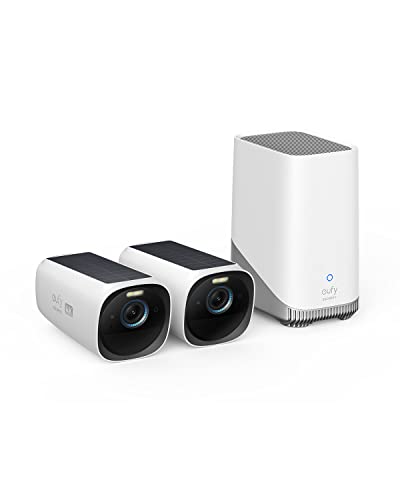
eufy Security eufyCam S330 (eufyCam 3) 2-Cam Kit
- Best for: A home that wants 4K footage stored locally on the hub, with no ongoing plan needed for storage.
- Video resolution: 4K (Ultra HD)
- Cameras included: 2 eufyCam S330 cameras
- Base station: HomeBase 3 (S380) included
- Built-in storage: 16GB, expandable up to 16TB with a hard drive
A home that wants 4K footage stored locally on the hub, with no ongoing plan needed for storage.
The cameras only work through the HomeBase 3, so the hub needs a powered indoor spot, and this listing is sold in several kit sizes, so confirm the box holds two cameras and the hub.
This two-camera kit suits a household that wants sharp footage kept inside the home instead of on a remote server. Each S330 camera records in 4K and carries its own solar panel, so a couple of hours of direct sun a day can keep the battery topped up between charges. The included HomeBase 3 stores clips on 16GB of built-in memory and accepts a hard drive for far more room, while its face recognition sorts familiar people from strangers. Two cameras will not cover a large property, but as a starter system that can grow, it is a tidy package.
Watch out for: The cameras only work through the HomeBase 3, so the hub needs a powered indoor spot, and this listing is sold in several kit sizes, so confirm the box holds two cameras and the hub.
REOLINK 4K Solar Security Camera 4 Cam Kit with Home Hub
- Best for: A larger property that needs four outdoor views covered at once, with recordings kept on the hub.
- Video resolution: 4K 8MP (3840 x 2160)
- Cameras included: 4 Argus Eco Ultra cameras with solar panels
- Hub: Reolink Home Hub included
- Storage: 128GB microSD card included, expandable local storage
A larger property that needs four outdoor views covered at once, with recordings kept on the hub.
Check the seller shown on the listing before ordering, and plan each solar panel’s placement with care, because a panel mounted in permanent shade can leave its camera short of charge.
Four cameras make this the widest starting coverage in the group, and every one of them is wire-free. The Argus Eco Ultra cameras record 4K footage, connect over dual-band Wi-Fi, and recharge from their own solar panels, so mounting spots do not need a power outlet nearby. Clips land on the included Home Hub, which arrives with a 128GB microSD card fitted and encrypts local storage, keeping recordings in the house rather than on a remote server. It fits buyers who want several outdoor views watched from day one without paying an ongoing plan for storage.
Watch out for: Check the seller shown on the listing before ordering, and plan each solar panel’s placement with care, because a panel mounted in permanent shade can leave its camera short of charge.
Blink Outdoor 4 5 Camera System with Sync Module Core
- Best for: A house with many separate spots to watch, where long battery life matters more than 4K detail.
- Video resolution: 1080p HD live view
- Cameras included: 5 Outdoor 4 cameras
- Hub: Sync Module Core included
- Battery life: up to two years with the included AA Energizer lithium batteries
A house with many separate spots to watch, where long battery life matters more than 4K detail.
The Sync Module Core in this kit has no local storage, so keeping clips means an optional Blink Subscription Plan, or a Sync Module 2 or XR bought separately for local backup.
Blink takes the opposite route from the solar kits: five cameras, plain AA batteries, and a small Sync Module Core that ties them together. The draw is endurance and simplicity, since each camera can run for up to two years on the included lithium cells before you touch a ladder. Video is 1080p rather than 4K, and the Core offers no local storage, so clips live in the cloud under an optional plan. For a bigger house that needs many doors, gates and corners watched at once, that trade can make sense.
Watch out for: The Sync Module Core in this kit has no local storage, so keeping clips means an optional Blink Subscription Plan, or a Sync Module 2 or XR bought separately for local backup.
Which One Fits Your Situation
You Want Your Footage Kept Inside the House
Choose between the eufy and Reolink kits, since both record to a hub sitting in your home. The eufy HomeBase 3 starts with 16GB built in and can grow with a hard drive, while the Reolink Home Hub arrives with a 128GB card already fitted. Either way, your clips stay on your own hardware, and neither system needs an ongoing plan just to store what the cameras capture.
You Need Many Outdoor Views Covered at Once
The Blink system puts five cameras in one box, and the Reolink kit covers four spots with sharper 4K cameras. If your list of places runs to a front door, back door, driveway, garage and side gate, Blink’s count wins on simplicity. If four views are enough and you want the clearer picture for faces and plates, the Reolink set is the stronger match for the same kind of property.
You Cannot Run Power to the Camera Spots
Both solar kits were built for this problem. Their cameras carry batteries topped up by panels, so a fence post or a tree-side wall becomes a workable mounting point as long as it catches some direct sun each day. The eufy kit covers two such spots; the Reolink kit covers four. Blink also avoids cables entirely, trading solar charging for very long-lived AA batteries you replace roughly every couple of years.
You Want to Start Small and Expand Later
Begin with the eufy two-camera kit. Its HomeBase 3 is the center of a wider family of eufy cameras and sensors, and its storage can grow from the built-in memory to a full hard drive as your needs change. Cover the two views that matter most now, learn how the alerts behave at your address, and add cameras to the same hub when you know exactly which corners still need watching.
Common Mistakes
- Buying a bundle of standalone cameras and discovering afterwards that the hub they need is not in the box.
- Expecting battery cameras to record around the clock, when they are built to wake for motion and save clips.
- Placing the hub in a far corner of the house, then blaming the cameras for weak connections at the edges of the property.
- Assuming local storage is included, when some modules store nothing themselves and keep clips only under a cloud plan.
- Mounting solar panels where a roofline or tree shades them for most of the day, then wondering why the batteries fade.
Frequently Asked Questions
Do these systems keep recording if the internet goes down?
The cameras and hub keep working together on your home network, and kits that store footage on the hub or its card keep saving clips locally during an outage. What you lose until the connection returns is remote viewing through the app and any cloud uploads. Systems that rely on cloud storage, like the Blink kit without a local module, are more limited while the connection is out.
How many cameras can one hub handle?
It depends on the hub, and the limit is worth checking before you buy extra cameras. Hub-based systems are designed to manage more cameras than the kit includes, so a two-camera starter set can usually grow. The Reolink Home Hub, for example, can manage up to eight battery Wi-Fi cameras. Counting your future views now prevents the frustration of owning cameras your hub cannot adopt.
Do battery-powered cameras record all the time?
No. Battery and solar cameras rest in a low-power state and wake when their sensors spot movement, recording a clip of the event. That is how they stretch a charge across months. Continuous recording belongs to plug-in cameras paired with a recorder and a hard drive. If an unbroken record of one spot matters to you, plan a powered camera for that position instead.
What is the difference between a sync module and a recorder?
A sync module is mainly a connector: it links the cameras to your network and the app, and may or may not hold footage itself. A recorder, whether a hub with built-in storage or a network video recorder with a hard drive, is built to store recordings locally. The practical question is always where your clips end up, so check the storage line of any kit before you buy.
FAQ
Do these systems keep recording if the internet goes down?
How many cameras can one hub handle?
Do battery-powered cameras record all the time?
What is the difference between a sync module and a recorder?
More from Amazon
Programs that pair well with the guide above. Offers and eligibility are set by Amazon and may change.
Free shipping on eligible items, Prime Video and more. Eligible new members can start with a free trial.
Start a Prime free trialA Prime membership for ages 18-24 with a trial period. Eligibility is set by Amazon.
See Prime for Young AdultsAudiobooks and podcasts to listen to on the go. Eligible new members can start with a free trial.
Try Audible freeAd-free music streaming. Eligible new subscribers can start with a free trial.
Try Music Unlimited freeAs an Amazon Associate we earn from qualifying purchases.