Key takeaways
- Low DPI players need room to sweep. Compare five large, smooth gaming mouse pads built for wide arm movements and steady, controlled tracking.
Playing at low sensitivity means your arm does the aiming, not your wrist. A flick across the map can travel half a metre, and the moment your mouse slides off the edge of a small pad, the shot is gone. The real decision here is not which brand looks best on your desk. It is how much flat, consistent surface you get, and whether the glide lets you stop exactly where you meant to.


This guide is for tactical shooter players running 400 to 800 DPI, arm aimers who sweep wide, and anyone tired of lifting and resetting the mouse mid-fight. Each pad below was picked from its Amazon listing name and listed specifications, with a focus on large and extended sizes, smooth cloth or hybrid surfaces, and bases that stay put during fast, wide movements.
Quick Picks
As an Amazon Associate we earn from qualifying purchases.
| Product | Best for | Key spec from title |
|---|---|---|
| SteelSeries QcK XXL | Full desk coverage for keyboard and mouse | XXL cloth, 900 x 400 mm |
| Logitech G640 | Controlled low DPI tracking on a compact desk | Large cloth, 460 x 400 x 3 mm |
| Razer Gigantus V2 XXL | Widest sweep room for very low sensitivity | XXL cloth, 940 x 410 mm |
| Corsair MM300 Extended | Long, narrow desk with room to sweep sideways | Extended cloth, 930 x 300 x 3 mm |
| Razer Strider XXL | Fast flicks with firm, hybrid stopping power | XXL hybrid, 940 x 410 x 3 mm |
How to Choose
Size Comes First at Low Sensitivity
At low DPI, the pad is your range of motion. Measure the flat, clear part of your desk before buying, then compare it with the pad dimensions in millimetres, because size labels like XL and XXL are not standardised across brands. A pad around 900 mm wide covers a full turn for most low sensitivity settings without lifting the mouse. If your desk is shallow, a long and narrow extended pad gives you sideways sweep room without eating depth. Always leave a margin at the front edge so your wrist rests on the pad, not on bare desk.
Match the Surface to Your Stopping Style
Cloth pads give a controlled glide with natural friction that helps you stop on a target, which suits players who track and micro-adjust. Hybrid pads use a firmer, smoother weave that feels faster on the first flick but still bites when you brake. If you overshoot targets often, a slower cloth surface will calm your aim down. If your flicks feel sluggish and you fight the pad on every turn, a hybrid surface frees up the movement. Either way, the texture should feel the same across the whole pad, with no slick or rough patches.
Thickness and Base Decide Stability
A 3 mm pad sits close to the desk and keeps your wrist angle low, which many arm aimers prefer for long sessions. A thicker pad cushions the wrist and smooths out small bumps or seams in the desk underneath. What matters more than thickness is the base: a textured rubber underside grips the desk and stops the pad creeping during hard flicks. If your desk surface is glossy or slightly uneven, a heavier pad with a full rubber base will stay planted better than a light, thin one.
Edges and Upkeep Decide How Long It Lasts
Stitched edges stop a cloth pad fraying and peeling at the rim, which matters when your wrist and forearm rub the same spot for hours every day. Unstitched edges can lift and catch the mouse cable or your sleeve. Cloth pads pick up skin oils and dust over time, so check whether the listing says the pad can be washed or wiped clean. A pad that rolls up for transport is handy if you take it to events, but let it lie flat for a while after unrolling so the edges do not curl under your mouse.
The 5 Best Options
SteelSeries QcK XXL
The QcK XXL is the classic full-desk cloth pad, stretched wide enough that your keyboard and mouse share one continuous surface. Its micro-woven cloth gives a smooth, even glide with enough friction to stop cleanly, and the wide footprint means a low sensitivity sweep never runs out of room. The non-slip rubber base holds firm while you flick, and the pad lies flat without curling at the corners. For players who want one big, simple surface under everything, this is the straightforward pick.
Specs
- Micro-woven cloth surface for smooth, controlled tracking
- Size 900 x 400 mm, covering keyboard and mouse
- Non-slip rubber base keeps the pad planted
- Designed for low and high DPI tracking
Best for: Players who want keyboard and mouse on one large, uniform surface.
Watch out for: The plain black cloth shows dust and lint, so expect to clean it regularly.
Logitech G640
The G640 is the control-oriented choice for players who want low DPI precision without covering the whole desk. Its cloth surface uses moderate friction that Logitech describes as suited to low DPI gaming, helping you start, stop, and change direction without overshoot. At 460 x 400 mm it fits desks where a 900 mm mat will not, yet still gives an arm aimer real sweep room. The rubber base stays put, and the pad rolls up for transport without losing its shape.
Specs
- Cloth surface with moderate friction for low DPI gaming
- Size 460 x 400 x 3 mm
- Rubber base with a stable, rollable design
- Surface matched to Logitech G sensor tuning
Best for: Control players on smaller desks who still sweep with the arm.
Watch out for: The edges are unstitched, so check them over time for fraying.
Razer Gigantus V2 XXL
The Gigantus V2 XXL gives you the widest cloth surface in this guide, built for players whose sensitivity sits at the very low end. Its textured micro-weave cloth balances speed and control, so fast flicks glide while tracking stays steady. The thick, high-density rubber foam base absorbs desk imperfections and keeps the pad from shifting during hard stops. At 940 mm wide, it covers a full turn for most low DPI setups with room to spare.
Specs
- Textured micro-weave cloth surface for speed and control
- Size 940 x 410 mm
- Thick, high-density rubber foam base
- Non-slip base for stable, wide movements
Best for: Very low sensitivity players who need maximum sweep width.
Watch out for: The large footprint needs a deep, clear desk, so measure before ordering.
Corsair MM300 Extended
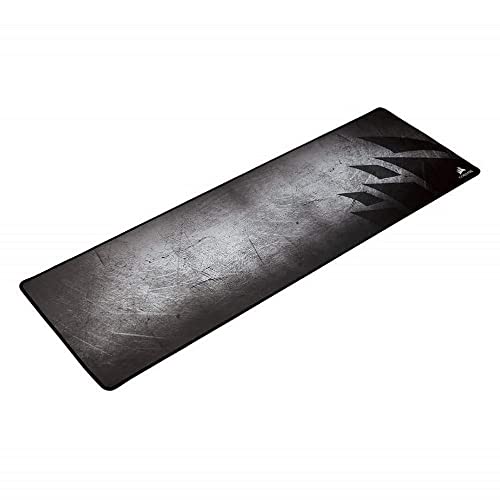
The MM300 Extended is the long, narrow option, made for desks that are wide but shallow. Its textile-weave cloth gives a low-friction glide that suits fast, sideways flicks, while the anti-fray stitched edges survive daily wrist contact. The anti-skid textured rubber base keeps the mat from bunching or sliding when you brake hard. At 930 mm long and only 300 mm deep, it fits under a keyboard and leaves the rest of the desk free.
Specs
- Textile-weave cloth surface for low-friction tracking
- Extended size 930 x 300 x 3 mm
- Anti-fray stitched edges
- Anti-skid textured rubber base
Best for: Wide, shallow desks where sideways sweep room matters most.
Watch out for: The 300 mm depth leaves little room in front of the keyboard, so check your wrist clearance.
Razer Strider XXL
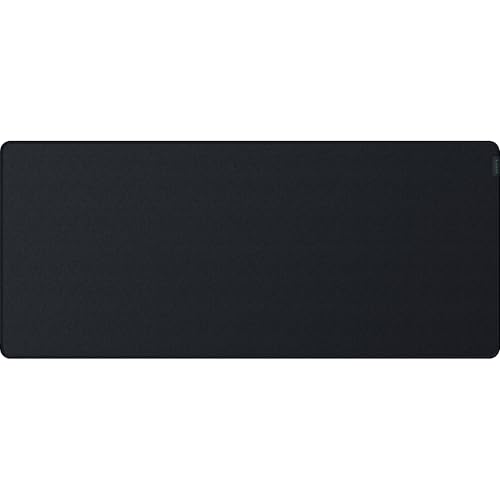
The Strider XXL is the hybrid pick, pairing a firm gliding surface with a soft, rollable base. Its polyester weave feels slicker than plain cloth on the first flick, then firms up as you brake, which suits players who want speed without losing stopping control. Stitched edges resist fraying, the water-resistant surface wipes clean, and the anti-slip base holds through aggressive turns. At 940 x 410 mm it gives the same wide sweep room as the largest cloth pads here.
Specs
- Hybrid polyester surface combining glide and control
- Size 940 x 410 x 3 mm
- Anti-slip base with anti-fraying stitched edges
- Water-resistant and rollable for transport
Best for: Fast flick players who want a firmer glide than plain cloth.
Watch out for: The slicker surface takes a few sessions to adjust to if you come from slow cloth.
Which One Fits Your Situation
Your Desk Is Small but Your Sensitivity Is Low
Pick the Logitech G640. At 460 x 400 mm it is the most compact pad here, yet it still gives an arm aimer real room to sweep, and its moderate-friction cloth is tuned for exactly this style of play. It fits desks where a 900 mm mat would hang over the edge, and it rolls up if you need to pack it away.
You Want the Keyboard and Mouse on One Surface
Pick the SteelSeries QcK XXL. Its 900 x 400 mm footprint covers both, so your mouse never crosses a pad edge mid-flick and your keyboard stops drifting across bare desk. The micro-woven cloth is consistent across the whole surface, which keeps tracking predictable from one side to the other, even during long diagonal sweeps.
You Play at Very Low Sensitivity and Flick Hard
Pick the Razer Gigantus V2 XXL. Its 940 mm width is the widest cloth surface in this guide, and the thick foam base stays planted when you brake hard after a long sweep. It suits players who run 400 DPI and make big, full-arm turns in tactical shooters, where every centimetre of surface counts.
You Want Speed with a Firm Stop
Pick the Razer Strider XXL. The hybrid polyester surface glides faster than plain cloth on the opening flick, then gives you a firm, controlled stop. The stitched edges and water-resistant surface also make it the easiest pad here to keep clean over a long season of daily play, with no special care routine needed.
Common Mistakes
- Buying a standard-size pad and running out of surface mid-flick, which forces constant lifting and resetting.
- Choosing a glossy hard pad for low DPI play, where the lack of stopping friction makes precise tracking harder.
- Ignoring desk depth and ordering a 400 mm deep mat that hangs over the front edge or pushes the keyboard too far back.
- Skipping stitched edges on a cloth pad, then watching the rim fray where your wrist rests every day.
- Rolling a new pad the wrong way for storage or leaving it curled, so the edges lift and catch the mouse during play.
Frequently Asked Questions
What size mouse pad do I need for 400 DPI?
A pad around 900 mm wide covers a full 360-degree turn for most 400 DPI setups without lifting the mouse, since a complete turn at that sensitivity typically takes well under a metre of movement. If your desk cannot fit that width, a 460 mm pad still works, but expect to lift and reset the mouse on the longest turns.
Is a cloth or hybrid pad better for low DPI?
Cloth pads suit players who value stopping control and steady tracking, because the natural friction helps you halt exactly on target. Hybrid pads suit players who want a faster opening flick with a firm brake. Both work at low DPI, so the choice comes down to whether you overshoot targets or feel held back by friction.
Does pad thickness matter for low DPI play?
Thickness matters less than the base and surface, but it changes comfort. A 3 mm pad keeps your wrist low and close to the desk, while a thicker pad cushions the wrist and smooths out bumps underneath. If your desk is flat and hard, 3 mm is plenty; on an uneven desk, a thicker pad feels more stable.
How do I clean a large cloth gaming mouse pad?
Shake off loose dust first, then wipe the surface with a damp cloth and a small amount of mild soap, working in the direction of the weave. Let the pad dry flat and fully before using it again, since a damp pad can feel slow and may curl. Avoid harsh cleaners that can strip the surface coating.
FAQ
What size mouse pad do I need for 400 DPI?
Is a cloth or hybrid pad better for low DPI?
Does pad thickness matter for low DPI play?
How do I clean a large cloth gaming mouse pad?
More from Amazon
Programs that pair well with the guide above. Offers and eligibility are set by Amazon and may change.
Free shipping on eligible items, Prime Video and more. Eligible new members can start with a free trial.
Start a Prime free trialA Prime membership for ages 18-24 with a trial period. Eligibility is set by Amazon.
See Prime for Young AdultsAudiobooks and podcasts to listen to on the go. Eligible new members can start with a free trial.
Try Audible freeAd-free music streaming. Eligible new subscribers can start with a free trial.
Try Music Unlimited freeAs an Amazon Associate we earn from qualifying purchases.