Key takeaways
- Compare three wireless lightweight gaming mice with long battery life, fast wireless links and low weight, and pick the one that matches your grip.
A wireless lightweight gaming mouse removes two problems at once: the cable that drags against your pad and the extra weight that slows your flicks. Modern wireless links respond in about a millisecond, so the old worry about lag no longer decides the choice. What decides it now is the balance between weight, battery life and shape, because a mouse that dies mid-match or feels wrong in your hand will cost you more than any cable ever did.
This guide is for competitive shooter players, MOBA players and anyone who moves their mouse fast and often, including players who travel with their setup. The three mice below come from Amazon product listings, and every specification in this guide comes from those listings, so you can check each detail against the product page before you buy.
Quick Picks
As an Amazon Associate we earn from qualifying purchases
| Product | Best for | Key spec from title |
|---|---|---|
| Logitech G PRO X Superlight | Competitive play with the lightest pro shell | HERO 25K sensor, 25,600 DPI, under 63 g |
| SteelSeries Aerox 3 Wireless | Long battery life with dual wireless modes | TrueMove Air sensor, 18,000 CPI, 200-hour battery |
| Razer Orochi V2 | Travel and small hands with huge battery life | 5G Advanced 18K DPI sensor, 60 g, 950-hour battery |
How to Choose
Weight and shape
Weight is the first thing you feel when you pick up a wireless mouse, and anything under 70 g feels quick during fast flicks and long sessions. A shell near 60 g reduces finger fatigue, but shape decides whether that lightness helps you: a symmetric shell suits claw and fingertip grips, while an ergonomic shell supports palm grip. Measure your hand and compare it with the mouse length, because a shell near 108 mm suits smaller hands while a shell near 125 mm suits medium to large hands. If you play with a claw grip, check that the hump sits under your knuckles.
Wireless link and polling
A good wireless gaming mouse uses a dedicated 2.4 GHz receiver with a 1 ms response, which feels identical to a wired connection in play. Some mice add Bluetooth as a second mode for laptops and travel, which is handy when you do not want to carry the receiver, though Bluetooth can feel slower in fast games. Check the polling rate too: a 1,000 Hz polling rate reports your position a thousand times per second, which keeps the cursor smooth during quick movement. A mouse that only offers Bluetooth will not feel as sharp in competitive shooters.
Battery life and charging
Battery life decides how often you think about charging, and the range here is wide: from about 70 hours on a rechargeable pro mouse to 950 hours on a battery-powered travel mouse. Rechargeable mice charge over USB-C and keep working while plugged in, so a dead battery costs you a cable rather than a match. Battery-powered mice run on a single AA or AAA cell and last for months, which suits players who hate cables entirely. Check whether the mouse supports fast charging, because a short charge before a session can cover a full evening of play.
Sensor, buttons and durability
The sensor still matters most for aiming, and a strong optical sensor with a wide DPI range and high tracking speed keeps flicks accurate at any sensitivity. Look for a sensor that reaches at least 18,000 DPI with 400 IPS tracking, which covers fast movement on a large pad. Five or six programmable buttons suit most players, while eight buttons help MOBA players who bind many abilities. Check the switch durability as well: switches built for 60 million clicks or more stay consistent far longer than cheaper switches, and smooth PTFE feet keep the mouse gliding evenly.
The 3 Best Options
Logitech G PRO X Superlight
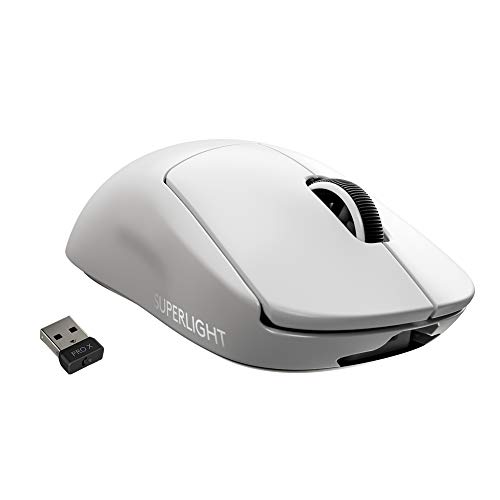
The PRO X Superlight is the mouse competitive players reach for when every gram counts, and at under 63 g it feels almost weightless during fast flicks. Its HERO 25K sensor covers up to 25,600 DPI with precise tracking, while LIGHTSPEED wireless technology responds in 1 ms through the included USB receiver. Five programmable buttons keep the layout clean and easy to learn, and the zero-additive PTFE feet glide smoothly on cloth pads. The battery lasts up to 70 hours, which covers a full week of evening sessions before you need to plug in the charging cable.
Specs
- HERO 25K optical sensor, up to 25,600 DPI
- Under 63 g
- 5 programmable buttons
- LIGHTSPEED wireless technology, 1 ms response
- Up to 70-hour battery life
- Zero-additive PTFE feet
- 125 x 63.5 x 40 mm
- USB receiver included
- PC and Mac compatible
Best for: Competitive players who want the lightest pro wireless mouse with a clean, simple layout.
Watch out for: The 70-hour battery is shorter than the other mice here, so players who hate charging should check the battery section first.
SteelSeries Aerox 3 Wireless

The Aerox 3 Wireless pairs a 66 g shell with a battery that lasts up to 200 hours, which is the longest rechargeable battery life in this group. Its TrueMove Air optical sensor covers 18,000 CPI with 400 IPS tracking and 40 G acceleration, so fast flicks stay accurate across a large pad. Dual wireless modes let you switch between gaming-grade 2.4 GHz and Bluetooth 5.0, which makes the mouse easy to carry between a desktop and a laptop. The shell resists water and dust with an IP54 rating, and USB-C fast charging tops the battery up quickly before a session.
Specs
- TrueMove Air optical sensor, up to 18,000 CPI
- 400 IPS tracking speed, 40 G acceleration
- 66 g
- Dual wireless: 2.4 GHz and Bluetooth 5.0
- Up to 200-hour battery life
- USB-C fast charging
- IP54 water and dust resistance
- 120.6 x 67 x 38.1 mm
- 1,000 Hz polling rate
- Quantum 2.0 Wireless technology
Best for: Players who want long battery life and the freedom to switch between desktop and laptop play.
Watch out for: The open shell design lets dust inside over time, so players in dusty rooms should clean it regularly.
Razer Orochi V2

The Orochi V2 is the smallest and lightest mouse in this group at 60 g, and its battery life reaches up to 950 hours on Bluetooth, which means months between battery changes. Its 5G Advanced 18K DPI optical sensor tracks precisely at high sensitivity, while dual wireless modes give you both HyperSpeed 2.4 GHz for gaming and Bluetooth for laptops and travel. The compact ambidextrous shape suits small hands and claw or fingertip grips, and the second-generation mechanical switches are built for 60 million clicks. It runs on a single AA or AAA battery, so you can swap in a fresh cell anywhere.
Specs
- 5G Advanced 18K DPI optical sensor, up to 18,000 DPI
- 60 g excluding battery
- Dual wireless: HyperSpeed Wireless and Bluetooth
- Up to 950-hour battery life on Bluetooth
- 2nd-gen mechanical switches built for 60 million clicks
- Runs on one AA or AAA battery
- About 108.2 x 62.7 mm
- Compact ambidextrous shape
Best for: Small hands, travel and players who want months of battery life without charging cables.
Watch out for: The compact shape feels cramped for large hands, and the battery adds weight beyond the listed 60 g.
Which One Fits Your Situation
You play competitively and want the lightest mouse
Pick the Logitech G PRO X Superlight. At under 63 g with a 1 ms LIGHTSPEED link and a 25,600 DPI sensor, it feels instant during fast flicks. Five buttons keep the layout simple, so nothing gets in the way of your aim. The zero-additive PTFE feet glide smoothly on cloth pads, and the battery lasts up to 70 hours.
You hate charging and play on two computers
Pick the SteelSeries Aerox 3 Wireless. Its 200-hour battery lasts weeks between charges, and dual wireless modes let you switch between 2.4 GHz on your desktop and Bluetooth on your laptop. USB-C fast charging covers you when the battery finally runs low, and the TrueMove Air sensor tracks at 400 IPS for accurate flicks.
You travel often or have small hands
Pick the Razer Orochi V2. The compact 108 mm body fits small hands and slips into a laptop bag, and the 950-hour Bluetooth battery means you may not change the cell for months. The AA or AAA battery slot lets you swap power anywhere, and the 5G Advanced 18K DPI sensor tracks precisely at high sensitivity.
You want the best balance of weight and battery
Pick the SteelSeries Aerox 3 Wireless if battery life matters most, or the PRO X Superlight if pure lightness matters most. The Aerox 3 gives you 200 hours at 66 g, while the Superlight gives you under 63 g with a 70-hour battery, so your charging habits decide the winner.
Common Mistakes
- Choosing the lightest mouse available without checking whether the shape fits your hand.
- Buying a Bluetooth-only mouse for competitive shooters, where a 2.4 GHz receiver feels sharper.
- Forgetting to check battery life, then losing a match to a dead mouse.
- Ignoring the battery type, and finding out too late that your mouse needs a cable you did not pack.
- Setting DPI far higher than you need, which makes fine aim corrections harder to control.
Frequently Asked Questions
Is wireless really as fast as wired for gaming?
Yes, for the mice in this guide. A dedicated 2.4 GHz receiver with a 1 ms response and 1,000 Hz polling feels identical to a wired connection in play, and competitive players use wireless mice at the highest level. Bluetooth-only connections can feel slower, so use the 2.4 GHz receiver for fast games and keep Bluetooth for travel or casual use.
How light should a wireless gaming mouse be?
Most players find the sweet spot between 60 and 74 g, where the mouse feels quick without feeling hollow. The three mice here sit between 60 and 66 g, which suits fast flicks and long sessions. If your current mouse weighs over 90 g, any of these will feel noticeably quicker, but shape still matters more than a few grams.
How long does the battery last in real use?
Battery life depends on polling rate, lighting and how many hours you play each day. A 70-hour battery covers about a week of evening sessions, a 200-hour battery covers several weeks, and a 950-hour Bluetooth battery can last months. Turning off RGB lighting and lowering the polling rate when you are not gaming stretches every battery further.
Can I use these mice with a laptop on the go?
Yes, and that is where the dual-mode mice shine. The Aerox 3 Wireless and Orochi V2 both pair over Bluetooth, so you can leave the receiver at home and still play on a laptop. The PRO X Superlight needs its USB receiver, so keep the receiver in your bag if you travel with it.
FAQ
Is wireless really as fast as wired for gaming?
How light should a wireless gaming mouse be?
How long does the battery last in real use?
Can I use these mice with a laptop on the go?
More from Amazon
Programs that pair well with the guide above. Offers and eligibility are set by Amazon and may change.
Free shipping on eligible items, Prime Video and more. Eligible new members can start with a free trial.
Start a Prime free trialA Prime membership for ages 18-24 with a trial period. Eligibility is set by Amazon.
See Prime for Young AdultsAudiobooks and podcasts to listen to on the go. Eligible new members can start with a free trial.
Try Audible freeAd-free music streaming. Eligible new subscribers can start with a free trial.
Try Music Unlimited freeAs an Amazon Associate we earn from qualifying purchases.