Key takeaways
- Compare five mechanical gaming mice with optical and hybrid switches, high-DPI sensors and fast polling, then pick the click feel that fits your grip and games.
A gaming mouse lives or dies by its clicks. When every shot, dodge and ability depends on a button press landing exactly when you mean it, the switch under that button matters more than the logo on the shell. Mechanical and optical switches promise faster actuation, a crisper feel and far more clicks before they wear out, but they do not all feel the same, and the lightest mouse on the shelf is not automatically the right one for your hand.
This guide is for competitive shooter players who want consistent clicks, MMO and strategy players who need many programmable buttons, and anyone replacing a mouse that started double-clicking. The five mice below were chosen from the name and specifications on the Amazon product page, with attention to switch type, sensor, weight and shape, so you can match the hardware to how you actually play.
Quick Picks
As an Amazon Associate we earn from qualifying purchases
| Product | Best for | Key spec from title |
|---|---|---|
| Logitech G502 X Wired | Button-heavy games at a fixed desk | LIGHTFORCE hybrid optical-mechanical switches, HERO 25K sensor |
| Razer DeathAdder V3 Wired | Lightweight FPS aiming | Gen-3 optical switches, Focus Pro 30K sensor, 59g |
| Razer Basilisk V3 Wired | Ergonomic comfort with many controls | Gen-2 optical switches, Focus+ 26K sensor, 11 programmable buttons |
| Logitech G Pro X Superlight 2 Wireless | Wireless competitive play | LIGHTFORCE hybrid switches, HERO 2 sensor, 44,000 DPI, 60g |
| Logitech G502 HERO Wired | Classic mechanical feel on a budget | Mechanical switch button tensioning, HERO 25K sensor, 11 programmable buttons |
How to Choose
Switch type decides the click feel
A mechanical gaming mouse earns its name from what sits under the primary buttons. Traditional mechanical switches use a metal contact and a spring, and Logitech adds a tensioning system with pivot hinges to keep the click crisp. Hybrid optical-mechanical switches, such as Logitech LIGHTFORCE, keep a mechanical feel but trigger with light, so actuation is faster and there is no metal contact to wear down and cause double-clicking. Razer optical switches work the same way, using an infrared beam instead of a contact. If your last mouse started registering two clicks from one press, an optical or hybrid switch is the single most useful upgrade.
Sensor and polling rate set the tracking ceiling
The sensor decides how faithfully the mouse follows your hand. A 25,000 or 26,000 DPI ceiling sounds extreme, yet the number that matters in daily play is tracking quality at the sensitivity you actually use, plus the polling rate, which is how often the mouse reports its position. A 1,000 Hz polling rate reports every millisecond, while an 8,000 Hz rate reports eight times as often, which can shave input delay on a high-refresh monitor. High polling only helps if your computer can keep up, so match the mouse to your monitor and processor before chasing the biggest numbers on the box.
Shape, weight and grip matter more than specs
No sensor can fix a shape that fights your hand. Palm-grip players need a taller shell with a thumb rest, claw-grip players need a shorter body with a defined hump, and fingertip players need a light mouse they can lift and reset quickly. A 59-gram mouse flicks easily but can feel twitchy if you anchor your wrist, while a heavier mouse with adjustable weights stays planted during slow, precise aiming. Check the button layout too: side buttons should fall under your thumb without stretching, and a scroll wheel that tilts or free-spins is genuinely useful in games with many binds.
Wired or wireless, and what else comes with it
A wired mouse never needs charging and usually costs less for the same sensor, but a stiff cable can drag and pull against fast flicks, so look for a light, flexible cable or a bungee to hold it. A wireless mouse removes the cable entirely, yet you then live with charging, so check whether it charges over USB-C and whether it supports a wireless charging pad. On-board memory is worth having if you play on more than one computer, because it carries your button assignments with the mouse instead of leaving them in software on a single machine.
The 5 Best Options
Logitech G502 X Wired
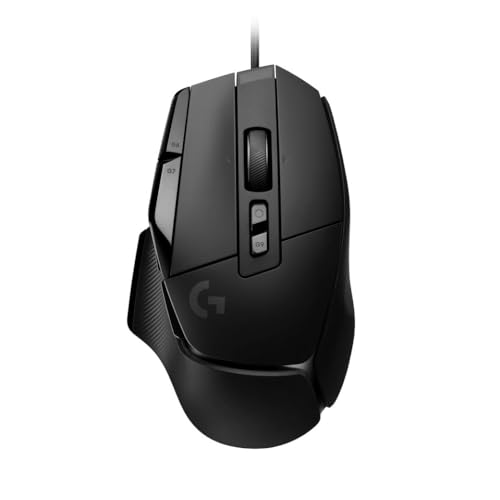
The G502 X Wired is the control-heavy pick for players who want a dozen commands under one hand. Its LIGHTFORCE hybrid optical-mechanical switches give the primary buttons a crisp mechanical feel with optical actuation, and the HERO 25K sensor tracks cleanly across the sensitivity range most players actually use. Thirteen programmable controls, a dual-mode hyper-fast scroll wheel and a familiar ergonomic shape make it a strong fit for MMO, strategy and shooter sessions at a fixed desk.
Specs
- LIGHTFORCE hybrid optical-mechanical primary switches
- HERO 25K gaming sensor
- 13 programmable controls
- Hyper-fast scroll wheel
- Compatible with PC, macOS and Windows
Best for: Players who want many programmable buttons and a proven ergonomic shape for long sessions.
Watch out for: The wired cable needs routing if your desk is tight, and the right-handed shape does not suit left-handed players.
Razer DeathAdder V3 Wired

The DeathAdder V3 Wired is the lightweight FPS pick in this roundup, built around speed rather than extra buttons. Its Gen-3 optical switches are rated for 90 million clicks and actuate in 0.2 milliseconds with no debounce delay, while the Focus Pro 30K optical sensor and 8,000 Hz HyperPolling keep tracking tight during fast flicks. At 59 grams with a comfortable ergonomic shell and a flexible Speedflex cable, it suits players who lift the mouse often and want as little drag as possible.
Specs
- Razer Optical Mouse Switches Gen-3, rated for 90 million clicks
- Focus Pro 30K optical sensor
- 8,000 Hz HyperPolling
- 59g ultra-lightweight design
- 6 programmable buttons
- Speedflex cable
Best for: FPS players who want a light, ergonomic mouse with very fast clicks.
Watch out for: Only six programmable buttons, so bind-heavy MMO players should check the layout before buying.
Razer Basilisk V3 Wired

The Basilisk V3 Wired is the comfort-first option for players who spend hours in game and still want plenty of controls. Its Gen-2 optical switches actuate in 0.2 milliseconds and are rated for 70 million clicks, and the Focus+ 26K DPI optical sensor tracks without smoothing. Eleven programmable buttons, a HyperScroll tilt wheel and a thumb rest make it easy to map abilities, weapons and menus, while Chroma RGB lighting covers eleven zones for players who like a lit desk.
Specs
- Optical Mouse Switches Gen-2, 0.2ms actuation, rated for 70 million clicks
- Focus+ 26K DPI optical sensor
- 11 programmable buttons
- HyperScroll tilt wheel
- Chroma RGB lighting with 11 zones
Best for: Long sessions where an ergonomic thumb rest and many programmable buttons both matter.
Watch out for: The ergonomic shape is right-handed only, and the extra buttons add weight compared with ultralight FPS mice.
Logitech G Pro X Superlight 2 Wireless

The Pro X Superlight 2 Wireless is the competitive pick for players who want a cable-free desk without giving up switch speed. Its LIGHTFORCE hybrid switches combine optical actuation with a mechanical click feel, and the HERO 2 sensor reaches 44,000 DPI with an 8 kHz report rate. At 60 grams with five programmable buttons and USB-C charging, it is built for players who value a clean, symmetrical shape and a mouse that disappears in the hand during fast aim duels.
Specs
- LIGHTFORCE hybrid switches
- HERO 2 sensor, up to 44,000 DPI
- 8 kHz report rate
- 60g pro-grade design
- 5 programmable buttons
- USB-C charging
Best for: Competitive players who want wireless freedom in a very light, symmetrical shell.
Watch out for: Only five programmable buttons, so players who need many binds should confirm the layout fits their game.
Logitech G502 HERO Wired

The G502 HERO Wired is the classic mechanical pick for buyers who want the G502 shape and button layout without paying for the newest generation. Its mechanical switch button tensioning uses a metal spring system and pivot hinges for a crisp, clean click feel, and the HERO 25K sensor covers 100 to 25,600 DPI with 1:1 tracking. Eleven programmable buttons, a dual-mode hyper-fast scroll wheel, five removable tuning weights and on-board memory make it a flexible all-rounder for shooters, strategy games and everyday desktop work.
Specs
- Mechanical switch button tensioning with metal spring system and pivot hinges
- HERO 25K sensor, 100 to 25,600 DPI
- 11 programmable buttons
- Dual-mode hyper-fast scroll wheel
- Five removable 3.6g tuning weights
- On-board memory for up to five profiles
Best for: Buyers who want a proven mechanical mouse with many buttons and adjustable weight.
Watch out for: The wired cable and heavier body suit a fixed desk better than a portable setup.
Which One Fits Your Situation
You play competitive shooters and flick a lot
Pick the Razer DeathAdder V3 Wired or the Logitech G Pro X Superlight 2 Wireless. Both are close to 60 grams, both use fast optical or hybrid switches, and both track well at high polling rates. Choose the DeathAdder if you prefer a wired connection and an ergonomic shape, and the Superlight 2 if you want wireless freedom and a symmetrical shell.
You play MMO, MOBA or strategy games with many binds
Pick the Logitech G502 X Wired or the Razer Basilisk V3 Wired. Each gives you eleven or more programmable controls, a scroll wheel that suits menu-heavy games, and on-board memory or software profiles for saving layouts. The G502 X adds adjustable weight tuning, while the Basilisk V3 adds a thumb rest and tilt wheel.
You play for hours and comfort comes first
Pick the Razer Basilisk V3 Wired. Its ergonomic shape, thumb rest and Gen-2 optical switches are built for long sessions, and the eleven programmable buttons keep your most-used actions close. If your hand is small, check the shell length against your grip before ordering, since the ergonomic shape is fixed.
You want one mouse for gaming and daily work
Pick the Logitech G502 HERO Wired. Its mechanical tensioning system gives a satisfying click for both games and desktop work, the adjustable weights let you tune the feel, and the on-board memory carries your profiles between computers, so your setup follows you. It is the most versatile shape in this roundup for mixed use.
Common Mistakes
- Buying the highest DPI number instead of the shape and switch feel that fit your grip.
- Choosing an ultralight mouse for low-sensitivity aiming, then finding it hard to control during slow, precise movements.
- Ignoring the switch type and replacing a double-clicking mouse with another metal-contact design.
- Picking a wireless mouse without checking how it charges or how long it runs between charges.
- Forgetting that a right-handed ergonomic shell cannot be mirrored, so left-handed players need an ambidextrous shape.
Frequently Asked Questions
What makes a gaming mouse “mechanical”?
A mechanical gaming mouse uses physical switches under its buttons, either traditional metal-contact switches with a spring tensioning system or hybrid designs that pair a mechanical feel with optical actuation. The switch decides click speed, feel and lifespan, so it matters more than the sensor for how the mouse feels in daily play.
Do optical switches last longer than mechanical switches?
Optical switches avoid the metal contact that wears out in traditional mechanical switches, which is why they are rated for 70 to 90 million clicks and do not develop double-clicking from contact wear. Mechanical switches with a tensioning system still last a long time, but the contact is the part that usually fails first.
Is an 8,000 Hz polling rate worth it?
An 8,000 Hz polling rate reports the mouse position eight times as often as the standard 1,000 Hz rate, which can reduce input delay on a high-refresh monitor. The gain is small and only shows up if your computer and monitor can use it, so treat it as a bonus rather than the main reason to buy.
Can a heavy mouse still be good for FPS games?
Yes, if the weight matches your sensitivity and grip. Low-sensitivity players often prefer a heavier mouse because it stays stable during slow, precise aiming, and adjustable weights let you tune the balance. The problem is not weight itself but a shape or weight that fights your hand during flicks.
FAQ
What makes a gaming mouse “mechanical”?
Do optical switches last longer than mechanical switches?
Is an 8,000 Hz polling rate worth it?
Can a heavy mouse still be good for FPS games?
More from Amazon
Programs that pair well with the guide above. Offers and eligibility are set by Amazon and may change.
Free shipping on eligible items, Prime Video and more. Eligible new members can start with a free trial.
Start a Prime free trialA Prime membership for ages 18-24 with a trial period. Eligibility is set by Amazon.
See Prime for Young AdultsAudiobooks and podcasts to listen to on the go. Eligible new members can start with a free trial.
Try Audible freeAd-free music streaming. Eligible new subscribers can start with a free trial.
Try Music Unlimited freeAs an Amazon Associate we earn from qualifying purchases.