
Key takeaways
- Compare the best cheap gaming mice: wired and wireless picks with proper gaming sensors, programmable buttons and honest trade-offs for budget players.
Buying a cheap gaming mouse is really a decision about which corners you are willing to let a manufacturer cut. At this end of the market, the sensor is almost never the problem anymore, so the real choice is between shape, switch feel, cable or wireless freedom, and how much software control you get. Pay for the wrong thing and you end up with a mouse that tracks fine but fights your hand every session.
This guide is for first-time PC gamers, students building a setup on a tight budget, and anyone replacing a worn-out mouse without raiding the upgrade fund. Every pick below was chosen from the name and specifications on its Amazon product page, and each one is a genuine gaming mouse from a known maker rather than a no-name shell with lights glued on.
Quick Picks
As an Amazon Associate we earn from qualifying purchases
| Product | Best for | Key spec from title |
|---|---|---|
| Logitech G203 LIGHTSYNC | Most budget buyers who want simple wired reliability | 8,000 DPI sensor |
| Razer DeathAdder Essential | Palm-grip players with medium or large hands | 6,400 DPI optical sensor |
| Redragon M612 Predator | Players who want lots of programmable buttons | 11 programmable buttons |
| HyperX Pulsefire Core | Claw-grip players who want a named Pixart sensor | Pixart 3327 sensor up to 6,200 DPI |
| Logitech G305 LIGHTSPEED | Anyone who wants wireless freedom on a budget | HERO sensor, 12,000 DPI |
How to Choose
Sensor quality matters more than the DPI headline
A huge DPI number on the box tells you almost nothing, because nearly every gamer plays somewhere between 400 and 3,200 DPI in practice. What separates a real gaming mouse from a cheap office mouse in disguise is tracking consistency: a proper optical gaming sensor keeps the cursor faithful during fast flicks instead of spinning out or adding acceleration you never asked for. Every mouse in this guide uses a named gaming-grade optical sensor, and that single fact matters more than whether the ceiling is 6,200 or 12,000 DPI.
Shape and grip decide comfort before specs do
Palm-grip players rest their whole hand on the shell and usually prefer a taller, right-handed ergonomic body like the DeathAdder Essential. Claw and fingertip players arch their fingers and tend to prefer flatter, symmetrical shells such as the Pulsefire Core or G203, which are easier to lift and reposition. Hand size counts too: a long ergonomic mouse can feel clumsy in a small hand no matter how good its sensor is. Match the shell to how you actually hold a mouse before comparing anything else.
Wired is the safe default, wireless is now a real option
A wired mouse never needs charging, never drops a connection, and at this budget it buys you better buttons and lighting for the same money. The catch is cable drag, which a mouse bungee or a tidy desk mostly solves. Wireless used to mean lag and a big price jump, but the G305 shows how far the budget end has come: a 1 ms LIGHTSPEED connection and months of battery life from a single AA cell. Choose wireless only if the cable genuinely annoys you.
Buttons, switches, and software are where cheap mice cut corners
Count the buttons you will actually use. Two side buttons cover most shooters; MMO and MOBA players benefit from the M612’s eleven programmable inputs. Switch ratings, stated in millions of clicks on each listing, hint at how long the main clicks stay crisp. Software is the quiet divider: Logitech G HUB, Razer Synapse, HyperX NGENUITY, and Redragon’s own app all handle remapping and DPI steps, but check whether settings save to on-board memory if you switch computers often.
The 5 Best Options
Logitech G203 LIGHTSYNC

The G203 is the default recommendation at this budget because it gets the fundamentals right and adds nothing you have to fight. Its symmetrical shell suits claw and fingertip grips in small to medium hands, the gaming-grade sensor tracks cleanly up to 8,000 DPI, and the spring-tensioned main buttons feel crisper than most rivals at this level. LIGHTSYNC RGB is there if you want it, G HUB handles remapping, and on-board memory means your settings survive a move to another PC without reinstalling anything.
Specs
- Sensor: gaming-grade optical, 200 to 8,000 DPI
- Buttons: 6 programmable
- Lighting: LIGHTSYNC RGB with customizable effects
- Report rate: 1,000 Hz (1 ms)
- Weight: 85 g
- Cable: 2.1 m
- Memory: on-board profile storage
- Compatibility: PC and Mac via USB
Best for: budget buyers who want a safe, proven wired mouse for mixed gaming.
Watch out for: the symmetrical shape runs small for large hands, and there is no braided cable.
ASIN: B07YN82X3B
Razer DeathAdder Essential

The DeathAdder name carries weight because the shape has been refined for years, and the Essential keeps that tall, right-handed ergonomic shell while trimming everything else. Palm-grip players with medium or large hands get a body that fills the hand and supports the wrist through long sessions. The 6,400 DPI optical sensor is modest on paper yet entirely adequate for real play, the mechanical switches are rated for ten million clicks, and the ridged rubber side grips help during fast, sweaty matches where a smooth shell would wander.
Specs
- Sensor: optical, up to 6,400 DPI with on-the-fly adjustment
- Buttons: 5 independently programmable Hyperesponse buttons
- Switches: mechanical, rated up to 10 million clicks
- Form factor: right-handed ergonomic
- Grips: ridged, rubberized side grips
- Lighting: single-color green LED
- Connection: wired USB
Best for: palm-grip players who want a full-size ergonomic shape at the lowest cost.
Watch out for: left-handed players cannot use the shape, and the lighting is a single fixed color.
ASIN: B094PS5RZQ
Redragon M612 Predator

Redragon built the M612 for players who look at a two-side-button mouse and immediately want more. Eleven programmable buttons, including a dedicated rapid-fire key, make it the macro and MMO pick of this group, and the supporting software lets you record keybinds and assign DPI stages yourself. The optical sensor reaches 8,000 DPI with five redefinable levels, and five RGB backlight modes cover the visual side. The shell is a larger ergonomic grip body, so it favors medium and large hands that want something substantial to hold.
Specs
- Sensor: optical, up to 8,000 DPI
- DPI levels: 5 redefinable stages (defaults 500/1,000/2,000/3,000/4,000)
- Buttons: 11 programmable, including a rapid-fire button
- Backlight: 5 RGB modes
- Software: supports DIY keybinds and macros
- Form factor: ergonomic grip body, right-handed
- Connection: wired USB
Best for: MMO, MOBA, and macro-heavy players who want maximum buttons for minimum money.
Watch out for: the bigger shell and extra weight will not suit small hands or fingertip grips.
ASIN: B08SJ5Z8JL
HyperX Pulsefire Core
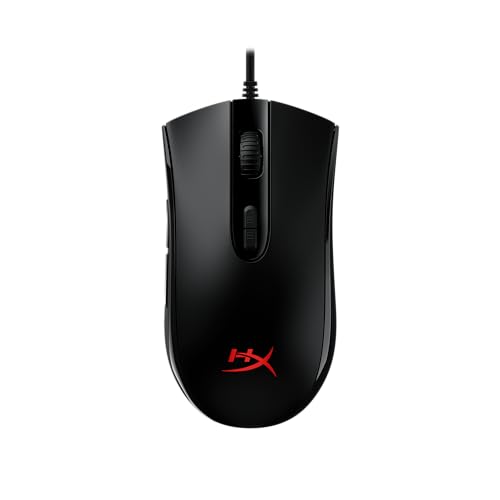
The Pulsefire Core is the quiet overachiever here: a Pixart 3327 sensor is the kind of part usually found in pricier mice, and it tracks without hardware acceleration up to its native 6,200 DPI. The symmetrical shell and 87 g weight suit claw-grip players with medium hands, seven programmable buttons cover shooter and MOBA needs, and the main switches are rated for twenty million clicks, double the figure on several rivals in this guide. A textured grip and a full RGB light ring finish a package that feels a class above its price band.
Specs
- Sensor: Pixart 3327 optical, native DPI up to 6,200
- Buttons: 7 programmable
- Switches: rated for 20 million clicks
- Weight: 87 g
- Lighting: RGB light ring, software controlled
- Software: HyperX NGENUITY for macros and lighting
- Connection: wired USB
Best for: claw-grip players who want a respected named sensor and durable switches.
Watch out for: the DPI ceiling is lower than rivals, which only matters if you play at very high sensitivity.
ASIN: B07H3GFJJ2
Logitech G305 LIGHTSPEED

The G305 answers the obvious question: can a cheap gaming mouse also be wireless without ruining response time? Its LIGHTSPEED connection reports at 1 ms, the HERO sensor is efficient enough to run up to 250 hours on a single AA battery, and sensitivity tops out at 12,000 DPI. The compact symmetrical shell stores its USB receiver inside the body, which makes it the natural laptop-bag pick here. Six programmable buttons and on-board memory round out a mouse that asks you to give up only the RGB lighting wired rivals include.
Specs
- Sensor: HERO optical, 200 to 12,000 DPI
- Wireless: LIGHTSPEED USB receiver, 1 ms report rate
- Battery: up to 250 hours on one AA battery (included)
- Buttons: 6 programmable
- Weight: 99 g
- Memory: on-board profile storage, receiver stored in the mouse
- Compatibility: PC and Mac
Best for: players who hate cable drag and want wireless freedom without leaving the budget tier.
Watch out for: it runs on a replaceable AA battery rather than recharging, and there is no RGB.
ASIN: B07CMS5Q6P
Which One Fits Your Situation
You play shooters and want the safest first purchase
Start with the Logitech G203 LIGHTSYNC. Its sensor is dependable, the shell works for the two most common grip styles, and G HUB makes setting DPI stages painless for a beginner. If your hands are on the larger side and you palm the mouse, take the DeathAdder Essential instead, since its taller ergonomic body will support your hand better through long matches than the smaller symmetrical shells here.
You play MMOs or MOBAs and live on keybinds
The Redragon M612 Predator is built for you. Eleven programmable buttons plus a rapid-fire key give you room for spell rotations, item slots, and push-to-talk without reaching across the keyboard. Set your macros in Redragon’s software once, then lower the DPI stages for inventory screens and raise them for map movement. None of the other mice in this guide comes close on raw button count at this budget.
You want a clean desk with no cable at all
Choose the Logitech G305 LIGHTSPEED and stop thinking about wires. The connection is fast enough for competitive play, the battery lasts for months of evenings on one AA cell, and the receiver tucks inside the shell when you travel. It is also the easiest pick to share between a desktop and a laptop, since there is nothing to unplug and coil at the end of the night.
You claw your mouse and flick hard in fast games
The HyperX Pulsefire Core fits that style best. Its symmetrical shell, moderate weight, and textured sides stay put when you lift and reset between flicks, and the Pixart 3327 keeps tracking honest at the low DPI settings claw players favor. The G203 is the fallback if you prefer Logitech’s software, but the Core’s higher switch rating makes it the longer-lived tool for aggressive clicking.
Common Mistakes
- Choosing by the biggest DPI number, when sensor consistency and shape affect your aim far more than a five-figure ceiling you will never use.
- Ignoring grip style and hand size, then blaming the sensor for a mouse that never fit your hand in the first place.
- Buying a no-name mouse with impressive lighting but an office-grade sensor that spins out during fast movements.
- Forgetting the software check: some budget mice only save settings while their app stays installed, which matters if you change computers.
- Assuming wireless always lags, or the opposite mistake, buying wireless and then resenting battery swaps you never planned for.
Frequently Asked Questions
Is a cheap gaming mouse good enough for competitive shooters?
Yes, provided it uses a real gaming sensor like the five picks in this guide. Competitive play depends on consistent tracking, a shape you can control, and switches that register cleanly, and all of those exist at this budget. Expensive mice add lighter shells, premium cables, and finer adjustments, but they do not unlock accuracy that a G203 or DeathAdder Essential lacks.
How much DPI do I actually need for gaming?
Most players settle between 400 and 3,200 DPI, pairing a low in-game sensitivity with large arm movements or a higher setting with wrist aiming. Every mouse here covers that range comfortably. Treat headline figures like 12,000 DPI as headroom rather than a target, and spend your decision energy on shape and buttons instead, because those are what your hand notices every minute.
Wired or wireless at this budget: which should I pick?
Wired is the lower-risk default: no batteries, no interference worries, and more of your money goes into buttons and build. Wireless makes sense when cable drag genuinely bothers you or the mouse travels between rooms. The G305 proves the budget wireless option is now legitimate, with a 1 ms connection and very long battery life, so the choice is about lifestyle rather than performance.
How long will a cheap gaming mouse last?
The main buttons are the usual wear point, and the listings here rate them between ten and twenty million clicks, which translates to years of daily play for most people. Feet wear and cable fraying end more budget mice than dead sensors do. A mouse pad, a little slack in the cable, and keeping drinks off the desk will extend any of these picks well past expectations.
FAQ
Is a cheap gaming mouse good enough for competitive shooters?
How much DPI do I actually need for gaming?
Wired or wireless at this budget: which should I pick?
How long will a cheap gaming mouse last?
More from Amazon
Programs that pair well with the guide above. Offers and eligibility are set by Amazon and may change.
Free shipping on eligible items, Prime Video and more. Eligible new members can start with a free trial.
Start a Prime free trialA Prime membership for ages 18-24 with a trial period. Eligibility is set by Amazon.
See Prime for Young AdultsAudiobooks and podcasts to listen to on the go. Eligible new members can start with a free trial.
Try Audible freeAd-free music streaming. Eligible new subscribers can start with a free trial.
Try Music Unlimited freeAs an Amazon Associate we earn from qualifying purchases.









