Our Short List of 3
All 3 Picks at a Glance
| Product | Specs | Action |
|---|---|---|
 Samsung Galaxy Tab S10 FE with Book Cover Keyboard Slim | Check price on Amazon | |
 Samsung Galaxy Tab S9 FE | Check price on Amazon | |
 Microsoft Surface Pro 11 Copilot+ PC Bundle | Check price on Amazon |
Key takeaways
- Find the best tablets for live streaming with sharp front cameras, clear microphones, bright displays and steady Wi-Fi for smooth broadcasts from anywhere.
Going live from a tablet is a practical way to broadcast without a full desk rig. A tablet can hold the camera, show the chat, run the streaming app and keep the whole session in one slim slab that fits in a bag. The best tablets for live streaming pair a sharp front camera with a clean microphone array, a bright screen you can read in daylight, enough processing headroom to encode video while the chat scrolls, and wireless that holds a steady connection for the length of a broadcast.
This guide covers tablets that work as the camera and the control surface for a live broadcast. That means the front camera matters more than the rear camera, the microphone matters more than the speakers, and the wireless radio matters more than raw storage. Every pick below runs the live apps from YouTube, TikTok, Twitch and Instagram, and every pick connects to an external microphone through USB-C or Bluetooth when the built-in microphones are not enough.
One honest note up front: no tablet in this guide is a dedicated streaming encoder. A tablet runs a streaming app and sends one camera feed. A multi-camera show with scene switching, overlays and a separate audio mixer still needs a computer or a hardware switcher. The picks below are ordered from the strongest all-round live tablet to the most capable Windows option, and each one is a current model with a verified Amazon US listing.
What to look for
Front camera placement comes first. A front camera centred on the long edge of the tablet frames your face naturally when the tablet sits in landscape on a stand. A camera on the short edge forces an awkward angle or a portrait crop. Look for a 12-megapixel front camera with a wide field of view and automatic framing that keeps you centred when you move around the frame.
Microphones come second. A tablet with two or three microphones placed around the frame picks up your voice from arm’s length without a headset. Studio-quiet rooms are forgiving, but a noisy room, a workshop or an outdoor spot exposes a weak microphone fast. Every pick in this guide accepts an external microphone through USB-C or Bluetooth, so plan on adding one if your room has echo or background noise.
Display quality comes third. A bright display with accurate colour lets you check your framing and read chat without squinting. A screen of ten inches or more gives the chat and the camera view room to breathe side by side. A high refresh display makes scrolling chat and switching apps feel smooth, but it is a comfort feature rather than a broadcast requirement.
Processing headroom comes fourth. Live encoding, a camera feed, a chat window and a music app running together ask more of a chip than watching a film does. A modern mid-range chip or better handles that load without dropping frames. Memory matters here too: eight gigabytes of RAM or more keeps the streaming app alive when you switch to a browser or a notes app mid-broadcast.
Wireless comes fifth. Wi-Fi 6 or Wi-Fi 6E holds a steadier link than older wireless when the network is busy. A tablet with cellular costs more and needs a data plan, so the Wi-Fi-only picks in this guide suit a home studio or any place with a solid wireless network. If you plan to stream from the field, check the cellular version of the same model rather than assuming the Wi-Fi model will do.
Battery and ports come sixth. A live show of an hour or two drains a battery faster than video playback does, because the camera, the encoder and the screen all run at once. A USB-C port also takes an external microphone, a capture device or an Ethernet adapter.
Software support comes last. The tablet must run the streaming app you plan to use, and it must keep receiving updates. iPadOS and Android both run the major live apps, while Windows tablets also run desktop streaming software.
Apple iPad Air 11-inch (M2)
The iPad Air 11-inch with the M2 chip is the strongest all-round tablet for live streaming in this guide. Its 12-megapixel front camera sits on the long edge of the tablet, so it frames your face correctly when the tablet rests in landscape on a stand. The camera supports automatic framing that follows you as you move, which keeps a solo broadcast looking steady without a camera operator.
The 11-inch Liquid Retina display is bright and colour-accurate, with P3 wide colour and True Tone, so your camera view matches what your audience sees more closely than a dim panel would. The M2 chip handles live encoding, a chat window and a second app at the same time without stutter, and eight gigabytes of memory keeps the streaming app alive when you switch away to check a note or a browser tab.
Wi-Fi 6E gives the Air a steadier wireless link than the Wi-Fi 6 tablets in this guide, which matters when the network carries other traffic during a broadcast. The USB-C port takes an external microphone, a capture device or an Ethernet adapter, and it charges the tablet while it streams.
The Air runs every major live app from the App Store, including the YouTube, TikTok, Twitch and Instagram apps, plus streaming apps such as Streamlabs and Prism Live. Apple Pencil Pro and Apple Pencil with USB-C work with this model for on-screen notes or drawings during a broadcast, but neither pen ships in the box; both are sold separately. The model listed here carries 128 gigabytes of storage, which holds the streaming apps, recorded clips and downloaded media with room to spare.
For a creator who wants one tablet that covers camera, chat, notes and editing after the show, the iPad Air M2 is the pick to beat. Its front camera placement, wireless radio and chip headroom are the combination the other picks are measured against.
Apple iPad (10th Generation)
The tenth-generation iPad is the sensible entry point for live streaming on iPadOS. Its 12-megapixel front camera also sits on the long edge, with automatic framing that keeps you centred, so the camera behaviour matches the Air even though the chip and the display sit a step below it.
The 10.9-inch Liquid Retina display is large enough to show the camera view and the chat side by side, and True Tone keeps the screen comfortable to read under mixed lighting. The A14 Bionic chip is older than the M2, but it still encodes a live feed while the chat scrolls, and it handles the major live apps without trouble. Wi-Fi 6 keeps the connection steady on a home network, and the USB-C port takes an external microphone and charges the tablet while it streams.
This model carries 64 gigabytes of storage. That is enough for the streaming apps and a modest library of clips, but creators who record every broadcast on the tablet itself will want to move recordings to cloud storage or a computer regularly. Apple Pencil first generation works with this iPad for on-screen drawing, and it needs a USB-C adapter to pair and charge; the pen is sold separately.
The tenth-generation iPad suits a creator who wants the iPadOS live apps and the landscape front camera at the lowest cost in this guide. It gives up the faster wireless, the brighter display tuning and the extra headroom of the Air, but for a single-camera live show it covers the essentials.
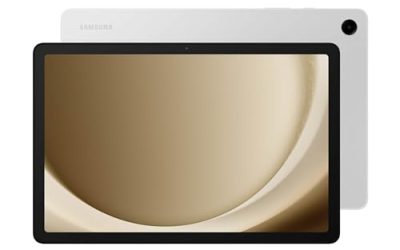
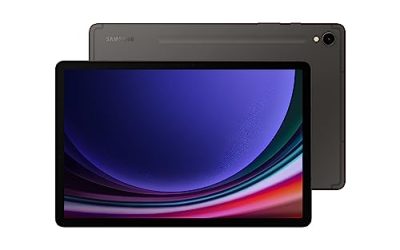
Samsung Galaxy Tab S10 FE with Book Cover Keyboard Slim
The Galaxy Tab S10 FE bundle is the Android pick that arrives ready to type and to stream. The bundle in this listing pairs the tablet with the Book Cover Keyboard Slim, so the keyboard and the stand are in the box rather than a separate purchase.
The tablet itself carries a 10.9-inch display with a 90-hertz adaptive refresh rate and a 2304 by 1440 resolution, which makes scrolling chat feel smooth and keeps the camera view crisp. The 12-megapixel front camera handles the video feed, and the Exynos 1580 chip with eight gigabytes of memory keeps the streaming app, the chat and a browser running together. Wi-Fi 6 holds the connection, and the tablet is water and dust resistant to the IP68 standard, which is useful for outdoor broadcasts or a workshop where dust and splashes are part of the day.
The S Pen ships in the box with this tablet, and it is handy for sketching on screen, annotating a diagram or signing off a show with a handwritten note. Storage is 128 gigabytes, and a microSD card slot takes a card up to two terabytes for recorded broadcasts, though the card is sold separately. The listing states up to twenty hours of battery life; live encoding with the camera running drains the battery faster than video playback does, so plan on charging through USB-C during a long show. A 45-watt charger is sold separately.
Android runs the YouTube, TikTok, Twitch and Instagram live apps, plus streaming apps such as Streamlabs and Prism Live. The Tab S10 FE suits a creator who wants an Android tablet with a keyboard and a pen included, a screen that stays smooth while chat scrolls, and a body that tolerates dust and splashes.
Samsung Galaxy Tab S9 FE
The Galaxy Tab S9 FE is the value Android pick for live streaming. Its 10.9-inch display runs at 2304 by 1440, the 12-megapixel front camera carries the video feed, and the Exynos 1380 chip with six gigabytes of memory handles a live app plus chat without trouble. Like the S10 FE, it is water and dust resistant to the IP68 standard, and the S Pen ships in the box.
The differences from the S10 FE are modest but real. The display refreshes at a standard rate rather than 90 hertz, the chip is a generation older, and memory is six gigabytes rather than eight. For a single-camera live show with chat open, those differences rarely show on the broadcast itself.
Storage is 128 gigabytes with a microSD slot for recorded shows, and the listing states up to eighteen hours of battery life. As with every tablet in this guide, live encoding drains the battery faster than the headline figure suggests, so charge through USB-C during a long broadcast. The tablet charges with Super Fast Charging and reaches a full charge in under ninety minutes with a compatible charger, which is sold separately.
The S9 FE suits a creator who wants the Android live apps, a pen in the box and a durable body at a lower cost than the S10 FE bundle. It gives up the bundled keyboard, the faster chip and the smoother display, but it keeps the camera, the pen and the dust and water resistance that matter for a live show.
Microsoft Surface Pro 11 Copilot+ PC Bundle
The Surface Pro 11 bundle is the Windows pick in this guide, and it is the only pick that runs desktop streaming software. The bundle in this listing includes the tablet, the Sapphire Pro Keyboard and the Slim Pen, so the keyboard and the pen arrive in the same box. The tablet itself is a 13-inch touchscreen with a 2880 by 1920 resolution, the largest screen in this guide, which gives the camera view, the chat and a notes window room to sit side by side.
The front camera records quad-HD video with AI framing effects that keep you centred and adjust your gaze on camera, which suits a presenter who moves while talking. The Snapdragon X Plus chip with sixteen gigabytes of memory and 512 gigabytes of storage runs Windows 11 Pro, and Windows runs the desktop streaming apps that iPadOS and Android cannot run, including OBS Studio and the desktop version of Streamlabs.
Two things need stating plainly. The Snapdragon chip is ARM-based, so most Windows apps run natively or through emulation, but a few older Windows apps may run slowly or not at all; check that your streaming software and any plug-ins support ARM before you buy. The listing is a three-piece bundle, so confirm the exact bundle contents on the listing before ordering, and note that the tablet, keyboard and pen are sold as a set rather than as separate items.
The Surface suits a creator who wants a tablet that doubles as a full Windows streaming computer, with the largest screen in this guide and desktop software support no other pick gives. It is heavier and more complex than the iPad and Galaxy picks, but for a multi-scene broadcast it is the only pick that does the whole job on one device.
Comparison
| Tablet | Screen | Front camera | Memory | Storage | Wireless | In the box |
|---|---|---|---|---|---|---|
| Apple iPad Air 11-inch (M2) | 11-inch Liquid Retina | 12MP landscape, auto framing | 8GB | 128GB | Wi-Fi 6E | Tablet, cable |
| Apple iPad (10th Generation) | 10.9-inch Liquid Retina | 12MP landscape, auto framing | 4GB | 64GB | Wi-Fi 6 | Tablet, cable |
| Samsung Galaxy Tab S10 FE bundle | 10.9-inch, 90Hz | 12MP | 8GB | 128GB, microSD slot | Wi-Fi 6 | Tablet, S Pen, keyboard cover |
| Samsung Galaxy Tab S9 FE | 10.9-inch | 12MP | 6GB | 128GB, microSD slot | Wi-Fi 6 | Tablet, S Pen, cable |
| Microsoft Surface Pro 11 bundle | 13-inch 2.8K touchscreen | Quad-HD, AI framing | 16GB | 512GB SSD | Wi-Fi 6E | Tablet, Pro Keyboard, Slim Pen |
Frequently asked questions
Do I need an external microphone to stream from a tablet?
Not always, but it helps a lot. The built-in microphones on every pick in this guide pick up a voice clearly from arm’s length in a quiet room. A noisy room, a workshop, a kitchen with a fan running, or an outdoor spot will expose the limits of a built-in microphone fast. A small USB-C microphone or a Bluetooth lavalier microphone costs little, clips on in seconds, and lifts the audio quality more than any other single upgrade. If your audience complains about echo or background noise, the microphone is the first thing to change, not the tablet.
Can a tablet replace a dedicated streaming computer?
For a single-camera live show, yes. A tablet runs the live app, carries the camera feed, shows the chat and records the show, which covers most solo broadcasts. For a multi-camera show with scene switching, overlays, a separate audio mixer and a second camera, a tablet falls short. The Surface Pro 11 in this guide is the exception, because Windows runs desktop streaming software with scene switching and overlays. Match the device to the show: one camera and one host suits a tablet, while a produced show with several sources suits a computer.
Which tablet suits TikTok Live versus YouTube Live?
The apps decide more than the tablet does. TikTok Live runs in portrait on a phone, but on a tablet it runs in the app’s own layout, so a tablet with a good landscape front camera still frames you well. YouTube Live suits a landscape broadcast, so a tablet with a landscape front camera and a large screen for reading chat is the natural fit. Twitch suits a landscape show with chat on screen, which favours the larger screens in this guide. If you stream mostly on TikTok, check how the app frames your feed on a tablet before you commit to a stand or a mount.
How to choose
Begin with the camera. If you broadcast alone from a desk or a stand, a tablet with a landscape front camera and automatic framing is the single most useful feature in this guide, and the two iPads and the Surface lead on it. If you broadcast from a workshop, a kitchen or outdoors, the dust and water resistance of the two Galaxy tablets earns its place.
Next, weigh the software. If your show lives inside the YouTube, TikTok, Twitch or Instagram apps, any pick works, so choose on screen and battery. If your show needs desktop streaming software with scenes and overlays, the Surface Pro 11 is the only pick that runs it. If you edit clips on the tablet after the show, the iPad Air M2 and the Surface Pro 11 have the headroom for it.
Then weigh the extras. A keyboard in the box speeds up chat replies, a pen in the box helps on-screen drawing, and a large screen keeps the camera view and the chat readable at a glance.
Finally, confirm the listing before you order. Check that the model number, the storage size and the bundle contents match the pick you want, and check that the listing shows a new unit from a seller you trust. Buy the tablet that fits the show you actually run, and add a microphone and a stand before you add a second tablet.
Disclosure: As an Amazon Associate, we may earn a commission from qualifying purchases made through links in this article, at no additional cost to you.
FAQ
Do I need an external microphone to stream from a tablet?
Can a tablet replace a dedicated streaming computer?
Which tablet suits TikTok Live versus YouTube Live?
More from Amazon
Programs that pair well with the guide above. Offers and eligibility are set by Amazon and may change.
Free shipping on eligible items, Prime Video and more. Eligible new members can start with a free trial.
Start a Prime free trialA Prime membership for ages 18-24 with a trial period. Eligibility is set by Amazon.
See Prime for Young AdultsAudiobooks and podcasts to listen to on the go. Eligible new members can start with a free trial.
Try Audible freeAd-free music streaming. Eligible new subscribers can start with a free trial.
Try Music Unlimited freeAs an Amazon Associate we earn from qualifying purchases.