Key takeaways
- Comparing monitors for beginners? See how four Full HD screens differ on size, panel, refresh rate and ports, and pick the right one for your desk.
For most beginners, a 24-inch Full HD IPS monitor with a 75Hz refresh rate is the safest first choice: it is large enough for two windows side by side, sharp enough for long reading sessions, and smooth enough for casual play. If your desk is tight, a 21.5-inch model saves space without giving up clarity, while a 27-inch screen suits anyone who keeps several windows open at once, so the comparison comes down to desk space, viewing distance, and the ports your computer already has.
This guide is written for first-time buyers setting up a home office, students replacing a laptop screen, and casual players who want a bigger picture without learning a glossary of display terms. Every monitor in this article was chosen from the name and specifications shown on its Amazon product page, and the comparison focuses on the differences a beginner will actually notice on day one.
Quick Picks
As an Amazon Associate we earn from qualifying purchases
| Product | Best for | Key spec from title |
|---|---|---|
| ASUS VA24DQ | Everyday work and study on a standard desk | 23.8-inch Full HD IPS, 75Hz |
| Acer SB220Q bi | Small desks and tight spaces | 21.5-inch Full HD IPS, ultra-thin zero frame |
| Sceptre E248W-19203R | A second screen or a spare room setup | 24-inch Full HD LED, two HDMI ports |
| LG 27MP400-B | Large text and several windows at once | 27-inch Full HD IPS, borderless design |
How to Choose
Start with screen size, not brand names
Screen size decides how much fits on your desk and how far you sit from the display. A 21.5-inch monitor suits a shallow desk or a bedroom corner, because it leaves room for a keyboard, a notebook, and a lamp. A 24-inch screen is the middle ground most beginners settle on: wide enough for a document beside a browser window. A 27-inch panel spreads windows further apart and makes text larger at the same resolution, which helps tired eyes, but it needs a deeper desk so the screen does not fill your whole field of view. Measure your desk width before anything else, then pick the size that leaves at least a hand’s width of space on each side.
Understand resolution and panel type together
Resolution and panel type work as a pair, and beginners should weigh both before choosing. Full HD, written as 1920 x 1080, is the standard resolution here, and it keeps text sharp on 21.5-inch and 24-inch panels. On a 27-inch screen the same resolution stretches further, so pixels become slightly more visible up close, though text stays easy to read. An IPS panel keeps colours steady when you lean to one side or share the screen with someone sitting next to you, while a basic LED panel can shift in tone at an angle. If you watch films, edit photos, or often show your screen to others, an IPS panel is worth favouring over other panel types.
Do not overthink the refresh rate
Refresh rate, measured in hertz, tells you how many times per second the screen redraws its image. A 60Hz screen redraws sixty times per second, which is fine for documents, video calls, and streaming. A 75Hz screen redraws a little more often, and the difference shows up as slightly smoother scrolling and mouse movement, which many beginners notice without knowing why. Higher refresh rates exist, yet they belong on screens built for competitive play, and they add cost that a first-time buyer rarely needs. For a beginner, 75Hz is a sensible target: it feels smoother than the basic standard, it pairs well with ordinary office and study tasks, and it does not demand a powerful graphics card to keep up.
Check the ports and the stand before you buy
Ports and the stand decide whether the monitor works with the computer you already own. Look at the back of your laptop or desktop and note its outputs: HDMI is the most common, DisplayPort appears on many desktops, and VGA survives on older machines. A monitor with two HDMI ports lets you connect a laptop and a second device without swapping cables, which is handy in a shared home. The stand matters too: a tilt-only stand is enough for most desks, while a VESA mount lets you attach the screen to an arm later if you want the desk space back. Check that the monitor includes the cable you need, because some boxes ship with only one cable type.
The 4 Best Options
ASUS VA24DQ
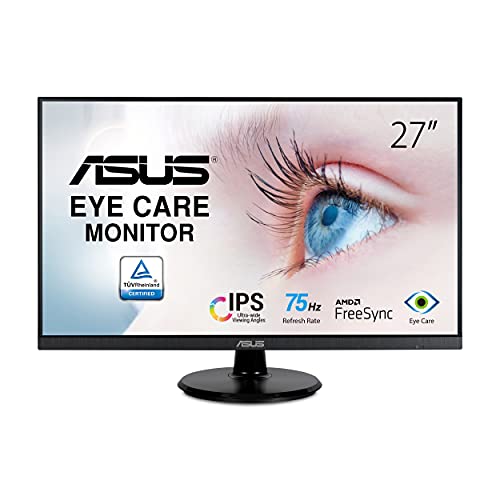
The ASUS VA24DQ is the balanced pick for a beginner who wants one monitor that handles work, study, and casual play without fuss. Its 23.8-inch IPS panel keeps text clear and colours steady from the side, so it suits a desk shared with a partner or a study corner where you lean back in your chair. The 75Hz refresh rate makes scrolling feel smooth, and the eye-care features reduce flicker and blue light during long sessions. With HDMI, DisplayPort, and VGA on the back, it connects to almost any computer a beginner is likely to own, old or new.
Specs
- 23.8-inch Full HD (1920 x 1080) IPS panel
- 75Hz refresh rate with Adaptive-Sync and FreeSync support
- Eye Care technology with Low Blue Light and Flicker Free modes
- HDMI, DisplayPort, and VGA inputs
- Frameless design with VESA wall-mount support
Best for: A first monitor for everyday work, study, and casual play on a standard desk.
Watch out for: It has no built-in speakers, so plan for separate speakers or headphones if you watch videos without them.
Acer SB220Q bi
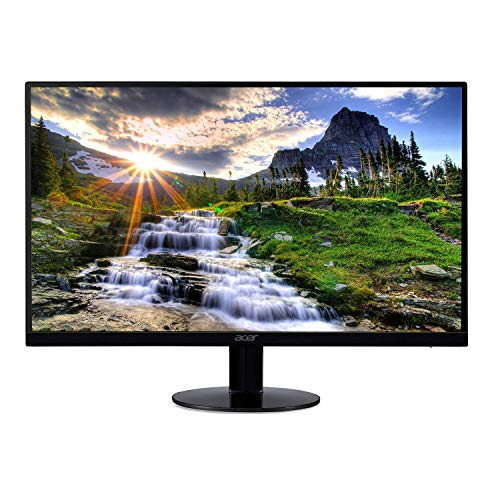
The Acer SB220Q bi is the compact choice for a beginner whose desk is small or shared. Its 21.5-inch IPS panel delivers the same Full HD resolution as larger screens, so text and video stay sharp while the frame takes up far less room. The ultra-thin zero-frame design looks tidy on a crowded desk, and the 75Hz refresh rate keeps scrolling smooth for study and office work. With HDMI and VGA inputs it connects to most laptops and older desktops, and its light frame is easy to move when you rearrange a room.
Specs
- 21.5-inch Full HD (1920 x 1080) IPS panel
- 75Hz refresh rate
- Ultra-thin zero-frame design
- HDMI and VGA ports
- Acer VisionCare eye-care features
Best for: Small desks, bedroom corners, and anyone who wants a sharp screen that takes up little space.
Watch out for: The small screen makes side-by-side windows feel cramped, so check your desk depth before choosing it over a 24-inch model.
Sceptre E248W-19203R

The Sceptre E248W-19203R is the practical pick for a beginner who wants a second screen or a simple monitor for a spare room. Its 24-inch Full HD panel is the same size as the ASUS model here, and it comes with two HDMI ports plus VGA, so you can keep a laptop and a second device plugged in at the same time. Built-in speakers save you from buying separate audio gear for video calls and streaming, and the thin frame keeps the desk looking neat. It is a straightforward screen that does the everyday jobs well without extra features to learn.
Specs
- 24-inch Full HD (1920 x 1080) LED monitor
- Two HDMI ports and one VGA port
- Built-in speakers
- Thin frame design in machine black
- Wide sRGB colour coverage
Best for: A second screen, a spare room, or a first setup where built-in speakers matter.
Watch out for: The stand tilts only, with no height adjustment, so you may need a riser or a stack of books to bring the screen to eye level.
LG 27MP400-B

The LG 27MP400-B is the large-screen option for a beginner who wants bigger text and more room for windows. Its 27-inch IPS panel shows the same Full HD resolution as the others here, but spread across a wider surface, which makes menus, spreadsheets, and subtitles easier to read at a glance. The three-side virtually borderless design keeps the frame slim, so the screen feels modern on the desk and works well beside a second monitor later. AMD FreeSync support smooths motion during casual play, and the OnScreen Control software lets you adjust settings from the desktop instead of fumbling with buttons under the bezel.
Specs
- 27-inch Full HD (1920 x 1080) IPS display
- 75Hz refresh rate with AMD FreeSync
- Three-side virtually borderless design
- OnScreen Control software for on-screen settings
- HDMI and VGA inputs with VESA mount support
Best for: Large text, spreadsheets, and several windows open at once on a deep desk.
Watch out for: Full HD on a 27-inch panel looks slightly softer up close than on a 24-inch screen, so sit at arm’s length or further for the sharpest text.
Which One Fits Your Situation
Your desk is small or shared with someone else
Pick the Acer SB220Q bi. Its 21.5-inch frame leaves room for a keyboard, a notebook, and a cup, while its Full HD IPS panel keeps text sharp enough for study and office work. The 75Hz refresh rate keeps scrolling smooth, and the HDMI and VGA ports cover most laptops and older desktops. You give up some space for side-by-side windows, yet you gain a tidy desk that does not feel crowded.
You want one monitor for work, study, and casual play
Pick the ASUS VA24DQ. The 23.8-inch IPS panel is the middle size that suits almost every beginner, and its eye-care modes help during long sessions at the screen. HDMI, DisplayPort, and VGA cover nearly any computer you might connect, and the VESA mount leaves the door open to a monitor arm later. It is the safest single choice if you only want to buy once and stop comparing.
You need a second screen or a spare-room setup
Pick the Sceptre E248W-19203R. Two HDMI ports let you keep two devices connected without swapping cables, and the built-in speakers mean you do not need extra audio gear for calls and streaming. The 24-inch panel matches the size of most main monitors, so a dual-screen setup looks balanced. Remember that the stand only tilts, so plan a riser if the screen sits too low.
You read a lot of text or juggle several windows
Pick the LG 27MP400-B. The 27-inch panel makes text, menus, and spreadsheets larger and easier to scan, which helps during long reading and data-entry sessions. Its borderless design looks clean on the desk and pairs well with a second screen later, while FreeSync keeps casual play smooth. Make sure your desk is deep enough to sit at arm’s length, because that distance keeps the Full HD image looking its sharpest.
Common Mistakes
- Buying the biggest screen without measuring the desk, then sitting too close for the image to look sharp.
- Ignoring the ports on your own computer and discovering the monitor needs a cable or adapter you do not own.
- Choosing a screen by refresh rate alone, when size, resolution, and panel type matter more for everyday use.
- Placing the monitor too low or too high, which strains the neck during long sessions at the desk.
- Forgetting audio: some monitors have no built-in speakers, so video calls and streaming need separate speakers or headphones.
Frequently Asked Questions
What size monitor is best for a beginner?
A 24-inch monitor is the best starting point for most beginners, because it fits a standard desk and keeps Full HD text sharp at arm’s length. A 21.5-inch screen suits a small desk, while a 27-inch screen helps if you read a lot or keep several windows open. Measure your desk first, then choose the size that leaves space on each side.
Is Full HD enough for a first monitor?
Yes, Full HD at 1920 x 1080 is enough for a first monitor, and it keeps text, video, and office work looking clear on 21.5-inch and 24-inch screens. It also runs well on ordinary laptops and desktops without demanding extra graphics power. Higher resolutions help mainly on larger screens or for detailed photo and video work.
Do beginners need a high refresh rate?
No, beginners do not need a high refresh rate. A 75Hz screen already feels smoother than the basic 60Hz standard for scrolling and everyday movement, and it suits office work, study, and casual play. Faster screens are built for competitive play, where every frame counts, and they add cost a first-time buyer rarely needs.
IPS or LED: which panel should a beginner choose?
An IPS panel is the better choice for most beginners, because it keeps colours steady when you view the screen from an angle or share it with someone beside you. A basic LED panel can shift in tone off-axis, which is less noticeable when you always sit directly in front of the screen. If you watch films or share your screen often, favour IPS.
FAQ
What size monitor is best for a beginner?
Is Full HD enough for a first monitor?
Do beginners need a high refresh rate?
IPS or LED: which panel should a beginner choose?
More from Amazon
Programs that pair well with the guide above. Offers and eligibility are set by Amazon and may change.
Free shipping on eligible items, Prime Video and more. Eligible new members can start with a free trial.
Start a Prime free trialA Prime membership for ages 18-24 with a trial period. Eligibility is set by Amazon.
See Prime for Young AdultsAudiobooks and podcasts to listen to on the go. Eligible new members can start with a free trial.
Try Audible freeAd-free music streaming. Eligible new subscribers can start with a free trial.
Try Music Unlimited freeAs an Amazon Associate we earn from qualifying purchases.