Key takeaways
- A macro keys keyboard puts programmable keys on the board so one press can run a whole command sequence. Compare four keyboards with dedicated macro keys.
A macro keys keyboard is a keyboard with dedicated programmable keys that run a recorded sequence of keystrokes, commands, or shortcuts with a single press. The best choice for most buyers is a full-size mechanical board with at least five dedicated macro keys, onboard memory for storing macros, and software that makes recording them simple. The four keyboards below all ship with dedicated macro keys listed in their published specifications.
Our top pick: Corsair K95 RGB Platinum XT. Runner-up: Razer BlackWidow V4 Pro. This guide compares published specifications only: every feature, switch type, and macro-key count below comes from the manufacturer listing or the Amazon product listing, with no practical claims and no performance promises beyond what the listing states.
At a Glance
| Product | Best for | Key specification |
|---|---|---|
| Corsair K95 RGB Platinum XT | Most buyers who want a proven macro column | 6 dedicated macro keys, CHERRY MX Brown switches, 8MB onboard storage |
| Razer BlackWidow V4 Pro | Most macro keys plus a command dial | 8 dedicated macro keys, Razer Yellow switches, command dial |
| Corsair K100 RGB | Fastest switch response and deepest onboard storage | 6 dedicated macro keys, CORSAIR OPX switches, 4000Hz hyper-polling |
| Redragon K580 VATA | A lower-cost board with onboard macro recording | 5 dedicated macro keys, Outemu Blue switches, hot-swappable socket |
How to Choose
1. Count the dedicated macro keys
A dedicated macro key is a physical key set apart from the main layout, usually in a column on the left edge, that exists only to run a macro or a remapped command. Boards in this guide carry five, six, or eight of them. Five is enough for a small set of daily shortcuts, while eight suits players who bind a full rotation of abilities, push-to-talk, and utility commands. Check the listing for the exact count, because some boards describe every key as programmable while only a few are truly dedicated macro keys.
2. Decide how macros are recorded and stored
There are two storage models. Onboard memory stores macros on the keyboard itself, so they travel with the board to another machine. Software-only storage keeps macros in a profile on one computer. The Corsair boards in this guide list 8MB of onboard storage, the K100 lists room for up to 200 onboard profiles, and the Redragon K580 VATA lists onboard macro recording that works without software running. If you move between machines, onboard storage matters more than any other feature.
3. Pick a switch type that matches the feel you want
Macro keys are only useful if the board under them feels right for long sessions. CHERRY MX Brown switches give a light tactile bump without a loud click. Razer Yellow switches are linear and silent, with a smooth straight-down press. CORSAIR OPX optical-mechanical switches actuate at 1.0mm and carry a 150 million keystroke rating in the listing. Outemu Blue switches are clicky and tactile, with an audible click on every press. The switch type does not change what a macro does, but it changes how the board feels while you use it all day.
4. Check the layout and the desk space it needs
Every board in this guide is a full-size layout with a number pad, plus a macro column on the left edge that adds width. A full-size board with a macro column is wider than a standard full-size board, so measure the desk before choosing. If desk space is tight, a compact board without dedicated macro keys may fit better, but it will not give you the one-press macro column this guide covers.
5. Look at the software behind the keys
Dedicated macro keys need software to record complex sequences, assign key remaps, and manage profiles. Corsair boards use iCUE software, Razer boards use Synapse, and Redragon boards use the Redragon utility, with the K580 VATA also providing on-the-fly recording without software. The software also controls per-key lighting, media controls, and profile switching, so check that it runs on your operating system before buying.
6. Consider build materials and the keycap set
An aluminum frame resists flex during heavy use, and all four boards here list an aluminum frame or aluminum top plate. Double-shot PBT keycaps resist shine and fading better than standard ABS keycaps, and the two Corsair boards and the K100 list double-shot PBT sets. The BlackWidow V4 Pro lists doubleshot ABS keycaps, which the listing presents as durable, while the K580 VATA lists a standard keycap set with an aluminum top plate. A detachable palm rest, listed for the K95 XT and the BlackWidow V4 Pro, helps during long sessions.
7. Weigh connectivity and extra controls
All four boards connect over a wired USB connection, which keeps input latency low and removes battery concerns. Extra controls vary: the K95 XT lists dedicated media keys, an aluminum volume roller, and a USB pass-through port; the BlackWidow V4 Pro lists a programmable command dial, a media roller, and four media buttons; the K100 lists a programmable iCUE control wheel; the K580 VATA lists dedicated media controls and a volume wheel. These extras do not run macros, but they shape how the board works as a daily driver.
8. Match the macro count to the games and work you actually do
In massively multiplayer games, macro keys commonly hold ability rotations, target markers, and chat commands. In strategy games, they hold build orders and control groups. In creative work, they hold tool switches, undo sequences, and export commands. Count the sequences you would realistically bind before choosing: if the answer is three or four, five macro keys are plenty, and the extra keys on an eight-macro board would sit unused.
Our Picks
Corsair K95 RGB Platinum XT — ASIN B082GRKQYF

The Corsair K95 RGB Platinum XT is a full-size mechanical gaming keyboard with six dedicated macro keys listed in its published specifications, programmable with custom macros or key remaps through iCUE software. It uses German-made CHERRY MX Brown switches, rated in the listing for 100 million keystrokes, with a light tactile bump and no loud click. The keycap set is a precision-molded double-shot PBT set, and the frame is anodized aluminum. Onboard storage is 8MB, with hardware macro and lighting playback for up to five profiles, so macros stored on the board keep working on another machine. The board also lists per-key RGB backlighting, a 19-zone LightEdge strip across the top, dedicated multimedia keys, an aluminum volume roller, a USB pass-through port, and a detachable cushioned leatherette palm rest. The Elgato Stream Deck software integration lets the macro keys run streaming commands when the included S-key keycaps are fitted.
Best for: Most buyers who want a proven macro column, tactile switches, and onboard profile storage in one full-size board.
Consideration: The macro column and full-size layout make the board wide, so it needs a desk with room to spare, and the wired connection keeps it tethered to the desk.
Razer BlackWidow V4 Pro — ASIN B0BV4BC7LV

The Razer BlackWidow V4 Pro is a wired mechanical gaming keyboard with eight dedicated macro keys listed in its published specifications: five macro keys along the left edge and three additional macro buttons on the left side of the board. The keys are fully programmable through Razer Synapse software, where they can hold keybinds, macros, and shortcuts. It uses Razer Yellow switches, described in the listing as linear and silent, with doubleshot ABS keycaps. A programmable command dial sits above the number pad for assigning custom functions, and the board lists Chroma RGB per-key lighting, underglow lighting, a media roller, four media buttons, and a magnetic plush wrist rest. The connection is wired USB-C, and the listing notes Snap Tap as a listed feature. With eight dedicated macro keys, this board carries the highest macro-key count in this guide.
Best for: Buyers who want the most dedicated macro keys in this guide plus a command dial for extra custom functions.
Consideration: The board is a large full-size keyboard with a wide footprint, and full macro programming runs through Razer Synapse software, so the software needs to be installed and running to record and manage macros.
Corsair K100 RGB — ASIN B08HR74WV4

The Corsair K100 RGB is an optical-mechanical gaming keyboard with six dedicated macro keys listed in its published specifications, fully programmable for complex macros and key remaps in iCUE software, or for streaming commands through Elgato Stream Deck software. It uses exclusive CORSAIR OPX RGB optical-mechanical switches, listed with a 1.0mm actuation distance and a 150 million keystroke rating. AXON Hyper-Processing Technology is listed with native 4000Hz hyper-polling and 4000Hz key scanning, which the listing states delivers up to four times faster throughput than standard mechanical keyboards. The board lists a 44-zone three-sided LightEdge, per-key RGB backlighting, double-shot PBT keycaps, an aluminum frame, a programmable iCUE control wheel, and 8MB of onboard storage with room for up to 200 onboard profiles. A detachable magnetic cushioned leatherette palm rest is included in the listing.
Best for: Buyers who want the fastest listed switch response, the deepest onboard profile storage in this guide, and a macro column on a flagship board.
Consideration: The full-size layout with a macro column takes up substantial desk space, and the board is wired only, so it stays connected to the computer by cable.
Redragon K580 VATA — ASIN B07G11G2X8
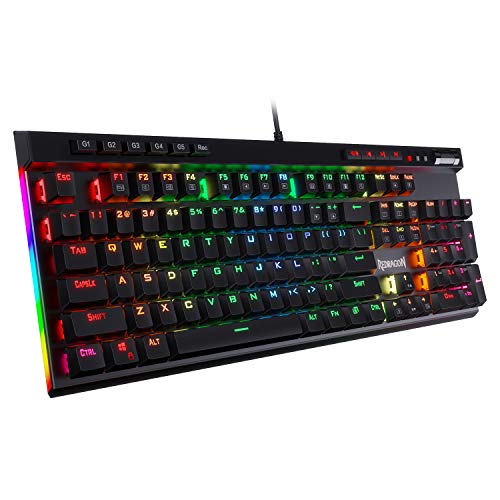
The Redragon K580 VATA is a 104-key mechanical gaming keyboard with five dedicated macro keys, labeled G1 through G5, listed in its published specifications. The listing states that macros can be recorded on the fly with no software required, and the recorded macros are stored in the board’s onboard memory. It uses Outemu Blue switches, described in the listing as clicky with tactile feedback, and the socket is hot-swappable, so switches can be changed without soldering. The board lists dedicated media controls, a volume wheel, 18 RGB lighting modes, N-key rollover with anti-ghosting, and an aluminum top plate. The five macro keys sit in a column on the left edge, and the listing presents the board as a wired keyboard with a standard full-size layout plus the macro column.
Best for: Buyers who want dedicated macro keys and onboard recording at a lower tier than the flagship boards in this guide.
Consideration: The Outemu Blue switches are clicky and loud by design, which suits gaming but may disturb a shared room, and the board has five macro keys rather than six or eight, so it holds fewer bound sequences at once.
Which One Is Right for You?
If you want the most balanced macro board in this guide, choose the Corsair K95 RGB Platinum XT: six dedicated macro keys, tactile CHERRY MX Brown switches, double-shot PBT keycaps, and onboard storage for five profiles. If you need the highest macro-key count and a command dial, choose the Razer BlackWidow V4 Pro, with eight dedicated macro keys and a programmable dial. If switch speed and onboard capacity matter most, choose the Corsair K100 RGB, with OPX switches at 1.0mm actuation, 4000Hz hyper-polling in the listing, and room for up to 200 onboard profiles. If you want macro keys and onboard recording without a flagship board, choose the Redragon K580 VATA, with five dedicated macro keys and on-the-fly recording that needs no software. In every case, count the macros you will actually bind before paying for keys you will not use.
Frequently Asked Questions
What is a macro keys keyboard?
A macro keys keyboard is a keyboard with dedicated programmable keys that run a recorded sequence of keystrokes, commands, or shortcuts when pressed once. The dedicated keys sit apart from the main layout, usually in a column on the left edge, and they are programmed through the maker’s software or, on some boards, recorded directly on the keyboard.
How many macro keys do I need?
Five macro keys cover a small set of daily shortcuts, such as push-to-talk, a screenshot command, and a few ability bindings. Six keys suit most players who bind a rotation plus utility commands. Eight keys suit players who bind a full ability bar, target markers, and chat commands at the same time. Count the sequences you would bind every session before choosing.
Do macro keys work without software?
It depends on the board. The Redragon K580 VATA lists onboard macro recording that works without software, and its macros are stored in the board’s onboard memory. The Corsair and Razer boards in this guide list onboard storage for profiles and macros, but recording and managing complex macros runs through iCUE or Synapse software, so the software is needed to set them up.
Are macro keys allowed in games?
Game rules vary by title, and some games restrict automated input or multi-action macros, so check the rules of the games you play before binding a macro that performs several actions at once. The keyboards in this guide only provide the hardware and software to record macros; they do not change the rules of any game.
What is the difference between a dedicated macro key and a programmable key?
A dedicated macro key is a separate physical key whose only job is to run a macro or a remapped command. A programmable key is any key that can be reassigned, including ordinary letter keys. Boards with dedicated macro keys give you extra keys on top of the standard layout, so binding a macro does not take a normal key away from typing or play.
Bottom Line
A macro keys keyboard turns repeated command sequences into a single press, and the right board is the one with enough dedicated macro keys, onboard storage, and a switch feel that suits long sessions. The Corsair K95 RGB Platinum XT is the most balanced pick in this guide, the Razer BlackWidow V4 Pro carries the most dedicated macro keys, the Corsair K100 RGB pairs its macro column with the fastest listed switch response, and the Redragon K580 VATA brings onboard macro recording to a lower tier. Pick the macro count first, then the switch feel, and the rest of the board follows from those two choices.
Disclosure: As an Amazon Associate, this site earns from qualifying purchases.
FAQ
Which One Is Right for You?
What is a macro keys keyboard?
How many macro keys do I need?
Do macro keys work without software?
Are macro keys allowed in games?
What is the difference between a dedicated macro key and a programmable key?
More from Amazon
Programs that pair well with the guide above. Offers and eligibility are set by Amazon and may change.
Free shipping on eligible items, Prime Video and more. Eligible new members can start with a free trial.
Start a Prime free trialA Prime membership for ages 18-24 with a trial period. Eligibility is set by Amazon.
See Prime for Young AdultsAudiobooks and podcasts to listen to on the go. Eligible new members can start with a free trial.
Try Audible freeAd-free music streaming. Eligible new subscribers can start with a free trial.
Try Music Unlimited freeAs an Amazon Associate we earn from qualifying purchases.