Key takeaways
- Compare the best business sheet-fed scanners for shared offices by scan speed, feeder capacity, daily volume and connectivity, with verified models and key spec
As an Amazon Associate, we earn from qualifying purchases made through links on this page.
A shared office scanner has a social job as much as a technical one: it must be obvious enough that anyone can use it, forgiving of mixed paper and connected so files land where each person expects. Business sheet-fed models earn the shared spot with wireless or network connections, touchscreen shortcuts and feeders sized for a day’s accumulated paper from several desks. This guide compares the shared-office class from Brother, Epson and Canon, weighing walk-up usability and per-user destinations as heavily as engine speed, because a shared scanner that confuses people simply stops being shared.
What to Look For
- Sharing model first: Wi-Fi or Ethernet with per-user shortcuts beats a faster USB scanner that only one desk can reach.
- Walk-up simplicity — a touchscreen with named destinations (‘Scan to Finance’, ‘Scan to My Folder’) removes the training burden.
- Feeder capacity of 60-100 sheets and duplex speed around 35-40 ppm, enough for end-of-day piles from a small team.
- Broad driver and app support (Windows, macOS, mobile) since shared offices are never single-platform.
- Compact footprint and a feeder that folds closed, because shared scanners live on credenzas and counters, not in machine rooms.
The Picks
Brother ADS-3300W (ASIN: B09TRWNL2G)

The ADS-3300W is Brother’s compact workgroup scanner: 40 ppm duplex speed, wireless networking and a touchscreen with shortcuts that let shared users scan to their own folders without touching a PC menu. The ultrasonic multifeed sensor is a feature many scanners at this size omit, and Brother’s driver support spans Windows, macOS and Linux, which helps in mixed offices.
Key specifications:
– 40 ppm / 80 ipm single-pass duplex scanning
– 60-sheet automatic document feeder
– Wireless Wi-Fi and USB 3.0 connectivity
– 2.8-inch color touchscreen with programmable shortcuts
– Ultrasonic multifeed detection sensor
– Scan to PC, network, FTP/SFTP, email and USB flash drive
– TWAIN, WIA, ICA and SANE driver compatibility
Limitations to know: The 60-sheet feeder is the smallest in this group, so very large batches need more frequent reloading than the 100-sheet models.
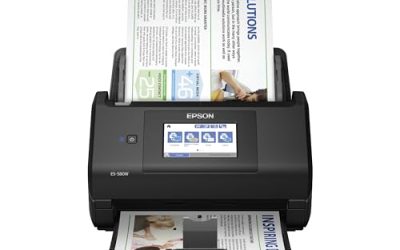
Epson WorkForce ES-580W (ASIN: B08P3ZT5WH)

The ES-580W is the approachable business sheet-fed option: a compact wireless unit with a large touchscreen, direct scanning to cloud storage and phone-friendly setup through Epson’s apps. Its 100-sheet feeder is generous for its size, and the 35 ppm duplex engine covers the daily paper flow of a small office, a front desk or a shared admin workstation without the bulk of a departmental machine.
Key specifications:
– 35 ppm / 70 ipm single-pass duplex scanning
– 100-sheet automatic document feeder
– Wireless Wi-Fi and SuperSpeed USB 3.0 connectivity
– 4.3-inch touchscreen with direct-to-cloud scan destinations
– Epson ScanSmart software with OCR and searchable PDF output
– Compact desktop footprint with a fold-away feeder design
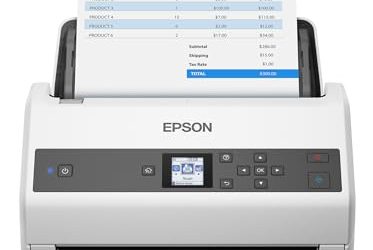
Limitations to know: It is a workgroup desktop unit rather than a departmental scanner, so sustained all-day batch volume belongs on the DS-970 or fi Series models.
Brother ADS-4300N (ASIN: B09TRWDQM4)

The ADS-4300N is the wired-network specialist: it skips Wi-Fi entirely in favor of a stable Ethernet connection, which suits offices with wireless restrictions or interference problems. Brother rates it for up to 6,000 pages a day, the feeder takes 80 sheets, and the ultrasonic sensor plus a separation switch for tricky media make it a dependable shared back-office unit.
Key specifications:
– 40 ppm / 80 ipm single-pass duplex scanning
– 80-sheet automatic document feeder
– Gigabit Ethernet wired networking plus USB 3.0
– Manufacturer daily duty cycle up to 6,000 pages
– Ultrasonic multifeed detection sensor and separation switch
– Scan to PC, network, FTP/SFTP, email and USB without wireless radios
– Three configurable shortcut buttons for shared walk-up use
Limitations to know: There is no Wi-Fi and no touchscreen, so placement depends on a nearby network port and most setup happens through the connected PC or web interface.
Canon imageFORMULA R40 (ASIN: B07YNK4S9Y)

The R40 is Canon’s easy-setup office scanner: plug in the USB cable, install CaptureOnTouch and the one-touch job buttons handle the common destinations. It scans both sides of a page at up to 40 ppm, detects color and blank pages automatically, and its software is deliberately simpler than Canon’s departmental CapturePerfect stack, which is exactly what small offices usually want.
Key specifications:
– 40 ppm / 80 ipm duplex scanning
– 60-sheet automatic document feeder
– USB connection for Windows and Mac
– CaptureOnTouch software with one-touch job buttons
– Automatic color detection, text orientation and blank page skipping
– Handles receipts, business cards, photos and long documents
Limitations to know: USB-only connectivity means one computer at a time; shared offices that need walk-up network scanning should look at the network models in this guide.
Quick Comparison
| Model | ASIN | Speed | Feeder | Connection |
|---|---|---|---|---|
| Brother ADS-3300W | B09TRWNL2G | 40 ppm / 80 ipm | 60 sheets | Wi-Fi, USB |
| Epson ES-580W | B08P3ZT5WH | 35 ppm / 70 ipm | 100 sheets | Wi-Fi, USB |
| Brother ADS-4300N | B09TRWDQM4 | 40 ppm / 80 ipm | 80 sheets | Ethernet, USB |
| Canon imageFORMULA R40 | B07YNK4S9Y | 40 ppm / 80 ipm | 60 sheets | USB |
Frequently Asked Questions
Can several people really share one desktop scanner well?
Yes, when destinations are set up per person. The Brother and Epson models here store individual shortcuts, so each user taps their name or folder and the file routes correctly without a shared-PC session.
Wireless or wired for a shared scanner?
Wireless offers placement freedom and works well for this class. The wired ADS-4300N suits offices with strict wireless policies or congested Wi-Fi, trading placement freedom for connection stability.
What if our office is mostly Mac or mixed?
All four brands support macOS, and the Brother adds Linux SANE support. The R40 is the simplest cross-platform USB option when network sharing is not required.
How much speed does a shared office need?
For typical shared use — a few hundred pages a day across a team — 35-40 ppm duplex is ample. Feeder size and shortcut quality affect daily satisfaction more than top speed.
Putting It to Work
One practical step before buying for a shared space: map the three scan jobs your office does most often, then confirm the shortlisted model can store each as a named shortcut with the right destination, file type and OCR setting. Shared scanners fail socially, not mechanically — if the first week produces misfiled scans, people quietly return to the printer’s scanner. A ten-minute setup session, a printed one-line guide taped beside the feeder and a named owner for the address book keep a shared unit shared. Also confirm how the scanner behaves when the network drops: models that queue or clearly error are far better than silent failures.
Verdict
The ADS-3300W is the shared-office sweet spot with wireless, shortcuts and ultrasonic detection at a desktop size. The ES-580W matches it with a bigger touchscreen and cloud focus, the ADS-4300N covers wired-only offices, and the R40 is the simple USB fallback.
FAQ
Can several people really share one desktop scanner well?
Wireless or wired for a shared scanner?
What if our office is mostly Mac or mixed?
How much speed does a shared office need?
More from Amazon
Programs that pair well with the guide above. Offers and eligibility are set by Amazon and may change.
Free shipping on eligible items, Prime Video and more. Eligible new members can start with a free trial.
Start a Prime free trialA Prime membership for ages 18-24 with a trial period. Eligibility is set by Amazon.
See Prime for Young AdultsAudiobooks and podcasts to listen to on the go. Eligible new members can start with a free trial.
Try Audible freeAd-free music streaming. Eligible new subscribers can start with a free trial.
Try Music Unlimited freeAs an Amazon Associate we earn from qualifying purchases.