Key takeaways
- Compare the best business sheet-fed scanners for paperless operations by scan speed, feeder capacity, daily volume and connectivity, with verified models and ke
As an Amazon Associate, we earn from qualifying purchases made through links on this page.
For a small office going paperless, the scanner is the front door of the whole system: every invoice, contract and letter enters through it, and the quality of that entry — searchable, correctly named, routed to the right place — decides whether the paperless office works or becomes a shared drive of mystery PDFs. Business sheet-fed scanners built for this job combine one-pass duplex engines with software that OCRs, names and files documents automatically. This guide focuses on models whose software layer is as strong as their feeders, including a receipt specialist for offices whose paperless pain is mostly financial paperwork.
What to Look For
- OCR and file management in the box: searchable PDF creation, automatic naming and folder or cloud routing without extra subscriptions for the basics.
- One-pass duplex scanning at 35 ppm or more, so both sides are captured in a single feed and nothing depends on the operator remembering to flip pages.
- Cloud and app destinations your office actually uses — Drive, OneDrive, Dropbox, Evernote or network folders — set up as one-touch profiles.
- A 100-sheet feeder if the office batches a day or a week of paper at once; 60 sheets suffices for scan-as-it-arrives habits.
- Wireless placement near where paper arrives — the mail point, the front desk — not tethered to one person’s computer.
The Picks
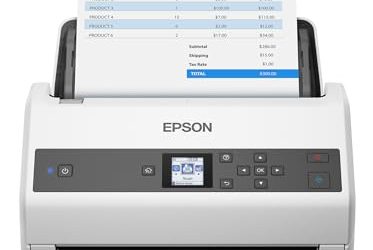
Epson WorkForce ES-580W (ASIN: B08P3ZT5WH)

The ES-580W is the approachable business sheet-fed option: a compact wireless unit with a large touchscreen, direct scanning to cloud storage and phone-friendly setup through Epson’s apps. Its 100-sheet feeder is generous for its size, and the 35 ppm duplex engine covers the daily paper flow of a small office, a front desk or a shared admin workstation without the bulk of a departmental machine.
Key specifications:
– 35 ppm / 70 ipm single-pass duplex scanning
– 100-sheet automatic document feeder
– Wireless Wi-Fi and SuperSpeed USB 3.0 connectivity
– 4.3-inch touchscreen with direct-to-cloud scan destinations
– Epson ScanSmart software with OCR and searchable PDF output
– Compact desktop footprint with a fold-away feeder design
Limitations to know: It is a workgroup desktop unit rather than a departmental scanner, so sustained all-day batch volume belongs on the DS-970 or fi Series models.
Epson RapidReceipt RR-600W (ASIN: B08P3ZXTP7)

The RR-600W shares its hardware class with Epson’s business desktop scanners but is tuned for paperwork with numbers on it: its bundled software is designed to pull vendor, date and amount data from receipts and invoices and export it toward accounting tools. For teams whose paperless problem is specifically expense and invoice processing, that data-extraction layer matters more than raw engine speed.
Key specifications:
– 35 ppm / 70 ipm single-pass duplex scanning
– 100-sheet automatic document feeder
– Wireless connectivity plus SuperSpeed USB
– 4.3-inch color touchscreen with one-touch scan profiles
– RapidReceipt software extracts data from receipts and invoices
– ScanSmart AI PRO data management for searchable, organized files
Limitations to know: The receipt-focused software is the point of this model; teams that mainly scan contracts and correspondence get the same engine without the extras in the ES-580W line.
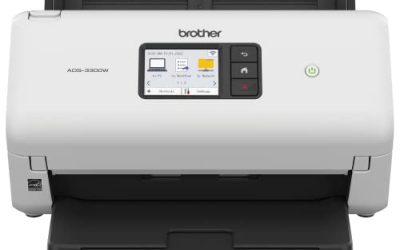
Brother ADS-3300W (ASIN: B09TRWNL2G)

The ADS-3300W is Brother’s compact workgroup scanner: 40 ppm duplex speed, wireless networking and a touchscreen with shortcuts that let shared users scan to their own folders without touching a PC menu. The ultrasonic multifeed sensor is a feature many scanners at this size omit, and Brother’s driver support spans Windows, macOS and Linux, which helps in mixed offices.
Key specifications:
– 40 ppm / 80 ipm single-pass duplex scanning
– 60-sheet automatic document feeder
– Wireless Wi-Fi and USB 3.0 connectivity
– 2.8-inch color touchscreen with programmable shortcuts
– Ultrasonic multifeed detection sensor
– Scan to PC, network, FTP/SFTP, email and USB flash drive
– TWAIN, WIA, ICA and SANE driver compatibility
Limitations to know: The 60-sheet feeder is the smallest in this group, so very large batches need more frequent reloading than the 100-sheet models.
Epson WorkForce DS-790WN (ASIN: B09TVBYMYV)
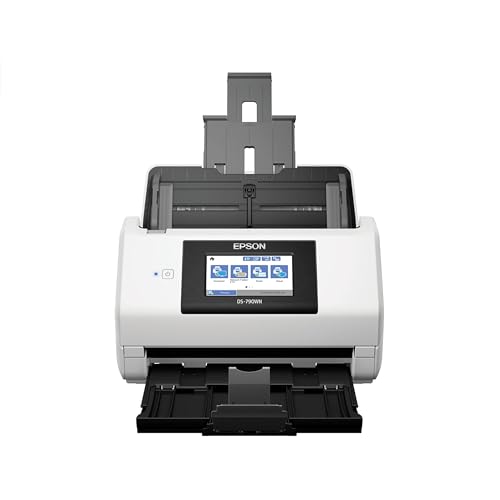
The DS-790WN is built for shared network scanning without a host computer: staff walk up, choose a destination on the large touchscreen and scan straight to a network folder, email or cloud service over Wi-Fi or Ethernet. The 100-sheet feeder and 45 ppm engine are sized for departmental daily work rather than occasional desktop batches, and PC-free operation keeps the workflow running even when the nearest computer is busy or off.
Key specifications:
– 45 ppm / 90 ipm single-pass duplex scanning
– 100-sheet automatic document feeder
– Built-in Wi-Fi, Ethernet and USB 3.0 connectivity
– PC-free scanning from a 4.3-inch color touchscreen
– Scan to network folders, email, cloud services and USB drives
– Ultrasonic double-feed detection and slow mode for delicate pages
– Epson Scan 2, TWAIN and Document Capture Pro support
Limitations to know: At 45 ppm it is half the speed of the fastest models here, so a single centralized high-volume station is better served by the DS-970 class.
Quick Comparison
| Model | ASIN | Speed | Feeder | Connection |
|---|---|---|---|---|
| Epson ES-580W | B08P3ZT5WH | 35 ppm / 70 ipm | 100 sheets | Wi-Fi, USB |
| Epson RapidReceipt RR-600W | B08P3ZXTP7 | 35 ppm / 70 ipm | 100 sheets | Wi-Fi, USB |
| Brother ADS-3300W | B09TRWNL2G | 40 ppm / 80 ipm | 60 sheets | Wi-Fi, USB |
| Epson DS-790WN | B09TVBYMYV | 45 ppm / 90 ipm | 100 sheets | Wi-Fi, Ethernet, USB |
Frequently Asked Questions
What makes a scanner good for paperless work specifically?
The software path after capture: OCR for searchability, sensible auto-naming and one-touch routing to the folders or cloud services where the office keeps records. Engine speed matters less than not creating a renaming backlog.
Should a small office choose the receipt-focused model?
If most incoming paper is receipts and invoices, yes — the RR-600W’s software extracts the data fields finance needs. If paper is mostly letters and contracts, the ES-580W’s general document workflow fits better.
Can these scanners keep up with a full office conversion?
For day-forward paperless operation, yes. Converting a large legacy backlog is a different job — that is where the departmental and production models in our other guides take over.
Do we still need a filing system after going paperless?
Absolutely — a digital one. Decide folder structure and naming rules before scanning begins; these scanners can enforce naming profiles, but the rules themselves are an office decision.
Verdict
The ES-580W is the general paperless pick for small offices. Choose the RR-600W when receipts and invoices dominate, the ADS-3300W for a compact wireless unit with ultrasonic detection, and the DS-790WN when the office has outgrown desktop-class sharing.
FAQ
What makes a scanner good for paperless work specifically?
Should a small office choose the receipt-focused model?
Can these scanners keep up with a full office conversion?
Do we still need a filing system after going paperless?
More from Amazon
Programs that pair well with the guide above. Offers and eligibility are set by Amazon and may change.
Free shipping on eligible items, Prime Video and more. Eligible new members can start with a free trial.
Start a Prime free trialA Prime membership for ages 18-24 with a trial period. Eligibility is set by Amazon.
See Prime for Young AdultsAudiobooks and podcasts to listen to on the go. Eligible new members can start with a free trial.
Try Audible freeAd-free music streaming. Eligible new subscribers can start with a free trial.
Try Music Unlimited freeAs an Amazon Associate we earn from qualifying purchases.