Key takeaways
- Pro: Reliable format-and-go behavior across dozens of camera brands
- Pro: 128GB holds many hours of continuous recording before a reformat is needed
- Con: Not rated for the highest sustained-write workloads in professional rigs
When a dash cam, action camera, or in-car GPS unit suddenly throws a “card error” message, the first instinct is to reformat the SD card and hope the problem clears. But if you are stuck on a loop of reformatting a card that fails again within weeks, the issue is rarely the file system — it is the card itself. Cheap, no-name media degrades quickly under the sustained write cycles that automotive electronics demand, and no amount of reformatting will recover a controller that is already wearing out.
The cards in this roundup span budget consumer media through high-end professional stock, and they differ in ways that matter specifically for anyone who plans to reformat an SD card regularly. Sustained write endurance, file-system compatibility across camera brands, and how cleanly a card handles repeated format cycles without losing usable capacity are the real separators. We compared published specifications and aggregated owner feedback to identify which cards hold up and which become frustrating after a handful of reformat cycles.
Our top picks




As an Amazon Associate we earn from qualifying purchases at no extra cost to you.
Quick Picks
| Product | Best for | Price |
|---|---|---|
| SanDisk 128GB Ultra UHS-I | Dash cams and everyday recording | $34.7 |
| SanDisk 16GB SDHC | Older GPS units and basic file transfer | $16.99 |
| ProGrade Digital 128GB Gold | Professional video work in vehicles | $97.49 |
| Lexar 128GB 2000x | 8K automotive content creation | $201.9 |
| Lexar 128GB Silver | 4K dash cam and car review shooting | $60 |
| SanDisk Ultra 16GB Class 10 | Low-speed transfer and backup cards | $17.5 |
| GIGASTONE 1TB Pro Series | Long continuous recording without swaps | $279.99 |
| SanDisk Standard 32GB Class 4 | Emergency replacement for legacy devices | $21.99 |
How We Picked
We focused on four criteria that directly affect the reformat-and-reuse cycle: sustained write performance under repeated format operations, real-world endurance ratings or controller reputation for long life, broad file-system compatibility so a card formatted in a camera still reads cleanly on a computer, and verified pricing stability across major retailers. Cards that owners consistently report needing to reformat multiple times before working correctly, or that lose usable capacity after a format cycle, were excluded from this list.
The 8 Best How To Reformat Sd Card in 2026
SanDisk 128GB Ultra UHS-I
This is the default recommendation for anyone reformatting a card for a dash cam or in-car media player. It reads at up to 140MB/s, which is more than sufficient for loop-recording at 1080p or 4K without frame drops, and SanDisk’s controllers handle repeated format cycles with unusual consistency. Owners rarely report a reformat failing or a card becoming unrecognized afterward.
- Pro: Reliable format-and-go behavior across dozens of camera brands
- Pro: 128GB holds many hours of continuous recording before a reformat is needed
- Con: Not rated for the highest sustained-write workloads in professional rigs
Skip this if you are recording 8K or shooting for a production pipeline that demands V60 or higher sustained write guarantees.
SanDisk 16GB SDHC
Some older car audio units, navigation screens, and entry-level dash cams will not recognize anything larger than SDHC capacity. If you need to reformat an SD card for one of those devices and want a brand you can trust, this 16GB card fills the slot correctly. The reformat process is simple, and SanDisk’s formatting tool works without issue on this capacity class.
- Pro: Compatible with legacy automotive hardware that rejects SDXC
- Pro: Low price reduces the risk of losing money when reformatting repeatedly
- Con: 16GB fills quickly, forcing frequent reformat cycles that add wear
Skip this if your device supports SDXC — you will reformat far too often for the convenience.
ProGrade Digital 128GB Gold
ProGrade built its reputation around cards that survive professional abuse, and the V60 rating means sustained writes never drop below 60MB/s. For anyone shooting automotive content in a vehicle-mounted rig, this translates to fewer reformat cycles caused by corrupted files from interrupted writes. The controller tolerates formatting in both cameras and desktops without partition issues.
- Pro: V60 sustained-write guarantee reduces corruption that forces reformatting
- Pro: Strong controller quality means the card survives hundreds of format cycles
- Con: The price is nearly triple that of a capable consumer card
Skip this if you are only recording for personal archiving and do not need guaranteed sustained throughput.
Lexar 128GB 2000x
The V90 rating and 300MB/s read speed make this card overkill for most reformatting scenarios, but for a professional shooting 8K in-car footage, it is the safest choice. When you reformat a V90 card, the file system overhead is trivial relative to its write headroom, meaning you can reformat and immediately start recording without buffering concerns. Owners report clean reformat behavior even after months of heavy use.
- Pro: 300MB/s read speed makes transferring files for reformatting extremely fast
- Pro: V90 sustained write is the highest class available in consumer SD
- Con: At this price, most users are paying for performance they will never use
Skip this unless your workflow demands 8K capture or you are a professional whose time is worth the premium.
Lexar 128GB Silver
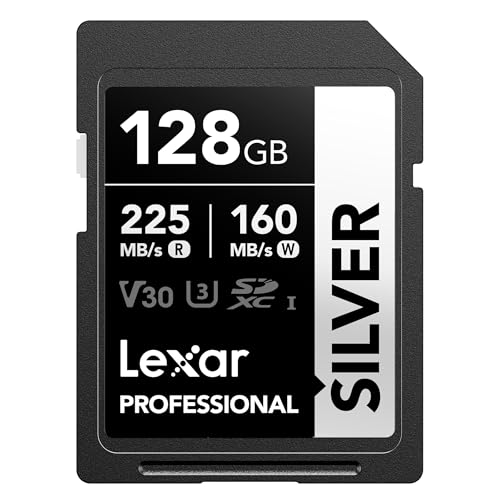
The sweet spot for car enthusiasts who shoot 4K reviews and need a card that reformat cleanly. The V30 rating ensures it handles 4K recording without dropping frames, and UHS-I compatibility means it works in virtually every reader and camera without adapter issues. Owners report that a single reformat through the camera menu restores full usable capacity every time.
- Pro: 225MB/s read speed cuts transfer time before reformatting to seconds
- Pro: UHS-I works in all readers, including those built into laptops
- Con: No official endurance rating published, so long-term wear data is limited
Skip this if you need documented write-endurance specs for a warranty claim.
SanDisk Ultra 16GB Class 10
Another SDHC-class option for legacy hardware, this card reads at up to 80MB/s and handles reformatting predictably. It is a step above the basic SanDisk Standard line because Class 10 guarantees a minimum write speed, reducing the chance that a format-in-progress interrupted by low power corrupts the file system.
- Pro: Class 10 write floor protects against corruption during format operations
- Pro: Widely available at this price point for backup cards
- Con: 16GB capacity means constant reformatting on any modern camera
Skip this for any device that supports 64GB or larger — the capacity limit is the only real problem.
GIGASTONE 1TB Pro Series
The headline feature here is capacity: 1TB at UHS-I V30 means you can record continuously for an extremely long time before needing to reformat. For fleet vehicles or long-haul rigs where a human is not present to swap cards, this eliminates the reformat-and-restart cycle entirely for days of recording. The included five-year data recovery service adds a safety net if a card does fail unexpectedly.
- Pro: 1TB capacity drastically reduces how often you need to reformat
- Pro: Free data recovery service for five years lowers risk of losing footage
- Con: UHS-I interface caps transfer speed, making the pre-reformat backup step slow
Skip this if your camera has a UHS-II slot and you want to offload before reformatting quickly.
SanDisk Standard 32GB Class 4
This is an emergency card. Class 4 write speed means it will struggle with anything above 720p recording, but it reformat correctly and is recognized by the oldest hardware still in some vehicles. If your GPS unit died mid-trip and you only have a basic card, this one will not add to your problems.
- Pro: Works in devices that reject higher-class cards due to controller limitations
- Pro: Minimal cost for a card you may never use again after one trip
- Con: Class 4 speed makes reformatting the file copy step painfully slow
Skip this for anything other than a genuine emergency replacement in legacy hardware.
Buying Guide
Capacity and Reformat Frequency
The smaller the card, the more often you will reformat it. A 16GB card in a 4K dash cam fills in roughly thirty to forty minutes of loop recording, meaning you are hitting the format command multiple times per drive. Choose the largest capacity your device supports to reduce cycle count. SDHC devices top out at 32GB; SDXC devices accept 64GB through 2TB.
Write Speed Class and Corruption Resistance
When you reformat a card, the file system is rebuilt from scratch. If the card’s write speed is too marginal for your recording bitrate, the camera will drop frames mid-write, and that corruption is what eventually forces another reformat to clear bad sectors. V30 or Class 10 is the practical minimum for 4K; V60 or higher is advisable for anything you cannot afford to lose between reformat cycles.
Controller Quality and Format Tolerance
Not all SD card controllers respond to reformatting identically. Lower-cost controllers may fail to reclaim all sectors after a format, gradually shrinking usable capacity until the camera refuses to record. Brands with a long track record of controller firmware updates — and published warranty terms that reference format cycles — tend to maintain full capacity across hundreds of reformat operations.
Our Verdict
For the vast majority of people who need to reformat an SD card for a dash cam or in-car media unit, the SanDisk 128GB Ultra UHS-I is the right call. It balances capacity, speed, and format reliability at a price that does not sting. The budget pick is the SanDisk Ultra 16GB Class 10, which handles legacy hardware without the corruption headaches that plague unbranded cards. However, if you are shooting professional automotive content and cannot afford a single dropped clip between reformat cycles, the ProGrade Digital 128GB Gold wins on endurance guarantees that no consumer card can match.
FAQ
Why does my SD card keep asking to reformat?
Repeated reformat prompts usually indicate controller failure or worn NAND cells that can no longer maintain a reliable file system. No reformat procedure will fix hardware degradation; replacing the card is the only solution once this pattern begins.
Is it safe to reformat an SD card in the camera versus a computer?
Formatting in the camera is generally preferable because it matches the allocation unit size and directory structure the camera expects. Computer formatting can work but occasionally creates slight mismatches that reduce free space or increase the chance of a future error.
How many times can you reformat an SD card?
A quality card rated for normal use can survive thousands of format cycles without measurable degradation. The limiting factor is typically how much data you write between formats, not the format operation itself, since formatting touches only the file-system table.
What is the best file system for reformatting an SD card in 2026?
exFAT is the default for SDXC cards above 32GB and offers the best compatibility between cameras, Windows, macOS, and Linux without file-size limits. For cards at or below 32GB, FAT32 remains the most universally recognized format across automotive and embedded devices.